
Idea Statica
Steel
Concrete
BIM & Workflows
Support & Learning
Pricing
Company
14-Day Trial
Who is using the license?
Licensing
What licensing system does IDEA StatiCa use?
Where to download installation files
Activating your user account
Setting up a commercial license
System requirements for IDEA StatiCa
Single Sign-on (SSO)
Set-up guide for Single Sign-On (SSO)
How to set which products I take from the license pool?
Do we have to do something special to open the traffic between the license server and our network?
How to add users who are assigned to another license?
Who is using the license?
New version indicator
Deploying IDEA StatiCa with Intune
Off-line licensing
Who is using the license?
LicensingKnowledge baseLicensing

Who is using the license?

This article is also available in
ENCSDEESFRITPTNLHURO

This answer applies to IDEA StatiCa version 21.1.6 and newer

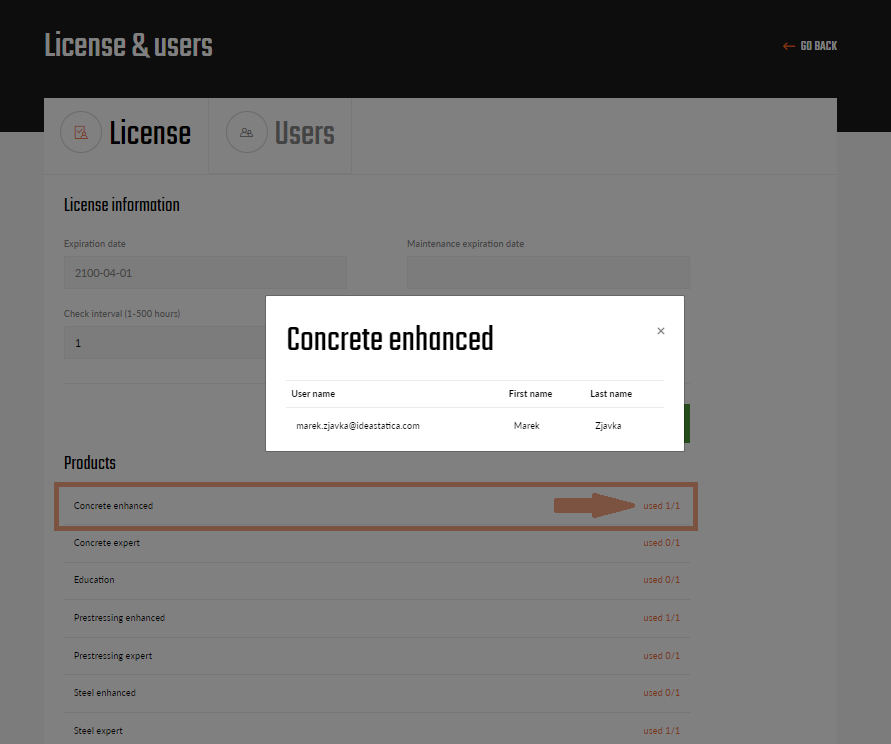
To check the current usage of your company license, log in to the IDEA StatiCa User portal and go to the License section.


In the "Products" part, you can see an overview of the usage and the total number of seats for each product. When you click on the current product status, you will see a pop-up table with the names of users who are currently using the product. 
If your activations are used up, ask some of your colleagues to release their license activation.