


Hướng dẫn này sử dụng Rhino 8. Nếu bạn làm việc với IDEA StatiCa phiên bản đến 24.1.3, hãy xem hướng dẫn này.
Widget #NaN: support_center_article
Name: Tutorial: Grasshopper - Plugin Installation
ID: 6d5f0dc8-ee5a-4c50-aced-df94e3586763
Show Raw Data
{
"title": {
"name": "Main headline (H1)",
"type": "text",
"value": "Grasshopper - Cài đặt Plugin"
},
"preview_image": {
"name": "Preview image",
"type": "asset",
"value": [
{
"name": "E1-1.png",
"description": null,
"type": "image/png",
"size": 68369,
"url": "https://preview-assets-us-01.kc-usercontent.com:443/66e7a155-be94-0096-73e6-c55dfc7e5788/fe255e56-8a4e-4dd5-8264-4c71f1dcb040/E1-1.png",
"width": 782,
"height": 692,
"renditions": {}
}
]
},
"post_date": {
"name": "Post date",
"type": "date_time",
"value": null,
"displayTimeZone": "Europe/Prague"
},
"perex_content": {
"name": "Lead paragraph",
"type": "text",
"value": ""
},
"content": {
"images": [
{
"description": null,
"imageId": "210c0a21-6b2e-4cf8-96ca-37e82d4862fa",
"url": "https://preview-assets-us-01.kc-usercontent.com:443/66e7a155-be94-0096-73e6-c55dfc7e5788/79496c31-039f-4837-b79c-cb4138788fee/g-1.png",
"height": 602,
"width": 822
},
{
"description": null,
"imageId": "17b9256a-6aa1-42b7-8631-d3e7d4e045fa",
"url": "https://preview-assets-us-01.kc-usercontent.com:443/66e7a155-be94-0096-73e6-c55dfc7e5788/af466a09-7c9d-43da-aa86-ae8cf2e05680/g-2.png",
"height": 265,
"width": 492
},
{
"description": null,
"imageId": "2a7f156a-11b3-4615-bfa5-c5e91e966443",
"url": "https://preview-assets-us-01.kc-usercontent.com:443/66e7a155-be94-0096-73e6-c55dfc7e5788/992a6362-f26a-4ba4-9082-0da7868c65c5/E1-1.png",
"height": 692,
"width": 782
},
{
"description": null,
"imageId": "b957b01f-e69c-482c-841e-87a2cab6aca6",
"url": "https://preview-assets-us-01.kc-usercontent.com:443/66e7a155-be94-0096-73e6-c55dfc7e5788/71249ebe-9e05-4c66-bf72-1b3714c9decf/g-4.png",
"height": 599,
"width": 1077
},
{
"description": null,
"imageId": "8e7e6c80-c3e3-4d20-8aab-7481515ddf8d",
"url": "https://preview-assets-us-01.kc-usercontent.com:443/66e7a155-be94-0096-73e6-c55dfc7e5788/f0c189a8-203f-40ea-9248-7aaf4be667ec/grasshopper-idea.png",
"height": 161,
"width": 814
}
],
"linkedItemCodenames": [],
"linkedItems": [],
"links": [
{
"codename": "grasshopper___introduction_to_the_plugin_component",
"linkId": "f2f373ad-9a22-499b-aced-f9520c80a37a",
"urlSlug": "description-of-grasshopper-plugin-components",
"type": "support_center_article"
}
],
"name": "Content",
"type": "rich_text",
"value": "<p>Bạn có thể tải phiên bản dùng thử của Rhino3d và Grasshopper từ trang web <a href=\"https://www.rhino3d.com/download/\" data-new-window=\"true\" target=\"_blank\" rel=\"noopener noreferrer\">Rhino3d</a>. Chạy Rhinoceros và chọn mẫu với <strong>Meters</strong>:</p>\n<figure data-asset-id=\"210c0a21-6b2e-4cf8-96ca-37e82d4862fa\" data-image-id=\"210c0a21-6b2e-4cf8-96ca-37e82d4862fa\"><img src=\"https://preview-assets-us-01.kc-usercontent.com:443/66e7a155-be94-0096-73e6-c55dfc7e5788/79496c31-039f-4837-b79c-cb4138788fee/g-1.png\" data-asset-id=\"210c0a21-6b2e-4cf8-96ca-37e82d4862fa\" data-image-id=\"210c0a21-6b2e-4cf8-96ca-37e82d4862fa\" alt=\"\"></figure>\n<p>Trong dòng lệnh, vui lòng nhập \"<strong>Package Manager</strong>\":</p>\n<figure data-asset-id=\"17b9256a-6aa1-42b7-8631-d3e7d4e045fa\" data-image-id=\"17b9256a-6aa1-42b7-8631-d3e7d4e045fa\"><img src=\"https://preview-assets-us-01.kc-usercontent.com:443/66e7a155-be94-0096-73e6-c55dfc7e5788/af466a09-7c9d-43da-aa86-ae8cf2e05680/g-2.png\" data-asset-id=\"17b9256a-6aa1-42b7-8631-d3e7d4e045fa\" data-image-id=\"17b9256a-6aa1-42b7-8631-d3e7d4e045fa\" alt=\"\"></figure>\n<p>Một cửa sổ mới xuất hiện; chọn IDEAStatiCa và nhấp vào <strong>Install</strong>. Plugin sẽ được tải xuống và cài đặt. Để kích hoạt, cần khởi động lại Rhinoceros.</p>\n<figure data-asset-id=\"2a7f156a-11b3-4615-bfa5-c5e91e966443\" data-image-id=\"2a7f156a-11b3-4615-bfa5-c5e91e966443\"><img src=\"https://preview-assets-us-01.kc-usercontent.com:443/66e7a155-be94-0096-73e6-c55dfc7e5788/992a6362-f26a-4ba4-9082-0da7868c65c5/E1-1.png\" data-asset-id=\"2a7f156a-11b3-4615-bfa5-c5e91e966443\" data-image-id=\"2a7f156a-11b3-4615-bfa5-c5e91e966443\" alt=\"\"></figure>\n<p> Để khởi động Grasshopper với plugin IDEA StatiCa, chọn <strong>Tools / Grasshopper </strong>trong tab Rhinoceros.</p>\n<figure data-asset-id=\"b957b01f-e69c-482c-841e-87a2cab6aca6\" data-image-id=\"b957b01f-e69c-482c-841e-87a2cab6aca6\"><img src=\"https://preview-assets-us-01.kc-usercontent.com:443/66e7a155-be94-0096-73e6-c55dfc7e5788/71249ebe-9e05-4c66-bf72-1b3714c9decf/g-4.png\" data-asset-id=\"b957b01f-e69c-482c-841e-87a2cab6aca6\" data-image-id=\"b957b01f-e69c-482c-841e-87a2cab6aca6\" alt=\"\"></figure>\n<p>Như bạn có thể thấy, plugin đã được tích hợp sẵn.</p>\n<figure data-asset-id=\"8e7e6c80-c3e3-4d20-8aab-7481515ddf8d\" data-image-id=\"8e7e6c80-c3e3-4d20-8aab-7481515ddf8d\"><img src=\"https://preview-assets-us-01.kc-usercontent.com:443/66e7a155-be94-0096-73e6-c55dfc7e5788/f0c189a8-203f-40ea-9248-7aaf4be667ec/grasshopper-idea.png\" data-asset-id=\"8e7e6c80-c3e3-4d20-8aab-7481515ddf8d\" data-image-id=\"8e7e6c80-c3e3-4d20-8aab-7481515ddf8d\" alt=\"\"></figure>\n<p>Tìm hiểu về các thành phần và lệnh trong plugin IDEA StatiCa cho Grasshopper trong bài viết <a data-item-id=\"f2f373ad-9a22-499b-aced-f9520c80a37a\" href=\"\">Mô tả các thành phần của plugin Grasshopper</a>.</p>"
},
"linked_items": {
"name": "Linked items",
"type": "modular_content",
"value": [],
"linkedItems": []
},
"regions": {
"name": "Region",
"type": "taxonomy",
"value": [
{
"name": "AMER",
"codename": "amer"
},
{
"name": "EMEA",
"codename": "emea"
},
{
"name": "APAC",
"codename": "apac"
}
],
"taxonomyGroup": "region"
},
"product_groups": {
"name": "Product group",
"type": "taxonomy",
"value": [
{
"name": "Steel",
"codename": "steel"
},
{
"name": "Connection design",
"codename": "connection_design"
}
],
"taxonomyGroup": "product_group"
},
"support_center_article_types": {
"name": "Support center article",
"type": "taxonomy",
"value": [
{
"name": "Tutorials",
"codename": "tutorial"
}
],
"taxonomyGroup": "support_center_article"
},
"expertise_levels": {
"name": "Expertise level",
"type": "taxonomy",
"value": [
{
"name": "Intermediate",
"codename": "intermediate"
},
{
"name": "Expert",
"codename": "expert"
}
],
"taxonomyGroup": "expertise_level"
},
"labels": {
"name": "Labels",
"type": "taxonomy",
"value": [
{
"name": "IDEA Open Model (API)",
"codename": "idea_open_model__api_"
},
{
"name": "Connection",
"codename": "connection"
}
],
"taxonomyGroup": "labels"
},
"attachments__files": {
"name": "Attachments",
"type": "asset",
"value": []
},
"content_priority__value": {
"name": "Content priority value",
"type": "number",
"value": null
},
"options": {
"name": "Options",
"type": "multiple_choice",
"value": []
},
"url_slug": {
"name": "Url slug",
"type": "url_slug",
"value": "grasshopper-plugin-installation"
},
"unique_url_slug": {
"name": "Unique URL slug",
"type": "custom",
"value": "[\"grasshopper-plugin-installation\",\"[autogenerated]\"]"
},
"content_settings__sitemap": {
"name": "Show in sitemap",
"type": "multiple_choice",
"value": []
},
"content_settings__robots": {
"name": "Search engine indexing",
"type": "multiple_choice",
"value": []
},
"content_settings__is_hidden": {
"name": "Hidden nested content",
"type": "multiple_choice",
"value": []
},
"content_settings__is_topped": {
"name": "Topped",
"type": "multiple_choice",
"value": []
},
"metadata__page_title": {
"name": "Page title",
"type": "text",
"value": ""
},
"metadata__page_description": {
"name": "Page description",
"type": "text",
"value": ""
},
"metadata__page_keywords": {
"name": "Page keywords",
"type": "text",
"value": ""
},
"metadata__canonical_url": {
"name": "Canonical URL",
"type": "text",
"value": ""
},
"metadata__og_title": {
"name": "OG:title",
"type": "text",
"value": ""
},
"metadata__og_description": {
"name": "OG:description",
"type": "text",
"value": ""
},
"metadata__og_image": {
"name": "OG:image",
"type": "asset",
"value": []
},
"translation__translation_connector": {
"name": "Translation Connector",
"type": "taxonomy",
"value": [],
"taxonomyGroup": "languages"
},
"translation__force_translation": {
"name": "Force translation",
"type": "multiple_choice",
"value": []
},
"translation__translate_standalone_nested_content_items": {
"name": "Translate standalone nested content items",
"type": "multiple_choice",
"value": []
},
"translation__last_translation": {
"images": [],
"linkedItemCodenames": [],
"linkedItems": [],
"links": [],
"name": "Last translation",
"type": "rich_text",
"value": "<p>Translation info:</p>\n<ul>\n <li>cs-CZ: Never translated</li>\n <li>de-DE: Never translated</li>\n <li>en-US: Never translated</li>\n <li>es-ES: Never translated</li>\n <li>fr-FR: Never translated</li>\n <li>hu-HU: Never translated</li>\n <li>it-IT: Never translated</li>\n <li>ko-KR: Never translated</li>\n <li>nl-NL: Never translated</li>\n <li>pl-PL: Never translated</li>\n <li>pt-PT: Never translated</li>\n <li>ro-RO: Never translated</li>\n <li>ru-RU: Never translated</li>\n <li>th-TH: Never translated</li>\n <li>tr-TR: Never translated</li>\n <li>vi-VN: Translated on 13.5.2026 01:05</li>\n <li>zh-CN: Never translated</li>\n</ul>\n<p>Publish info:</p>\n<ul>\n <li>Publish info is available only in the main language</li>\n</ul>"
},
"translation__ai_translated": {
"name": "AI translated",
"type": "multiple_choice",
"value": [
{
"name": "Translated",
"codename": "translated"
}
]
},
"page_tree_settings__page_label": {
"name": "Page label",
"type": "text",
"value": ""
},
"page_tree_settings__path_segment": {
"name": "Path segment",
"type": "text",
"value": ""
},
"page_tree_settings__breadcrumb_style": {
"name": "Breadcrumb style",
"type": "multiple_choice",
"value": []
},
"page_tree_settings__hide_in_breadcrumbs": {
"name": "Hide in breadcrumbs",
"type": "multiple_choice",
"value": []
}
}Plugin HUMAN
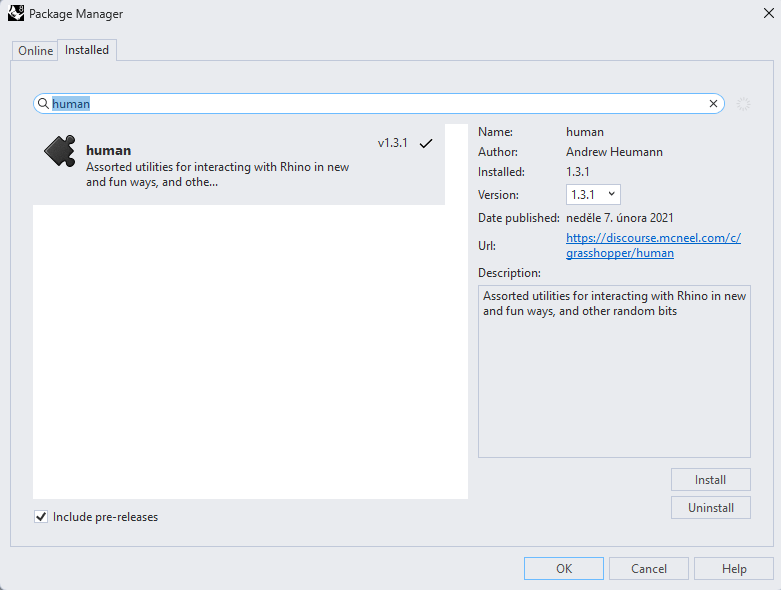
Trong ví dụ này, chúng ta cần chọn một phần của kết cấu, và để thực hiện điều đó, bạn phải cài đặt thêm một plugin khác - HUMAN, plugin này sẽ được sử dụng trong hướng dẫn này.
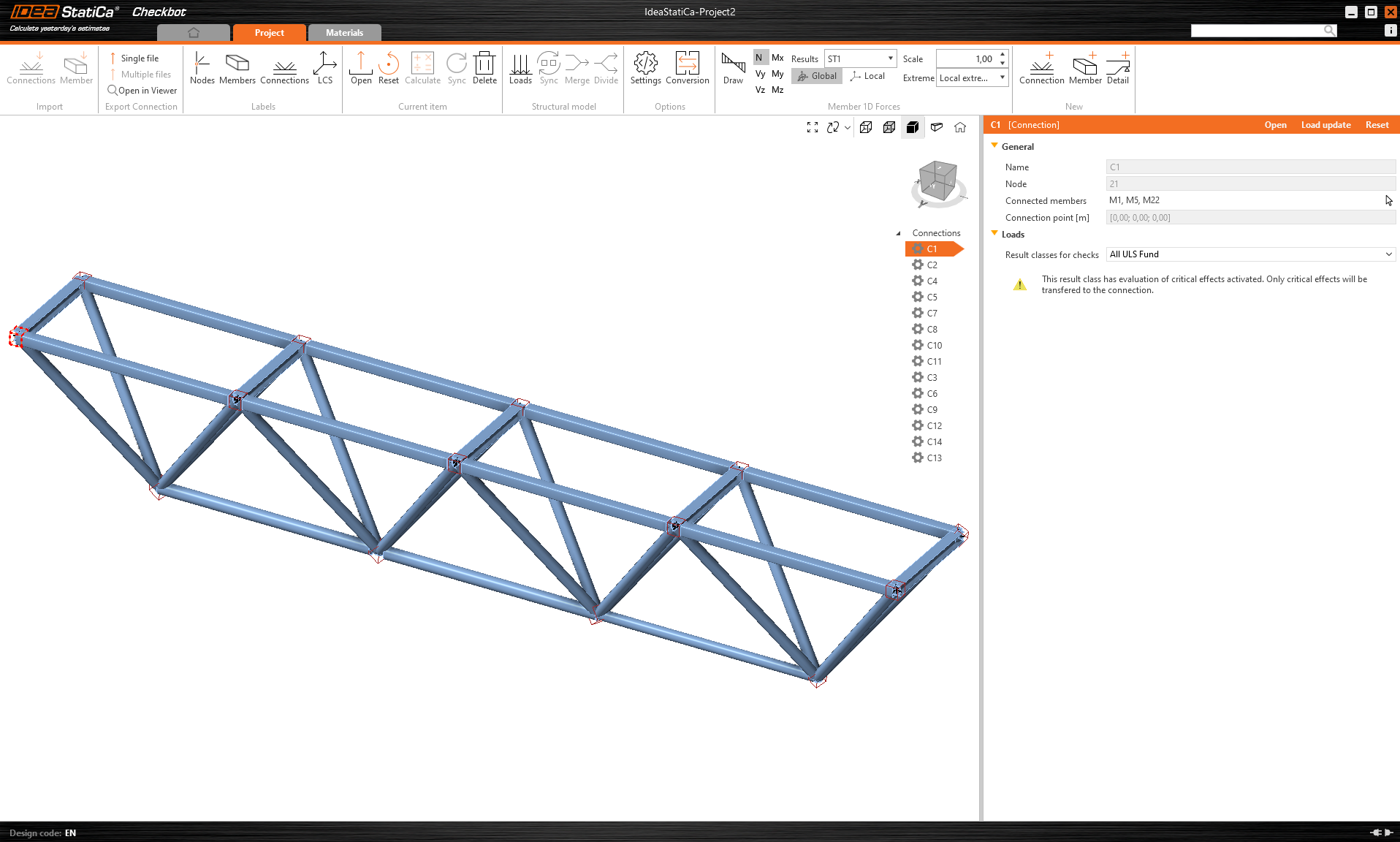
IDEA StatiCa Checkbot – nhập kết cấu, thiết kế nút liên kết
Mở thư mục đính kèm chứa kết cấu được nhập từ phần mềm bên thứ ba. Nội lực đã được bao gồm.
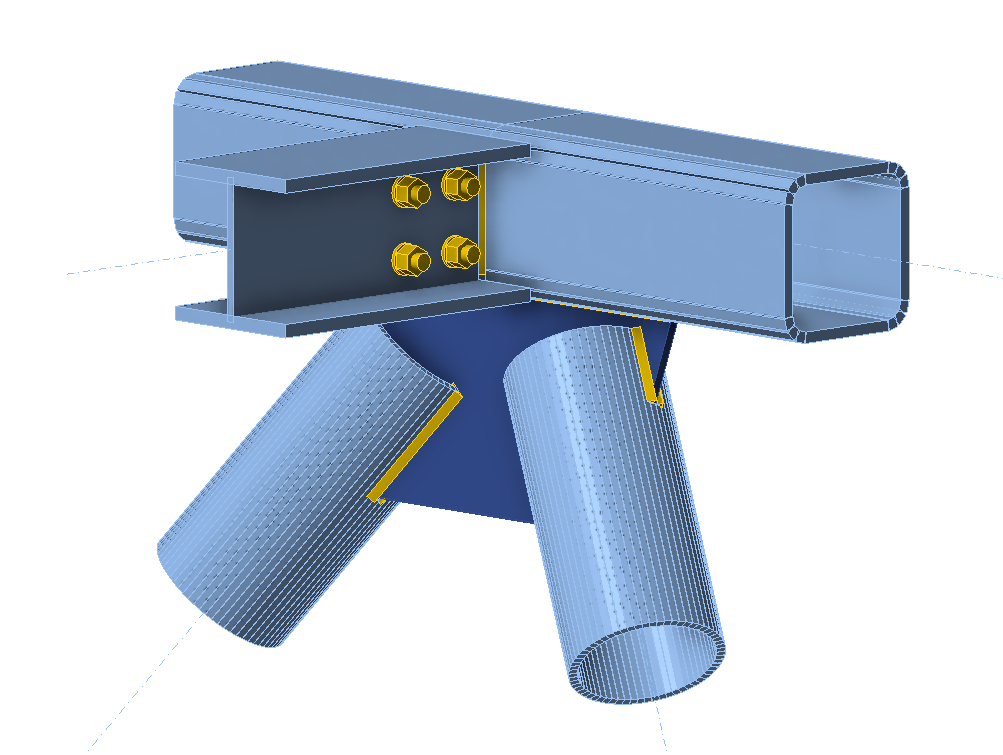
Vui lòng chọn một trong các nút liên kết ở giữa thanh cánh trên (ví dụ: C11) và mở nó trong IDEA StatiCa Connection.
Bạn có thể thiết kế đúng theo nhu cầu của mình hoặc sử dụng nút liên kết đã được chuẩn bị đầy đủ của chúng tôi tại đây.
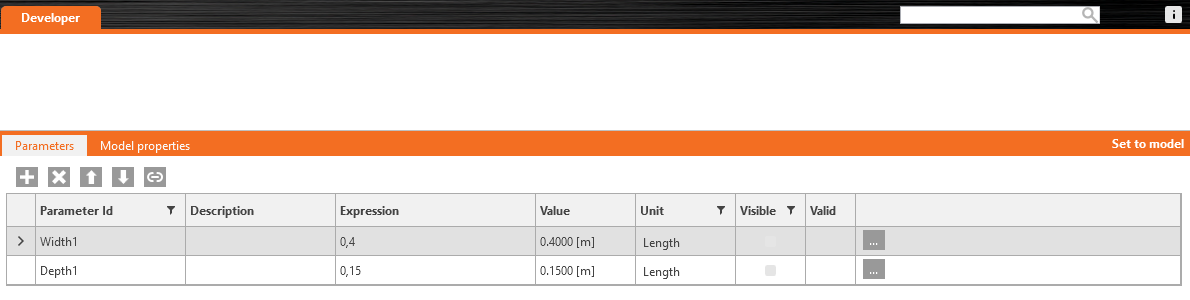
Vào tab Developer, đặt các tham số và liên kết chúng với thao tác tương ứng theo các hình ảnh sau:

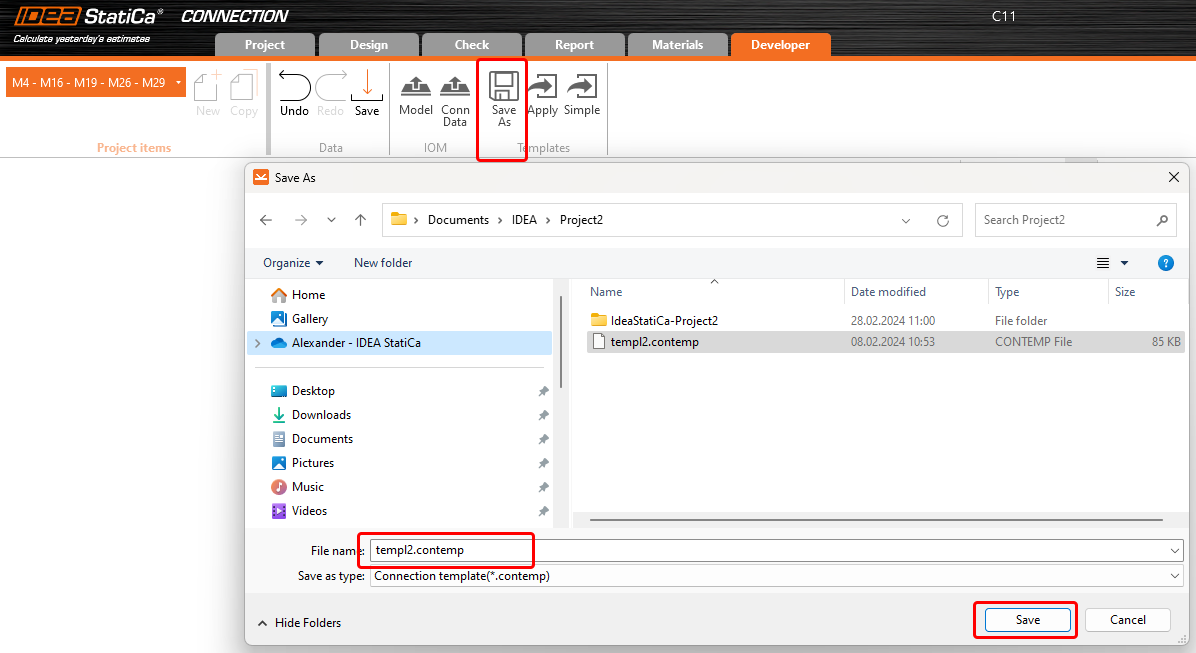
Cuối cùng, lưu toàn bộ nút liên kết dưới dạng mẫu *.contemp, để sử dụng sau trong Grasshopper.
Grasshopper - nhập tệp XML, áp dụng mẫu
Tạo một tài liệu mới, chọn tab Params trên thanh ribbon phía trên và đặt thành phần File Path lên Canvas.
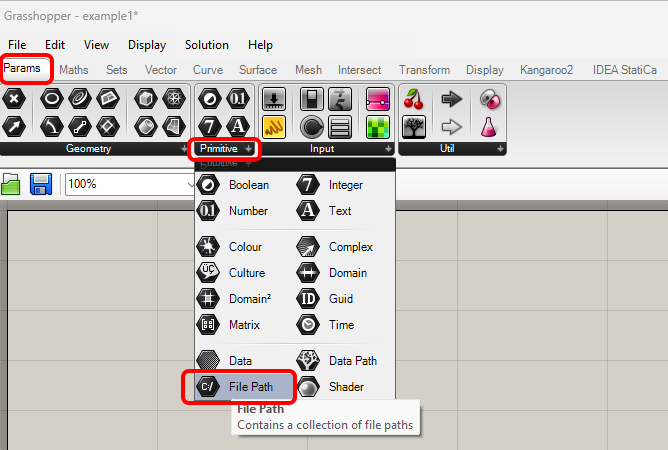
Nhấp chuột phải vào thành phần và chọn tệp import.xml, được tìm thấy trong thư mục Checkbot. Tệp này chứa tất cả dữ liệu từ kết cấu đã nhập.
Kể từ phiên bản 24.1.4, IDEA StatiCa đã ra mắt API mới, được mô tả tại đây.
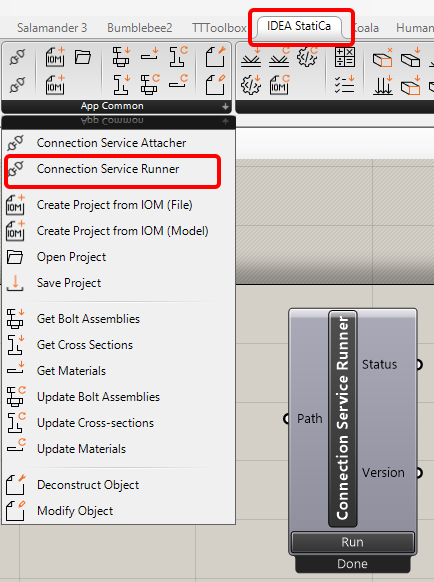
Để chạy các script Grasshopper, bạn phải thêm một thành phần có tên Connection Service Runner vào mỗi tệp. Thành phần này có thể được tìm thấy trong IDEA StatiCa / App Common.
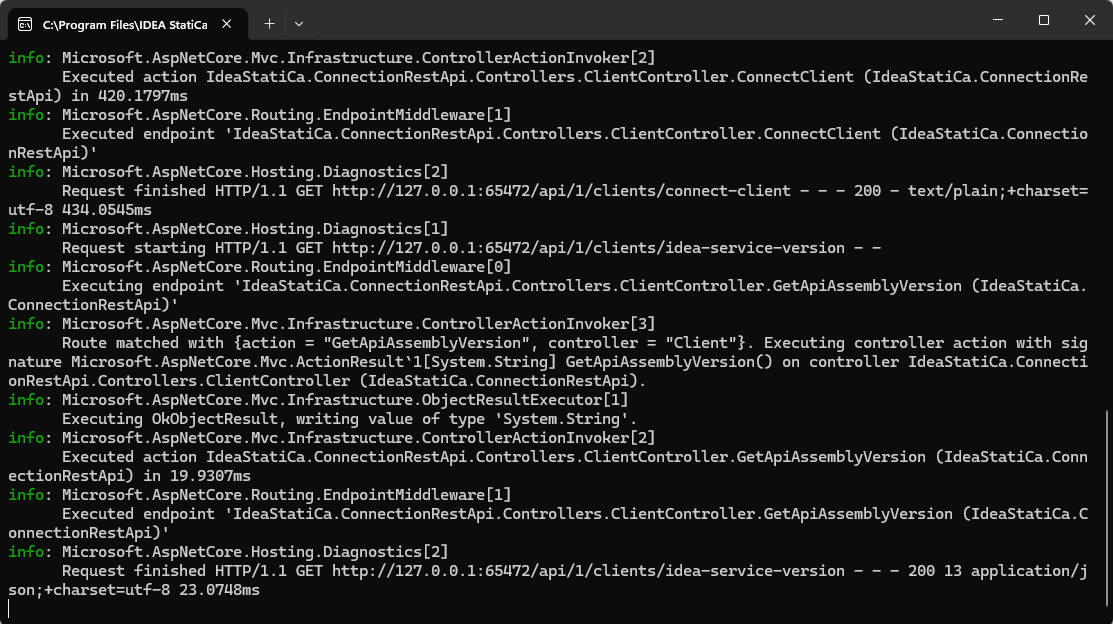
Khi chạy thành phần này, bạn sẽ thấy cửa sổ sau xuất hiện.
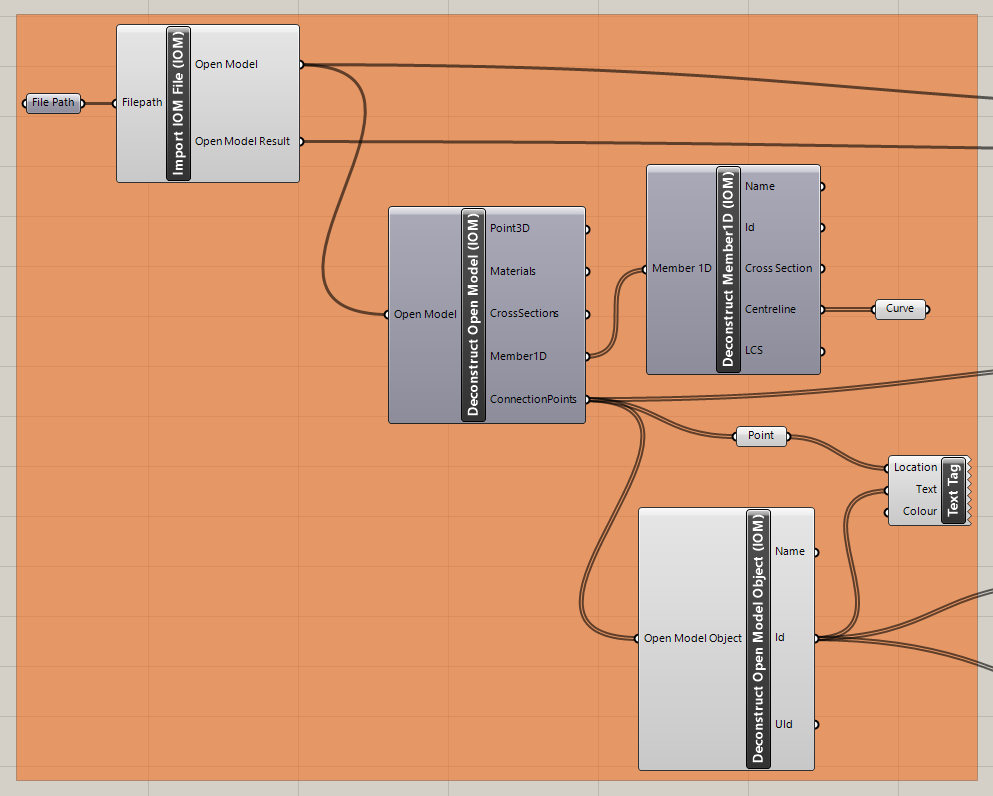
Bây giờ, bạn thêm các thành phần sau vào canvas và kết nối chúng như được hiển thị trong hình.
Nhập tệp và hiển thị kết cấu, bao gồm mô tả các nút liên kết trong Rhino:
IDEA StatiCa / Open Model / Import IOM File
IDEA StatiCa / Open Model / Deconstruct Open Model
IDEA StatiCa / Open Model / Deconstruct Open Model Object
IDEA StatiCa / Open Model Create / Deconstruct Member 1D
Params / Geometry / Curve
Params / Geometry / Point
Display / Dimensions / Text Tag
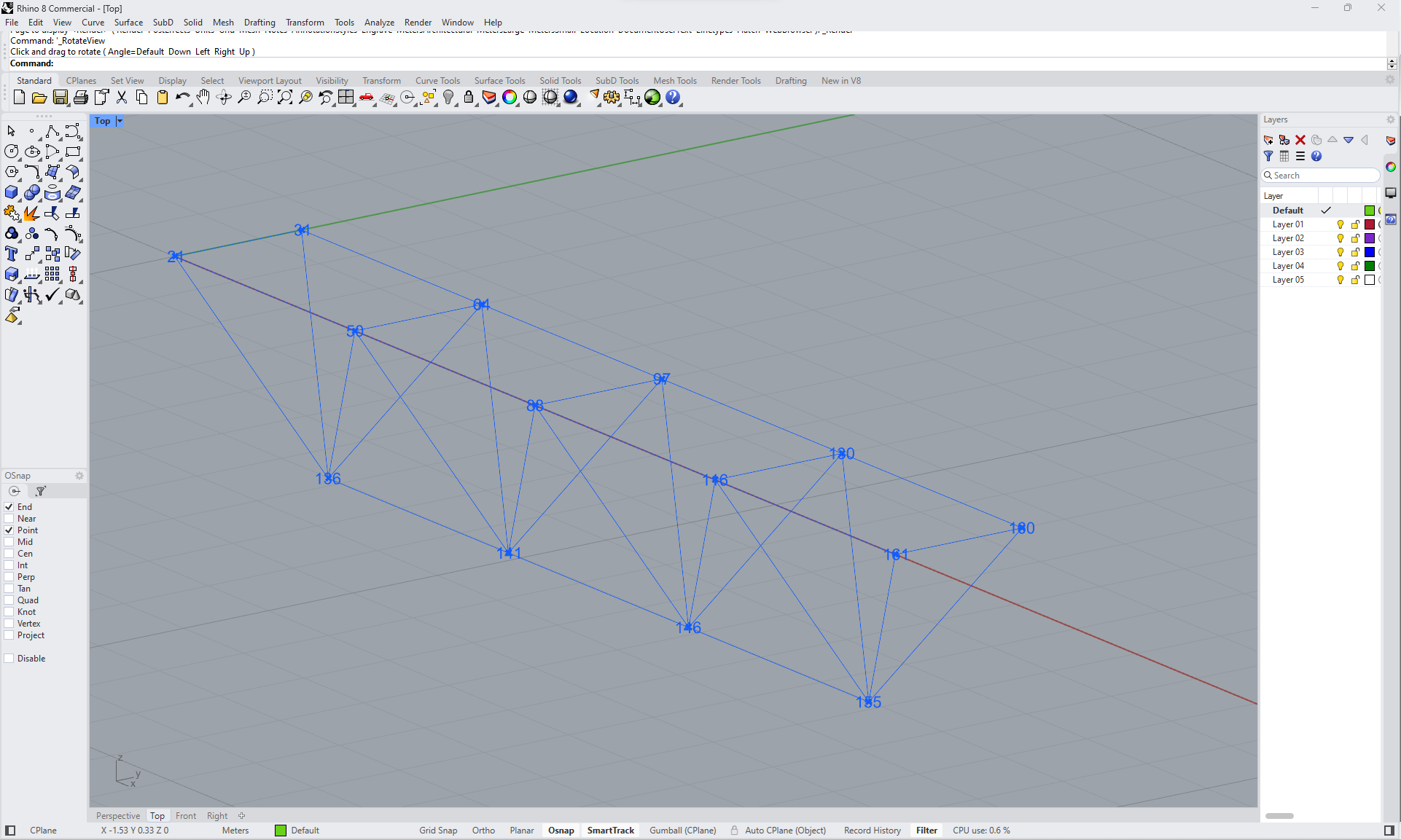
Bây giờ bạn có thể thấy kết cấu trong Rhino:
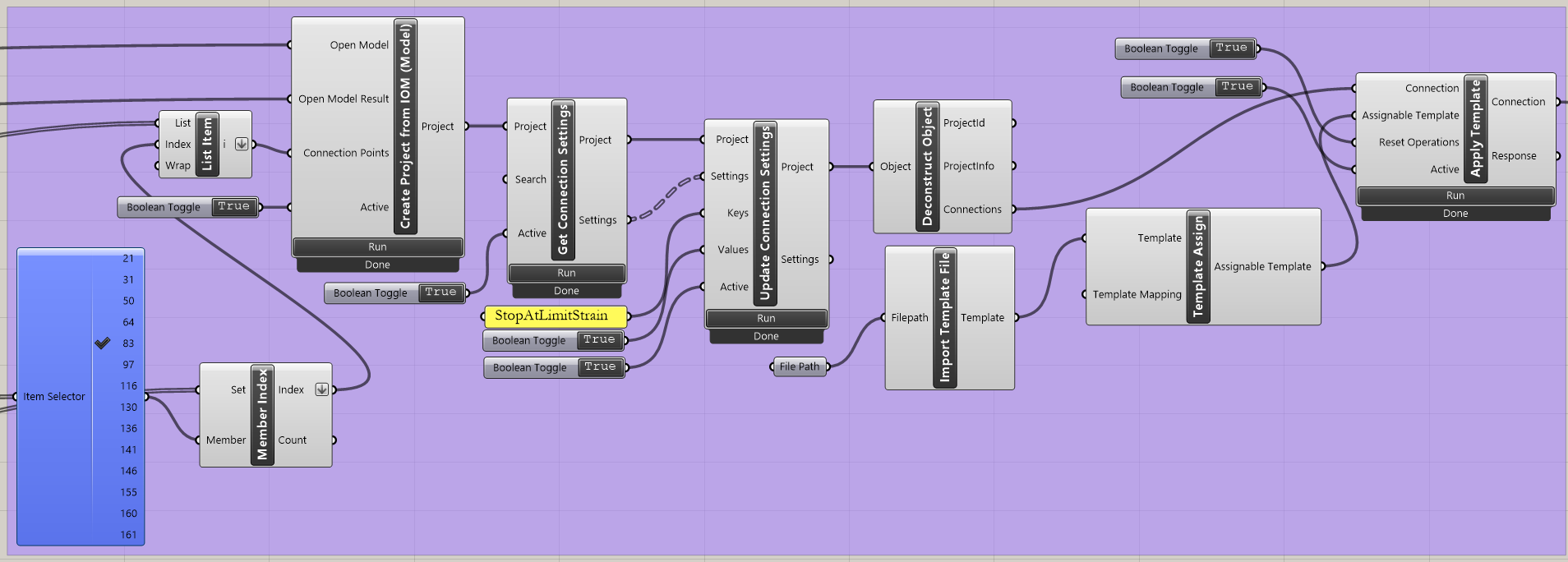
Nhập mẫu và áp dụng cho các nút liên kết đã chọn:
IDEA StatiCa / App Common / Create Connection from IOM
IDEA StatiCa / Connection / Get Connection Settings
IDEA StatiCa / App Common / Deconstruct Object
IDEA StatiCa / Connection / Import Template file
IDEA StatiCa / Connection / Full template Assign
IDEA StatiCa / Connection / Apply Template
Human / Misc / Item Selector
Sets / Sets / Member Index
Sets / Lists / List item
Params / Primitive / File path (nhập mẫu - templ2.contemp)
Params / Input / Boolean Toggle (3x)
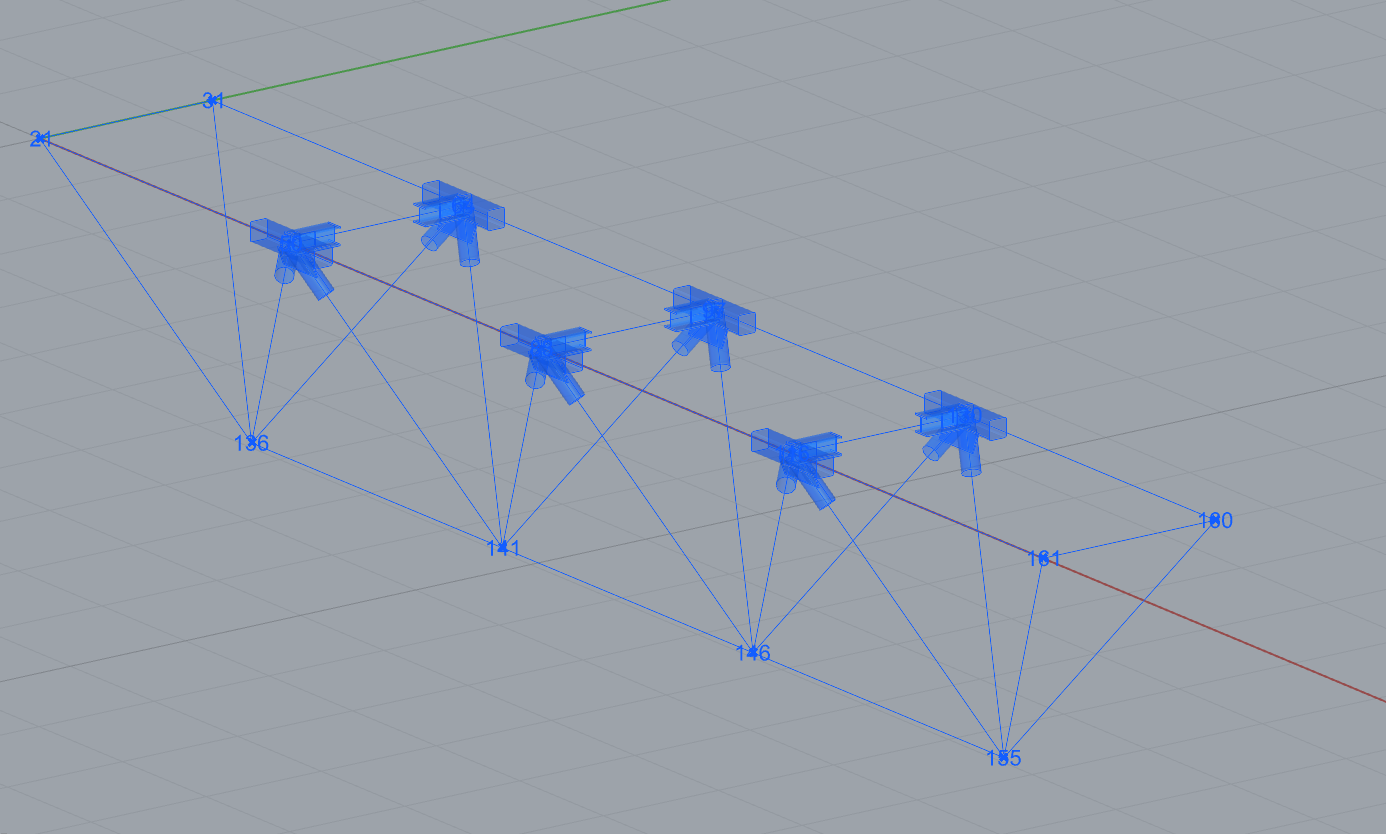
Bây giờ bạn có thể thấy kết cấu với các nút liên kết đã chọn nơi mẫu được áp dụng:
Grasshopper - chỉnh sửa tham số và chạy tính toán
Chỉnh sửa tham số:
IDEA StatiCa / Connection / Get Parameters
IDEA StatiCa / Connection / Update Parameters
IDEA StatiCa / App Common / Modify Object (2x)
IDEA StatiCa / Connection / Modify Code Setup (để đơn giản hóa bảng kết quả)
IDEA StatiCa / Connection / Modify Parameters
Params / Input / Panel (2x)
Params / Input / Boolean Toggle (3x)
Params / Input / Number Slider (2x)
Params / Sets / List Item (2x)
Params / Sets / Tree / Merge
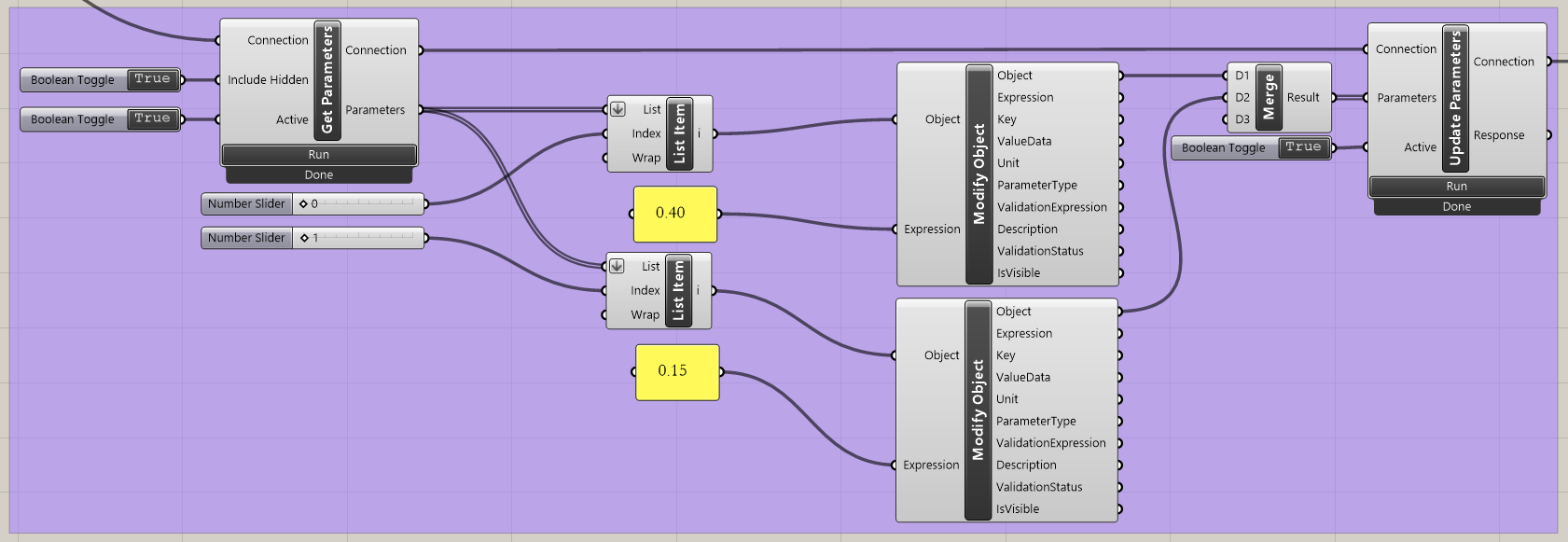
Tính toán các nút liên kết:
IDEA StatiCa / App Common / Deconstruct Object
IDEA StatiCa / Connection / Calculate Connection Project
IDEA StatiCa / Connection / Deconstruct Result Item (truyền dữ liệu đến các thành phần để trực quan hóa)
IDEA StatiCa / Connection / Export IOM
IDEA StatiCa / Open Model / Connection Open Model (truyền dữ liệu đến các thành phần để trực quan hóa)
Params / Input / Boolean Toggle (2x)
Params / Input / Number Slider (1x)
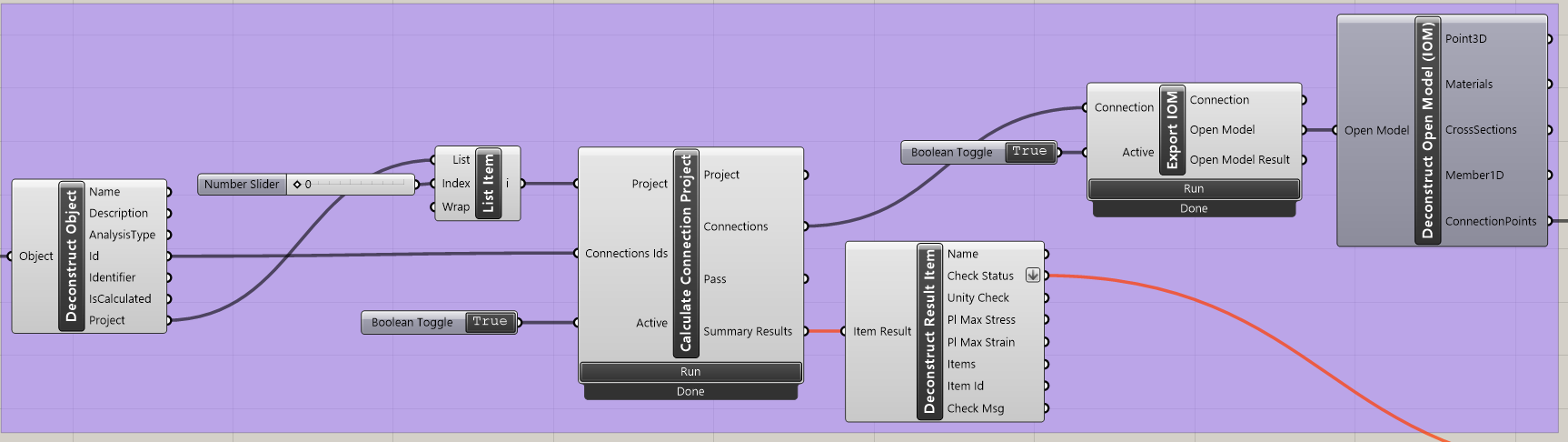
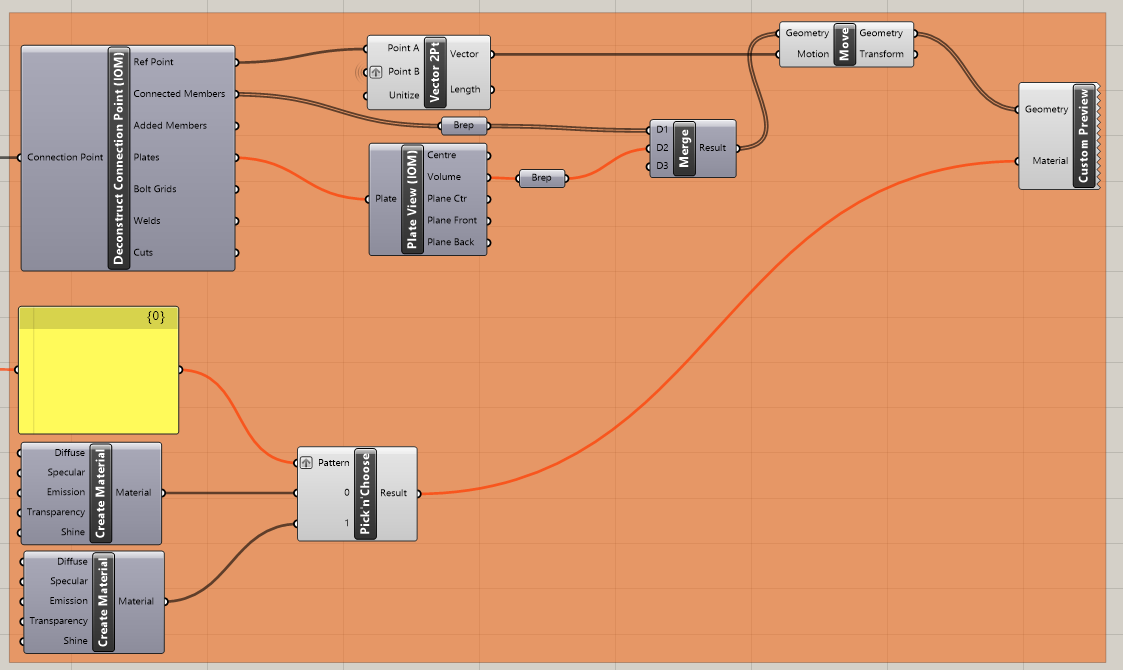
Trực quan hóa kết quả:
Grasshopper cho phép bạn nâng cao kết quả với trực quan hóa đồ họa. Các thành phần được hiển thị trong hình tiếp theo cho phép bạn thấy các nút liên kết đã tính toán đạt yêu cầu hiển thị màu xanh lá; những nút không vượt qua kiểm tra tiêu chuẩn sẽ hiển thị màu đỏ.
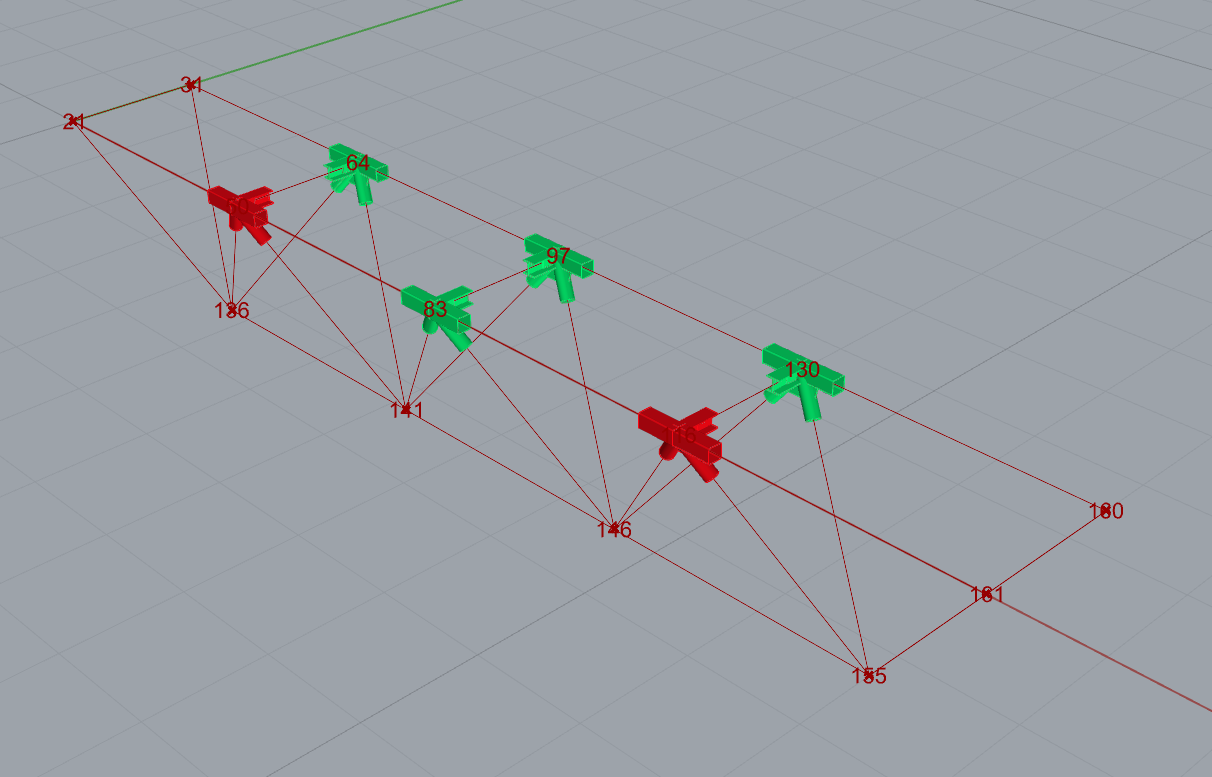
Đây là toàn bộ hình ảnh của tệp Grasshopper để xem các liên kết giữa các thành phần:
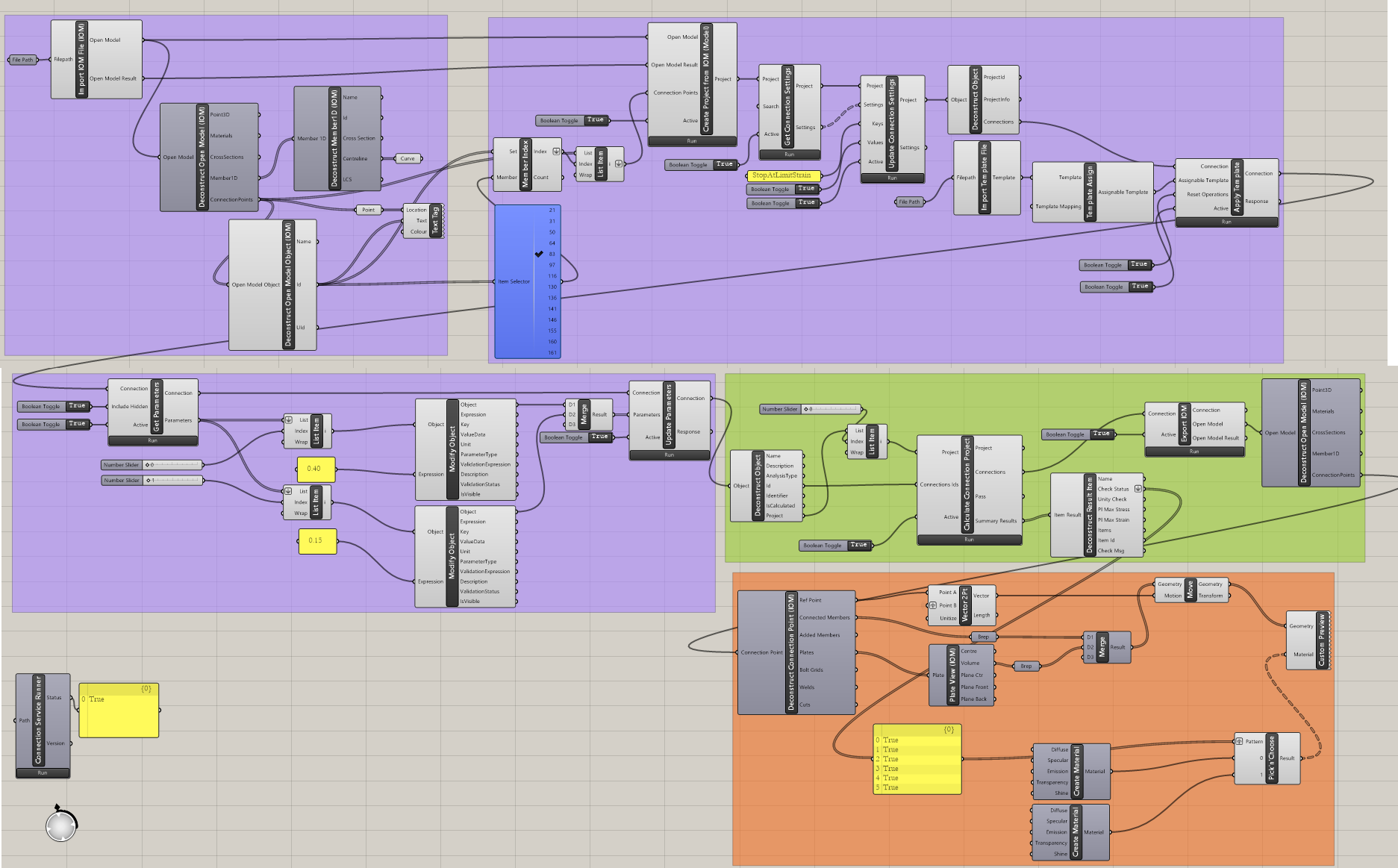
Các ví dụ phức tạp hơn có thể được tìm thấy trong thư mục
"%appdata%\McNeel\Rhinoceros\packages\8.0\IDEAStatiCa\0.2.5\Examples0.2.5.zip"