


บทช่วยสอนนี้ใช้ Rhino 8 หากคุณทำงานกับ IDEA StatiCa เวอร์ชันถึง 24.1.3 ดูบทช่วยสอนนี้
Widget #NaN: support_center_article
Name: Tutorial: Grasshopper - Plugin Installation
ID: 6d5f0dc8-ee5a-4c50-aced-df94e3586763
Show Raw Data
{
"title": {
"name": "Main headline (H1)",
"type": "text",
"value": "Grasshopper - การติดตั้ง Plugin"
},
"preview_image": {
"name": "Preview image",
"type": "asset",
"value": [
{
"name": "E1-1.png",
"description": null,
"type": "image/png",
"size": 68369,
"url": "https://preview-assets-us-01.kc-usercontent.com:443/66e7a155-be94-0096-73e6-c55dfc7e5788/fe255e56-8a4e-4dd5-8264-4c71f1dcb040/E1-1.png",
"width": 782,
"height": 692,
"renditions": {}
}
]
},
"post_date": {
"name": "Post date",
"type": "date_time",
"value": null,
"displayTimeZone": "Europe/Prague"
},
"perex_content": {
"name": "Lead paragraph",
"type": "text",
"value": ""
},
"content": {
"images": [
{
"description": null,
"imageId": "210c0a21-6b2e-4cf8-96ca-37e82d4862fa",
"url": "https://preview-assets-us-01.kc-usercontent.com:443/66e7a155-be94-0096-73e6-c55dfc7e5788/79496c31-039f-4837-b79c-cb4138788fee/g-1.png",
"height": 602,
"width": 822
},
{
"description": null,
"imageId": "17b9256a-6aa1-42b7-8631-d3e7d4e045fa",
"url": "https://preview-assets-us-01.kc-usercontent.com:443/66e7a155-be94-0096-73e6-c55dfc7e5788/af466a09-7c9d-43da-aa86-ae8cf2e05680/g-2.png",
"height": 265,
"width": 492
},
{
"description": null,
"imageId": "2a7f156a-11b3-4615-bfa5-c5e91e966443",
"url": "https://preview-assets-us-01.kc-usercontent.com:443/66e7a155-be94-0096-73e6-c55dfc7e5788/992a6362-f26a-4ba4-9082-0da7868c65c5/E1-1.png",
"height": 692,
"width": 782
},
{
"description": null,
"imageId": "b957b01f-e69c-482c-841e-87a2cab6aca6",
"url": "https://preview-assets-us-01.kc-usercontent.com:443/66e7a155-be94-0096-73e6-c55dfc7e5788/71249ebe-9e05-4c66-bf72-1b3714c9decf/g-4.png",
"height": 599,
"width": 1077
},
{
"description": null,
"imageId": "8e7e6c80-c3e3-4d20-8aab-7481515ddf8d",
"url": "https://preview-assets-us-01.kc-usercontent.com:443/66e7a155-be94-0096-73e6-c55dfc7e5788/f0c189a8-203f-40ea-9248-7aaf4be667ec/grasshopper-idea.png",
"height": 161,
"width": 814
}
],
"linkedItemCodenames": [],
"linkedItems": [],
"links": [
{
"codename": "grasshopper___introduction_to_the_plugin_component",
"linkId": "f2f373ad-9a22-499b-aced-f9520c80a37a",
"urlSlug": "description-of-grasshopper-plugin-components",
"type": "support_center_article"
}
],
"name": "Content",
"type": "rich_text",
"value": "<p>คุณสามารถดาวน์โหลดเวอร์ชันทดลองใช้ของ Rhino3d และ Grasshopper ได้จากเว็บไซต์ <a href=\"https://www.rhino3d.com/download/\" data-new-window=\"true\" target=\"_blank\" rel=\"noopener noreferrer\">Rhino3d</a> เปิดโปรแกรม Rhinoceros และเลือก template ที่ใช้หน่วย <strong>Meters</strong>:</p>\n<figure data-asset-id=\"210c0a21-6b2e-4cf8-96ca-37e82d4862fa\" data-image-id=\"210c0a21-6b2e-4cf8-96ca-37e82d4862fa\"><img src=\"https://preview-assets-us-01.kc-usercontent.com:443/66e7a155-be94-0096-73e6-c55dfc7e5788/79496c31-039f-4837-b79c-cb4138788fee/g-1.png\" data-asset-id=\"210c0a21-6b2e-4cf8-96ca-37e82d4862fa\" data-image-id=\"210c0a21-6b2e-4cf8-96ca-37e82d4862fa\" alt=\"\"></figure>\n<p>ในบรรทัดคำสั่ง (Command line) กรุณาพิมพ์ \"<strong>Package Manager</strong>\":</p>\n<figure data-asset-id=\"17b9256a-6aa1-42b7-8631-d3e7d4e045fa\" data-image-id=\"17b9256a-6aa1-42b7-8631-d3e7d4e045fa\"><img src=\"https://preview-assets-us-01.kc-usercontent.com:443/66e7a155-be94-0096-73e6-c55dfc7e5788/af466a09-7c9d-43da-aa86-ae8cf2e05680/g-2.png\" data-asset-id=\"17b9256a-6aa1-42b7-8631-d3e7d4e045fa\" data-image-id=\"17b9256a-6aa1-42b7-8631-d3e7d4e045fa\" alt=\"\"></figure>\n<p>หน้าต่างใหม่จะปรากฏขึ้น ให้เลือก IDEAStatiCa แล้วคลิก <strong>Install</strong> Plugin จะถูกดาวน์โหลดและติดตั้ง เพื่อให้ Plugin ทำงานได้ จำเป็นต้องรีสตาร์ท Rhinoceros</p>\n<figure data-asset-id=\"2a7f156a-11b3-4615-bfa5-c5e91e966443\" data-image-id=\"2a7f156a-11b3-4615-bfa5-c5e91e966443\"><img src=\"https://preview-assets-us-01.kc-usercontent.com:443/66e7a155-be94-0096-73e6-c55dfc7e5788/992a6362-f26a-4ba4-9082-0da7868c65c5/E1-1.png\" data-asset-id=\"2a7f156a-11b3-4615-bfa5-c5e91e966443\" data-image-id=\"2a7f156a-11b3-4615-bfa5-c5e91e966443\" alt=\"\"></figure>\n<p> หากต้องการเริ่มใช้งาน Grasshopper พร้อมกับ Plugin ของ IDEA StatiCa ให้เลือก <strong>Tools / Grasshopper </strong>ในแท็บ Rhinoceros</p>\n<figure data-asset-id=\"b957b01f-e69c-482c-841e-87a2cab6aca6\" data-image-id=\"b957b01f-e69c-482c-841e-87a2cab6aca6\"><img src=\"https://preview-assets-us-01.kc-usercontent.com:443/66e7a155-be94-0096-73e6-c55dfc7e5788/71249ebe-9e05-4c66-bf72-1b3714c9decf/g-4.png\" data-asset-id=\"b957b01f-e69c-482c-841e-87a2cab6aca6\" data-image-id=\"b957b01f-e69c-482c-841e-87a2cab6aca6\" alt=\"\"></figure>\n<p>ดังที่เห็น Plugin ได้ถูกรวมเข้าไว้แล้ว</p>\n<figure data-asset-id=\"8e7e6c80-c3e3-4d20-8aab-7481515ddf8d\" data-image-id=\"8e7e6c80-c3e3-4d20-8aab-7481515ddf8d\"><img src=\"https://preview-assets-us-01.kc-usercontent.com:443/66e7a155-be94-0096-73e6-c55dfc7e5788/f0c189a8-203f-40ea-9248-7aaf4be667ec/grasshopper-idea.png\" data-asset-id=\"8e7e6c80-c3e3-4d20-8aab-7481515ddf8d\" data-image-id=\"8e7e6c80-c3e3-4d20-8aab-7481515ddf8d\" alt=\"\"></figure>\n<p>เรียนรู้เกี่ยวกับ Component และคำสั่งต่างๆ ใน Plugin ของ IDEA StatiCa สำหรับ Grasshopper ได้ในบทความ <a data-item-id=\"f2f373ad-9a22-499b-aced-f9520c80a37a\" href=\"\">คำอธิบาย Component ของ Grasshopper plugin</a></p>"
},
"linked_items": {
"name": "Linked items",
"type": "modular_content",
"value": [],
"linkedItems": []
},
"regions": {
"name": "Region",
"type": "taxonomy",
"value": [
{
"name": "AMER",
"codename": "amer"
},
{
"name": "EMEA",
"codename": "emea"
},
{
"name": "APAC",
"codename": "apac"
}
],
"taxonomyGroup": "region"
},
"product_groups": {
"name": "Product group",
"type": "taxonomy",
"value": [
{
"name": "Steel",
"codename": "steel"
},
{
"name": "Connection design",
"codename": "connection_design"
}
],
"taxonomyGroup": "product_group"
},
"support_center_article_types": {
"name": "Support center article",
"type": "taxonomy",
"value": [
{
"name": "Tutorials",
"codename": "tutorial"
}
],
"taxonomyGroup": "support_center_article"
},
"expertise_levels": {
"name": "Expertise level",
"type": "taxonomy",
"value": [
{
"name": "Intermediate",
"codename": "intermediate"
},
{
"name": "Expert",
"codename": "expert"
}
],
"taxonomyGroup": "expertise_level"
},
"labels": {
"name": "Labels",
"type": "taxonomy",
"value": [
{
"name": "IDEA Open Model (API)",
"codename": "idea_open_model__api_"
},
{
"name": "Connection",
"codename": "connection"
}
],
"taxonomyGroup": "labels"
},
"attachments__files": {
"name": "Attachments",
"type": "asset",
"value": []
},
"content_priority__value": {
"name": "Content priority value",
"type": "number",
"value": null
},
"options": {
"name": "Options",
"type": "multiple_choice",
"value": []
},
"url_slug": {
"name": "Url slug",
"type": "url_slug",
"value": "grasshopper-plugin-installation"
},
"unique_url_slug": {
"name": "Unique URL slug",
"type": "custom",
"value": "[\"grasshopper-plugin-installation\",\"[autogenerated]\"]"
},
"content_settings__sitemap": {
"name": "Show in sitemap",
"type": "multiple_choice",
"value": []
},
"content_settings__robots": {
"name": "Search engine indexing",
"type": "multiple_choice",
"value": []
},
"content_settings__is_hidden": {
"name": "Hidden nested content",
"type": "multiple_choice",
"value": []
},
"content_settings__is_topped": {
"name": "Topped",
"type": "multiple_choice",
"value": []
},
"metadata__page_title": {
"name": "Page title",
"type": "text",
"value": ""
},
"metadata__page_description": {
"name": "Page description",
"type": "text",
"value": ""
},
"metadata__page_keywords": {
"name": "Page keywords",
"type": "text",
"value": ""
},
"metadata__canonical_url": {
"name": "Canonical URL",
"type": "text",
"value": ""
},
"metadata__og_title": {
"name": "OG:title",
"type": "text",
"value": ""
},
"metadata__og_description": {
"name": "OG:description",
"type": "text",
"value": ""
},
"metadata__og_image": {
"name": "OG:image",
"type": "asset",
"value": []
},
"translation__translation_connector": {
"name": "Translation Connector",
"type": "taxonomy",
"value": [],
"taxonomyGroup": "languages"
},
"translation__force_translation": {
"name": "Force translation",
"type": "multiple_choice",
"value": []
},
"translation__translate_standalone_nested_content_items": {
"name": "Translate standalone nested content items",
"type": "multiple_choice",
"value": []
},
"translation__last_translation": {
"images": [],
"linkedItemCodenames": [],
"linkedItems": [],
"links": [],
"name": "Last translation",
"type": "rich_text",
"value": "<p>Translation info:</p>\n<ul>\n <li>cs-CZ: Never translated</li>\n <li>de-DE: Never translated</li>\n <li>en-US: Never translated</li>\n <li>es-ES: Never translated</li>\n <li>fr-FR: Never translated</li>\n <li>hu-HU: Never translated</li>\n <li>it-IT: Never translated</li>\n <li>ko-KR: Never translated</li>\n <li>nl-NL: Never translated</li>\n <li>pl-PL: Never translated</li>\n <li>pt-PT: Never translated</li>\n <li>ro-RO: Never translated</li>\n <li>ru-RU: Never translated</li>\n <li>th-TH: Translated on 13.5.2026 15:13</li>\n <li>tr-TR: Never translated</li>\n <li>vi-VN: Never translated</li>\n <li>zh-CN: Never translated</li>\n</ul>\n<p>Publish info:</p>\n<ul>\n <li>Publish info is available only in the main language</li>\n</ul>"
},
"translation__ai_translated": {
"name": "AI translated",
"type": "multiple_choice",
"value": [
{
"name": "Translated",
"codename": "translated"
}
]
},
"page_tree_settings__page_label": {
"name": "Page label",
"type": "text",
"value": ""
},
"page_tree_settings__path_segment": {
"name": "Path segment",
"type": "text",
"value": ""
},
"page_tree_settings__breadcrumb_style": {
"name": "Breadcrumb style",
"type": "multiple_choice",
"value": []
},
"page_tree_settings__hide_in_breadcrumbs": {
"name": "Hide in breadcrumbs",
"type": "multiple_choice",
"value": []
}
}HUMAN plugin
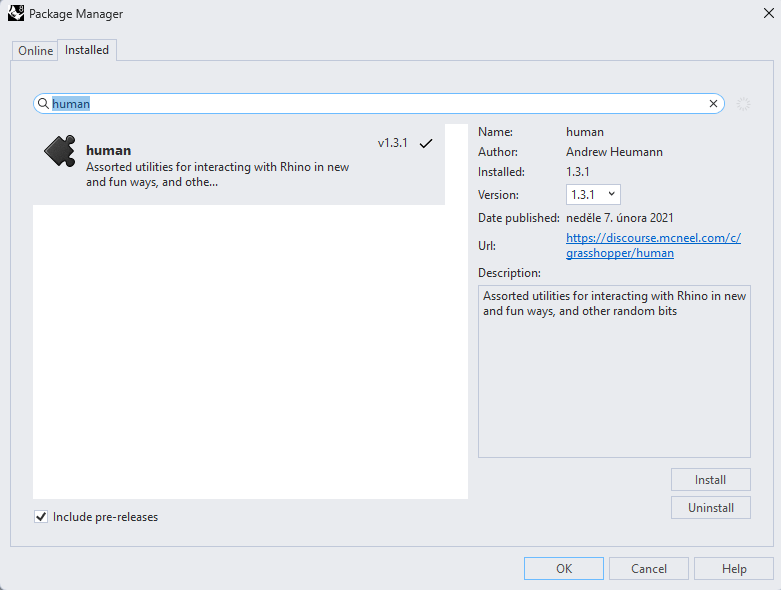
ในตัวอย่างนี้ เราต้องเลือกส่วนหนึ่งของโครงสร้าง และเพื่อจุดประสงค์นี้ คุณต้องติดตั้ง plugin อีกตัวหนึ่ง - HUMAN ซึ่งคุณจะใช้ในบทช่วยสอนนี้
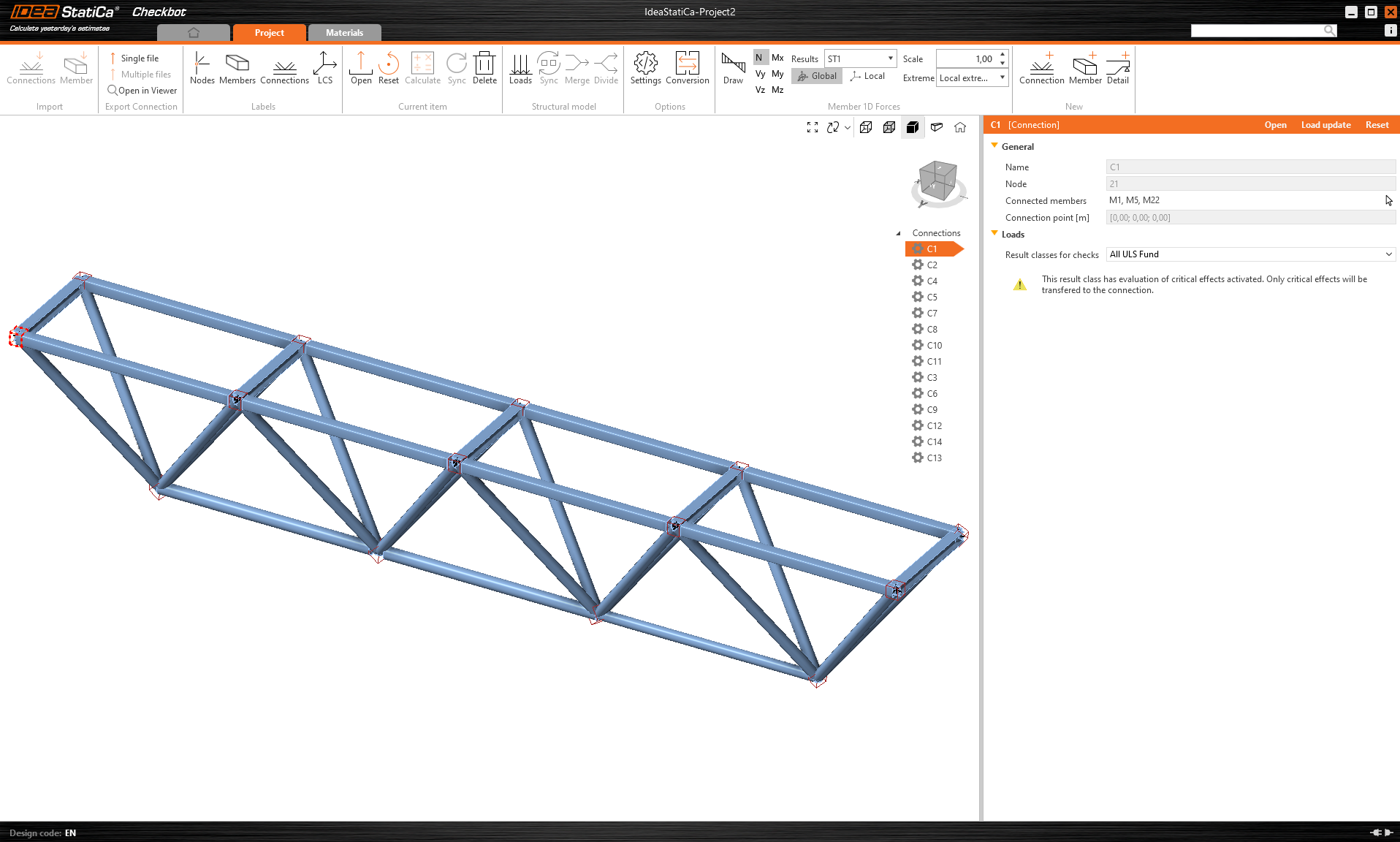
IDEA StatiCa Checkbot – การนำเข้าโครงสร้าง การออกแบบจุดต่อ
เปิดโฟลเดอร์ที่แนบมาพร้อมโครงสร้างที่นำเข้าจากซอฟต์แวร์ของบุคคลที่สาม โดยมีแรงภายในรวมอยู่ด้วย
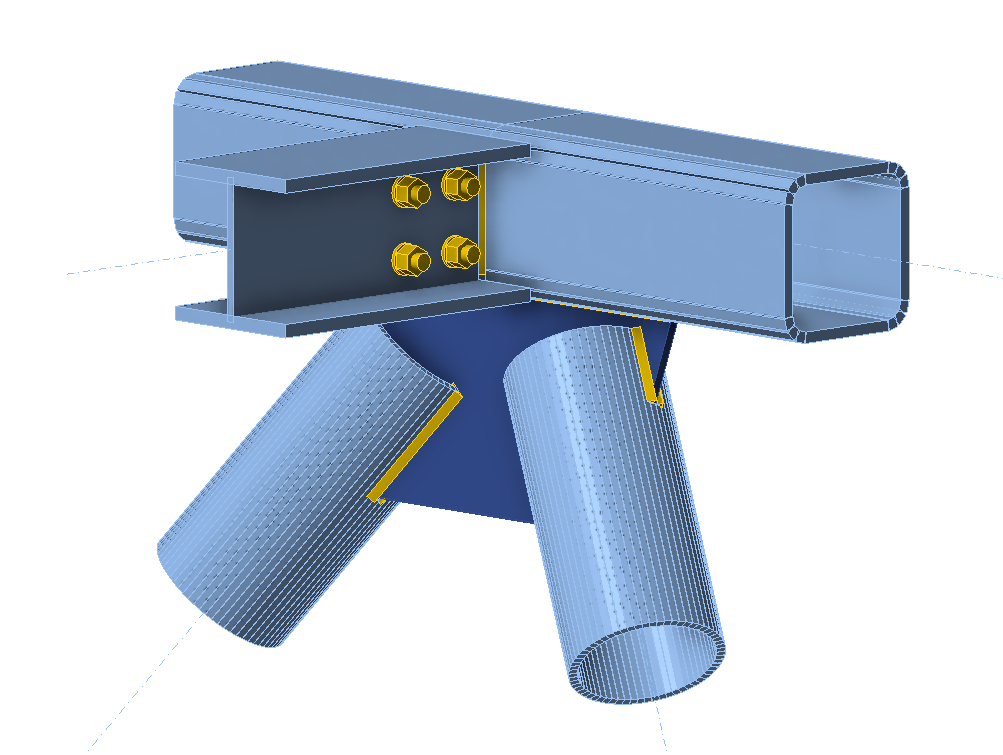
กรุณาเลือกจุดต่อตรงกลางจุดใดจุดหนึ่งในแถบบน (เช่น C11) และเปิดใน IDEA StatiCa Connection
คุณสามารถออกแบบได้อย่างถูกต้องตามความต้องการของคุณ หรือใช้จุดต่อที่เตรียมไว้อย่างสมบูรณ์ของเราที่นี่
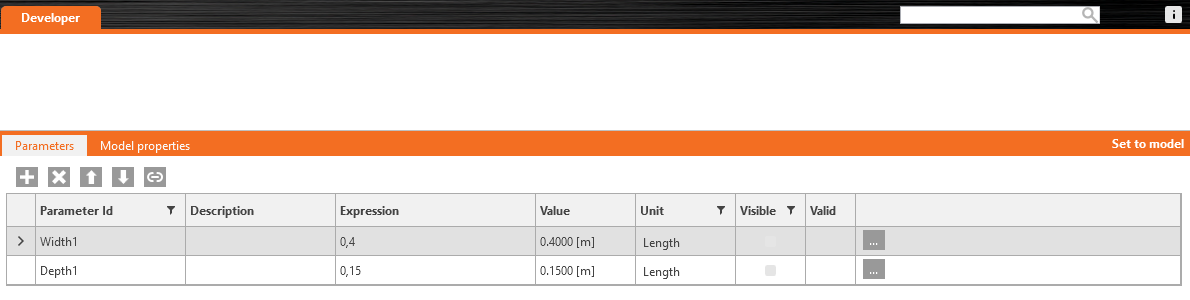
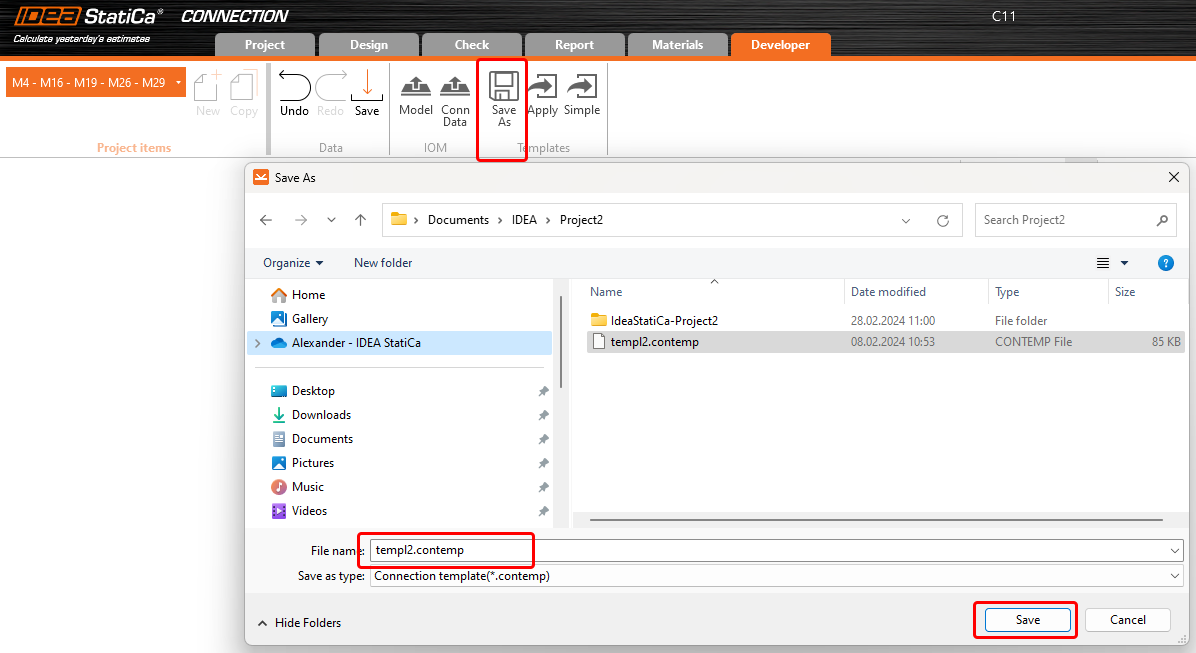
ไปที่แท็บ Developer ตั้งค่าพารามิเตอร์ และเชื่อมโยงกับการดำเนินการที่เหมาะสมตามภาพต่อไปนี้:

สุดท้าย บันทึกจุดต่อทั้งหมดเป็นแม่แบบ *.contemp เพื่อใช้ใน Grasshopper ในภายหลัง
Grasshopper - นำเข้าไฟล์ XML ใช้แม่แบบ
สร้างเอกสารใหม่ เลือกแท็บ Params ในริบบอนด้านบน และวางคอมโพเนนต์ File Path บน Canvas
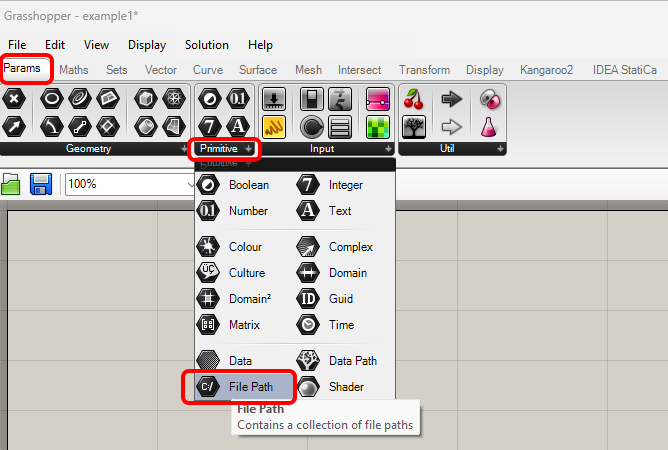
คลิกขวาที่คอมโพเนนต์และเลือกไฟล์ import.xml ที่พบใน Checkbot folder ไฟล์นี้มีข้อมูลทั้งหมดจากโครงสร้างที่นำเข้า
ตั้งแต่เวอร์ชัน 24.1.4 IDEA StatiCa มาพร้อมกับ API ใหม่ ซึ่งอธิบายไว้ ที่นี่
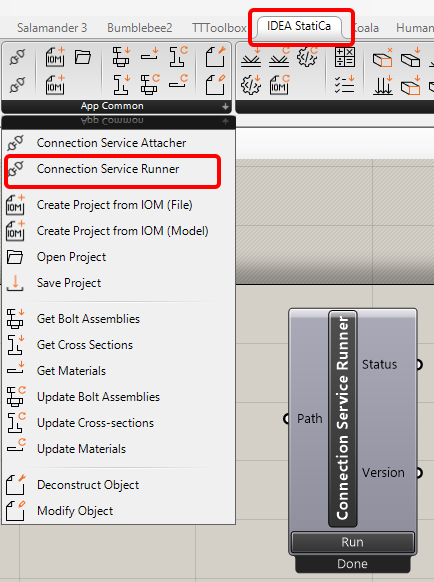
ในการรันสคริปต์ Grasshopper คุณต้องเพิ่มคอมโพเนนต์ที่เรียกว่า Connection Service Runner ในทุกไฟล์ คอมโพเนนต์นี้สามารถพบได้ใน IDEA StatiCa / App Common
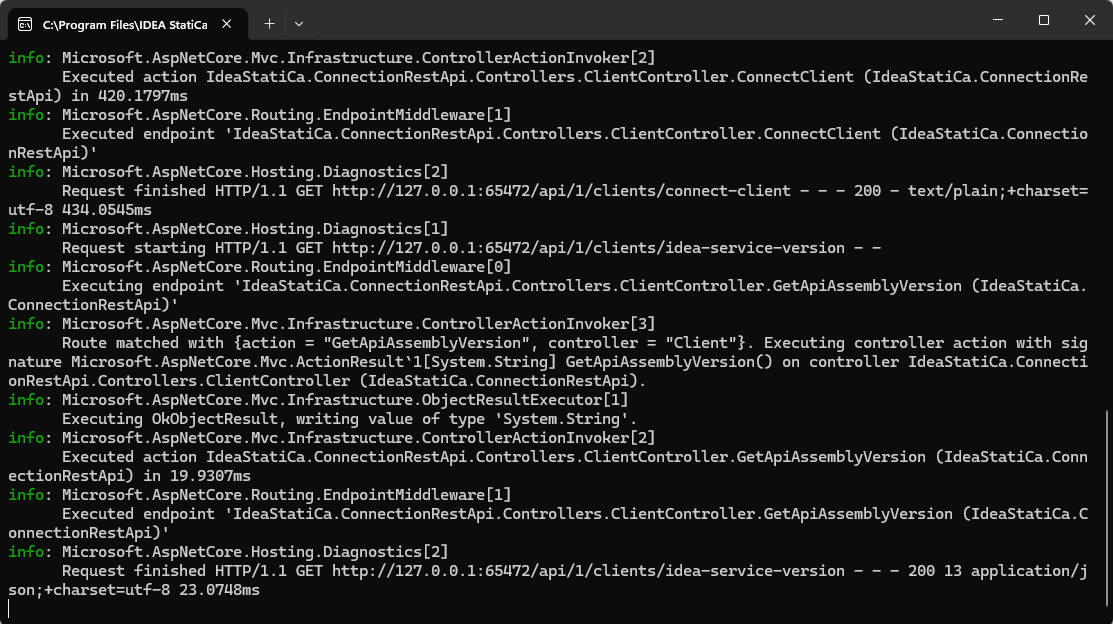
เมื่อรันคอมโพเนนต์นี้ คุณควรเห็นหน้าต่างต่อไปนี้ปรากฏขึ้น
ตอนนี้ คุณเพิ่มคอมโพเนนต์ต่อไปนี้ลงใน canvas และเชื่อมต่อตามที่แสดงในภาพ
นำเข้าไฟล์และแสดงโครงสร้าง รวมถึงคำอธิบายของจุดต่อใน Rhino:
IDEA StatiCa / Open Model / Import IOM File
IDEA StatiCa / Open Model / Deconstruct Open Model
IDEA StatiCa / Open Model / Deconstruct Open Model Object
IDEA StatiCa / Open Model Create / Deconstruct Member 1D
Params / Geometry / Curve
Params / Geometry / Point
Display / Dimensions / Text Tag
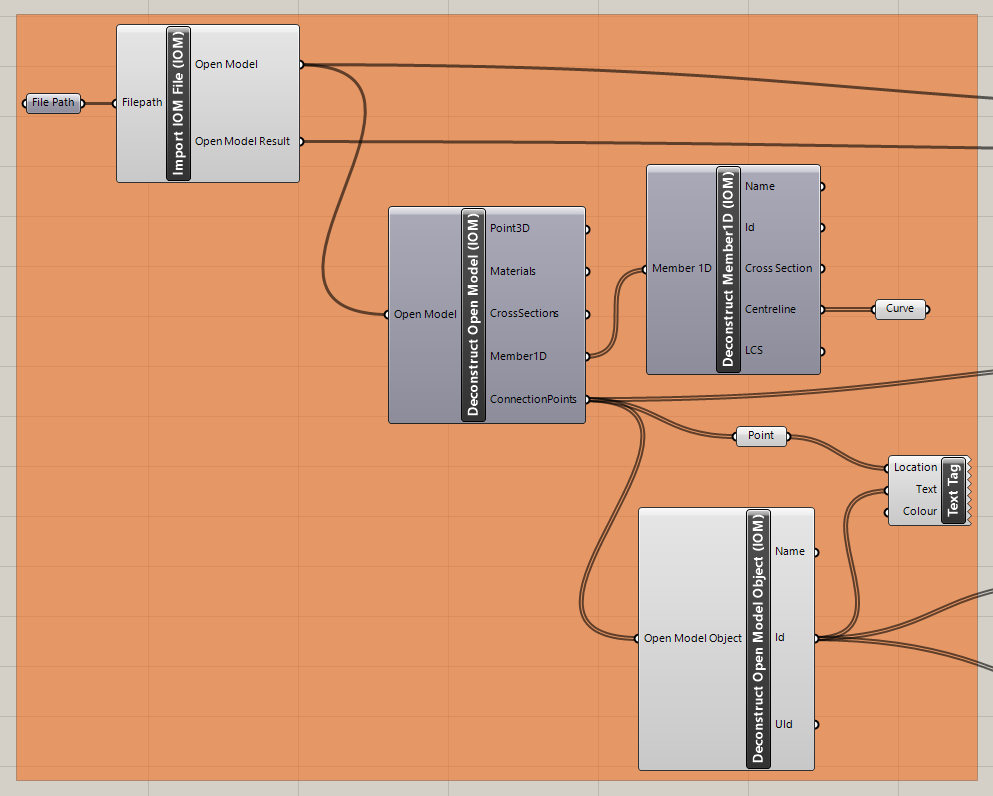
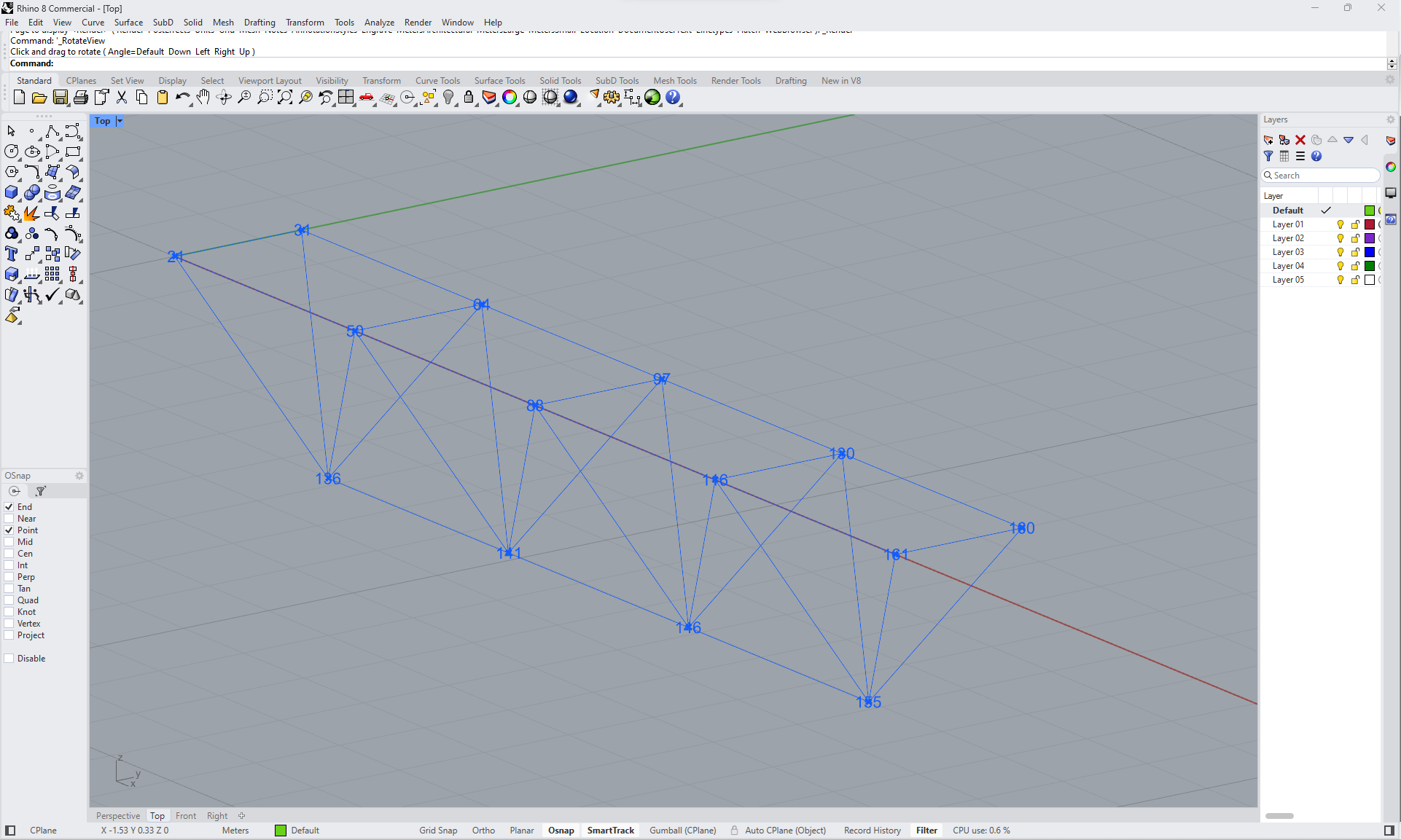
ตอนนี้คุณสามารถเห็นโครงสร้างใน Rhino:
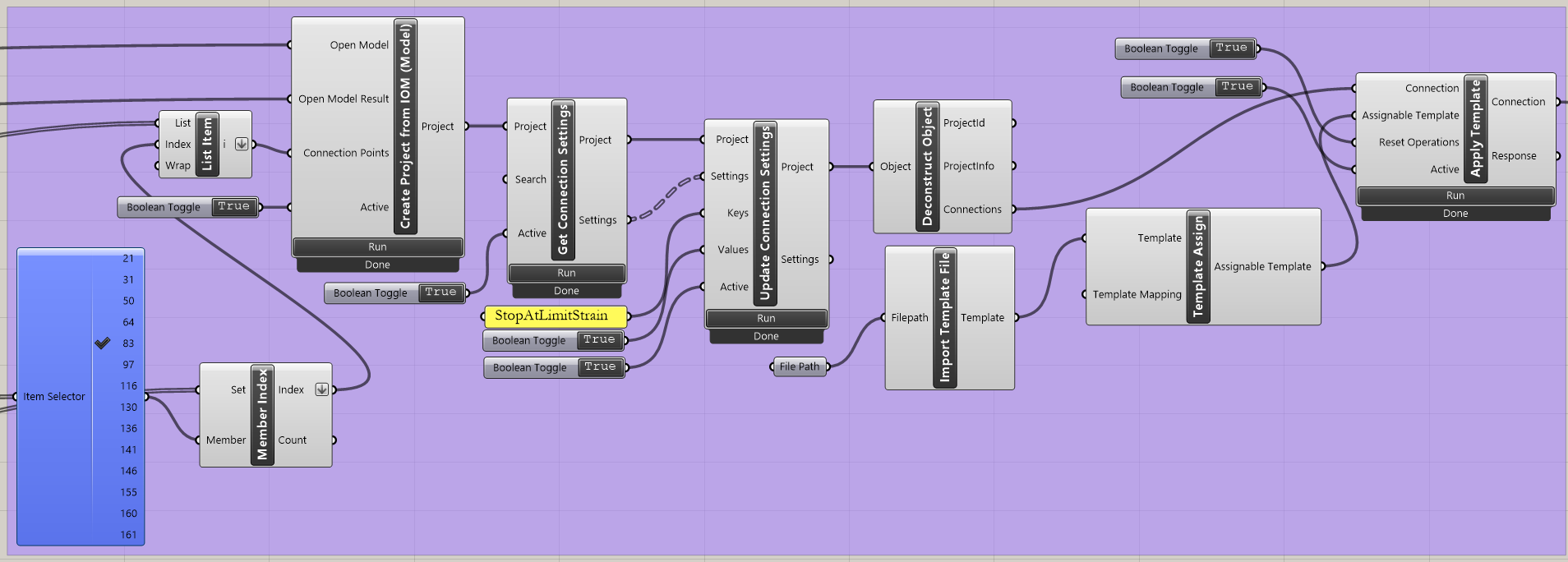
นำเข้าแม่แบบและใช้กับจุดต่อที่เลือก:
IDEA StatiCa / App Common / Create Connection from IOM
IDEA StatiCa / Connection / Get Connection Settings
IDEA StatiCa / App Common / Deconstruct Object
IDEA StatiCa / Connection / Import Template file
IDEA StatiCa / Connection / Full template Assign
IDEA StatiCa / Connection / Apply Template
Human / Misc / Item Selector
Sets / Sets / Member Index
Sets / Lists / List item
Params / Primitive / File path (นำเข้าแม่แบบ - templ2.contemp)
Params / Input / Boolean Toggle (3x)
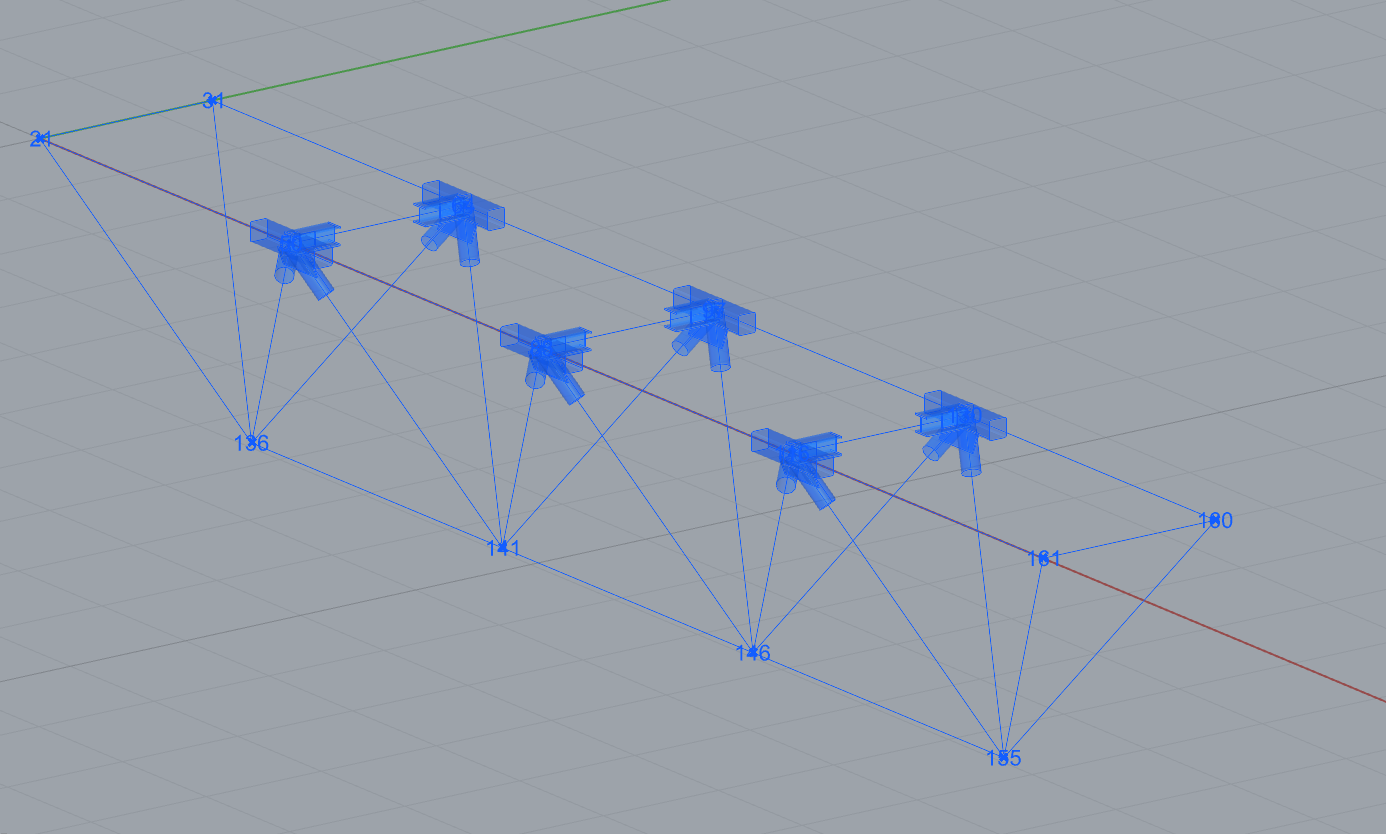
ตอนนี้คุณสามารถเห็นโครงสร้างพร้อมจุดต่อที่เลือกซึ่งใช้แม่แบบแล้ว:
Grasshopper - ปรับแต่งพารามิเตอร์และรันการคำนวณ
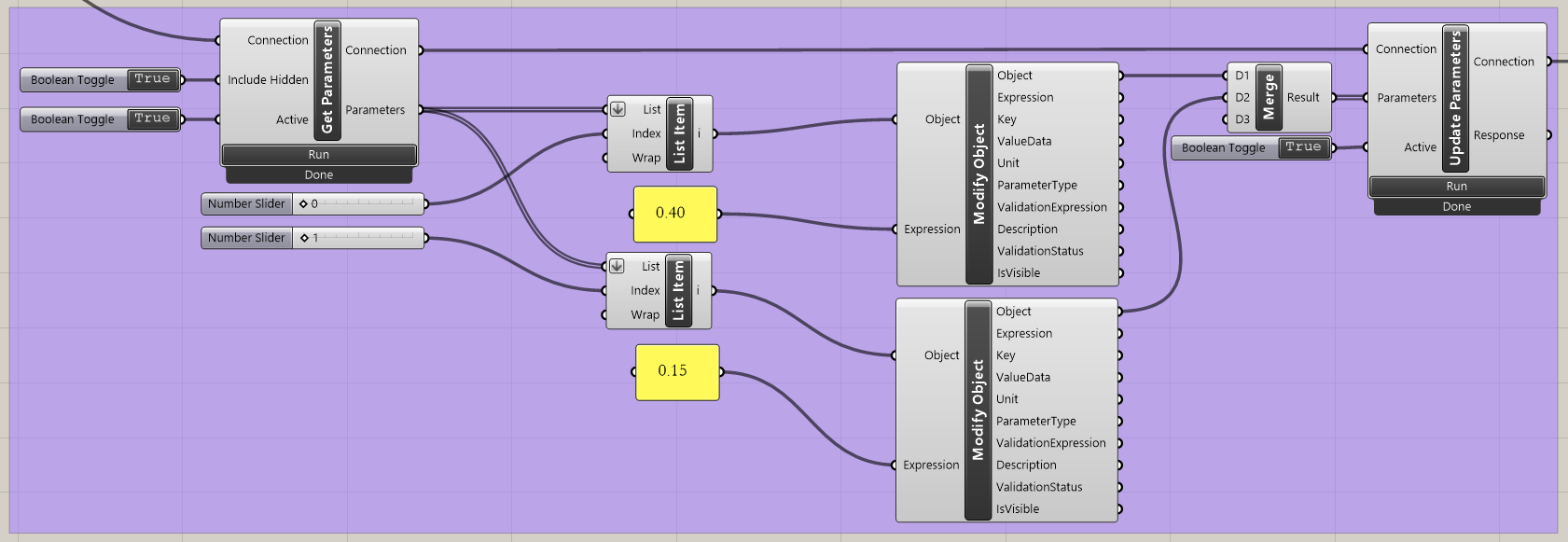
ปรับแต่งพารามิเตอร์:
IDEA StatiCa / Connection / Get Parameters
IDEA StatiCa / Connection / Update Parameters
IDEA StatiCa / App Common / Modify Object (2x)
IDEA StatiCa / Connection / Modify Code Setup (เพื่อลดความซับซ้อนของตารางผลลัพธ์)
IDEA StatiCa / Connection / Modify Parameters
Params / Input / Panel (2x)
Params / Input / Boolean Toggle (3x)
Params / Input / Number Slider (2x)
Params / Sets / List Item (2x)
Params / Sets / Tree / Merge
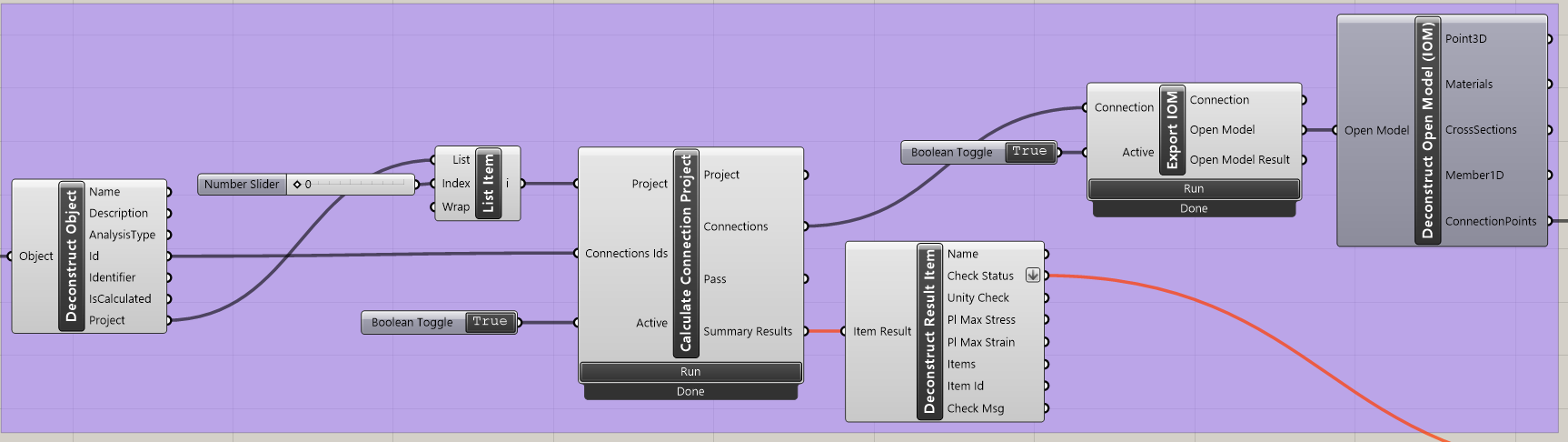
คำนวณจุดต่อ:
IDEA StatiCa / App Common / Deconstruct Object
IDEA StatiCa / Connection / Calculate Connection Project
IDEA StatiCa / Connection / Deconstruct Result Item (ส่งข้อมูลไปยังคอมโพเนนต์สำหรับการแสดงผล)
IDEA StatiCa / Connection / Export IOM
IDEA StatiCa / Open Model / Connection Open Model (ส่งข้อมูลไปยังคอมโพเนนต์สำหรับการแสดงผล)
Params / Input / Boolean Toggle (2x)
Params / Input / Number Slider (1x)
การแสดงผลลัพธ์:
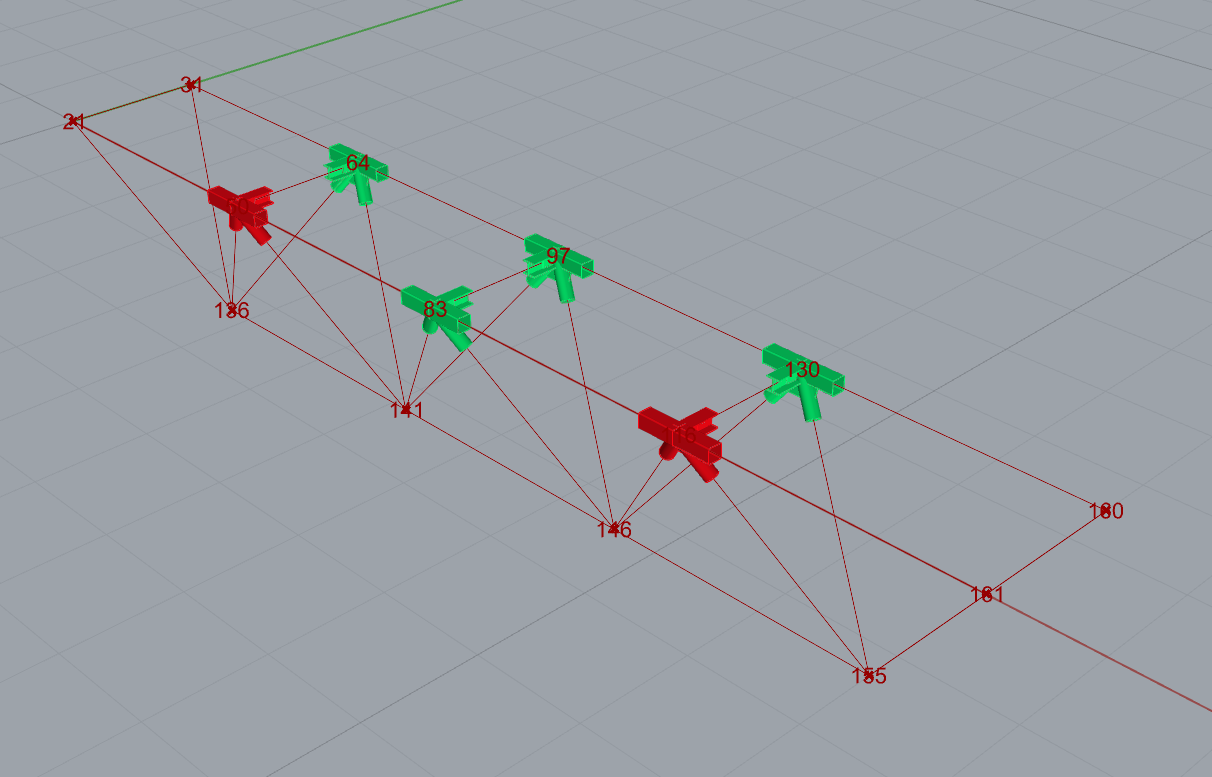
Grasshopper ช่วยให้คุณปรับปรุงผลลัพธ์ด้วยการแสดงผลแบบกราฟิก คอมโพเนนต์ที่แสดงในภาพถัดไปช่วยให้คุณเห็นจุดต่อที่คำนวณผ่านเป็นสีเขียว ส่วนจุดต่อที่ไม่ผ่านการตรวจสอบจะแสดงเป็นสีแดง
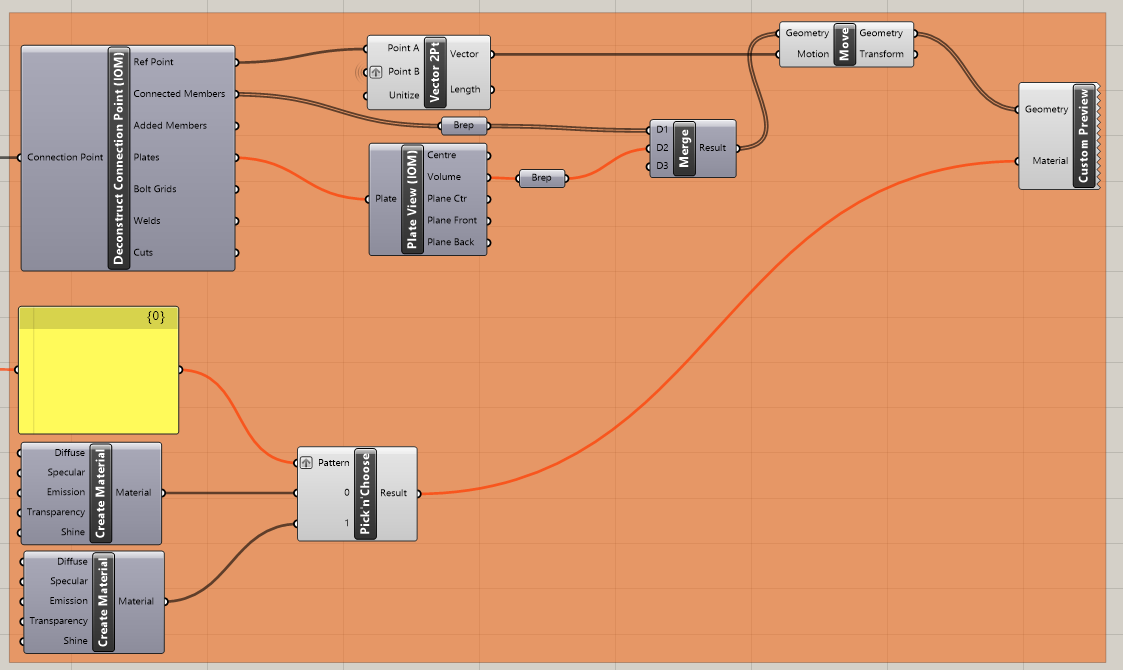
นี่คือภาพรวมทั้งหมดของไฟล์ Grasshopper เพื่อดูการเชื่อมต่อระหว่างคอมโพเนนต์:
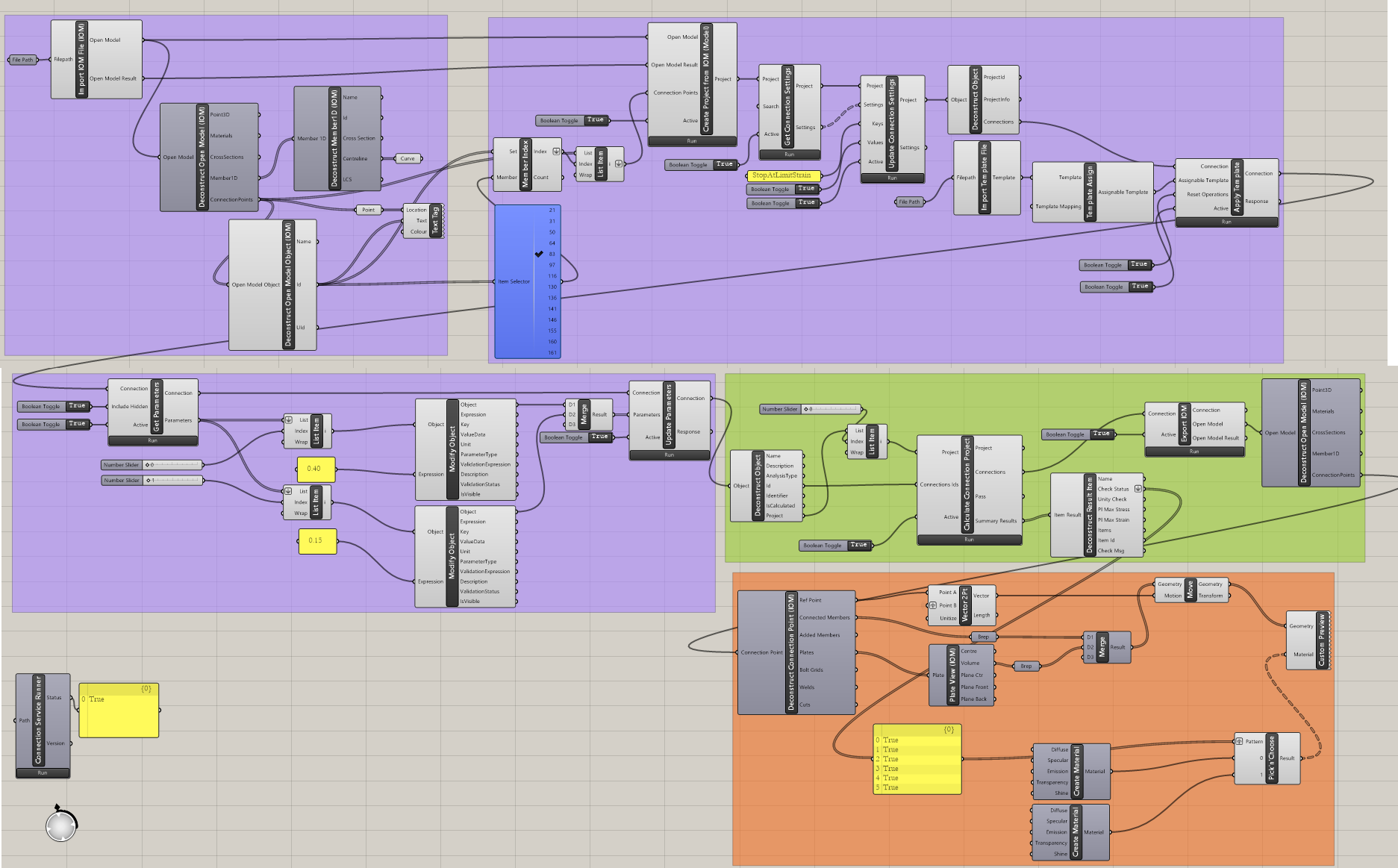
ตัวอย่างที่ซับซ้อนกว่านี้สามารถพบได้ในโฟลเดอร์
"%appdata%\McNeel\Rhinoceros\packages\8.0\IDEAStatiCa\0.2.5\Examples0.2.5.zip"