


Widget #NaN: support_center_article
Name: Tutorial: Grasshopper - Plugin Installation
ID: 6d5f0dc8-ee5a-4c50-aced-df94e3586763
Show Raw Data
{
"title": {
"name": "Main headline (H1)",
"type": "text",
"value": "Grasshopper - Eklenti Kurulumu"
},
"preview_image": {
"name": "Preview image",
"type": "asset",
"value": [
{
"name": "E1-1.png",
"description": null,
"type": "image/png",
"size": 68369,
"url": "https://preview-assets-us-01.kc-usercontent.com:443/66e7a155-be94-0096-73e6-c55dfc7e5788/fe255e56-8a4e-4dd5-8264-4c71f1dcb040/E1-1.png",
"width": 782,
"height": 692,
"renditions": {}
}
]
},
"post_date": {
"name": "Post date",
"type": "date_time",
"value": null,
"displayTimeZone": "Europe/Prague"
},
"perex_content": {
"name": "Lead paragraph",
"type": "text",
"value": ""
},
"content": {
"images": [
{
"description": null,
"imageId": "210c0a21-6b2e-4cf8-96ca-37e82d4862fa",
"url": "https://preview-assets-us-01.kc-usercontent.com:443/66e7a155-be94-0096-73e6-c55dfc7e5788/79496c31-039f-4837-b79c-cb4138788fee/g-1.png",
"height": 602,
"width": 822
},
{
"description": null,
"imageId": "17b9256a-6aa1-42b7-8631-d3e7d4e045fa",
"url": "https://preview-assets-us-01.kc-usercontent.com:443/66e7a155-be94-0096-73e6-c55dfc7e5788/af466a09-7c9d-43da-aa86-ae8cf2e05680/g-2.png",
"height": 265,
"width": 492
},
{
"description": null,
"imageId": "2a7f156a-11b3-4615-bfa5-c5e91e966443",
"url": "https://preview-assets-us-01.kc-usercontent.com:443/66e7a155-be94-0096-73e6-c55dfc7e5788/992a6362-f26a-4ba4-9082-0da7868c65c5/E1-1.png",
"height": 692,
"width": 782
},
{
"description": null,
"imageId": "b957b01f-e69c-482c-841e-87a2cab6aca6",
"url": "https://preview-assets-us-01.kc-usercontent.com:443/66e7a155-be94-0096-73e6-c55dfc7e5788/71249ebe-9e05-4c66-bf72-1b3714c9decf/g-4.png",
"height": 599,
"width": 1077
},
{
"description": null,
"imageId": "8e7e6c80-c3e3-4d20-8aab-7481515ddf8d",
"url": "https://preview-assets-us-01.kc-usercontent.com:443/66e7a155-be94-0096-73e6-c55dfc7e5788/f0c189a8-203f-40ea-9248-7aaf4be667ec/grasshopper-idea.png",
"height": 161,
"width": 814
}
],
"linkedItemCodenames": [],
"linkedItems": [],
"links": [
{
"codename": "grasshopper___introduction_to_the_plugin_component",
"linkId": "f2f373ad-9a22-499b-aced-f9520c80a37a",
"urlSlug": "description-of-grasshopper-plugin-components",
"type": "support_center_article"
}
],
"name": "Content",
"type": "rich_text",
"value": "<p>Rhino3d ve Grasshopper'ın deneme sürümünü <a href=\"https://www.rhino3d.com/download/\" data-new-window=\"true\" target=\"_blank\" rel=\"noopener noreferrer\">Rhino3d</a> web sitesinden edinebilirsiniz. Rhinoceros'u çalıştırın ve <strong>Metres</strong> şablonunu seçin:</p>\n<figure data-asset-id=\"210c0a21-6b2e-4cf8-96ca-37e82d4862fa\" data-image-id=\"210c0a21-6b2e-4cf8-96ca-37e82d4862fa\"><img src=\"https://preview-assets-us-01.kc-usercontent.com:443/66e7a155-be94-0096-73e6-c55dfc7e5788/79496c31-039f-4837-b79c-cb4138788fee/g-1.png\" data-asset-id=\"210c0a21-6b2e-4cf8-96ca-37e82d4862fa\" data-image-id=\"210c0a21-6b2e-4cf8-96ca-37e82d4862fa\" alt=\"\"></figure>\n<p>Komut satırına \"<strong>Package Manager</strong>\" yazın:</p>\n<figure data-asset-id=\"17b9256a-6aa1-42b7-8631-d3e7d4e045fa\" data-image-id=\"17b9256a-6aa1-42b7-8631-d3e7d4e045fa\"><img src=\"https://preview-assets-us-01.kc-usercontent.com:443/66e7a155-be94-0096-73e6-c55dfc7e5788/af466a09-7c9d-43da-aa86-ae8cf2e05680/g-2.png\" data-asset-id=\"17b9256a-6aa1-42b7-8631-d3e7d4e045fa\" data-image-id=\"17b9256a-6aa1-42b7-8631-d3e7d4e045fa\" alt=\"\"></figure>\n<p>Yeni bir pencere açılır; IDEAStatiCa'yı seçin ve <strong>Yükle</strong>'ye tıklayın. Eklenti indirilip kurulacaktır. Etkin hale gelmesi için Rhinoceros'un yeniden başlatılması gerekmektedir.</p>\n<figure data-asset-id=\"2a7f156a-11b3-4615-bfa5-c5e91e966443\" data-image-id=\"2a7f156a-11b3-4615-bfa5-c5e91e966443\"><img src=\"https://preview-assets-us-01.kc-usercontent.com:443/66e7a155-be94-0096-73e6-c55dfc7e5788/992a6362-f26a-4ba4-9082-0da7868c65c5/E1-1.png\" data-asset-id=\"2a7f156a-11b3-4615-bfa5-c5e91e966443\" data-image-id=\"2a7f156a-11b3-4615-bfa5-c5e91e966443\" alt=\"\"></figure>\n<p> IDEA StatiCa eklentisiyle Grasshopper'ı başlatmak için Rhinoceros sekmesinde <strong>Araçlar / Grasshopper</strong> seçeneğini seçin.</p>\n<figure data-asset-id=\"b957b01f-e69c-482c-841e-87a2cab6aca6\" data-image-id=\"b957b01f-e69c-482c-841e-87a2cab6aca6\"><img src=\"https://preview-assets-us-01.kc-usercontent.com:443/66e7a155-be94-0096-73e6-c55dfc7e5788/71249ebe-9e05-4c66-bf72-1b3714c9decf/g-4.png\" data-asset-id=\"b957b01f-e69c-482c-841e-87a2cab6aca6\" data-image-id=\"b957b01f-e69c-482c-841e-87a2cab6aca6\" alt=\"\"></figure>\n<p>Görüldüğü gibi, eklenti zaten entegre edilmiştir.</p>\n<figure data-asset-id=\"8e7e6c80-c3e3-4d20-8aab-7481515ddf8d\" data-image-id=\"8e7e6c80-c3e3-4d20-8aab-7481515ddf8d\"><img src=\"https://preview-assets-us-01.kc-usercontent.com:443/66e7a155-be94-0096-73e6-c55dfc7e5788/f0c189a8-203f-40ea-9248-7aaf4be667ec/grasshopper-idea.png\" data-asset-id=\"8e7e6c80-c3e3-4d20-8aab-7481515ddf8d\" data-image-id=\"8e7e6c80-c3e3-4d20-8aab-7481515ddf8d\" alt=\"\"></figure>\n<p>Grasshopper için IDEA StatiCa eklentisindeki bileşenler ve komutlar hakkında bilgi edinmek için <a data-item-id=\"f2f373ad-9a22-499b-aced-f9520c80a37a\" href=\"\">Grasshopper eklenti bileşenlerinin açıklaması</a> makalesine bakın.</p>"
},
"linked_items": {
"name": "Linked items",
"type": "modular_content",
"value": [],
"linkedItems": []
},
"regions": {
"name": "Region",
"type": "taxonomy",
"value": [
{
"name": "AMER",
"codename": "amer"
},
{
"name": "EMEA",
"codename": "emea"
},
{
"name": "APAC",
"codename": "apac"
}
],
"taxonomyGroup": "region"
},
"product_groups": {
"name": "Product group",
"type": "taxonomy",
"value": [
{
"name": "Steel",
"codename": "steel"
},
{
"name": "Connection design",
"codename": "connection_design"
}
],
"taxonomyGroup": "product_group"
},
"support_center_article_types": {
"name": "Support center article",
"type": "taxonomy",
"value": [
{
"name": "Tutorials",
"codename": "tutorial"
}
],
"taxonomyGroup": "support_center_article"
},
"expertise_levels": {
"name": "Expertise level",
"type": "taxonomy",
"value": [
{
"name": "Intermediate",
"codename": "intermediate"
},
{
"name": "Expert",
"codename": "expert"
}
],
"taxonomyGroup": "expertise_level"
},
"labels": {
"name": "Labels",
"type": "taxonomy",
"value": [
{
"name": "IDEA Open Model (API)",
"codename": "idea_open_model__api_"
},
{
"name": "Connection",
"codename": "connection"
}
],
"taxonomyGroup": "labels"
},
"attachments__files": {
"name": "Attachments",
"type": "asset",
"value": []
},
"content_priority__value": {
"name": "Content priority value",
"type": "number",
"value": null
},
"options": {
"name": "Options",
"type": "multiple_choice",
"value": []
},
"url_slug": {
"name": "Url slug",
"type": "url_slug",
"value": "grasshopper-plugin-installation"
},
"unique_url_slug": {
"name": "Unique URL slug",
"type": "custom",
"value": "[\"grasshopper-plugin-installation\",\"[autogenerated]\"]"
},
"content_settings__sitemap": {
"name": "Show in sitemap",
"type": "multiple_choice",
"value": []
},
"content_settings__robots": {
"name": "Search engine indexing",
"type": "multiple_choice",
"value": []
},
"content_settings__is_hidden": {
"name": "Hidden nested content",
"type": "multiple_choice",
"value": []
},
"content_settings__is_topped": {
"name": "Topped",
"type": "multiple_choice",
"value": []
},
"metadata__page_title": {
"name": "Page title",
"type": "text",
"value": ""
},
"metadata__page_description": {
"name": "Page description",
"type": "text",
"value": ""
},
"metadata__page_keywords": {
"name": "Page keywords",
"type": "text",
"value": ""
},
"metadata__canonical_url": {
"name": "Canonical URL",
"type": "text",
"value": ""
},
"metadata__og_title": {
"name": "OG:title",
"type": "text",
"value": ""
},
"metadata__og_description": {
"name": "OG:description",
"type": "text",
"value": ""
},
"metadata__og_image": {
"name": "OG:image",
"type": "asset",
"value": []
},
"translation__translation_connector": {
"name": "Translation Connector",
"type": "taxonomy",
"value": [],
"taxonomyGroup": "languages"
},
"translation__force_translation": {
"name": "Force translation",
"type": "multiple_choice",
"value": []
},
"translation__translate_standalone_nested_content_items": {
"name": "Translate standalone nested content items",
"type": "multiple_choice",
"value": []
},
"translation__last_translation": {
"images": [],
"linkedItemCodenames": [],
"linkedItems": [],
"links": [],
"name": "Last translation",
"type": "rich_text",
"value": "<p>Translation info:</p>\n<ul>\n <li>cs-CZ: Never translated</li>\n <li>de-DE: Never translated</li>\n <li>en-US: Never translated</li>\n <li>es-ES: Never translated</li>\n <li>fr-FR: Never translated</li>\n <li>hu-HU: Never translated</li>\n <li>it-IT: Never translated</li>\n <li>ko-KR: Never translated</li>\n <li>nl-NL: Never translated</li>\n <li>pl-PL: Never translated</li>\n <li>pt-PT: Never translated</li>\n <li>ro-RO: Never translated</li>\n <li>ru-RU: Never translated</li>\n <li>th-TH: Never translated</li>\n <li>tr-TR: Translated on 22.5.2026 13:16</li>\n <li>vi-VN: Never translated</li>\n <li>zh-CN: Never translated</li>\n</ul>\n<p>Publish info:</p>\n<ul>\n <li>Publish info is available only in the main language</li>\n</ul>"
},
"translation__ai_translated": {
"name": "AI translated",
"type": "multiple_choice",
"value": [
{
"name": "Translated",
"codename": "translated"
}
]
},
"page_tree_settings__page_label": {
"name": "Page label",
"type": "text",
"value": ""
},
"page_tree_settings__path_segment": {
"name": "Path segment",
"type": "text",
"value": ""
},
"page_tree_settings__breadcrumb_style": {
"name": "Breadcrumb style",
"type": "multiple_choice",
"value": []
},
"page_tree_settings__hide_in_breadcrumbs": {
"name": "Hide in breadcrumbs",
"type": "multiple_choice",
"value": []
}
}Anemone eklentisi
Grasshopper döngülerle çalışamadığından, bunu yönetebilecek başka bir eklenti kurmanız gerekmektedir. Bu örnekte, Grasshopper'da döngüler oluşturmanıza olanak tanıyan Anemone'yi kullanacağız.

Not: .gha dosyasını Grasshopper kütüphanelerine yerleştirin, sağ tıklayarak özelliklere gidin, "engeli kaldır" kutusunu işaretleyin, uygula'ya basın, her şeyi kapatın ve Rhino'yu yeniden başlatın.
IDEA StatiCa Connection – Birleşim tasarımı ve parametrelerin ayarlanması
Örnek için, bir şablon kullanarak basit bir moment birleşimi oluşturacaksınız:
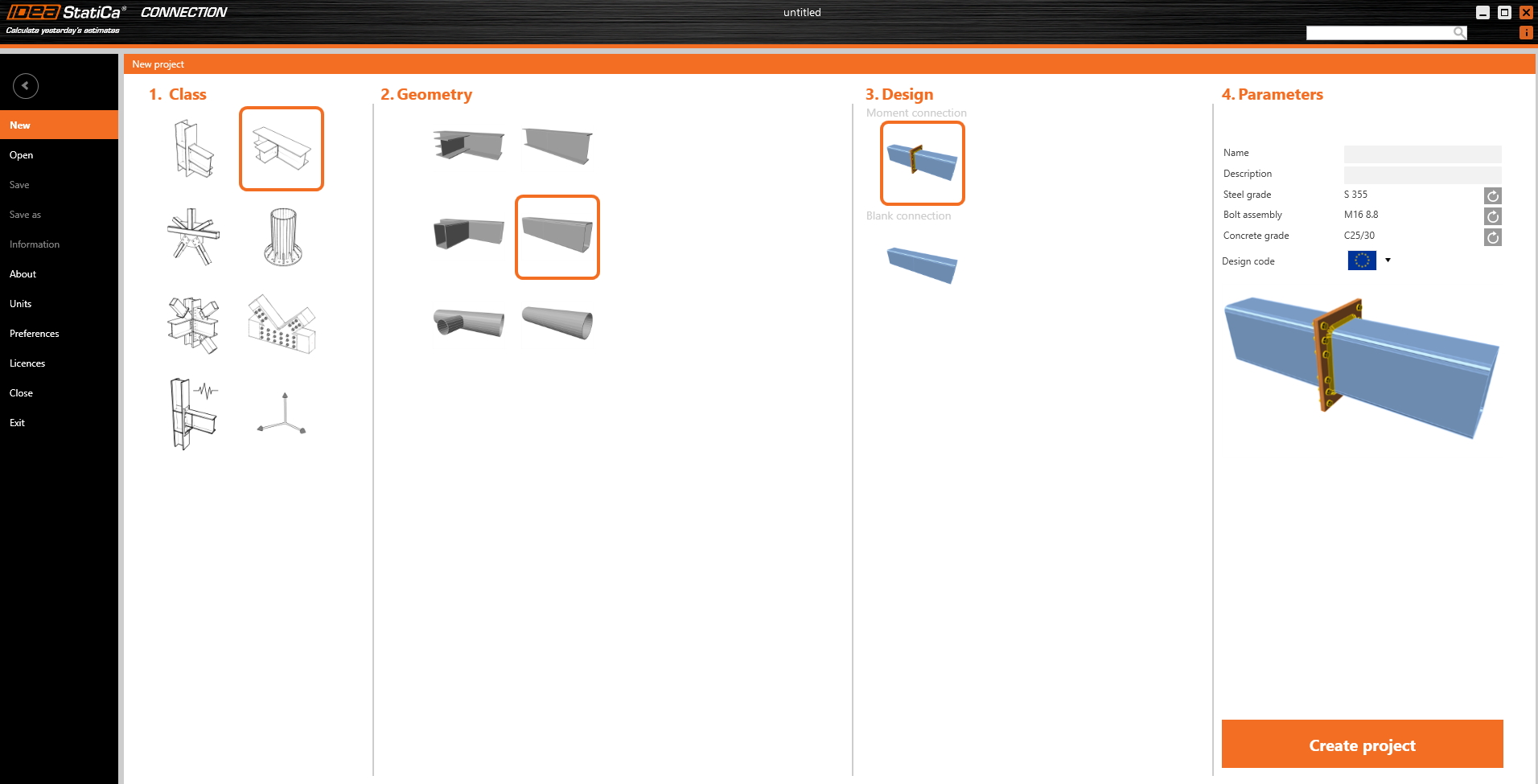
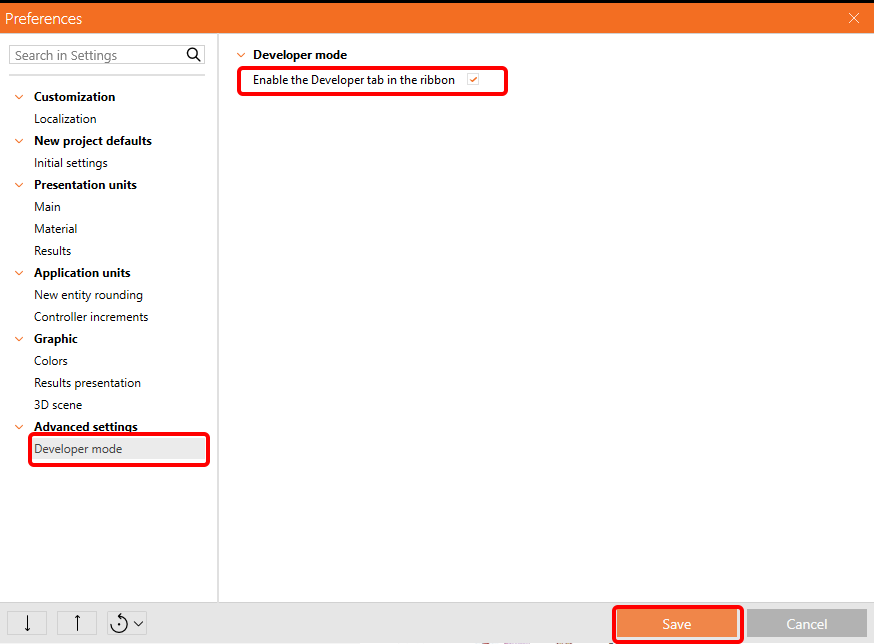
Parametrelerle çalışabilmek için Tercihler / Gelişmiş Ayarlar bölümünden Geliştirici sekmesini etkinleştirmek gerekmektedir:
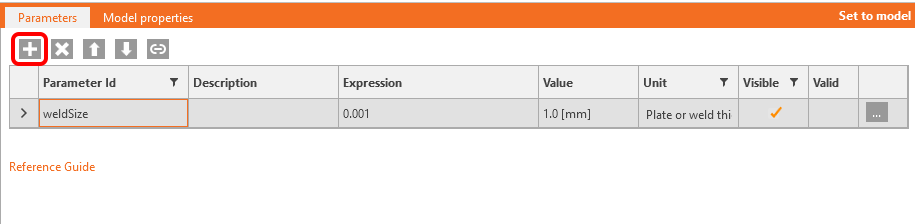
Şimdi, kaynaklar için parametreyi ayarlamanız gerekmektedir. Geliştirici sekmesindeki artı düğmesine tıklayın ve metni resme göre değiştirin:
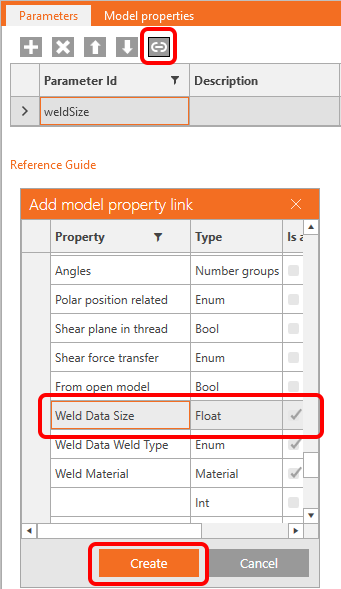
Bu parametreyi uygun kaynaklarla ilişkilendirmek için bağlantı düğmesine tıklayın ve aşağıdaki resimde görüldüğü gibi özellik alanını seçin:
Artık bu birleşimi işlem ve parametre ile birlikte Farklı Kaydet düğmesini kullanarak Example3.contemp adlı bir şablon olarak kaydedebilirsiniz.
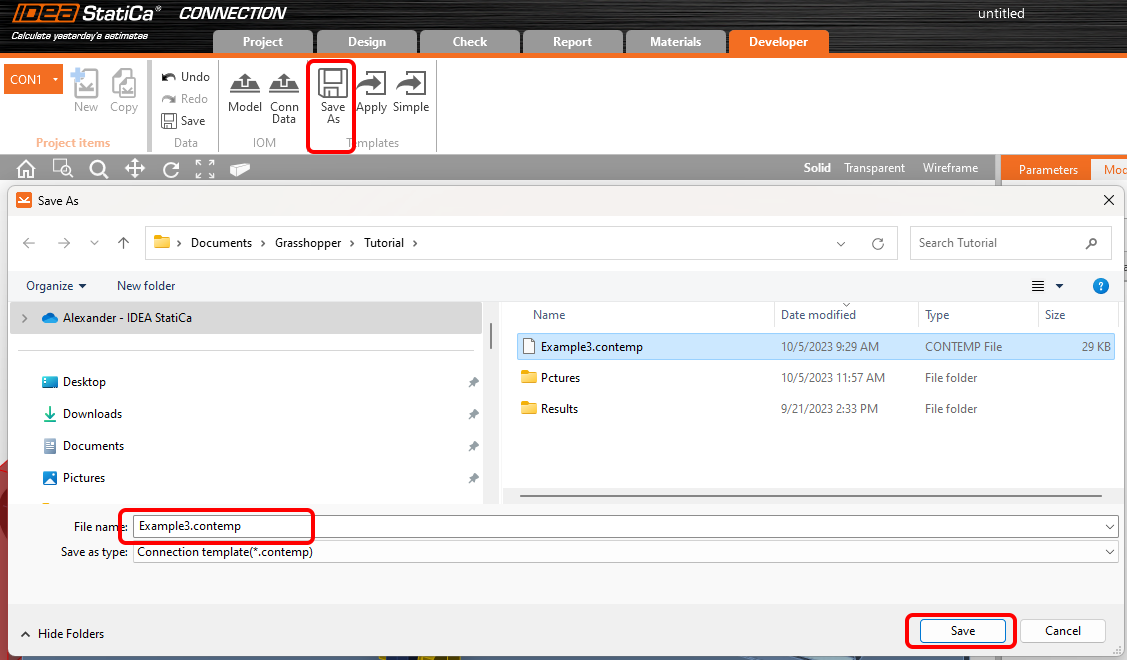
Dosyayı kapatın ve şablon işlemleri olmaksızın yeni bir dosya açın:
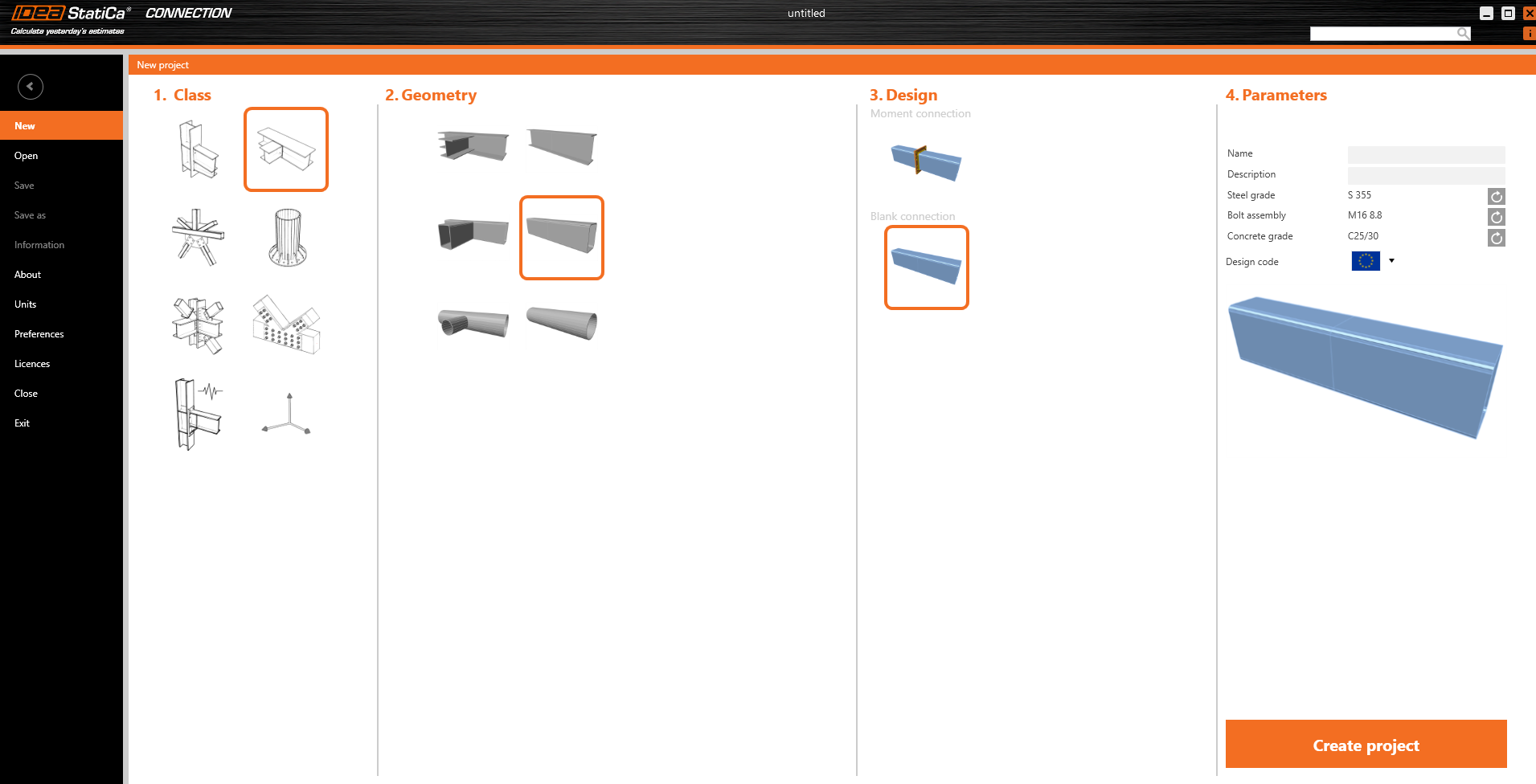
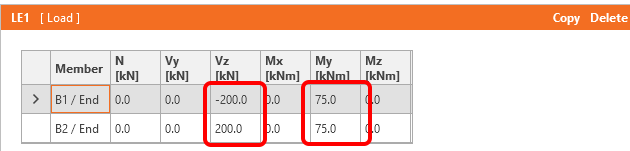
Yük etkileri bölümüne gidin ve yükleri aşağıdaki resme göre değiştirin:
Şimdi, bu dosyayı Example3.ideaCon adıyla kaydedin.
Grasshopper - *.ideaCon ve *.contemp dosyalarını birleştirme, kaynak kalınlığının belirlenmesi.
Yeni bir belge oluşturun ve *.ideaCon ile *.contempt dosyalarını birleştirmek için aşağıdaki bileşenleri ekleyin. Üst şeritteki Params sekmesini seçin ve Canvas üzerine File Path bileşenini yerleştirin.
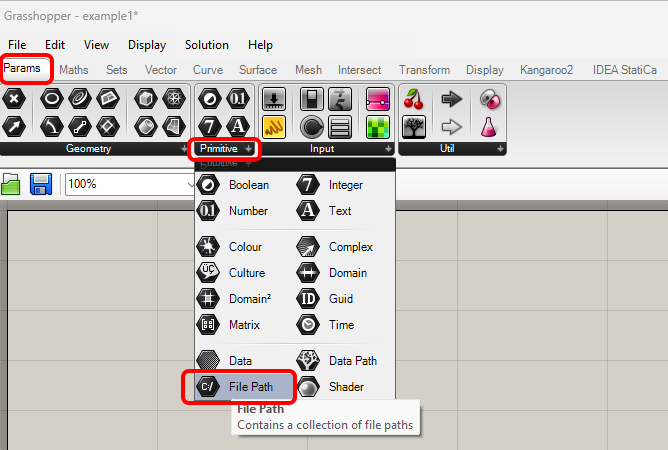
Bileşene sağ tıklayın ve daha önce kaydettiğimiz Example3.ideaCon dosyasını seçin.
Not: Ekli dosyayı açarsanız, bu yolu buna göre değiştirmeniz gerekmektedir.
Ya da Example3.contemp ve Example3.ideaCon dosyalarını içe aktarmak için Params / Panel ve Maths / C# Script bileşenlerini kullanabilirsiniz.
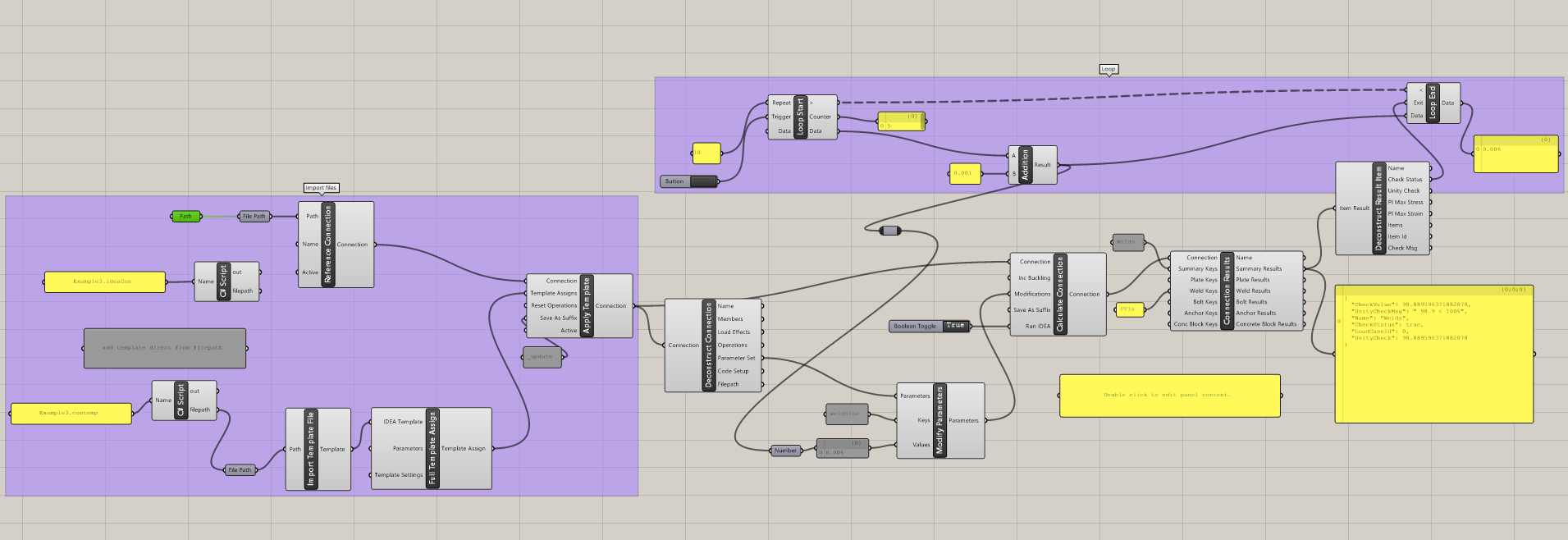
Şimdi, aşağıdaki bileşenleri resimde gösterildiği gibi canvas'a bağlayın.
Dosya İçe Aktarma:
IDEA StatiCa / Connection / Reference Connection
IDEA StatiCa / Connection / Import Template file
IDEA StatiCa / Connection / Full Template Assign
IDEA StatiCa / Connection / Apply Template (sonuç dosyası Example3_update.ideaCon oluşturmak için)
Hesaplama ve Sonuçlar:
IDEA StatiCa / Connection / Deconstruct Connection
IDEA StatiCa / Connection / Modify Parameters
IDEA StatiCa / Connection / Calculate Connection
IDEA StatiCa / Connection / Connection Results
IDEA StatiCa / Connection / Deconstruct Result Items
Kaynak boyutunu yinelemek için Anemone Bileşenleri:
Anemone / Class / Loop Start
Anemone / Class / Loop End
Params / Maths / Operators / Addition
Yinelemeyi başlatmak için Params / Input / Button bileşenini kullanıyoruz.
Yineleme, CheckStatus değeri True olana kadar 0,001 m'den başlayarak 1 mm adımlarla on kez çalışır.
Sonuçların yorumlanması
Bu özel birleşim için aşağıdaki değeri kullanarak tatmin edici sonuçlar elde edeceksiniz:
- Kaynak Kalınlığı 6 mm
Daha karmaşık örnekler bilgisayarınızda aşağıdaki dizinde bulunabilir:
"%appdata%\McNeel\Rhinoceros\packages\7.0\IDEAStatiCa\0.1.1\Examples.zip"