


Widget #NaN: support_center_article
Name: Tutorial: Grasshopper - Plugin Installation
ID: 6d5f0dc8-ee5a-4c50-aced-df94e3586763
Show Raw Data
{
"title": {
"name": "Main headline (H1)",
"type": "text",
"value": "Grasshopper - Eklenti Kurulumu"
},
"preview_image": {
"name": "Preview image",
"type": "asset",
"value": [
{
"name": "E1-1.png",
"description": null,
"type": "image/png",
"size": 68369,
"url": "https://preview-assets-us-01.kc-usercontent.com:443/66e7a155-be94-0096-73e6-c55dfc7e5788/fe255e56-8a4e-4dd5-8264-4c71f1dcb040/E1-1.png",
"width": 782,
"height": 692,
"renditions": {}
}
]
},
"post_date": {
"name": "Post date",
"type": "date_time",
"value": null,
"displayTimeZone": "Europe/Prague"
},
"perex_content": {
"name": "Lead paragraph",
"type": "text",
"value": ""
},
"content": {
"images": [
{
"description": null,
"imageId": "210c0a21-6b2e-4cf8-96ca-37e82d4862fa",
"url": "https://preview-assets-us-01.kc-usercontent.com:443/66e7a155-be94-0096-73e6-c55dfc7e5788/79496c31-039f-4837-b79c-cb4138788fee/g-1.png",
"height": 602,
"width": 822
},
{
"description": null,
"imageId": "17b9256a-6aa1-42b7-8631-d3e7d4e045fa",
"url": "https://preview-assets-us-01.kc-usercontent.com:443/66e7a155-be94-0096-73e6-c55dfc7e5788/af466a09-7c9d-43da-aa86-ae8cf2e05680/g-2.png",
"height": 265,
"width": 492
},
{
"description": null,
"imageId": "2a7f156a-11b3-4615-bfa5-c5e91e966443",
"url": "https://preview-assets-us-01.kc-usercontent.com:443/66e7a155-be94-0096-73e6-c55dfc7e5788/992a6362-f26a-4ba4-9082-0da7868c65c5/E1-1.png",
"height": 692,
"width": 782
},
{
"description": null,
"imageId": "b957b01f-e69c-482c-841e-87a2cab6aca6",
"url": "https://preview-assets-us-01.kc-usercontent.com:443/66e7a155-be94-0096-73e6-c55dfc7e5788/71249ebe-9e05-4c66-bf72-1b3714c9decf/g-4.png",
"height": 599,
"width": 1077
},
{
"description": null,
"imageId": "8e7e6c80-c3e3-4d20-8aab-7481515ddf8d",
"url": "https://preview-assets-us-01.kc-usercontent.com:443/66e7a155-be94-0096-73e6-c55dfc7e5788/f0c189a8-203f-40ea-9248-7aaf4be667ec/grasshopper-idea.png",
"height": 161,
"width": 814
}
],
"linkedItemCodenames": [],
"linkedItems": [],
"links": [
{
"codename": "grasshopper___introduction_to_the_plugin_component",
"linkId": "f2f373ad-9a22-499b-aced-f9520c80a37a",
"urlSlug": "description-of-grasshopper-plugin-components",
"type": "support_center_article"
}
],
"name": "Content",
"type": "rich_text",
"value": "<p>Rhino3d ve Grasshopper'ın deneme sürümünü <a href=\"https://www.rhino3d.com/download/\" data-new-window=\"true\" target=\"_blank\" rel=\"noopener noreferrer\">Rhino3d</a> web sitesinden edinebilirsiniz. Rhinoceros'u çalıştırın ve <strong>Metres</strong> şablonunu seçin:</p>\n<figure data-asset-id=\"210c0a21-6b2e-4cf8-96ca-37e82d4862fa\" data-image-id=\"210c0a21-6b2e-4cf8-96ca-37e82d4862fa\"><img src=\"https://preview-assets-us-01.kc-usercontent.com:443/66e7a155-be94-0096-73e6-c55dfc7e5788/79496c31-039f-4837-b79c-cb4138788fee/g-1.png\" data-asset-id=\"210c0a21-6b2e-4cf8-96ca-37e82d4862fa\" data-image-id=\"210c0a21-6b2e-4cf8-96ca-37e82d4862fa\" alt=\"\"></figure>\n<p>Komut satırına \"<strong>Package Manager</strong>\" yazın:</p>\n<figure data-asset-id=\"17b9256a-6aa1-42b7-8631-d3e7d4e045fa\" data-image-id=\"17b9256a-6aa1-42b7-8631-d3e7d4e045fa\"><img src=\"https://preview-assets-us-01.kc-usercontent.com:443/66e7a155-be94-0096-73e6-c55dfc7e5788/af466a09-7c9d-43da-aa86-ae8cf2e05680/g-2.png\" data-asset-id=\"17b9256a-6aa1-42b7-8631-d3e7d4e045fa\" data-image-id=\"17b9256a-6aa1-42b7-8631-d3e7d4e045fa\" alt=\"\"></figure>\n<p>Yeni bir pencere açılır; IDEAStatiCa'yı seçin ve <strong>Yükle</strong>'ye tıklayın. Eklenti indirilip kurulacaktır. Etkin hale gelmesi için Rhinoceros'un yeniden başlatılması gerekmektedir.</p>\n<figure data-asset-id=\"2a7f156a-11b3-4615-bfa5-c5e91e966443\" data-image-id=\"2a7f156a-11b3-4615-bfa5-c5e91e966443\"><img src=\"https://preview-assets-us-01.kc-usercontent.com:443/66e7a155-be94-0096-73e6-c55dfc7e5788/992a6362-f26a-4ba4-9082-0da7868c65c5/E1-1.png\" data-asset-id=\"2a7f156a-11b3-4615-bfa5-c5e91e966443\" data-image-id=\"2a7f156a-11b3-4615-bfa5-c5e91e966443\" alt=\"\"></figure>\n<p> IDEA StatiCa eklentisiyle Grasshopper'ı başlatmak için Rhinoceros sekmesinde <strong>Araçlar / Grasshopper</strong> seçeneğini seçin.</p>\n<figure data-asset-id=\"b957b01f-e69c-482c-841e-87a2cab6aca6\" data-image-id=\"b957b01f-e69c-482c-841e-87a2cab6aca6\"><img src=\"https://preview-assets-us-01.kc-usercontent.com:443/66e7a155-be94-0096-73e6-c55dfc7e5788/71249ebe-9e05-4c66-bf72-1b3714c9decf/g-4.png\" data-asset-id=\"b957b01f-e69c-482c-841e-87a2cab6aca6\" data-image-id=\"b957b01f-e69c-482c-841e-87a2cab6aca6\" alt=\"\"></figure>\n<p>Görüldüğü gibi, eklenti zaten entegre edilmiştir.</p>\n<figure data-asset-id=\"8e7e6c80-c3e3-4d20-8aab-7481515ddf8d\" data-image-id=\"8e7e6c80-c3e3-4d20-8aab-7481515ddf8d\"><img src=\"https://preview-assets-us-01.kc-usercontent.com:443/66e7a155-be94-0096-73e6-c55dfc7e5788/f0c189a8-203f-40ea-9248-7aaf4be667ec/grasshopper-idea.png\" data-asset-id=\"8e7e6c80-c3e3-4d20-8aab-7481515ddf8d\" data-image-id=\"8e7e6c80-c3e3-4d20-8aab-7481515ddf8d\" alt=\"\"></figure>\n<p>Grasshopper için IDEA StatiCa eklentisindeki bileşenler ve komutlar hakkında bilgi edinmek için <a data-item-id=\"f2f373ad-9a22-499b-aced-f9520c80a37a\" href=\"\">Grasshopper eklenti bileşenlerinin açıklaması</a> makalesine bakın.</p>"
},
"linked_items": {
"name": "Linked items",
"type": "modular_content",
"value": [],
"linkedItems": []
},
"regions": {
"name": "Region",
"type": "taxonomy",
"value": [
{
"name": "AMER",
"codename": "amer"
},
{
"name": "EMEA",
"codename": "emea"
},
{
"name": "APAC",
"codename": "apac"
}
],
"taxonomyGroup": "region"
},
"product_groups": {
"name": "Product group",
"type": "taxonomy",
"value": [
{
"name": "Steel",
"codename": "steel"
},
{
"name": "Connection design",
"codename": "connection_design"
}
],
"taxonomyGroup": "product_group"
},
"support_center_article_types": {
"name": "Support center article",
"type": "taxonomy",
"value": [
{
"name": "Tutorials",
"codename": "tutorial"
}
],
"taxonomyGroup": "support_center_article"
},
"expertise_levels": {
"name": "Expertise level",
"type": "taxonomy",
"value": [
{
"name": "Intermediate",
"codename": "intermediate"
},
{
"name": "Expert",
"codename": "expert"
}
],
"taxonomyGroup": "expertise_level"
},
"labels": {
"name": "Labels",
"type": "taxonomy",
"value": [
{
"name": "IDEA Open Model (API)",
"codename": "idea_open_model__api_"
},
{
"name": "Connection",
"codename": "connection"
}
],
"taxonomyGroup": "labels"
},
"attachments__files": {
"name": "Attachments",
"type": "asset",
"value": []
},
"content_priority__value": {
"name": "Content priority value",
"type": "number",
"value": null
},
"options": {
"name": "Options",
"type": "multiple_choice",
"value": []
},
"url_slug": {
"name": "Url slug",
"type": "url_slug",
"value": "grasshopper-plugin-installation"
},
"unique_url_slug": {
"name": "Unique URL slug",
"type": "custom",
"value": "[\"grasshopper-plugin-installation\",\"[autogenerated]\"]"
},
"content_settings__sitemap": {
"name": "Show in sitemap",
"type": "multiple_choice",
"value": []
},
"content_settings__robots": {
"name": "Search engine indexing",
"type": "multiple_choice",
"value": []
},
"content_settings__is_hidden": {
"name": "Hidden nested content",
"type": "multiple_choice",
"value": []
},
"content_settings__is_topped": {
"name": "Topped",
"type": "multiple_choice",
"value": []
},
"metadata__page_title": {
"name": "Page title",
"type": "text",
"value": ""
},
"metadata__page_description": {
"name": "Page description",
"type": "text",
"value": ""
},
"metadata__page_keywords": {
"name": "Page keywords",
"type": "text",
"value": ""
},
"metadata__canonical_url": {
"name": "Canonical URL",
"type": "text",
"value": ""
},
"metadata__og_title": {
"name": "OG:title",
"type": "text",
"value": ""
},
"metadata__og_description": {
"name": "OG:description",
"type": "text",
"value": ""
},
"metadata__og_image": {
"name": "OG:image",
"type": "asset",
"value": []
},
"translation__translation_connector": {
"name": "Translation Connector",
"type": "taxonomy",
"value": [],
"taxonomyGroup": "languages"
},
"translation__force_translation": {
"name": "Force translation",
"type": "multiple_choice",
"value": []
},
"translation__translate_standalone_nested_content_items": {
"name": "Translate standalone nested content items",
"type": "multiple_choice",
"value": []
},
"translation__last_translation": {
"images": [],
"linkedItemCodenames": [],
"linkedItems": [],
"links": [],
"name": "Last translation",
"type": "rich_text",
"value": "<p>Translation info:</p>\n<ul>\n <li>cs-CZ: Never translated</li>\n <li>de-DE: Never translated</li>\n <li>en-US: Never translated</li>\n <li>es-ES: Never translated</li>\n <li>fr-FR: Never translated</li>\n <li>hu-HU: Never translated</li>\n <li>it-IT: Never translated</li>\n <li>ko-KR: Never translated</li>\n <li>nl-NL: Never translated</li>\n <li>pl-PL: Never translated</li>\n <li>pt-PT: Never translated</li>\n <li>ro-RO: Never translated</li>\n <li>ru-RU: Never translated</li>\n <li>th-TH: Never translated</li>\n <li>tr-TR: Translated on 22.5.2026 13:16</li>\n <li>vi-VN: Never translated</li>\n <li>zh-CN: Never translated</li>\n</ul>\n<p>Publish info:</p>\n<ul>\n <li>Publish info is available only in the main language</li>\n</ul>"
},
"translation__ai_translated": {
"name": "AI translated",
"type": "multiple_choice",
"value": [
{
"name": "Translated",
"codename": "translated"
}
]
},
"page_tree_settings__page_label": {
"name": "Page label",
"type": "text",
"value": ""
},
"page_tree_settings__path_segment": {
"name": "Path segment",
"type": "text",
"value": ""
},
"page_tree_settings__breadcrumb_style": {
"name": "Breadcrumb style",
"type": "multiple_choice",
"value": []
},
"page_tree_settings__hide_in_breadcrumbs": {
"name": "Hide in breadcrumbs",
"type": "multiple_choice",
"value": []
}
}HUMAN eklentisi
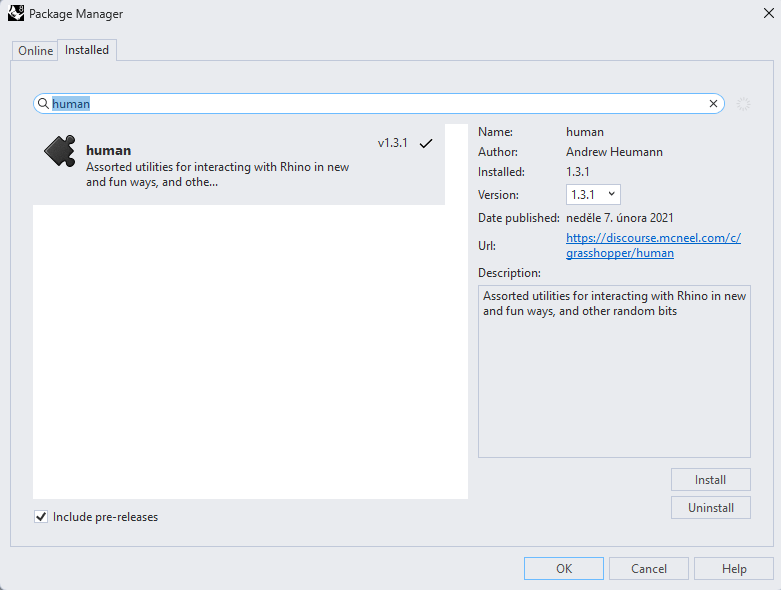
Bu örnekte, yapının bir bölümünü seçmemiz gerekiyor ve bu amaçla başka bir eklenti yüklemeniz gerekiyor - HUMAN, bu eğitimde kullanacağınız eklentidir.
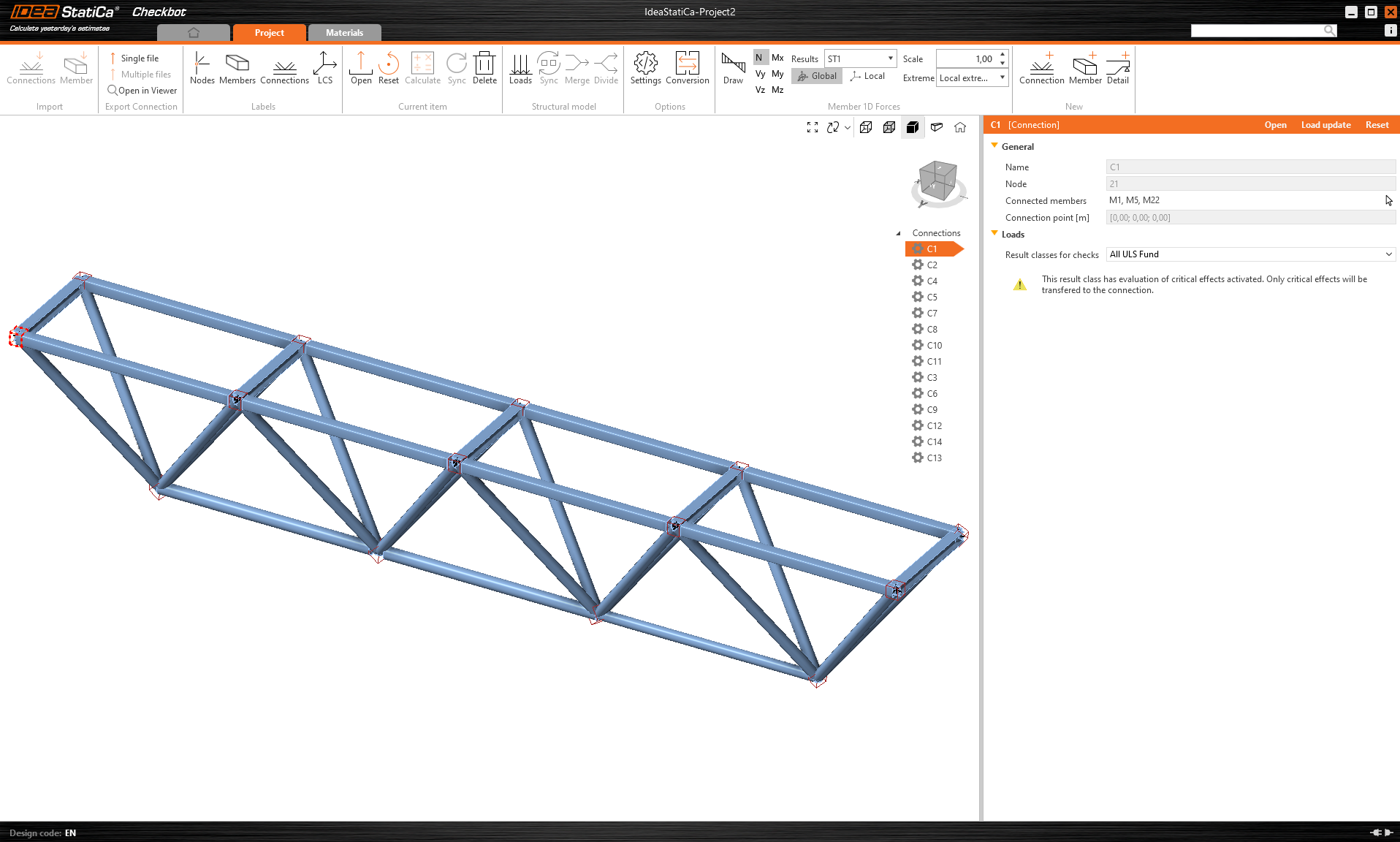
IDEA StatiCa Checkbot – yapının içe aktarılması, birleşim tasarımı
Üçüncü taraf yazılımdan içe aktarılan yapıyı içeren ekli klasörü açın. İç kuvvetler dahil edilmiştir.
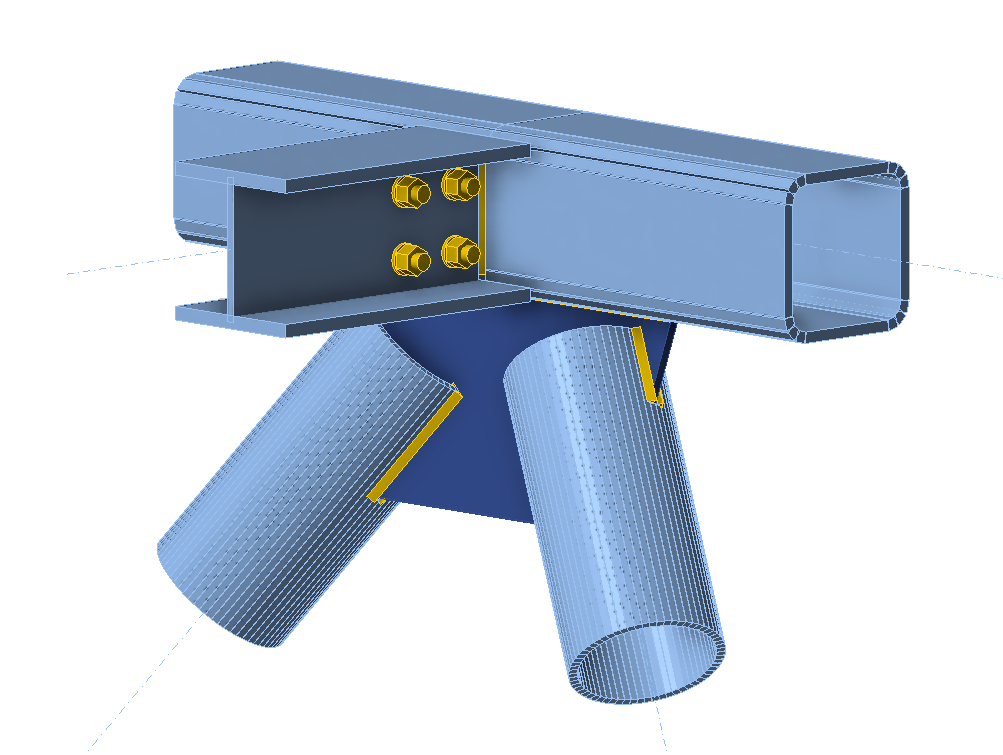
Lütfen üst kuşaktaki orta birleşimlerden birini seçin (örn. C11) ve IDEA StatiCa Connection'da açın.
İhtiyaçlarınıza göre doğru şekilde tasarlayabilir veya hazır birleşimimizi buradan kullanabilirsiniz.
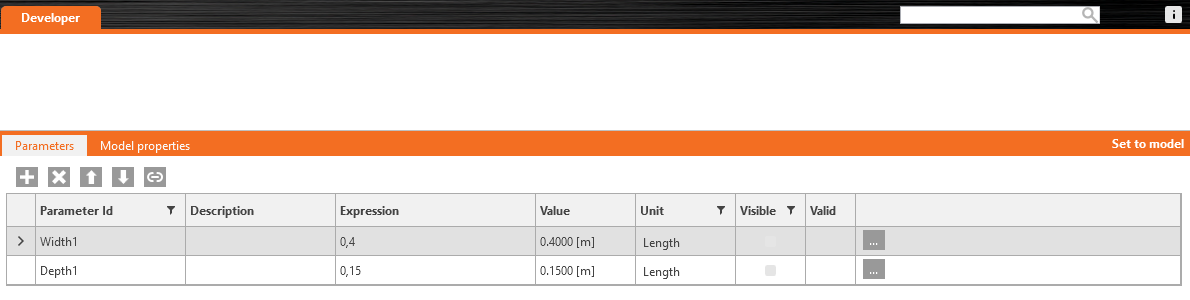
Geliştirici sekmesine gidin, parametreleri ayarlayın ve aşağıdaki resimlere göre bunları uygun işleme bağlayın:

Son olarak, tüm birleşimi Grasshopper'da daha sonra kullanılmak üzere bir şablon *.contemp olarak kaydedin.
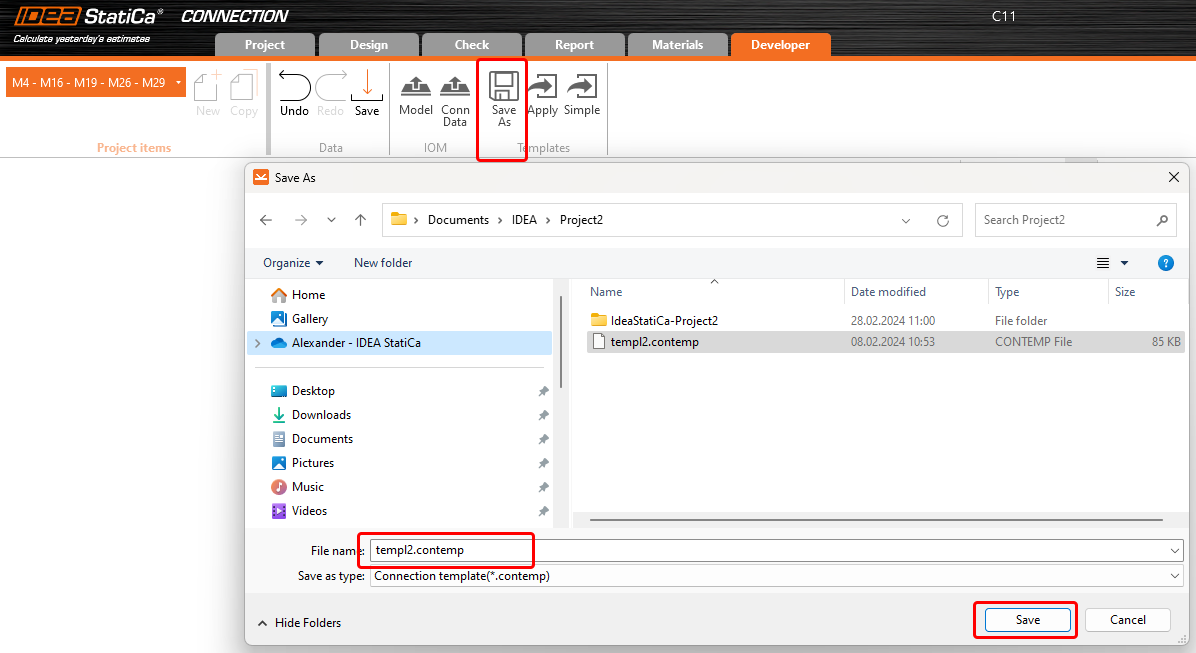
Grasshopper - XML dosyasını içe aktarma, şablonu uygulama
Yeni bir belge oluşturun, üst şeritteki Params sekmesini seçin ve Canvas üzerine File Path bileşenini yerleştirin.
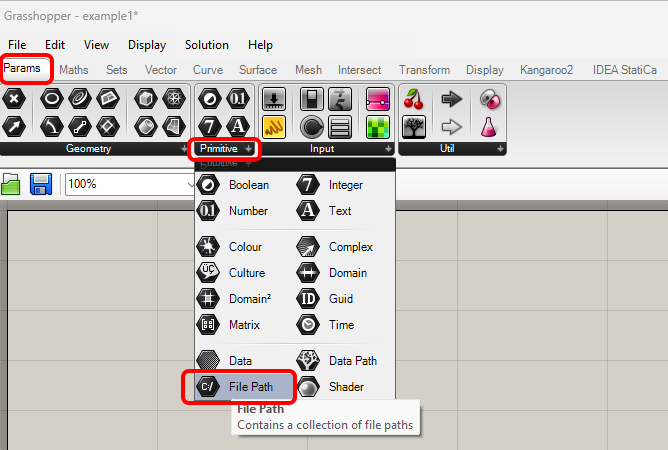
Bileşene sağ tıklayın ve Checkbot klasöründe bulunan import.xml dosyasını seçin. Bu dosya, içe aktarılan yapıya ait tüm verileri içerir.
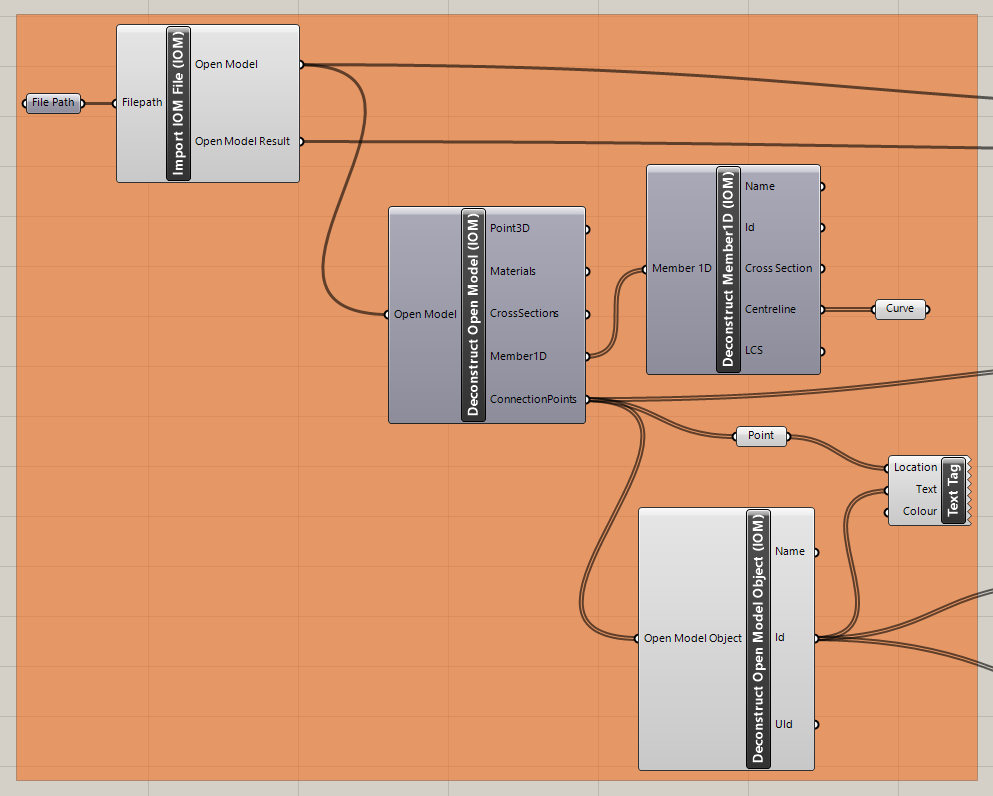
Şimdi, aşağıdaki bileşenleri canvas'a ekleyin ve resimde gösterildiği gibi bağlayın.
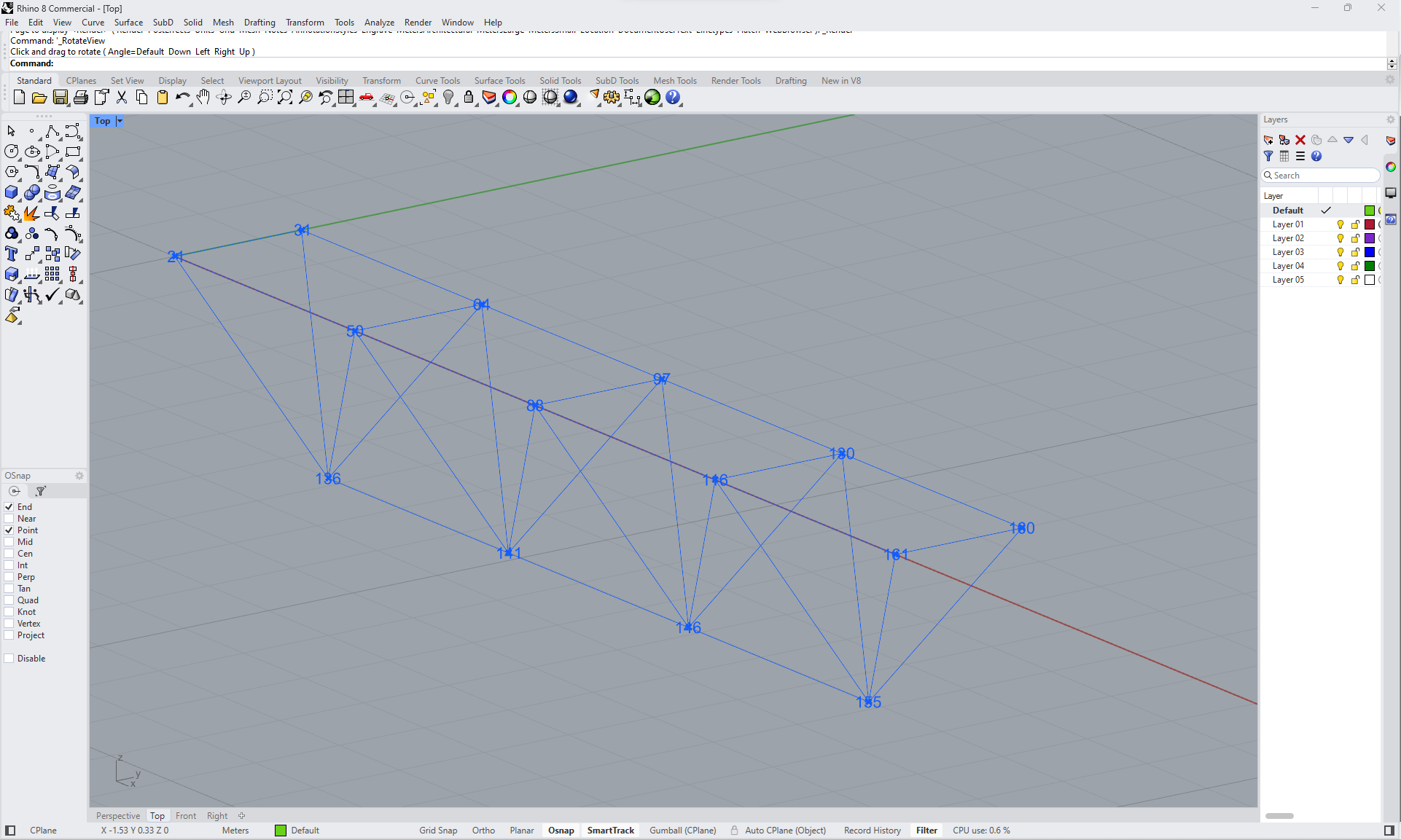
Dosyayı içe aktarma ve Rhino'da birleşim açıklamaları dahil yapıyı görüntüleme:
IDEA StatiCa / Open Model / Import IOM File
IDEA StatiCa / Open Model / Deconstruct Open Model
IDEA StatiCa / Open Model / Deconstruct Open Model Object
Params / Geometry / Curve
Params / Geometry / Point
Display / Dimensions / Text Tag
Şimdi yapıyı Rhino'da görebilirsiniz:
Şablonu içe aktarın ve seçili birleşimlere uygulayın:
IDEA StatiCa / Connection / Create Connection from IOM
IDEA StatiCa / Connection / Import Template file
IDEA StatiCa / Connection / Full template Assign
IDEA StatiCa / Connection / Apply Template
Human / Misc / Item Selector
Sets / Sets / Member Index
Sets / Lists / List item
Params / Primitive / File path (şablonu içe aktarma)
Params / Primitive / File path (birleşimlerin kaydedileceği klasör)
Params / Input / Boolean Toggle (2x)
Params / Input / Panel (birleşimin güncellenmiş sürümlerini oluşturmak için)
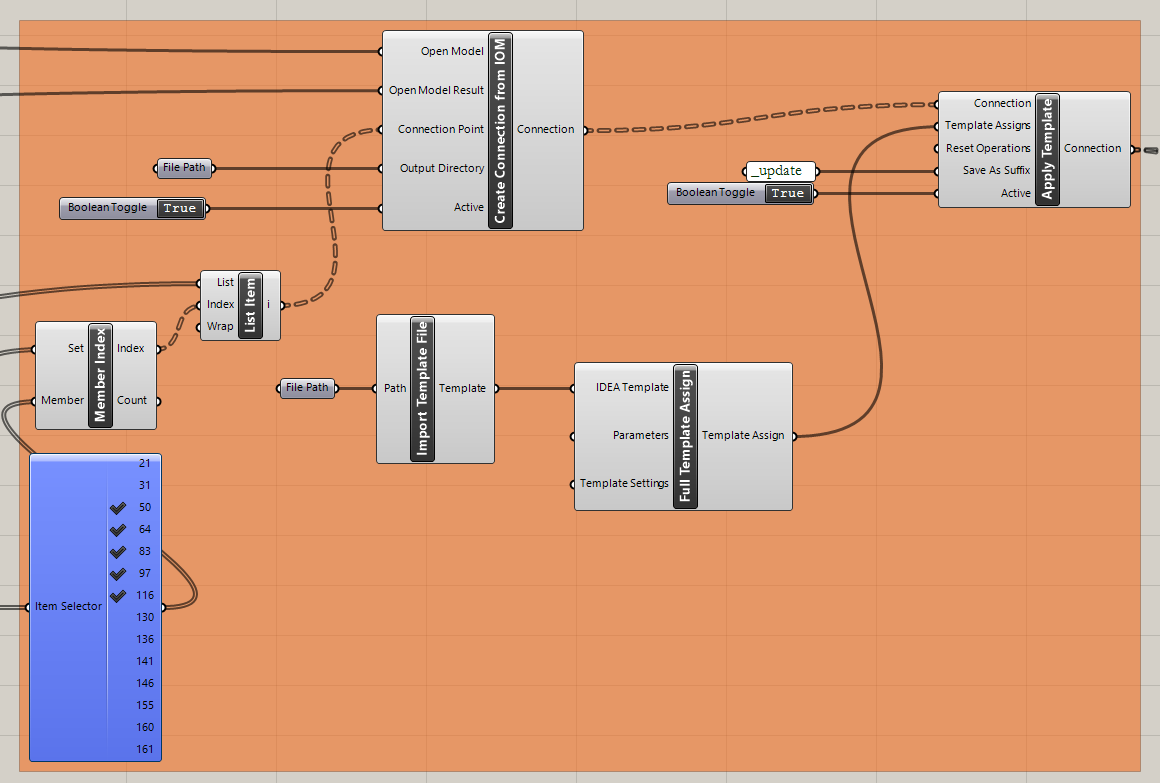
Şimdi şablonun uygulandığı seçili birleşimlerle yapıyı görebilirsiniz:
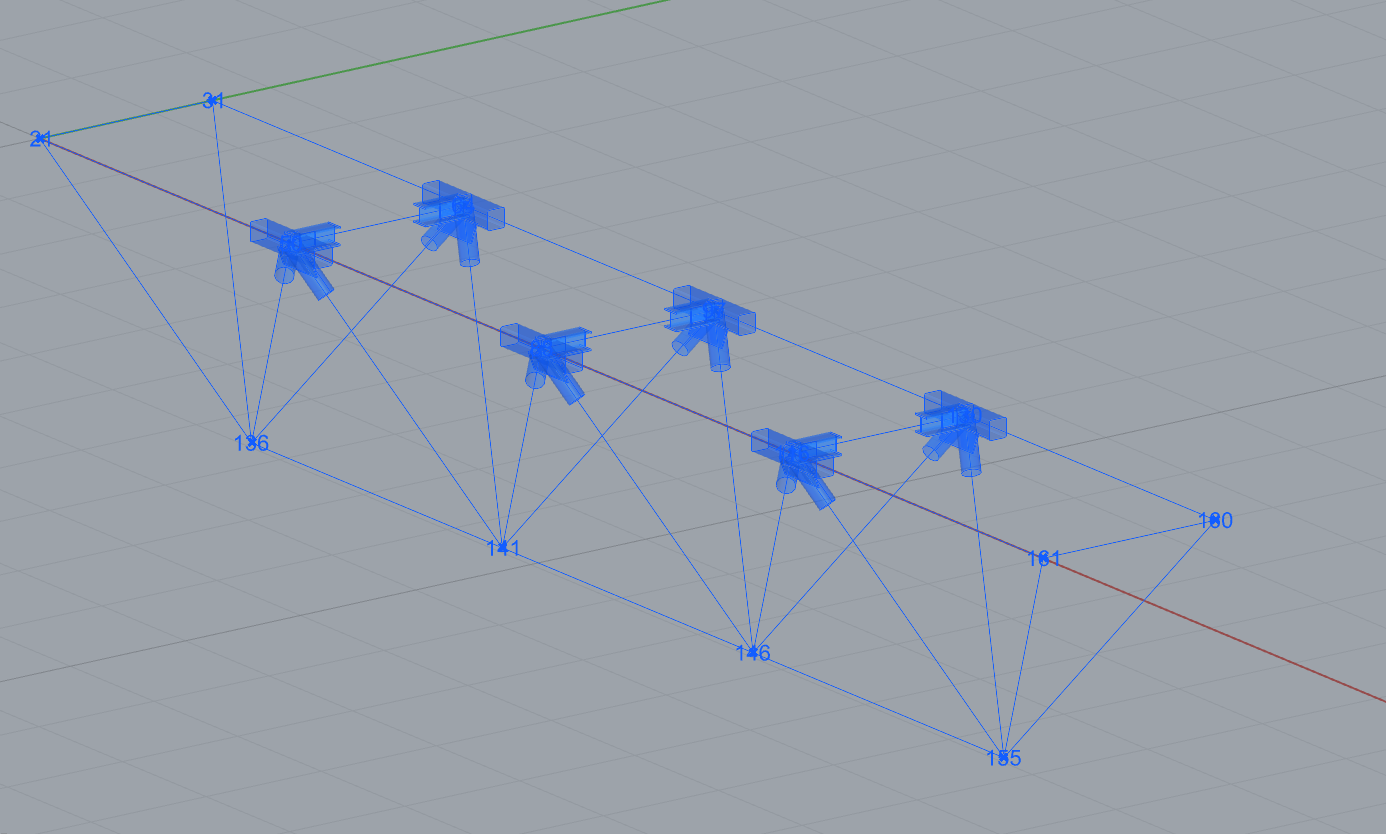
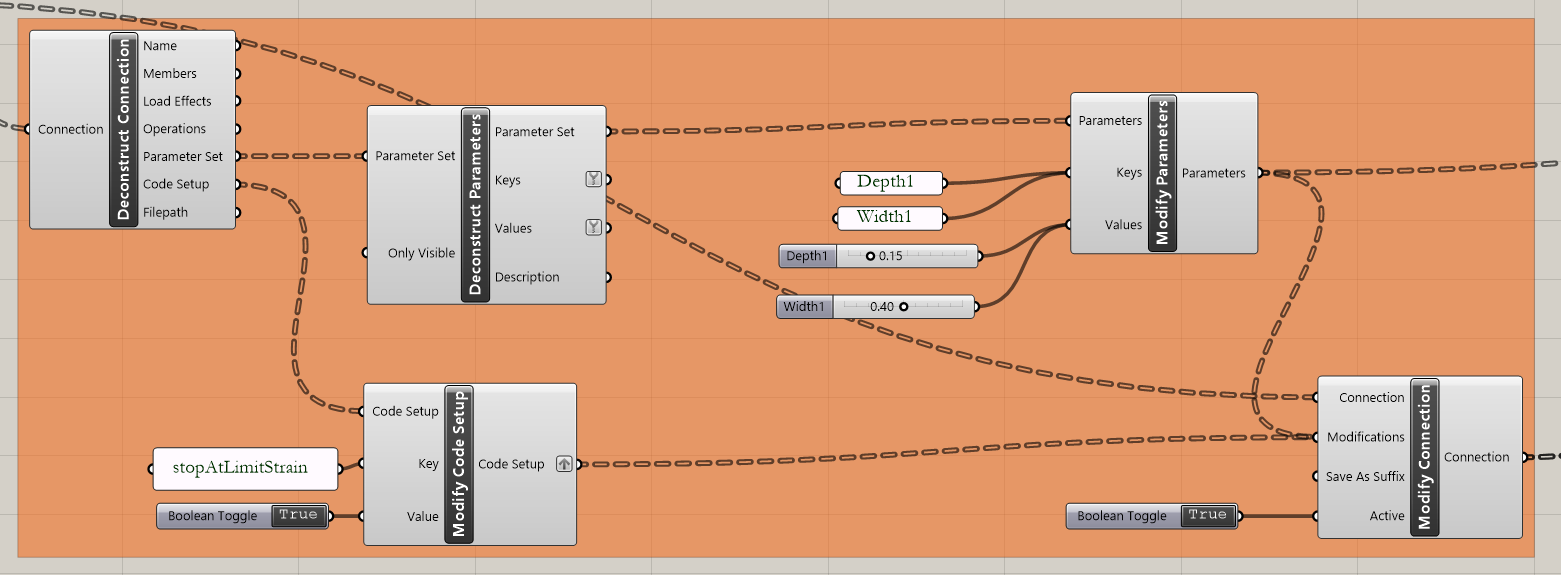
Grasshopper - parametreleri değiştirme ve hesabı çalıştırma
Parametreleri değiştirme:
IDEA StatiCa / Connection / Deconstruct Connection
IDEA StatiCa / Connection / Deconstruct Parameters
IDEA StatiCa / Connection / Modify Code Setup (çıktı tablosunu basitleştirmek için)
IDEA StatiCa / Connection / Modify Parameters
Params / Input / Panel (2x Parametre Adı)
Params / Input / Panel
Params / Input / Boolean Toggle (2x)
Params / Input / Number Slider
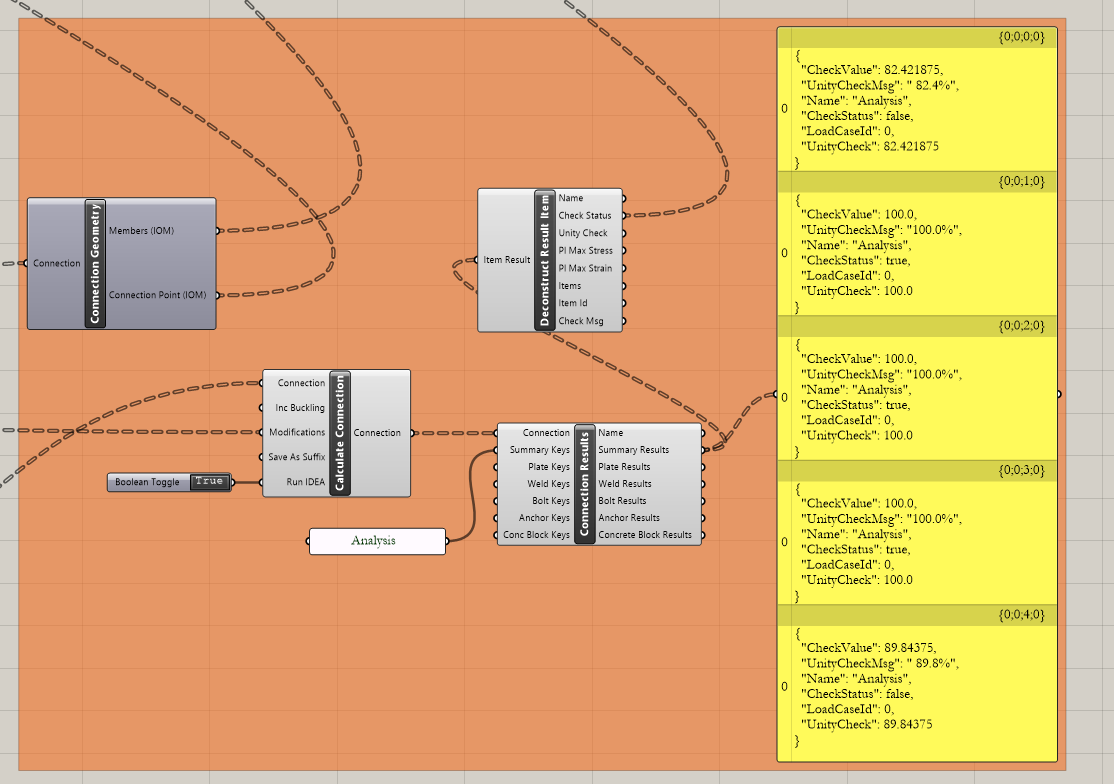
Birleşimleri hesaplama:
IDEA StatiCa / Connection / Calculate Connection
IDEA StatiCa / Connection / Connection Results
IDEA StatiCa / Connection / Connection Geometry (görselleştirme bileşenlerine veri aktarma)
IDEA StatiCa / Connection / Deconstruct Results (görselleştirme bileşenlerine veri aktarma)
Params / Input / Panel (Analysis - çıktı tablosunu basitleştirmek için)
Params / Input / Panel (Results)
Params / Input / Boolean Toggle
Sonuçların görselleştirilmesi:
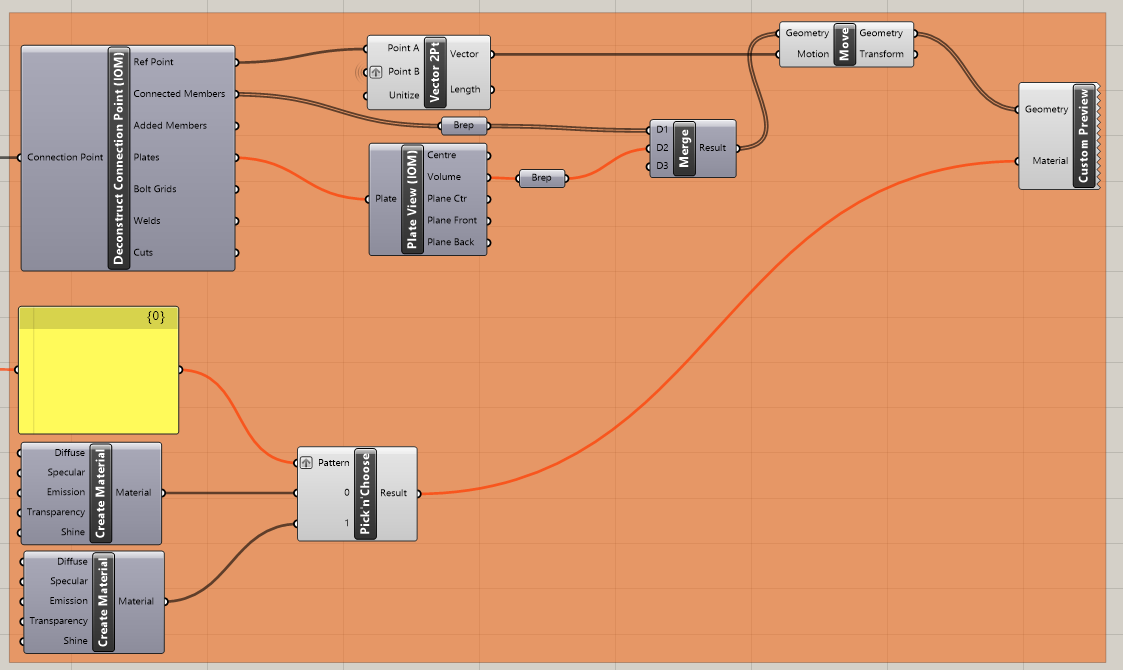
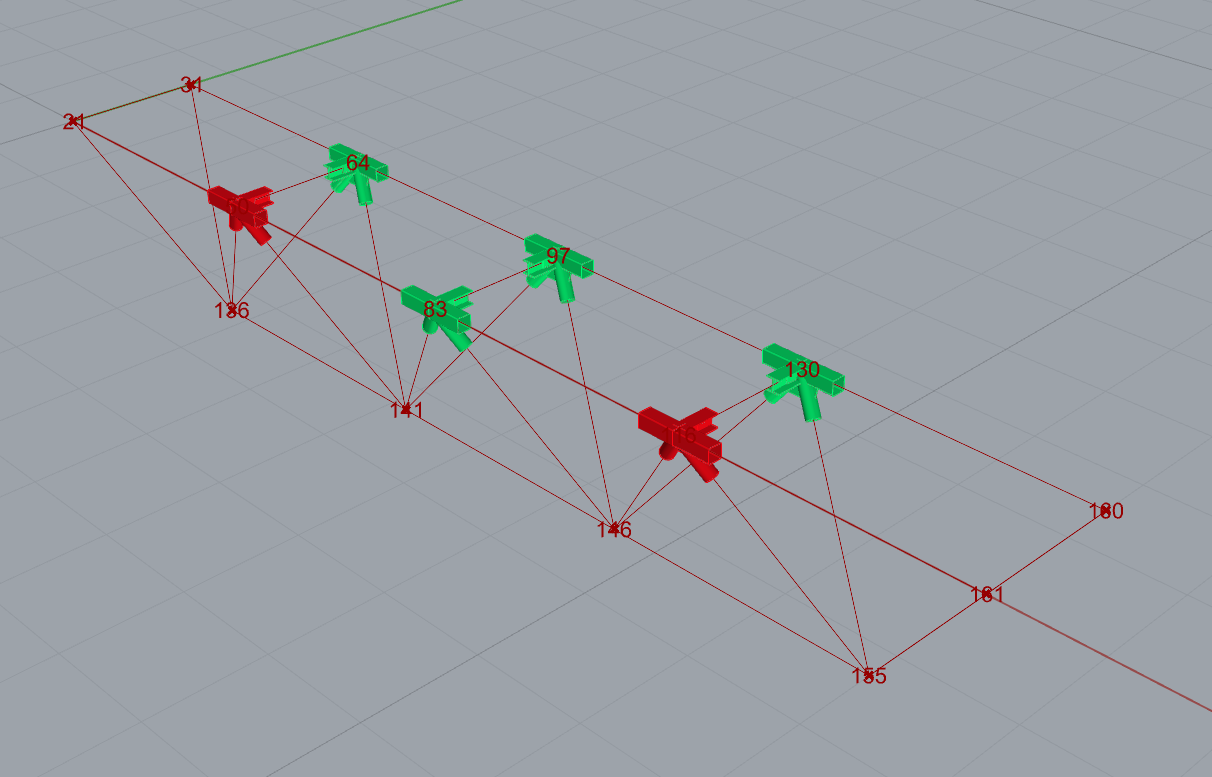
Grasshopper, sonuçlarınızı grafik görselleştirme ile zenginleştirmenize olanak tanır. Sonraki resimde gösterilen bileşenler, hesaplanan birleşimleri yeşil renkte görmenizi sağlar; kontrolleri geçemeyen birleşimler ise kırmızı renkte gösterilir.
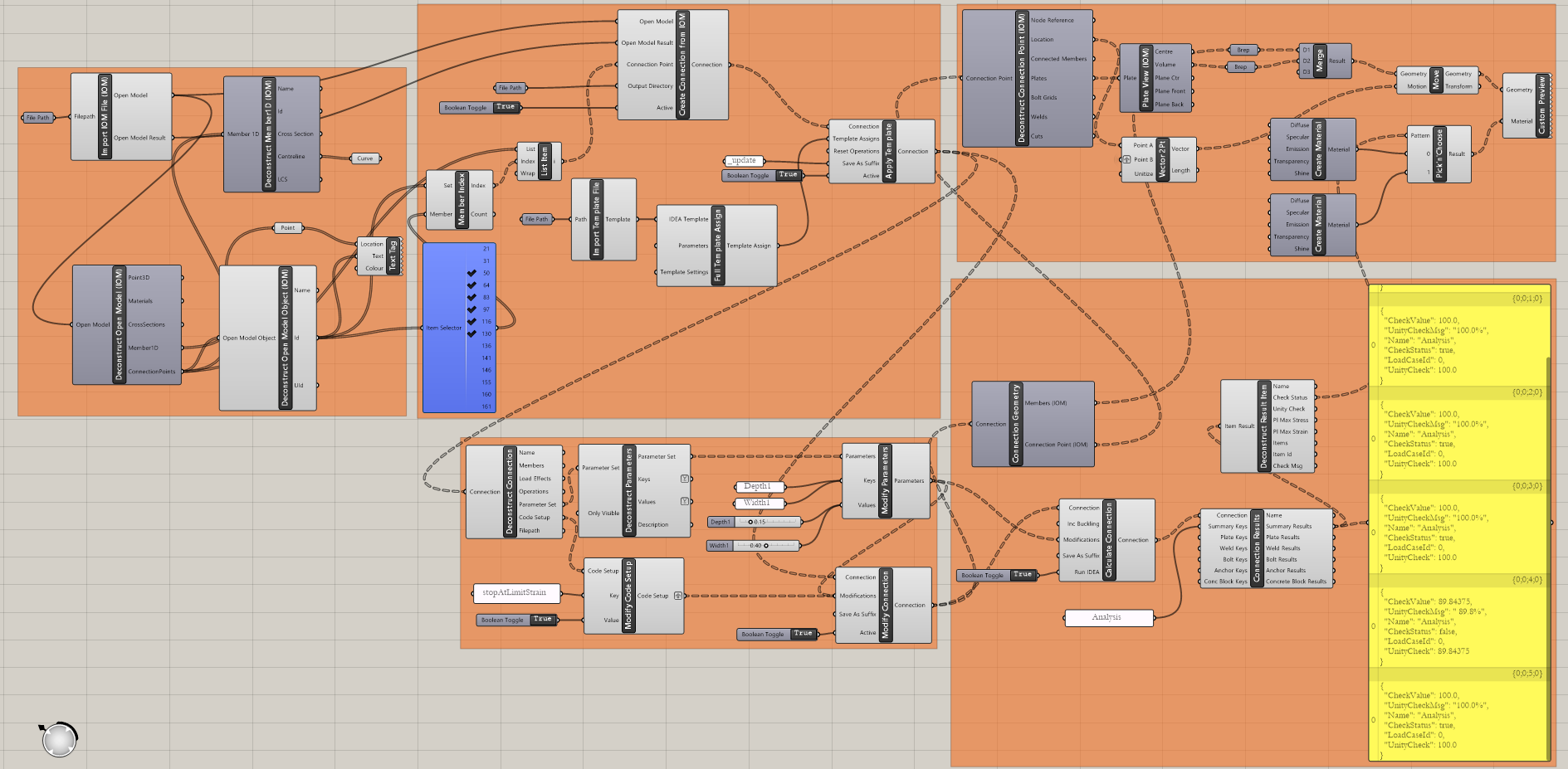
Bileşenler arasındaki bağlantıları görmek için Grasshopper dosyasının tüm görünümü aşağıdadır:
Daha karmaşık örnekler aşağıdaki klasörde bulunabilir
"%appdata%\McNeel\Rhinoceros\packages\7.0\IDEAStatiCa\0.1.1\Examples.zip"