


In the current version of IDEA StatiCa (check here), we provide BIM links in the application Checkbot for various CAD and FEA software. To keep up to date, we are able to maintain and support approximately 2 latest versions of linked software. However, if you need to create a BIM link between the latest IDEA StatiCa version and the older non-supported version of the 3rd party software, this is still possible.
Please note, that in such matter, we don't provide any technical support, and we don't guarantee correct functionality of the BIM link (e.g. correct import of balanced load effects).
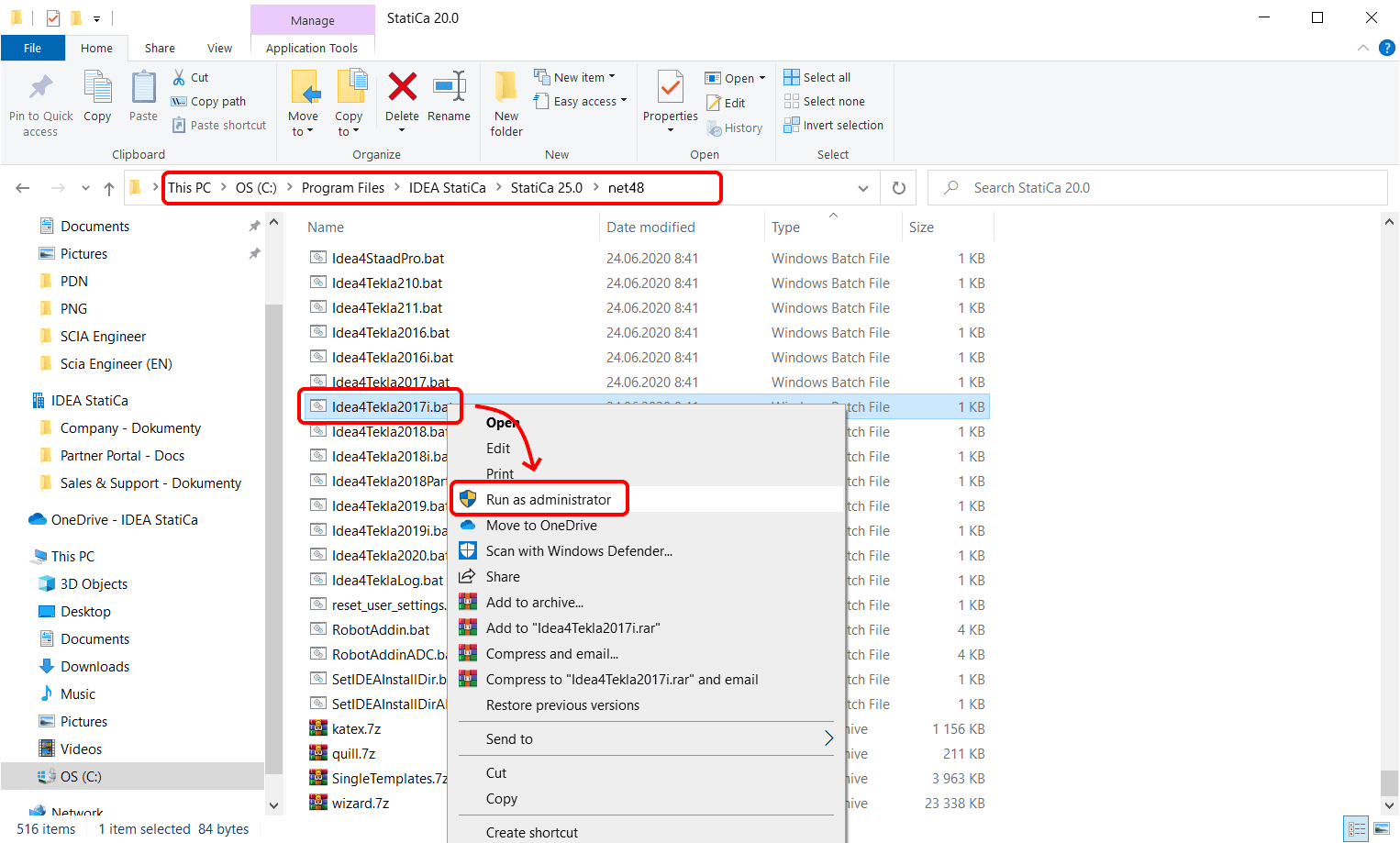
The BIM link can be created using the proper .bat files from the IDEA StatiCa installation folder in a few steps:
- Go to the installation folder C:\Program Files\IDEA StatiCa\StatiCa XX.X\net48
(for IDEA StatiCa 24.1 and older versions C:\Program Files\IDEA StatiCa\StatiCa XX.X) - Find the proper .bat or .exe file for your software:
For Robot Structural Analysis, run RobotAddin.bat
For Advance Steel, run Idea4AS2026.bat
For Midas Civil NX, run IdeaMidasCivilNXPlugin.exe
For Revit, run Idea4Revit2026.bat
For RAM Structural System, run RamToIdeaPluginInstall.exe
For RFEM, run Idea4RFEMNET6.bat or Idea4RFEM.bat (for version 5)
For RSTAB, run Idea4RSTABNET6.bat or Idea4RSTAB.bat (for version 5)
For SCIA Engineer, run SetIDEAInstallDir.bat
For SDS2, run Idea4SDS22025.bat
For STAAD.Pro, run Idea4StaadPro.bat
For Tekla Structures, run Idea4Tekla2025.bat
For AxisVM, run AxisVMLinkPluginInstaller.exe (C:\Program Files\IDEA StatiCa\StatiCa XX.X\net48)
For Advance Design, run SetIDEAInstallDirAD.bat (C:\Program Files\IDEA StatiCa\StatiCa XX.X\net48) - Run the file via the context menu as an administrator
- The link between IDEA StatiCa and selected software is installed
- Follow further instructions on how to run the link in a relevant tutorial (e.g. Tekla Structures BIM link for connection design)
Please note that some of the BIM links to IDEA StatiCa are developed by 3rd parties, using the public IDEA StatiCa API (called IOM). In that case, it is better to contact the actual developer. Where to check this? Just go to the BIM section and find information about the workflow most relevant for you.