


이 튜토리얼은 Rhino 8을 사용합니다. IDEA StatiCa 버전 24.1.3 이하를 사용하는 경우 이 튜토리얼을 참조하십시오.
Widget #NaN: support_center_article
Name: Tutorial: Grasshopper - Plugin Installation
ID: 6d5f0dc8-ee5a-4c50-aced-df94e3586763
Show Raw Data
{
"title": {
"name": "Main headline (H1)",
"type": "text",
"value": "Grasshopper - 플러그인 설치"
},
"preview_image": {
"name": "Preview image",
"type": "asset",
"value": [
{
"name": "E1-1.png",
"description": null,
"type": "image/png",
"size": 68369,
"url": "https://preview-assets-us-01.kc-usercontent.com:443/66e7a155-be94-0096-73e6-c55dfc7e5788/fe255e56-8a4e-4dd5-8264-4c71f1dcb040/E1-1.png",
"width": 782,
"height": 692,
"renditions": {}
}
]
},
"post_date": {
"name": "Post date",
"type": "date_time",
"value": null,
"displayTimeZone": "Europe/Prague"
},
"perex_content": {
"name": "Lead paragraph",
"type": "text",
"value": ""
},
"content": {
"images": [
{
"description": null,
"imageId": "210c0a21-6b2e-4cf8-96ca-37e82d4862fa",
"url": "https://preview-assets-us-01.kc-usercontent.com:443/66e7a155-be94-0096-73e6-c55dfc7e5788/79496c31-039f-4837-b79c-cb4138788fee/g-1.png",
"height": 602,
"width": 822
},
{
"description": null,
"imageId": "17b9256a-6aa1-42b7-8631-d3e7d4e045fa",
"url": "https://preview-assets-us-01.kc-usercontent.com:443/66e7a155-be94-0096-73e6-c55dfc7e5788/af466a09-7c9d-43da-aa86-ae8cf2e05680/g-2.png",
"height": 265,
"width": 492
},
{
"description": null,
"imageId": "2a7f156a-11b3-4615-bfa5-c5e91e966443",
"url": "https://preview-assets-us-01.kc-usercontent.com:443/66e7a155-be94-0096-73e6-c55dfc7e5788/992a6362-f26a-4ba4-9082-0da7868c65c5/E1-1.png",
"height": 692,
"width": 782
},
{
"description": null,
"imageId": "b957b01f-e69c-482c-841e-87a2cab6aca6",
"url": "https://preview-assets-us-01.kc-usercontent.com:443/66e7a155-be94-0096-73e6-c55dfc7e5788/71249ebe-9e05-4c66-bf72-1b3714c9decf/g-4.png",
"height": 599,
"width": 1077
},
{
"description": null,
"imageId": "8e7e6c80-c3e3-4d20-8aab-7481515ddf8d",
"url": "https://preview-assets-us-01.kc-usercontent.com:443/66e7a155-be94-0096-73e6-c55dfc7e5788/f0c189a8-203f-40ea-9248-7aaf4be667ec/grasshopper-idea.png",
"height": 161,
"width": 814
}
],
"linkedItemCodenames": [],
"linkedItems": [],
"links": [
{
"codename": "grasshopper___introduction_to_the_plugin_component",
"linkId": "f2f373ad-9a22-499b-aced-f9520c80a37a",
"urlSlug": "description-of-grasshopper-plugin-components",
"type": "support_center_article"
}
],
"name": "Content",
"type": "rich_text",
"value": "<p>Rhino3d 및 Grasshopper의 체험판은 <a href=\"https://www.rhino3d.com/download/\" data-new-window=\"true\" target=\"_blank\" rel=\"noopener noreferrer\">Rhino3d</a> 웹사이트에서 다운로드할 수 있습니다. Rhinoceros를 실행하고 <strong>Meters</strong> 템플릿을 선택하십시오:</p>\n<figure data-asset-id=\"210c0a21-6b2e-4cf8-96ca-37e82d4862fa\" data-image-id=\"210c0a21-6b2e-4cf8-96ca-37e82d4862fa\"><img src=\"https://preview-assets-us-01.kc-usercontent.com:443/66e7a155-be94-0096-73e6-c55dfc7e5788/79496c31-039f-4837-b79c-cb4138788fee/g-1.png\" data-asset-id=\"210c0a21-6b2e-4cf8-96ca-37e82d4862fa\" data-image-id=\"210c0a21-6b2e-4cf8-96ca-37e82d4862fa\" alt=\"\"></figure>\n<p>명령줄에 \"<strong>Package Manager</strong>\"를 입력하십시오:</p>\n<figure data-asset-id=\"17b9256a-6aa1-42b7-8631-d3e7d4e045fa\" data-image-id=\"17b9256a-6aa1-42b7-8631-d3e7d4e045fa\"><img src=\"https://preview-assets-us-01.kc-usercontent.com:443/66e7a155-be94-0096-73e6-c55dfc7e5788/af466a09-7c9d-43da-aa86-ae8cf2e05680/g-2.png\" data-asset-id=\"17b9256a-6aa1-42b7-8631-d3e7d4e045fa\" data-image-id=\"17b9256a-6aa1-42b7-8631-d3e7d4e045fa\" alt=\"\"></figure>\n<p>새 창이 나타나면 IDEAStatiCa를 선택하고 <strong>Install</strong>을 클릭하십시오. 플러그인이 다운로드되어 설치됩니다. 활성화하려면 Rhinoceros를 재시작해야 합니다.</p>\n<figure data-asset-id=\"2a7f156a-11b3-4615-bfa5-c5e91e966443\" data-image-id=\"2a7f156a-11b3-4615-bfa5-c5e91e966443\"><img src=\"https://preview-assets-us-01.kc-usercontent.com:443/66e7a155-be94-0096-73e6-c55dfc7e5788/992a6362-f26a-4ba4-9082-0da7868c65c5/E1-1.png\" data-asset-id=\"2a7f156a-11b3-4615-bfa5-c5e91e966443\" data-image-id=\"2a7f156a-11b3-4615-bfa5-c5e91e966443\" alt=\"\"></figure>\n<p> IDEA StatiCa 플러그인과 함께 Grasshopper를 시작하려면 Rhinoceros 탭에서 <strong>Tools / Grasshopper</strong>를 선택하십시오.</p>\n<figure data-asset-id=\"b957b01f-e69c-482c-841e-87a2cab6aca6\" data-image-id=\"b957b01f-e69c-482c-841e-87a2cab6aca6\"><img src=\"https://preview-assets-us-01.kc-usercontent.com:443/66e7a155-be94-0096-73e6-c55dfc7e5788/71249ebe-9e05-4c66-bf72-1b3714c9decf/g-4.png\" data-asset-id=\"b957b01f-e69c-482c-841e-87a2cab6aca6\" data-image-id=\"b957b01f-e69c-482c-841e-87a2cab6aca6\" alt=\"\"></figure>\n<p>보시다시피 플러그인이 이미 통합되어 있습니다.</p>\n<figure data-asset-id=\"8e7e6c80-c3e3-4d20-8aab-7481515ddf8d\" data-image-id=\"8e7e6c80-c3e3-4d20-8aab-7481515ddf8d\"><img src=\"https://preview-assets-us-01.kc-usercontent.com:443/66e7a155-be94-0096-73e6-c55dfc7e5788/f0c189a8-203f-40ea-9248-7aaf4be667ec/grasshopper-idea.png\" data-asset-id=\"8e7e6c80-c3e3-4d20-8aab-7481515ddf8d\" data-image-id=\"8e7e6c80-c3e3-4d20-8aab-7481515ddf8d\" alt=\"\"></figure>\n<p>Grasshopper용 IDEA StatiCa 플러그인의 구성 요소 및 명령에 대한 자세한 내용은 <a data-item-id=\"f2f373ad-9a22-499b-aced-f9520c80a37a\" href=\"\">Grasshopper 플러그인 구성 요소 설명</a> 문서를 참조하십시오.</p>"
},
"linked_items": {
"name": "Linked items",
"type": "modular_content",
"value": [],
"linkedItems": []
},
"regions": {
"name": "Region",
"type": "taxonomy",
"value": [
{
"name": "AMER",
"codename": "amer"
},
{
"name": "EMEA",
"codename": "emea"
},
{
"name": "APAC",
"codename": "apac"
}
],
"taxonomyGroup": "region"
},
"product_groups": {
"name": "Product group",
"type": "taxonomy",
"value": [
{
"name": "Steel",
"codename": "steel"
},
{
"name": "Connection design",
"codename": "connection_design"
}
],
"taxonomyGroup": "product_group"
},
"support_center_article_types": {
"name": "Support center article",
"type": "taxonomy",
"value": [
{
"name": "Tutorials",
"codename": "tutorial"
}
],
"taxonomyGroup": "support_center_article"
},
"expertise_levels": {
"name": "Expertise level",
"type": "taxonomy",
"value": [
{
"name": "Intermediate",
"codename": "intermediate"
},
{
"name": "Expert",
"codename": "expert"
}
],
"taxonomyGroup": "expertise_level"
},
"labels": {
"name": "Labels",
"type": "taxonomy",
"value": [
{
"name": "IDEA Open Model (API)",
"codename": "idea_open_model__api_"
},
{
"name": "Connection",
"codename": "connection"
}
],
"taxonomyGroup": "labels"
},
"attachments__files": {
"name": "Attachments",
"type": "asset",
"value": []
},
"content_priority__value": {
"name": "Content priority value",
"type": "number",
"value": null
},
"options": {
"name": "Options",
"type": "multiple_choice",
"value": []
},
"url_slug": {
"name": "Url slug",
"type": "url_slug",
"value": "grasshopper-plugin-installation"
},
"unique_url_slug": {
"name": "Unique URL slug",
"type": "custom",
"value": "[\"grasshopper-plugin-installation\",\"[autogenerated]\"]"
},
"content_settings__sitemap": {
"name": "Show in sitemap",
"type": "multiple_choice",
"value": []
},
"content_settings__robots": {
"name": "Search engine indexing",
"type": "multiple_choice",
"value": []
},
"content_settings__is_hidden": {
"name": "Hidden nested content",
"type": "multiple_choice",
"value": []
},
"content_settings__is_topped": {
"name": "Topped",
"type": "multiple_choice",
"value": []
},
"metadata__page_title": {
"name": "Page title",
"type": "text",
"value": ""
},
"metadata__page_description": {
"name": "Page description",
"type": "text",
"value": ""
},
"metadata__page_keywords": {
"name": "Page keywords",
"type": "text",
"value": ""
},
"metadata__canonical_url": {
"name": "Canonical URL",
"type": "text",
"value": ""
},
"metadata__og_title": {
"name": "OG:title",
"type": "text",
"value": ""
},
"metadata__og_description": {
"name": "OG:description",
"type": "text",
"value": ""
},
"metadata__og_image": {
"name": "OG:image",
"type": "asset",
"value": []
},
"translation__translation_connector": {
"name": "Translation Connector",
"type": "taxonomy",
"value": [],
"taxonomyGroup": "languages"
},
"translation__force_translation": {
"name": "Force translation",
"type": "multiple_choice",
"value": []
},
"translation__translate_standalone_nested_content_items": {
"name": "Translate standalone nested content items",
"type": "multiple_choice",
"value": []
},
"translation__last_translation": {
"images": [],
"linkedItemCodenames": [],
"linkedItems": [],
"links": [],
"name": "Last translation",
"type": "rich_text",
"value": "<p>Translation info:</p>\n<ul>\n <li>cs-CZ: Never translated</li>\n <li>de-DE: Never translated</li>\n <li>en-US: Never translated</li>\n <li>es-ES: Never translated</li>\n <li>fr-FR: Never translated</li>\n <li>hu-HU: Never translated</li>\n <li>it-IT: Never translated</li>\n <li>ko-KR: Translated on 7.5.2026 12:58</li>\n <li>nl-NL: Never translated</li>\n <li>pl-PL: Never translated</li>\n <li>pt-PT: Never translated</li>\n <li>ro-RO: Never translated</li>\n <li>ru-RU: Never translated</li>\n <li>th-TH: Never translated</li>\n <li>tr-TR: Never translated</li>\n <li>vi-VN: Never translated</li>\n <li>zh-CN: Never translated</li>\n</ul>\n<p>Publish info:</p>\n<ul>\n <li>Publish info is available only in the main language</li>\n</ul>"
},
"translation__ai_translated": {
"name": "AI translated",
"type": "multiple_choice",
"value": [
{
"name": "Translated",
"codename": "translated"
}
]
},
"page_tree_settings__page_label": {
"name": "Page label",
"type": "text",
"value": ""
},
"page_tree_settings__path_segment": {
"name": "Path segment",
"type": "text",
"value": ""
},
"page_tree_settings__breadcrumb_style": {
"name": "Breadcrumb style",
"type": "multiple_choice",
"value": []
},
"page_tree_settings__hide_in_breadcrumbs": {
"name": "Hide in breadcrumbs",
"type": "multiple_choice",
"value": []
}
}Colibri 플러그인
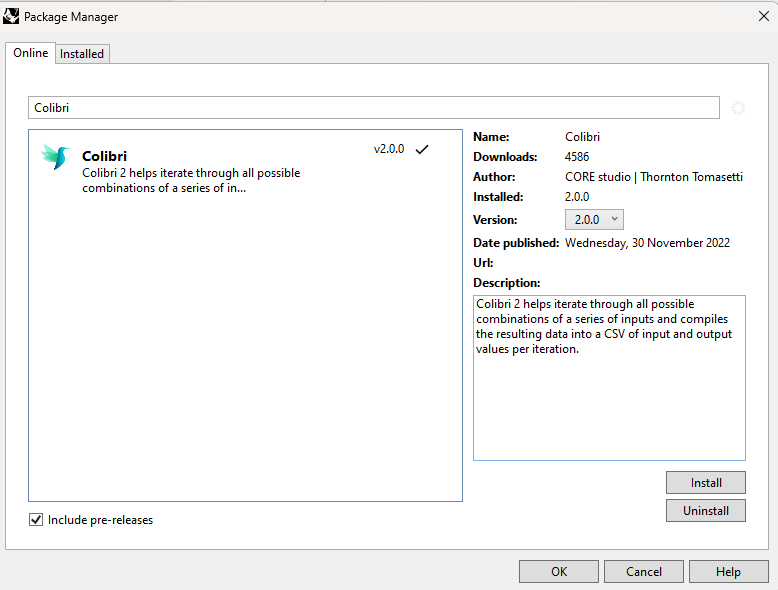
Grasshopper는 루프를 지원하지 않으므로, 이 튜토리얼에서 사용할 다른 플러그인인 COLIBRI를 설치해야 합니다.
IDEA StatiCa Connection – 파라미터가 있는 엔드 플레이트 접합부
이 튜토리얼을 위해 파라미터가 포함된 연결이 필요합니다. 첨부 파일을 열어 주십시오.
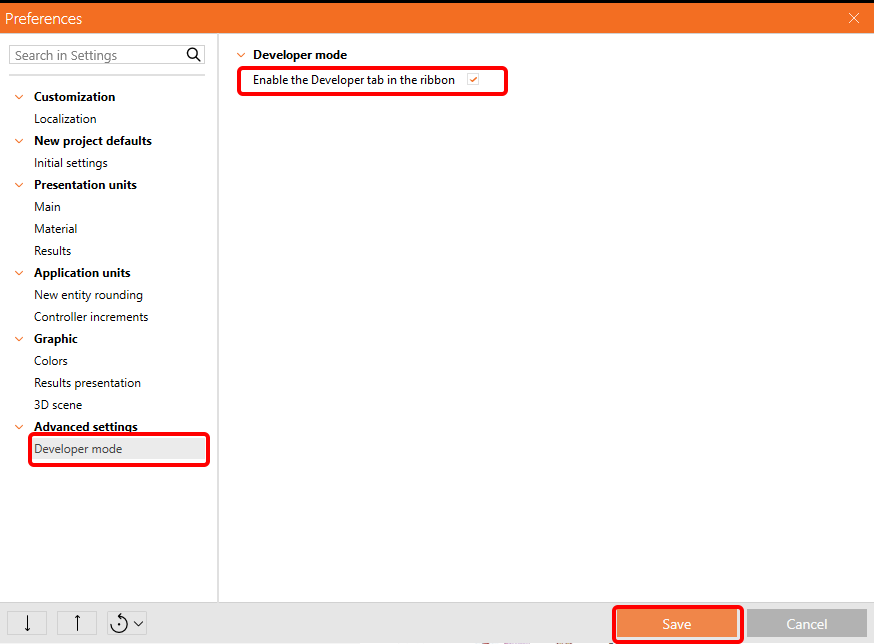
파라미터를 사용하려면 Preferences / Advance Settings에서 개발자 탭을 활성화해야 합니다.
이 연결에는 Bolts와 Endplate의 두 가지 파라미터가 포함되어 있습니다.

파라미터에 익숙하지 않은 경우 다음 튜토리얼을 참조하십시오:
IDEA StatiCa Connection의 파라메트릭 설계 - 기초 (01)
IDEA StatiCa Connection의 파라메트릭 설계 - 고급 (02)
Grasshopper - *ideaCon 파일 가져오기 및 파라미터 수정
새 문서를 만들고, 상단 리본에서 Params 탭을 선택한 후 캔버스에 File Path 컴포넌트를 배치합니다.
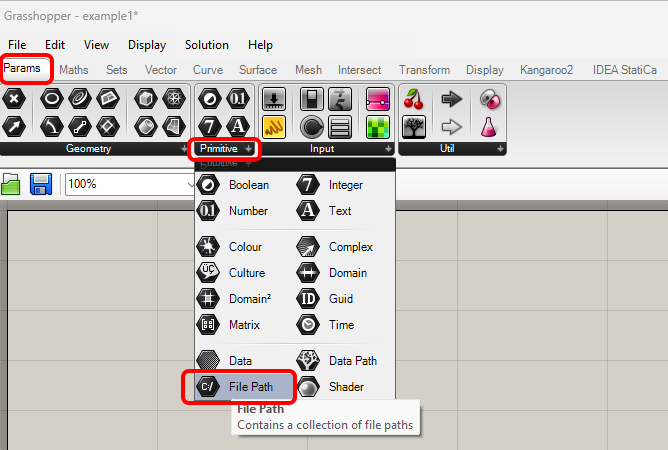
컴포넌트를 마우스 오른쪽 버튼으로 클릭하고 이전에 저장한 Example2.ideaCon 파일을 선택합니다.
참고: 첨부 파일을 열 경우 이 경로를 적절히 변경해야 합니다.
버전 24.1.4부터 IDEA StatiCa는 여기에 설명된 새로운 API를 제공합니다.
Grasshopper 스크립트를 실행하려면 모든 파일에 Connection Service Runner 컴포넌트를 추가해야 합니다. 이 컴포넌트는 IDEA StatiCa / App Common에서 찾을 수 있습니다.
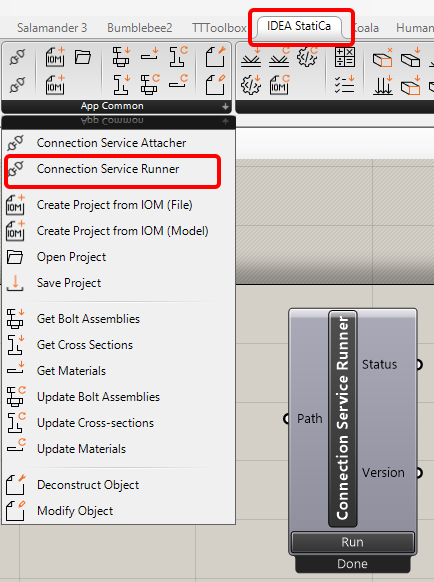
이 컴포넌트를 실행하면 다음 창이 나타납니다.
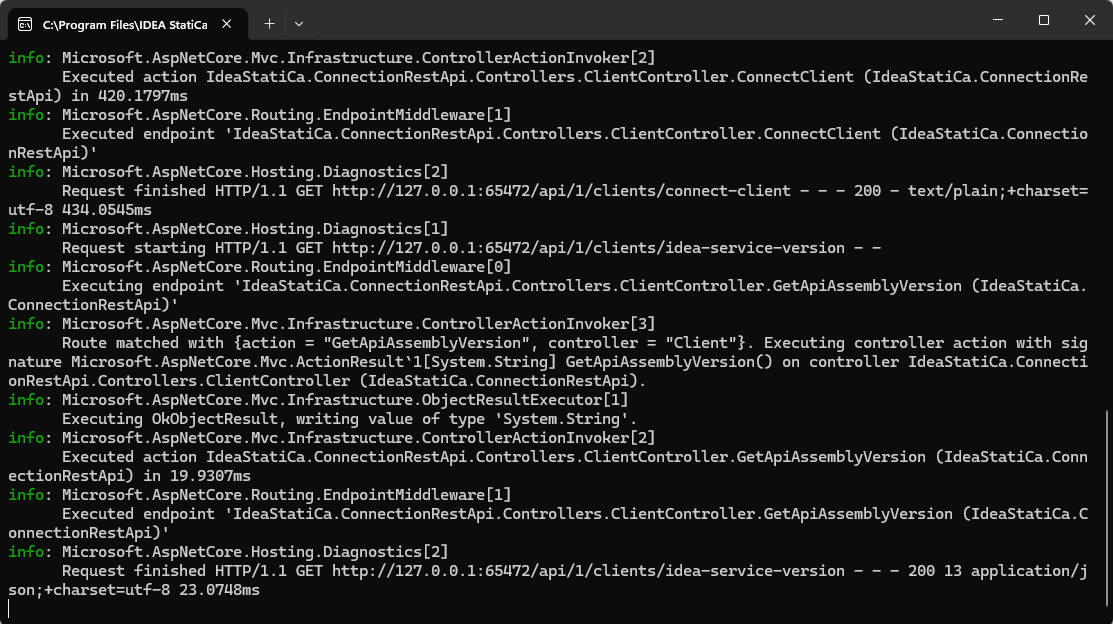
이제 다음 컴포넌트를 캔버스에 추가하고 그림과 같이 연결합니다.
파일 가져오기:
IDEA StatiCa / App common / Open Project
IDEA StatiCa / Connection / Get Connection
파라미터 보기:
IDEA StatiCa / Connection / Get Parameters
여기서 Params / Input / Panel 컴포넌트를 추가하여 파라미터 값을 확인할 수 있습니다.
파라미터 수정:
IDEA StatiCa / App common / Modify Object (1)
IDEA StatiCa / App common / Modify Object (2)
IDEA StatiCa / Connection / Update parameters
계산 및 결과:
IDEA StatiCa / Connection / Calculate Project
여기서도 Params / Input / Panel 컴포넌트를 추가하여 결과 값을 확인할 수 있습니다.
다음 컴포넌트의 경우
IDEA StatiCa / Connection / Calculate Project 및 IDEA StatiCa / Connection / Update parameters
'Run Synchronously' 파라미터를 반드시 확인해야 합니다.
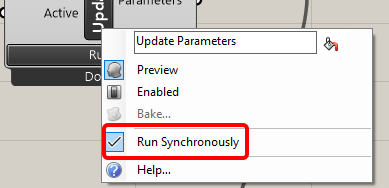
파라미터 조합 반복을 위한 Colibri 컴포넌트:
TTTollbox / Colibri Inputs
TTTollbox / Colibri Outputs
TTTollbox / Colibri Aggregator
입력의 경우, 첫 번째 Value list에는 엔드 플레이트 두께에 대한 3개의 값(0.010, 0.015, 0.020)이 포함됩니다.
두 번째에는 볼트 직경에 대한 세 가지 값(M12 8.8, M14 8.8, M16 8.8)이 포함됩니다.
결과는 data.csv 파일에 저장됩니다. 기본적으로 c:\Colibri에 저장되며, 여기서는 경로를 C:/IDEA로 설정해야 합니다. 접근 권한이 있는지 확인하십시오.
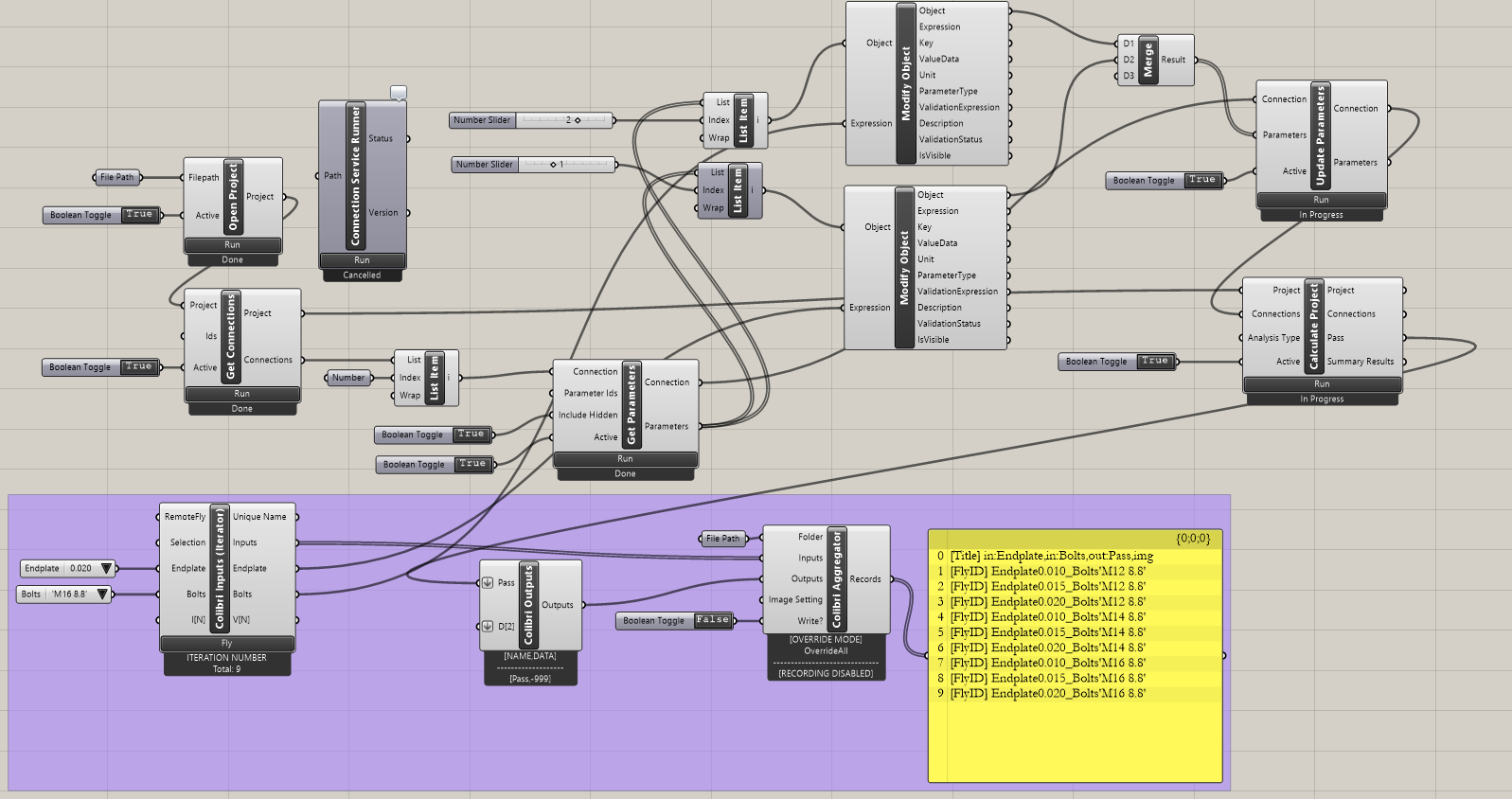
전체 반복을 실행하려면 Colibri Inputs / Fly 버튼을 클릭합니다. 잠시 후 CSV 파일이 생성됩니다.
파일을 열면 True / False로 표시된 간단한 결과를 확인할 수 있습니다.
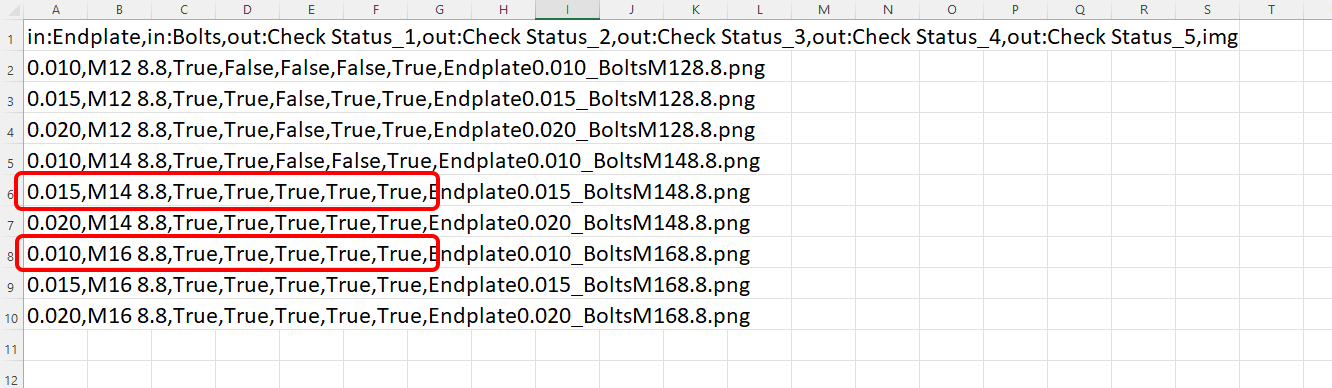
결과 해석
이 특정 연결의 경우, 다음 중 하나를 사용하면 만족스러운 결과를 얻을 수 있습니다.
- 엔드 플레이트 두께 10 mm와 볼트 M16 8.8
또는
- 엔드 플레이트 두께 15 mm와 볼트 M14 8.8
더 복잡한 예제는 PC의 다음 디렉토리에서 찾을 수 있습니다.
"%appdata%\McNeel\Rhinoceros\packages\8.0\IDEAStatiCa\0.2.5\Examples0.2.5.zip"