


Widget #NaN: support_center_article
Name: Tutorial: Grasshopper - Plugin Installation
ID: 6d5f0dc8-ee5a-4c50-aced-df94e3586763
Show Raw Data
{
"title": {
"name": "Main headline (H1)",
"type": "text",
"value": "Grasshopper - Cài đặt Plugin"
},
"preview_image": {
"name": "Preview image",
"type": "asset",
"value": [
{
"name": "E1-1.png",
"description": null,
"type": "image/png",
"size": 68369,
"url": "https://preview-assets-us-01.kc-usercontent.com:443/66e7a155-be94-0096-73e6-c55dfc7e5788/fe255e56-8a4e-4dd5-8264-4c71f1dcb040/E1-1.png",
"width": 782,
"height": 692,
"renditions": {}
}
]
},
"post_date": {
"name": "Post date",
"type": "date_time",
"value": null,
"displayTimeZone": "Europe/Prague"
},
"perex_content": {
"name": "Lead paragraph",
"type": "text",
"value": ""
},
"content": {
"images": [
{
"description": null,
"imageId": "210c0a21-6b2e-4cf8-96ca-37e82d4862fa",
"url": "https://preview-assets-us-01.kc-usercontent.com:443/66e7a155-be94-0096-73e6-c55dfc7e5788/79496c31-039f-4837-b79c-cb4138788fee/g-1.png",
"height": 602,
"width": 822
},
{
"description": null,
"imageId": "17b9256a-6aa1-42b7-8631-d3e7d4e045fa",
"url": "https://preview-assets-us-01.kc-usercontent.com:443/66e7a155-be94-0096-73e6-c55dfc7e5788/af466a09-7c9d-43da-aa86-ae8cf2e05680/g-2.png",
"height": 265,
"width": 492
},
{
"description": null,
"imageId": "2a7f156a-11b3-4615-bfa5-c5e91e966443",
"url": "https://preview-assets-us-01.kc-usercontent.com:443/66e7a155-be94-0096-73e6-c55dfc7e5788/992a6362-f26a-4ba4-9082-0da7868c65c5/E1-1.png",
"height": 692,
"width": 782
},
{
"description": null,
"imageId": "b957b01f-e69c-482c-841e-87a2cab6aca6",
"url": "https://preview-assets-us-01.kc-usercontent.com:443/66e7a155-be94-0096-73e6-c55dfc7e5788/71249ebe-9e05-4c66-bf72-1b3714c9decf/g-4.png",
"height": 599,
"width": 1077
},
{
"description": null,
"imageId": "8e7e6c80-c3e3-4d20-8aab-7481515ddf8d",
"url": "https://preview-assets-us-01.kc-usercontent.com:443/66e7a155-be94-0096-73e6-c55dfc7e5788/f0c189a8-203f-40ea-9248-7aaf4be667ec/grasshopper-idea.png",
"height": 161,
"width": 814
}
],
"linkedItemCodenames": [],
"linkedItems": [],
"links": [
{
"codename": "grasshopper___introduction_to_the_plugin_component",
"linkId": "f2f373ad-9a22-499b-aced-f9520c80a37a",
"urlSlug": "description-of-grasshopper-plugin-components",
"type": "support_center_article"
}
],
"name": "Content",
"type": "rich_text",
"value": "<p>Bạn có thể tải phiên bản dùng thử của Rhino3d và Grasshopper từ trang web <a href=\"https://www.rhino3d.com/download/\" data-new-window=\"true\" target=\"_blank\" rel=\"noopener noreferrer\">Rhino3d</a>. Chạy Rhinoceros và chọn mẫu với <strong>Meters</strong>:</p>\n<figure data-asset-id=\"210c0a21-6b2e-4cf8-96ca-37e82d4862fa\" data-image-id=\"210c0a21-6b2e-4cf8-96ca-37e82d4862fa\"><img src=\"https://preview-assets-us-01.kc-usercontent.com:443/66e7a155-be94-0096-73e6-c55dfc7e5788/79496c31-039f-4837-b79c-cb4138788fee/g-1.png\" data-asset-id=\"210c0a21-6b2e-4cf8-96ca-37e82d4862fa\" data-image-id=\"210c0a21-6b2e-4cf8-96ca-37e82d4862fa\" alt=\"\"></figure>\n<p>Trong dòng lệnh, vui lòng nhập \"<strong>Package Manager</strong>\":</p>\n<figure data-asset-id=\"17b9256a-6aa1-42b7-8631-d3e7d4e045fa\" data-image-id=\"17b9256a-6aa1-42b7-8631-d3e7d4e045fa\"><img src=\"https://preview-assets-us-01.kc-usercontent.com:443/66e7a155-be94-0096-73e6-c55dfc7e5788/af466a09-7c9d-43da-aa86-ae8cf2e05680/g-2.png\" data-asset-id=\"17b9256a-6aa1-42b7-8631-d3e7d4e045fa\" data-image-id=\"17b9256a-6aa1-42b7-8631-d3e7d4e045fa\" alt=\"\"></figure>\n<p>Một cửa sổ mới xuất hiện; chọn IDEAStatiCa và nhấp vào <strong>Install</strong>. Plugin sẽ được tải xuống và cài đặt. Để kích hoạt, cần khởi động lại Rhinoceros.</p>\n<figure data-asset-id=\"2a7f156a-11b3-4615-bfa5-c5e91e966443\" data-image-id=\"2a7f156a-11b3-4615-bfa5-c5e91e966443\"><img src=\"https://preview-assets-us-01.kc-usercontent.com:443/66e7a155-be94-0096-73e6-c55dfc7e5788/992a6362-f26a-4ba4-9082-0da7868c65c5/E1-1.png\" data-asset-id=\"2a7f156a-11b3-4615-bfa5-c5e91e966443\" data-image-id=\"2a7f156a-11b3-4615-bfa5-c5e91e966443\" alt=\"\"></figure>\n<p> Để khởi động Grasshopper với plugin IDEA StatiCa, chọn <strong>Tools / Grasshopper </strong>trong tab Rhinoceros.</p>\n<figure data-asset-id=\"b957b01f-e69c-482c-841e-87a2cab6aca6\" data-image-id=\"b957b01f-e69c-482c-841e-87a2cab6aca6\"><img src=\"https://preview-assets-us-01.kc-usercontent.com:443/66e7a155-be94-0096-73e6-c55dfc7e5788/71249ebe-9e05-4c66-bf72-1b3714c9decf/g-4.png\" data-asset-id=\"b957b01f-e69c-482c-841e-87a2cab6aca6\" data-image-id=\"b957b01f-e69c-482c-841e-87a2cab6aca6\" alt=\"\"></figure>\n<p>Như bạn có thể thấy, plugin đã được tích hợp sẵn.</p>\n<figure data-asset-id=\"8e7e6c80-c3e3-4d20-8aab-7481515ddf8d\" data-image-id=\"8e7e6c80-c3e3-4d20-8aab-7481515ddf8d\"><img src=\"https://preview-assets-us-01.kc-usercontent.com:443/66e7a155-be94-0096-73e6-c55dfc7e5788/f0c189a8-203f-40ea-9248-7aaf4be667ec/grasshopper-idea.png\" data-asset-id=\"8e7e6c80-c3e3-4d20-8aab-7481515ddf8d\" data-image-id=\"8e7e6c80-c3e3-4d20-8aab-7481515ddf8d\" alt=\"\"></figure>\n<p>Tìm hiểu về các thành phần và lệnh trong plugin IDEA StatiCa cho Grasshopper trong bài viết <a data-item-id=\"f2f373ad-9a22-499b-aced-f9520c80a37a\" href=\"\">Mô tả các thành phần của plugin Grasshopper</a>.</p>"
},
"linked_items": {
"name": "Linked items",
"type": "modular_content",
"value": [],
"linkedItems": []
},
"regions": {
"name": "Region",
"type": "taxonomy",
"value": [
{
"name": "AMER",
"codename": "amer"
},
{
"name": "EMEA",
"codename": "emea"
},
{
"name": "APAC",
"codename": "apac"
}
],
"taxonomyGroup": "region"
},
"product_groups": {
"name": "Product group",
"type": "taxonomy",
"value": [
{
"name": "Steel",
"codename": "steel"
},
{
"name": "Connection design",
"codename": "connection_design"
}
],
"taxonomyGroup": "product_group"
},
"support_center_article_types": {
"name": "Support center article",
"type": "taxonomy",
"value": [
{
"name": "Tutorials",
"codename": "tutorial"
}
],
"taxonomyGroup": "support_center_article"
},
"expertise_levels": {
"name": "Expertise level",
"type": "taxonomy",
"value": [
{
"name": "Intermediate",
"codename": "intermediate"
},
{
"name": "Expert",
"codename": "expert"
}
],
"taxonomyGroup": "expertise_level"
},
"labels": {
"name": "Labels",
"type": "taxonomy",
"value": [
{
"name": "IDEA Open Model (API)",
"codename": "idea_open_model__api_"
},
{
"name": "Connection",
"codename": "connection"
}
],
"taxonomyGroup": "labels"
},
"attachments__files": {
"name": "Attachments",
"type": "asset",
"value": []
},
"content_priority__value": {
"name": "Content priority value",
"type": "number",
"value": null
},
"options": {
"name": "Options",
"type": "multiple_choice",
"value": []
},
"url_slug": {
"name": "Url slug",
"type": "url_slug",
"value": "grasshopper-plugin-installation"
},
"unique_url_slug": {
"name": "Unique URL slug",
"type": "custom",
"value": "[\"grasshopper-plugin-installation\",\"[autogenerated]\"]"
},
"content_settings__sitemap": {
"name": "Show in sitemap",
"type": "multiple_choice",
"value": []
},
"content_settings__robots": {
"name": "Search engine indexing",
"type": "multiple_choice",
"value": []
},
"content_settings__is_hidden": {
"name": "Hidden nested content",
"type": "multiple_choice",
"value": []
},
"content_settings__is_topped": {
"name": "Topped",
"type": "multiple_choice",
"value": []
},
"metadata__page_title": {
"name": "Page title",
"type": "text",
"value": ""
},
"metadata__page_description": {
"name": "Page description",
"type": "text",
"value": ""
},
"metadata__page_keywords": {
"name": "Page keywords",
"type": "text",
"value": ""
},
"metadata__canonical_url": {
"name": "Canonical URL",
"type": "text",
"value": ""
},
"metadata__og_title": {
"name": "OG:title",
"type": "text",
"value": ""
},
"metadata__og_description": {
"name": "OG:description",
"type": "text",
"value": ""
},
"metadata__og_image": {
"name": "OG:image",
"type": "asset",
"value": []
},
"translation__translation_connector": {
"name": "Translation Connector",
"type": "taxonomy",
"value": [],
"taxonomyGroup": "languages"
},
"translation__force_translation": {
"name": "Force translation",
"type": "multiple_choice",
"value": []
},
"translation__translate_standalone_nested_content_items": {
"name": "Translate standalone nested content items",
"type": "multiple_choice",
"value": []
},
"translation__last_translation": {
"images": [],
"linkedItemCodenames": [],
"linkedItems": [],
"links": [],
"name": "Last translation",
"type": "rich_text",
"value": "<p>Translation info:</p>\n<ul>\n <li>cs-CZ: Never translated</li>\n <li>de-DE: Never translated</li>\n <li>en-US: Never translated</li>\n <li>es-ES: Never translated</li>\n <li>fr-FR: Never translated</li>\n <li>hu-HU: Never translated</li>\n <li>it-IT: Never translated</li>\n <li>ko-KR: Never translated</li>\n <li>nl-NL: Never translated</li>\n <li>pl-PL: Never translated</li>\n <li>pt-PT: Never translated</li>\n <li>ro-RO: Never translated</li>\n <li>ru-RU: Never translated</li>\n <li>th-TH: Never translated</li>\n <li>tr-TR: Never translated</li>\n <li>vi-VN: Translated on 13.5.2026 01:05</li>\n <li>zh-CN: Never translated</li>\n</ul>\n<p>Publish info:</p>\n<ul>\n <li>Publish info is available only in the main language</li>\n</ul>"
},
"translation__ai_translated": {
"name": "AI translated",
"type": "multiple_choice",
"value": [
{
"name": "Translated",
"codename": "translated"
}
]
},
"page_tree_settings__page_label": {
"name": "Page label",
"type": "text",
"value": ""
},
"page_tree_settings__path_segment": {
"name": "Path segment",
"type": "text",
"value": ""
},
"page_tree_settings__breadcrumb_style": {
"name": "Breadcrumb style",
"type": "multiple_choice",
"value": []
},
"page_tree_settings__hide_in_breadcrumbs": {
"name": "Hide in breadcrumbs",
"type": "multiple_choice",
"value": []
}
}IDEA StatiCa Connection - Thiết kế nút liên kết và xuất IOM
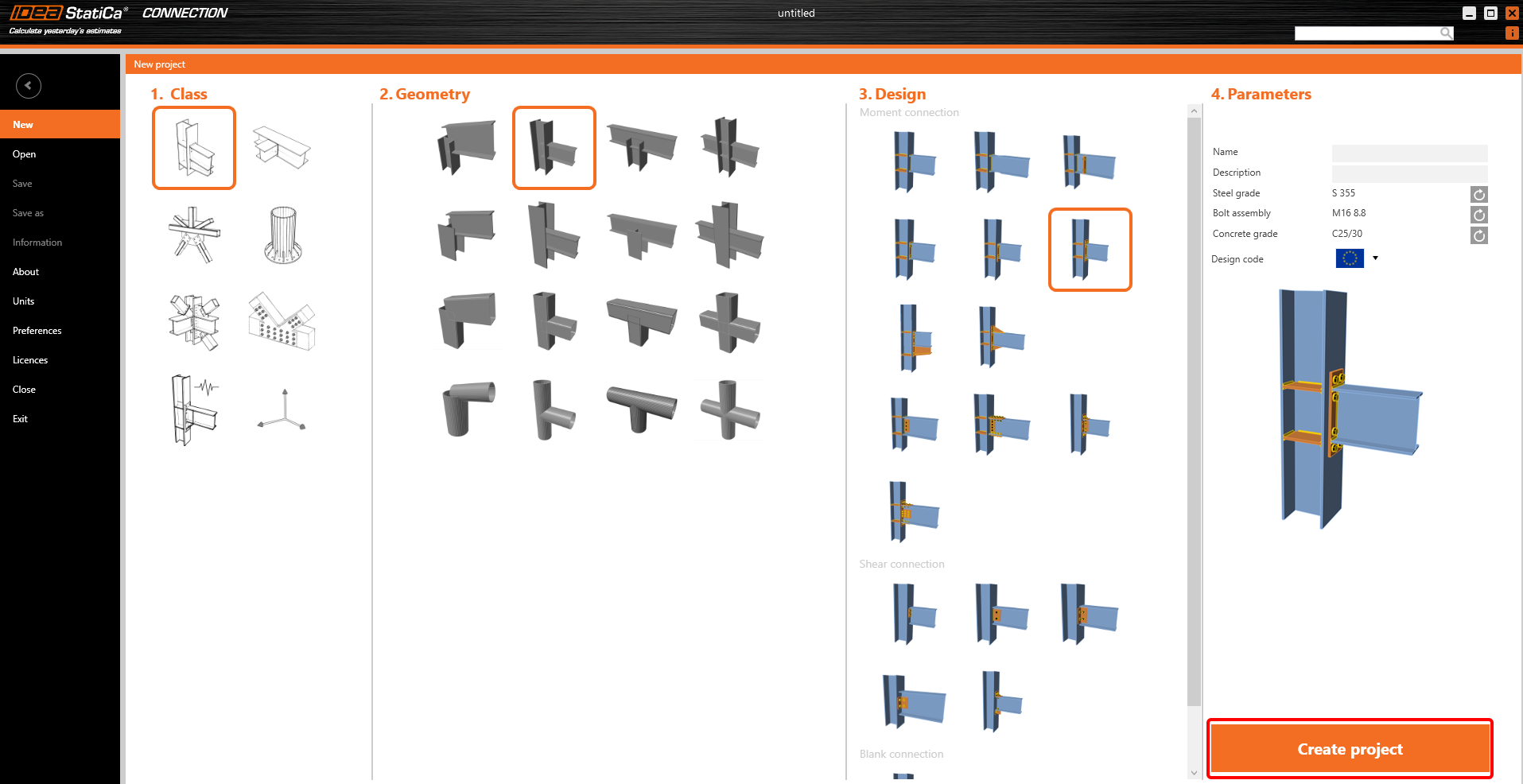
Trong ví dụ này, bạn sẽ tạo một liên kết chịu mô men đơn giản bằng cách sử dụng một mẫu:
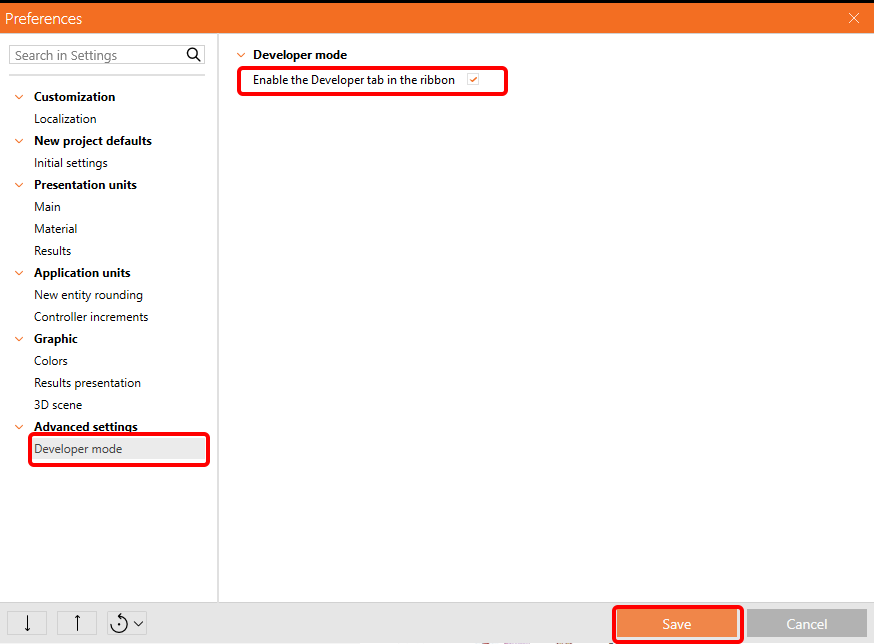
Để có thể làm việc với IOM, cần bật tab Nhà phát triển trong Preferences / Advance Settings:
Cuối cùng, bạn có thể lưu liên kết này với tên Example1.ideaCon và cũng xuất liên kết này sang tệp IOM Example1.xml.

Grasshopper - Nhập tệp IOM, hiển thị nút liên kết trong Rhino và xem kết quả tính toán
Tạo một tài liệu mới, chọn tab Params trên thanh ribbon phía trên và đặt thành phần File Path lên Canvas.
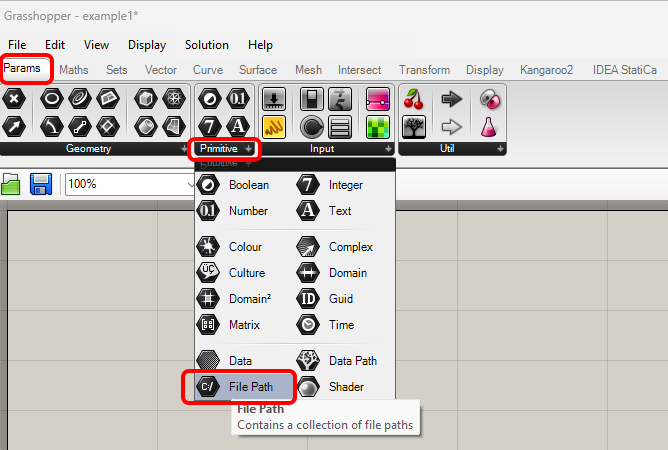
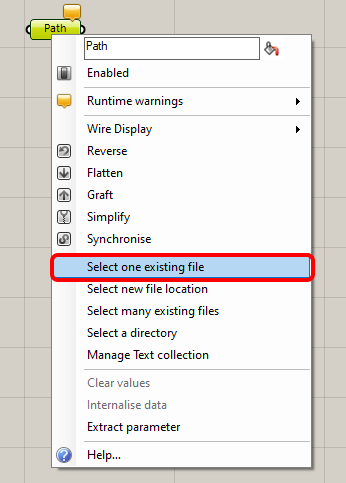
Nhấp chuột phải vào thành phần và chọn tệp chúng ta đã lưu trước đó:
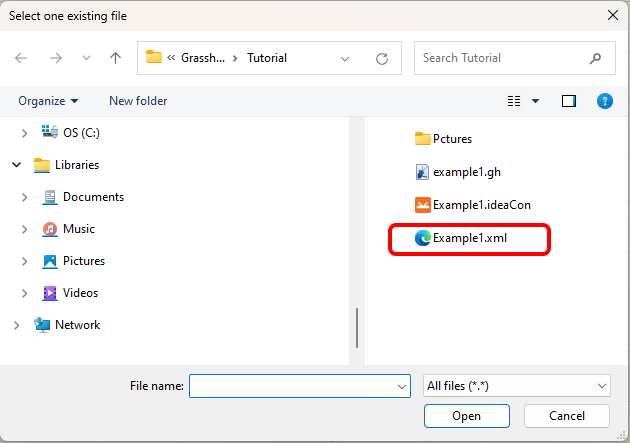
Lưu ý: Nếu bạn mở tệp đính kèm, bạn phải thay đổi đường dẫn này cho phù hợp.
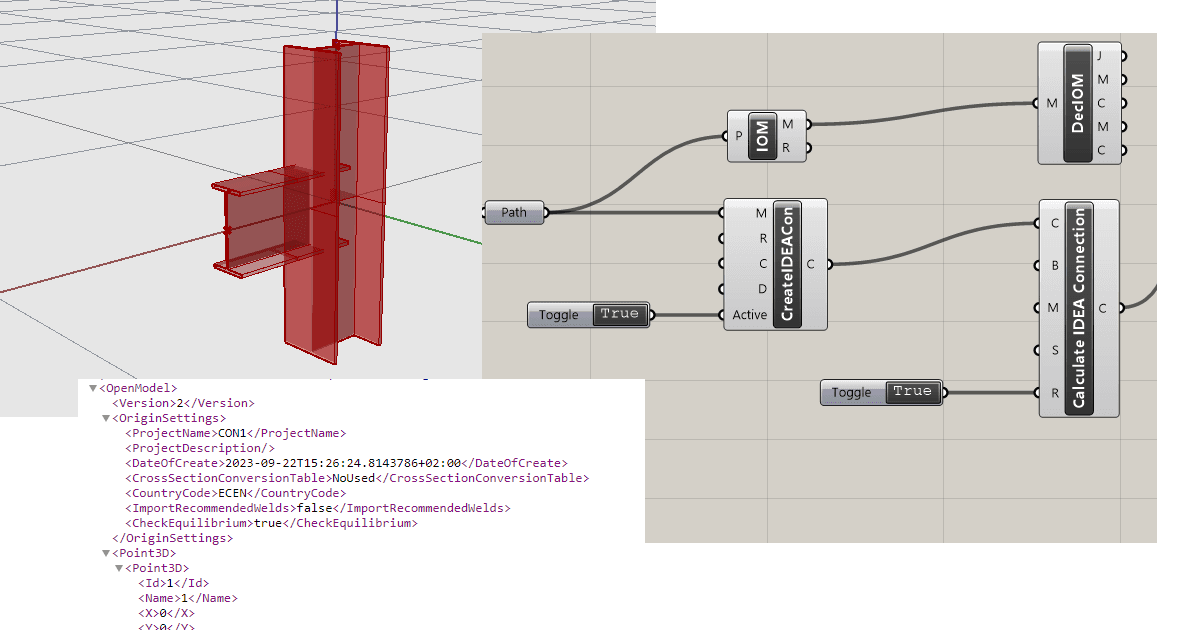
Bây giờ hãy thêm các thành phần sau vào canvas và kết nối chúng như trong hình.
IDEA StatiCa / Open Model / Import IOM File
IDEA StatiCa / Open Model / Deconstruct Open Model
IDEA StatiCa / Connection / Create Connection from IOM
IDEA StatiCa / Connection / Calculate Connection
IDEA StatiCa / Connection / Connection Results
Params / Input / Boolean Toggle
Params / Input / Boolean Toggle
Params / Input / Panel
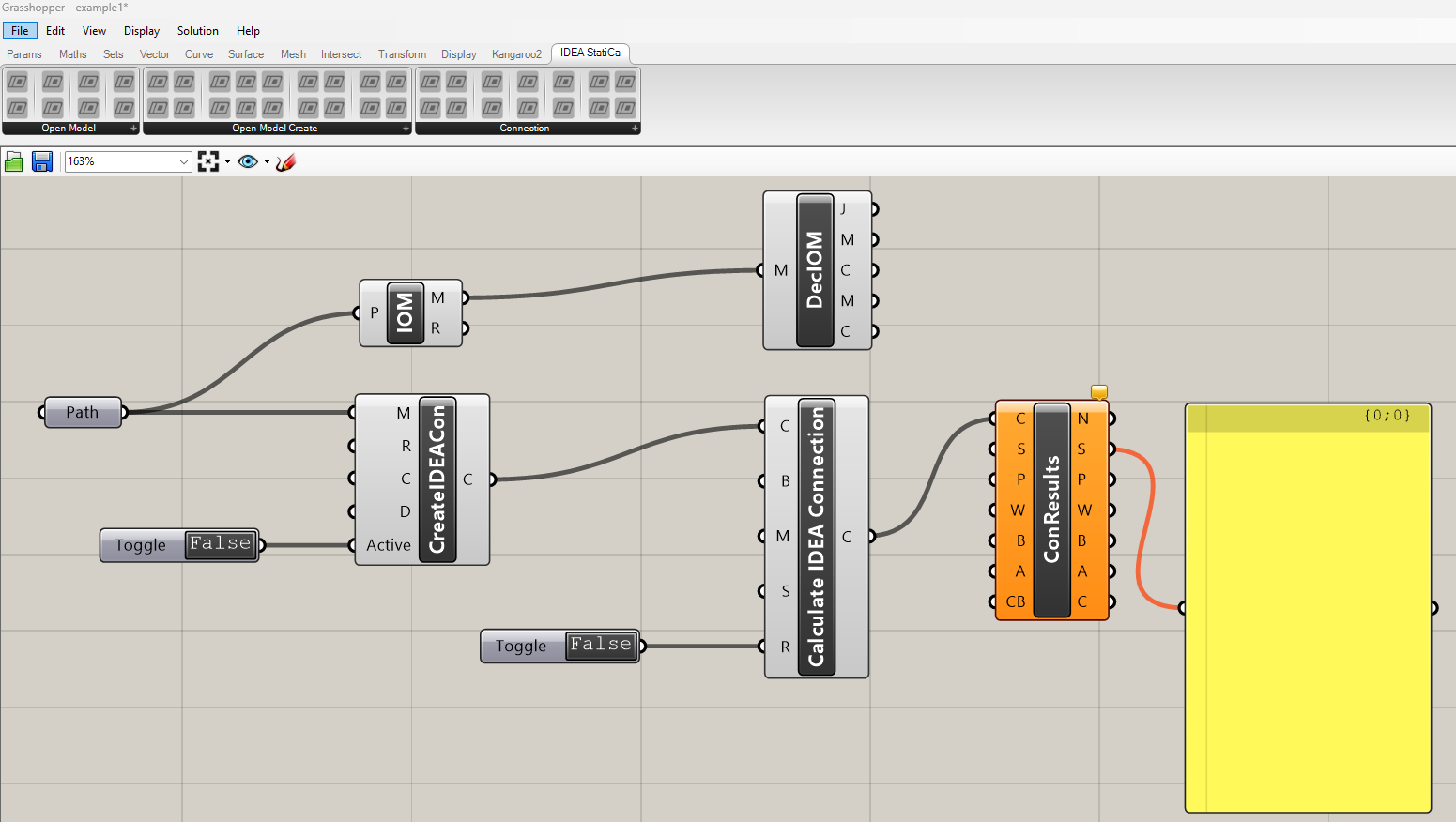
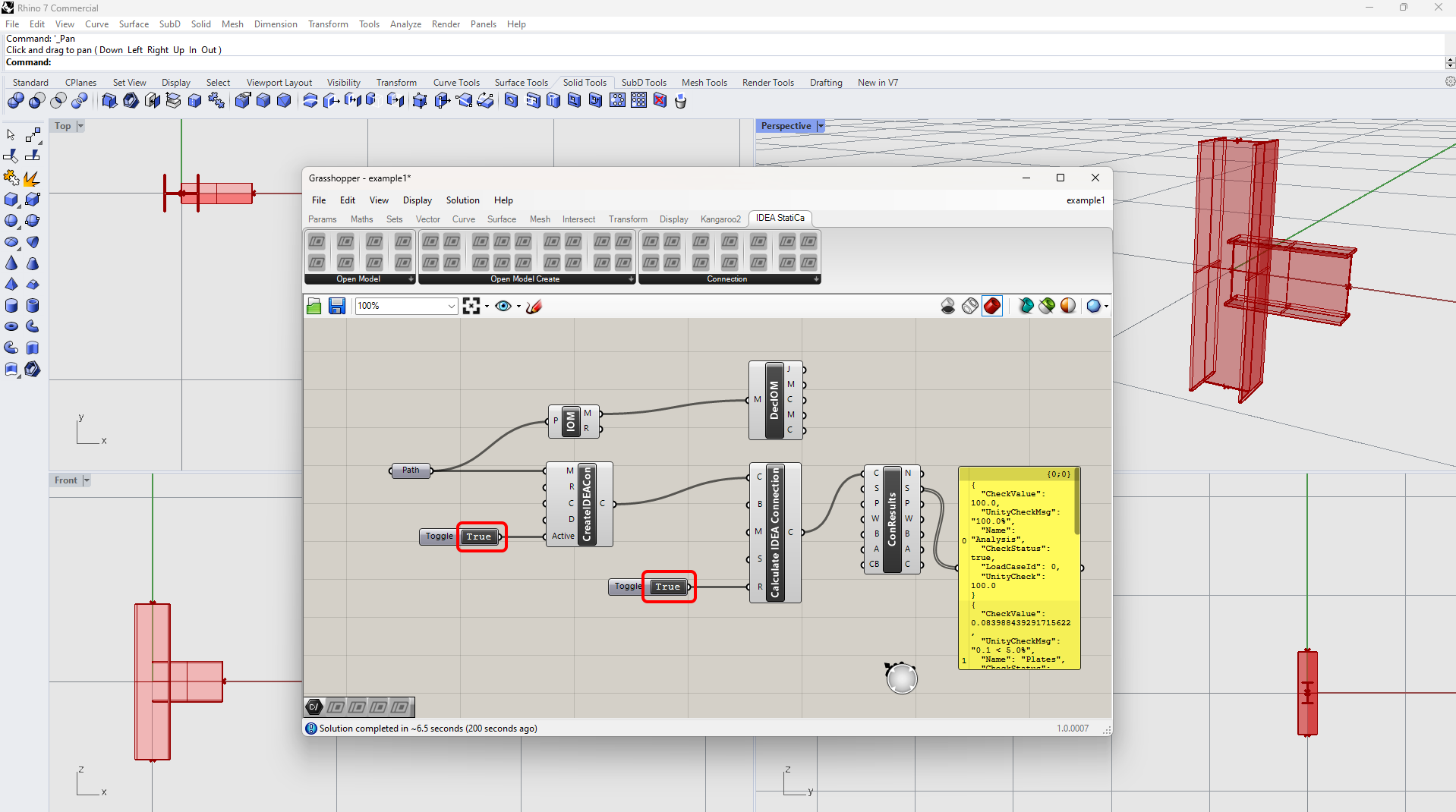
Để chạy tính toán và nhận kết quả hiển thị, nhấp đúp vào False/True. Khi bạn đã thêm thành phần Deconstruct Open Model, bạn cũng có thể thấy đường viền của nút liên kết trong Rhinoceros.
Các ví dụ phức tạp hơn có thể được tìm thấy trên máy tính của bạn trong thư mục
"%appdata%\McNeel\Rhinoceros\packages\7.0\IDEAStatiCa\0.1.1\Examples.zip"