

Widget #NaN: support_center_article
Name: General BIM Link tutorial - How to activate the link
ID: dd351d35-2833-4fa2-a88f-9c0c8769c77d
Show Raw Data
{
"title": {
"name": "Main headline (H1)",
"type": "text",
"value": "How to activate the link"
},
"preview_image": {
"name": "Preview image",
"type": "asset",
"value": []
},
"post_date": {
"name": "Post date",
"type": "date_time",
"value": null,
"displayTimeZone": null
},
"perex_content": {
"name": "Lead paragraph",
"type": "text",
"value": ""
},
"content": {
"images": [
{
"description": "IDEA start up window 25.0",
"imageId": "4a678807-07f6-408f-ae20-26c6a018d269",
"url": "https://assets-us-01.kc-usercontent.com:443/28eac049-c8ed-00e2-220c-12142a968dff/649a6f99-4ce2-4fa9-9ccf-876c0578ab47/IDEA%20start%20up%20window.jpg",
"height": 857,
"width": 1680
},
{
"description": null,
"imageId": "7633f2b4-f9be-41c3-9208-3f7031d8b5ab",
"url": "https://assets-us-01.kc-usercontent.com:443/28eac049-c8ed-00e2-220c-12142a968dff/5d2e07d6-e3ba-4c8d-b7cc-3d2e765eb5c4/bim-link.png",
"height": 1200,
"width": 1143
}
],
"linkedItemCodenames": [],
"linkedItems": [],
"links": [
{
"codename": "landing_page___downloads",
"linkId": "0dff6482-3e17-4ca2-bb66-b4abc6a8dde4",
"urlSlug": "product-downloads",
"type": "landing_page"
},
{
"codename": "bim_links__supported_versions",
"linkId": "eeb85fd1-4708-4f88-ad36-cbe30ac41eb7",
"urlSlug": "bim-links-supported-versions-of-3rd-party-applications",
"type": "support_center_article"
}
],
"name": "Content",
"type": "rich_text",
"value": "<ul>\n <li>Download and install the <a data-item-id=\"0dff6482-3e17-4ca2-bb66-b4abc6a8dde4\" href=\"\">latest version of IDEA StatiCa</a></li>\n <li>Make sure that you are using a <a data-item-id=\"eeb85fd1-4708-4f88-ad36-cbe30ac41eb7\" href=\"\">supported version</a> of your FEA solution</li>\n</ul>\n<p>IDEA StatiCa integrates BIM links into your FEA software during its installation. You can check the status and eventually integrate more BIM links by running IDEA StatiCa and opening the <strong>BIM links</strong>. Please note that some FEA software require additional steps to fully activate their BIM link to IDEA StatiCa.</p>\n<figure data-asset-id=\"4a678807-07f6-408f-ae20-26c6a018d269\" data-image-id=\"4a678807-07f6-408f-ae20-26c6a018d269\"><img src=\"https://assets-us-01.kc-usercontent.com:443/28eac049-c8ed-00e2-220c-12142a968dff/649a6f99-4ce2-4fa9-9ccf-876c0578ab47/IDEA%20start%20up%20window.jpg\" data-asset-id=\"4a678807-07f6-408f-ae20-26c6a018d269\" data-image-id=\"4a678807-07f6-408f-ae20-26c6a018d269\" alt=\"IDEA start up window 25.0\"></figure>\n<p>A notification \"<em>Do you want to allow this app to make changes to your device?</em>\" may appear, if so, please confirm with the <strong>Yes</strong> button.</p>\n<p>By clicking <strong>Install</strong>, the BIM link for the selected software is integrated. The screen also tells you the status of other BIM links.</p>\n<figure data-asset-id=\"7633f2b4-f9be-41c3-9208-3f7031d8b5ab\" data-image-id=\"7633f2b4-f9be-41c3-9208-3f7031d8b5ab\"><img src=\"https://assets-us-01.kc-usercontent.com:443/28eac049-c8ed-00e2-220c-12142a968dff/5d2e07d6-e3ba-4c8d-b7cc-3d2e765eb5c4/bim-link.png\" data-asset-id=\"7633f2b4-f9be-41c3-9208-3f7031d8b5ab\" data-image-id=\"7633f2b4-f9be-41c3-9208-3f7031d8b5ab\" alt=\"\"></figure>"
},
"regions": {
"name": "Region",
"type": "taxonomy",
"value": [
{
"name": "EMEA",
"codename": "emea"
},
{
"name": "AMER",
"codename": "amer"
},
{
"name": "APAC",
"codename": "apac"
}
],
"taxonomyGroup": "region"
},
"product_groups": {
"name": "Product group",
"type": "taxonomy",
"value": [
{
"name": "Steel",
"codename": "steel"
}
],
"taxonomyGroup": "product_group"
},
"support_center_article_types": {
"name": "Support center article",
"type": "taxonomy",
"value": [
{
"name": "Knowledge base",
"codename": "knowledgebase_article"
}
],
"taxonomyGroup": "support_center_article"
},
"expertise_levels": {
"name": "Expertise level",
"type": "taxonomy",
"value": [
{
"name": "Beginner",
"codename": "beginner"
},
{
"name": "Intermediate",
"codename": "intermediate"
}
],
"taxonomyGroup": "expertise_level"
},
"labels": {
"name": "Labels",
"type": "taxonomy",
"value": [
{
"name": "BIM link",
"codename": "bim_links"
}
],
"taxonomyGroup": "labels"
},
"linked_items": {
"name": "Linked items",
"type": "modular_content",
"value": [],
"linkedItems": []
},
"attachments__files": {
"name": "Attachments",
"type": "asset",
"value": []
},
"content_priority__value": {
"name": "Content priority value",
"type": "number",
"value": null
},
"options": {
"name": "Options",
"type": "multiple_choice",
"value": []
},
"url_slug": {
"name": "Url slug",
"type": "url_slug",
"value": "how-to-activate-the-link"
},
"unique_url_slug": {
"name": "Unique URL slug",
"type": "custom",
"value": "[\"how-to-activate-the-link\",\"[autogenerated]\"]"
},
"content_settings__sitemap": {
"name": "Show in sitemap",
"type": "multiple_choice",
"value": [
{
"name": "default",
"codename": "default"
}
]
},
"content_settings__robots": {
"name": "Search engine indexing",
"type": "multiple_choice",
"value": [
{
"name": "default",
"codename": "default"
}
]
},
"content_settings__is_hidden": {
"name": "Hidden nested content",
"type": "multiple_choice",
"value": []
},
"metadata__page_title": {
"name": "Page title",
"type": "text",
"value": ""
},
"metadata__page_description": {
"name": "Page description",
"type": "text",
"value": ""
},
"metadata__page_keywords": {
"name": "Page keywords",
"type": "text",
"value": ""
},
"metadata__canonical_url": {
"name": "Canonical URL",
"type": "text",
"value": ""
},
"metadata__og_title": {
"name": "OG:title",
"type": "text",
"value": ""
},
"metadata__og_description": {
"name": "OG:description",
"type": "text",
"value": ""
},
"metadata__og_image": {
"name": "OG:image",
"type": "asset",
"value": []
},
"translation__translation_connector": {
"name": "Translation Connector",
"type": "taxonomy",
"value": [],
"taxonomyGroup": "languages"
},
"translation__force_translation": {
"name": "Force translation",
"type": "multiple_choice",
"value": []
},
"translation__last_translation": {
"images": [],
"linkedItemCodenames": [],
"linkedItems": [],
"links": [],
"name": "Last translation",
"type": "rich_text",
"value": "<p><br></p>"
},
"translation__ai_translated": {
"name": "AI translated",
"type": "multiple_choice",
"value": []
},
"page_tree_settings__page_label": {
"name": "Page label",
"type": "text",
"value": ""
},
"page_tree_settings__path_segment": {
"name": "Path segment",
"type": "text",
"value": ""
},
"page_tree_settings__breadcrumb_style": {
"name": "Breadcrumb style",
"type": "multiple_choice",
"value": []
},
"page_tree_settings__hide_in_breadcrumbs": {
"name": "Hide in breadcrumbs",
"type": "multiple_choice",
"value": []
}
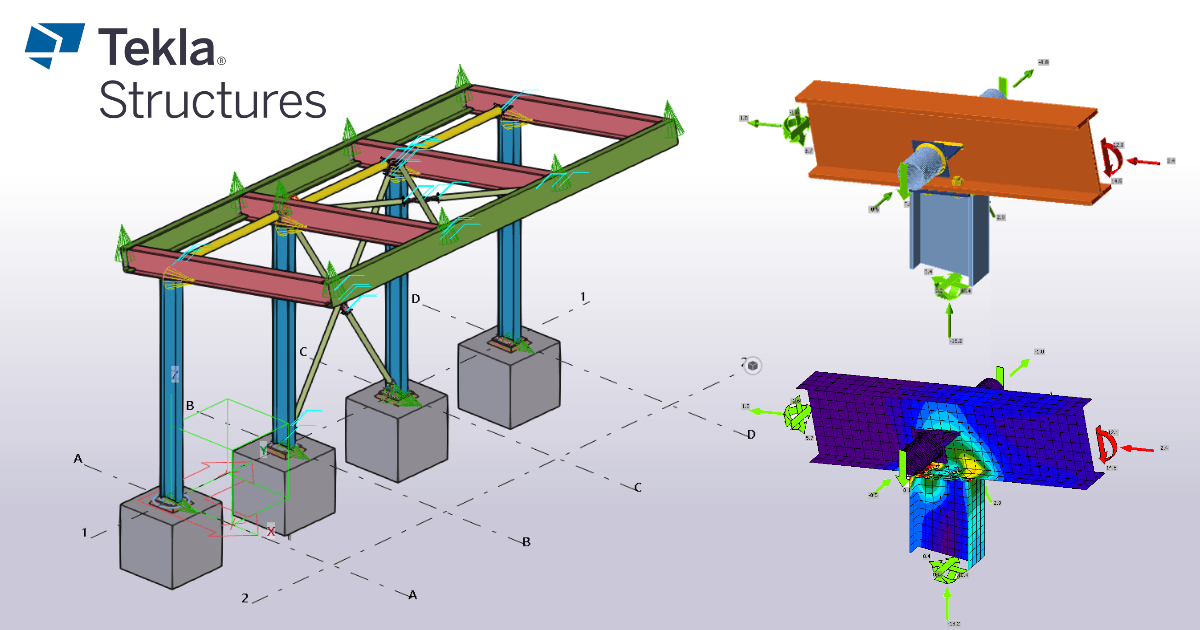
}Download the attached project and open it in Tekla Structures, created in the environment Default (Trimble Downloads)
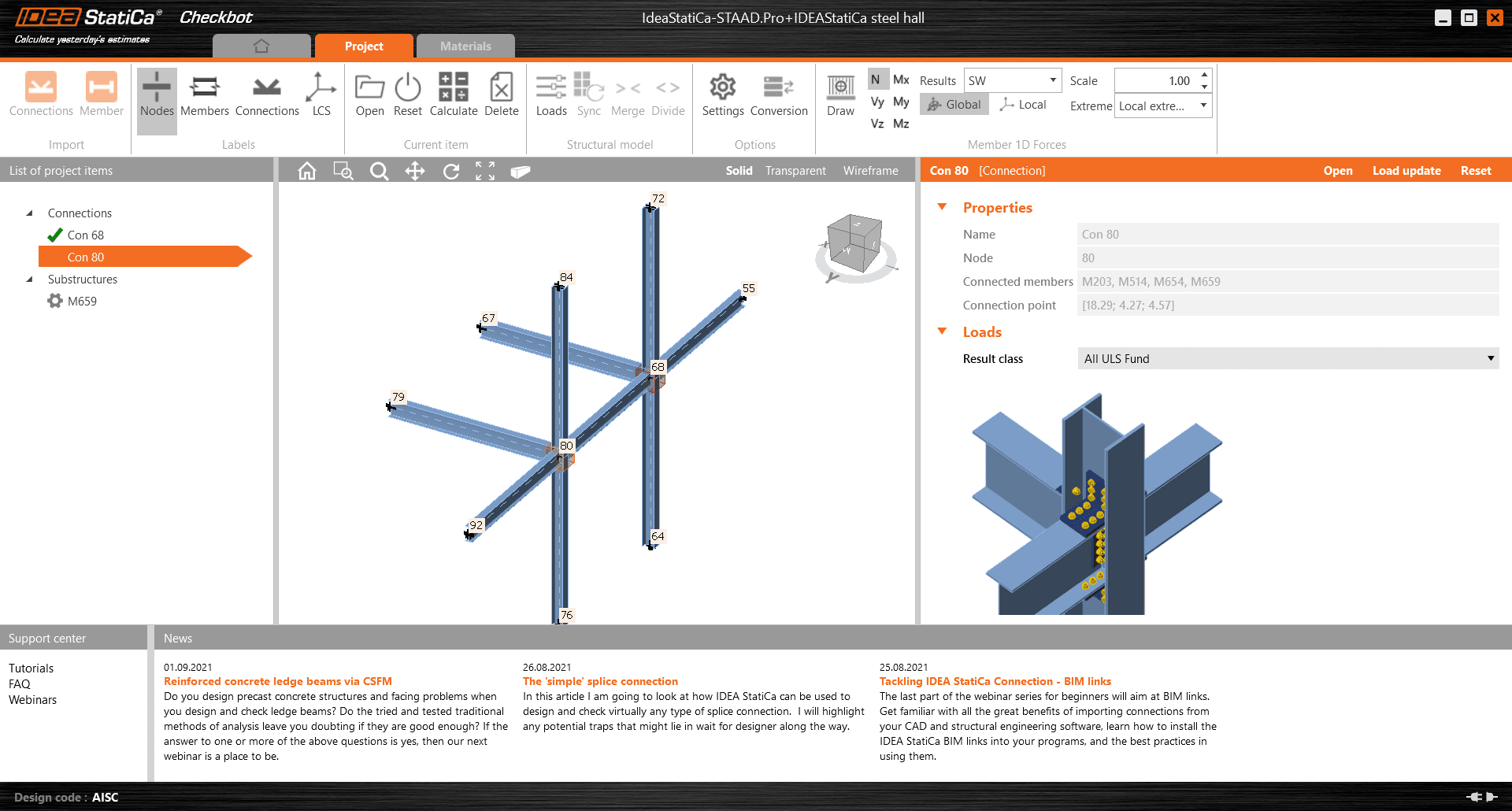
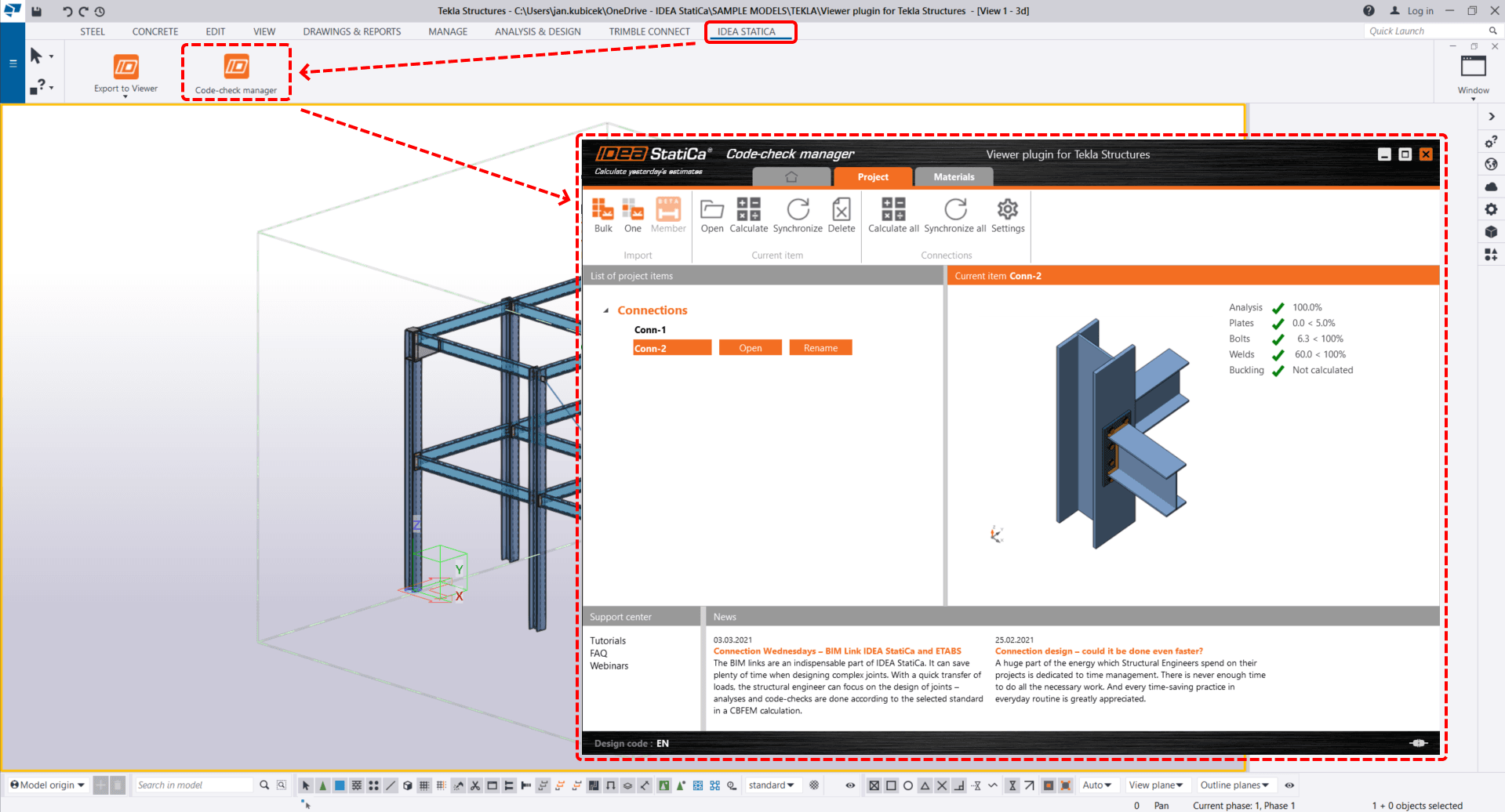
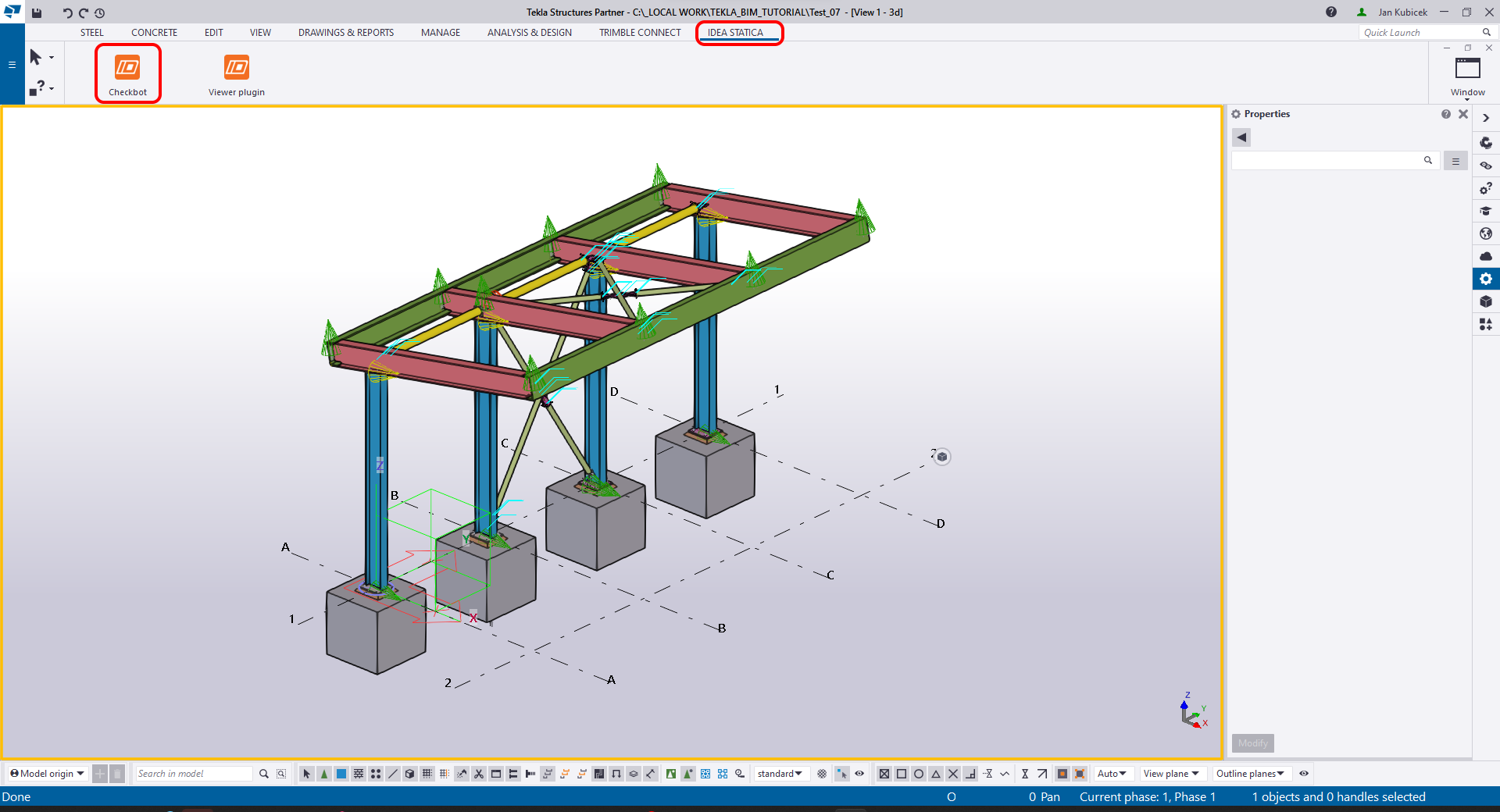
The BIM link is automatically integrated. You can find it in the top ribbon under IDEA StatiCa -> Checkbot. This will open the Checkbot application.
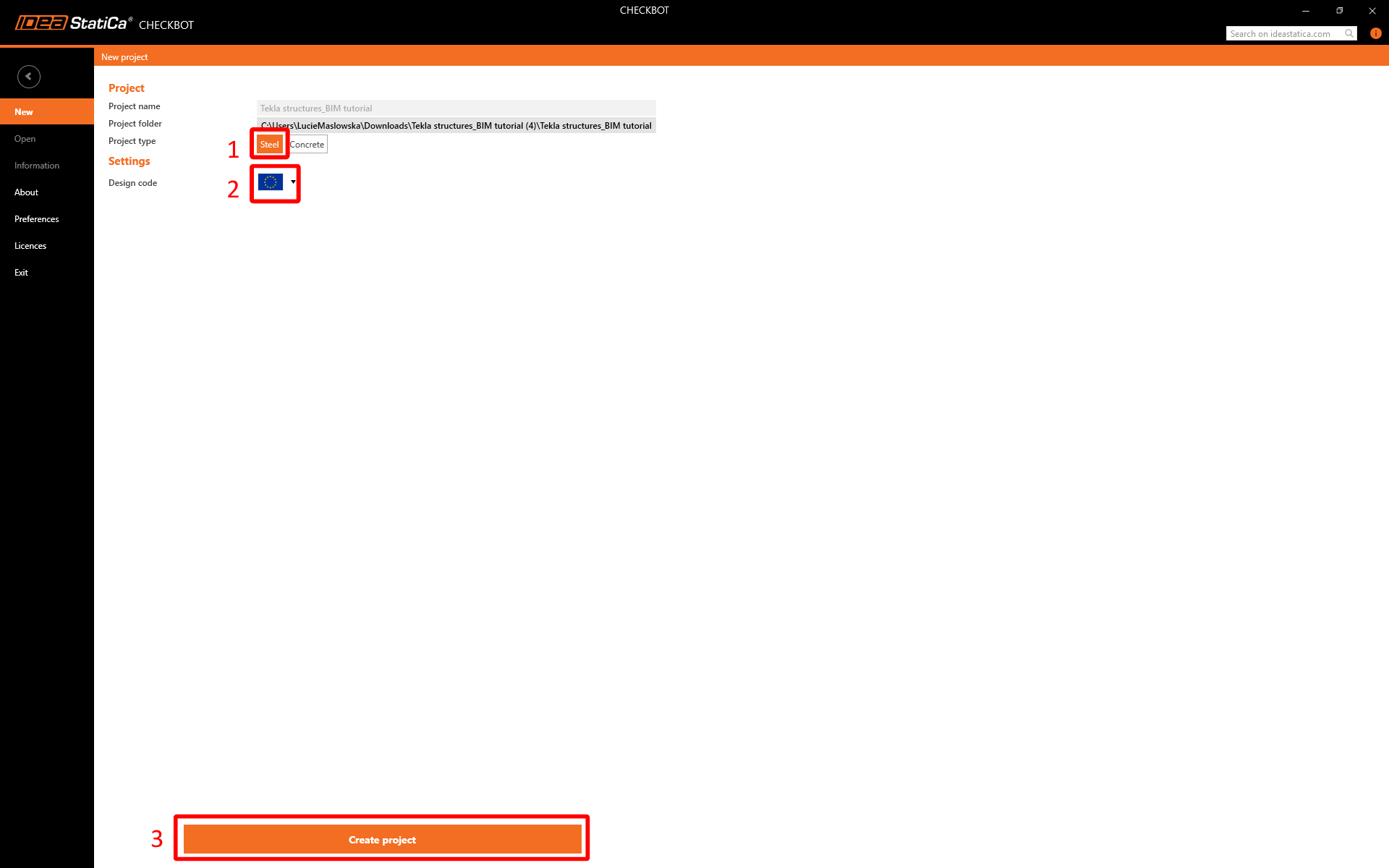
Select the New option with project type Steel and design code EN. Then select Create project.
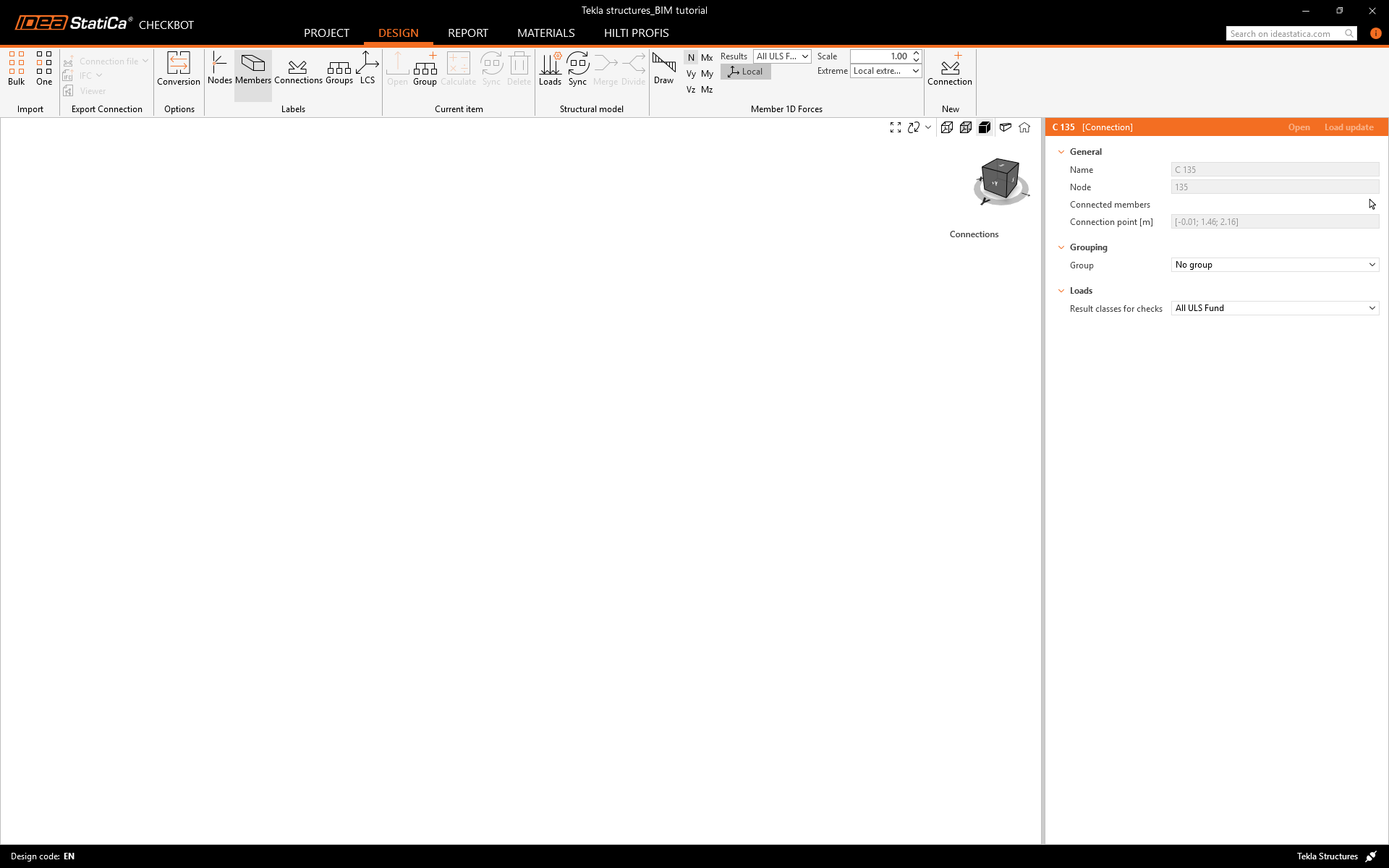
The new Checkbot project is ready to import connections from Tekla Structures.
Widget #NaN: support_center_article
Name: Tekla Structures BIM Link tutorial - Import
ID: 8ae1be1f-aad5-4111-99f7-8a8d2c198a8a
Show Raw Data
{
"title": {
"name": "Main headline (H1)",
"type": "text",
"value": "Import"
},
"preview_image": {
"name": "Preview image",
"type": "asset",
"value": []
},
"post_date": {
"name": "Post date",
"type": "date_time",
"value": null,
"displayTimeZone": null
},
"perex_content": {
"name": "Lead paragraph",
"type": "text",
"value": ""
},
"content": {
"images": [
{
"description": null,
"imageId": "4086368c-bb78-460c-8ed6-97450db2aeef",
"url": "https://assets-us-01.kc-usercontent.com:443/28eac049-c8ed-00e2-220c-12142a968dff/bbd694e8-ab3b-403b-b9c4-d74a76ba9e2d/3.png",
"height": 1200,
"width": 1920
},
{
"description": null,
"imageId": "73f0b116-5aae-4d6f-b05e-f9780e3514fb",
"url": "https://assets-us-01.kc-usercontent.com:443/28eac049-c8ed-00e2-220c-12142a968dff/8269a3d1-9576-4919-ad3a-0b2cf0494a1d/12_Tekla%20structures.png",
"height": 806,
"width": 1300
},
{
"description": null,
"imageId": "df6a3293-6e04-47db-a952-dfb9d88d5b23",
"url": "https://assets-us-01.kc-usercontent.com:443/28eac049-c8ed-00e2-220c-12142a968dff/895c2021-9047-4191-8d8a-142ecfa8d9ee/05_Tekla%20structures.png",
"height": 1030,
"width": 1920
},
{
"description": null,
"imageId": "4f78679d-fc58-45ea-9446-51f2131ce009",
"url": "https://assets-us-01.kc-usercontent.com:443/28eac049-c8ed-00e2-220c-12142a968dff/3a7d0ec2-7a92-4cd4-97e9-5167692541d2/4.png",
"height": 1200,
"width": 1920
},
{
"description": null,
"imageId": "92fc32dd-2590-440e-8b72-4ec83b269b8a",
"url": "https://assets-us-01.kc-usercontent.com:443/28eac049-c8ed-00e2-220c-12142a968dff/902f78e7-960b-4e2c-b913-807a5aae0fa3/5.png",
"height": 1200,
"width": 1920
},
{
"description": null,
"imageId": "d722b622-88a6-4188-961e-bb5d986cecaa",
"url": "https://assets-us-01.kc-usercontent.com:443/28eac049-c8ed-00e2-220c-12142a968dff/064f982c-d56c-4322-af01-7a38cfd15fc4/Bulk%20view.png",
"height": 1166,
"width": 1919
},
{
"description": null,
"imageId": "979fed4b-579c-4bb1-9a8c-bf8f612a070c",
"url": "https://assets-us-01.kc-usercontent.com:443/28eac049-c8ed-00e2-220c-12142a968dff/9652aea6-84c5-4e99-bc5c-72e764da41c9/6.png",
"height": 1200,
"width": 1920
}
],
"linkedItemCodenames": [],
"linkedItems": [],
"links": [
{
"codename": "checkbot",
"linkId": "caeb1a6c-2621-446f-8005-4d2799496a39",
"urlSlug": "checkbot",
"type": "landing_page"
},
{
"codename": "design_v2",
"linkId": "b0a659df-8f92-4d1f-abb6-2efa02bad946",
"urlSlug": "connection-design",
"type": "landing_page"
}
],
"name": "Content",
"type": "rich_text",
"value": "<p>In the <a data-item-id=\"caeb1a6c-2621-446f-8005-4d2799496a39\" href=\"\">Checkbot</a> application, click on the <strong>One </strong>button in the top ribbon.</p>\n<figure data-asset-id=\"4086368c-bb78-460c-8ed6-97450db2aeef\" data-image-id=\"4086368c-bb78-460c-8ed6-97450db2aeef\"><img src=\"https://assets-us-01.kc-usercontent.com:443/28eac049-c8ed-00e2-220c-12142a968dff/bbd694e8-ab3b-403b-b9c4-d74a76ba9e2d/3.png\" data-asset-id=\"4086368c-bb78-460c-8ed6-97450db2aeef\" data-image-id=\"4086368c-bb78-460c-8ed6-97450db2aeef\" alt=\"\"></figure>\n<p>Then in the Tekla structures model, follow these steps:</p>\n<ul>\n <li>Select the node position representing the center of the connection.</li>\n <li>Select the members related to the joint. In this case, it was selected in the order of construction sequence - the first one will be set as the bearing member in the Connection app. Confirm with the spacebar.</li>\n</ul>\n<figure data-asset-id=\"73f0b116-5aae-4d6f-b05e-f9780e3514fb\" data-image-id=\"73f0b116-5aae-4d6f-b05e-f9780e3514fb\"><img src=\"https://assets-us-01.kc-usercontent.com:443/28eac049-c8ed-00e2-220c-12142a968dff/8269a3d1-9576-4919-ad3a-0b2cf0494a1d/12_Tekla%20structures.png\" data-asset-id=\"73f0b116-5aae-4d6f-b05e-f9780e3514fb\" data-image-id=\"73f0b116-5aae-4d6f-b05e-f9780e3514fb\" alt=\"\"></figure>\n<ul>\n <li>Then select all the connection components (bolts, welds, plates, etc.) by dragging the mouse from the right-top to the left-bottom corner and confirm with the spacebar.</li>\n</ul>\n<figure data-asset-id=\"df6a3293-6e04-47db-a952-dfb9d88d5b23\" data-image-id=\"df6a3293-6e04-47db-a952-dfb9d88d5b23\"><img src=\"https://assets-us-01.kc-usercontent.com:443/28eac049-c8ed-00e2-220c-12142a968dff/895c2021-9047-4191-8d8a-142ecfa8d9ee/05_Tekla%20structures.png\" data-asset-id=\"df6a3293-6e04-47db-a952-dfb9d88d5b23\" data-image-id=\"df6a3293-6e04-47db-a952-dfb9d88d5b23\" alt=\"\"></figure>\n<p>This will import all of the selected parts of the structure into <a data-item-id=\"caeb1a6c-2621-446f-8005-4d2799496a39\" href=\"\">Checkbot</a> - with the same coordinates, orientations, and section sizes as per the BIM model. The joint center is specified by you according to the members' intersection.</p>\n<p>Note that the 3D workspace is designed to show an overview of the imported structure and not a detailed view of the actual <a data-item-id=\"b0a659df-8f92-4d1f-abb6-2efa02bad946\" href=\"\">connections</a>.</p>\n<figure data-asset-id=\"4f78679d-fc58-45ea-9446-51f2131ce009\" data-image-id=\"4f78679d-fc58-45ea-9446-51f2131ce009\"><img src=\"https://assets-us-01.kc-usercontent.com:443/28eac049-c8ed-00e2-220c-12142a968dff/3a7d0ec2-7a92-4cd4-97e9-5167692541d2/4.png\" data-asset-id=\"4f78679d-fc58-45ea-9446-51f2131ce009\" data-image-id=\"4f78679d-fc58-45ea-9446-51f2131ce009\" alt=\"\"></figure>\n<p>Another option is to do the <strong>Bulk </strong>import. It is faster,<strong> </strong>but note that the node and member numbering might be different, which would affect the correct <strong>XLS import</strong> of the load effects and the equilibrium in the joint.</p>\n<figure data-asset-id=\"92fc32dd-2590-440e-8b72-4ec83b269b8a\" data-image-id=\"92fc32dd-2590-440e-8b72-4ec83b269b8a\"><img src=\"https://assets-us-01.kc-usercontent.com:443/28eac049-c8ed-00e2-220c-12142a968dff/902f78e7-960b-4e2c-b913-807a5aae0fa3/5.png\" data-asset-id=\"92fc32dd-2590-440e-8b72-4ec83b269b8a\" data-image-id=\"92fc32dd-2590-440e-8b72-4ec83b269b8a\" alt=\"\"></figure>\n<p>Select the inside columns with bracing, making sure you also select all of the connection components (bolts, welds, plates, etc.). Lead the selection area from the right-top to the left-bottom corner.</p>\n<figure data-asset-id=\"d722b622-88a6-4188-961e-bb5d986cecaa\" data-image-id=\"d722b622-88a6-4188-961e-bb5d986cecaa\"><img src=\"https://assets-us-01.kc-usercontent.com:443/28eac049-c8ed-00e2-220c-12142a968dff/064f982c-d56c-4322-af01-7a38cfd15fc4/Bulk%20view.png\" data-asset-id=\"d722b622-88a6-4188-961e-bb5d986cecaa\" data-image-id=\"d722b622-88a6-4188-961e-bb5d986cecaa\" alt=\"\"></figure>\n<p>After selecting all the connection parts, confirm the selection with the spacebar. The joint center is created automatically by the software according to the member's intersection.</p>\n<figure data-asset-id=\"979fed4b-579c-4bb1-9a8c-bf8f612a070c\" data-image-id=\"979fed4b-579c-4bb1-9a8c-bf8f612a070c\"><img src=\"https://assets-us-01.kc-usercontent.com:443/28eac049-c8ed-00e2-220c-12142a968dff/9652aea6-84c5-4e99-bc5c-72e764da41c9/6.png\" data-asset-id=\"979fed4b-579c-4bb1-9a8c-bf8f612a070c\" data-image-id=\"979fed4b-579c-4bb1-9a8c-bf8f612a070c\" alt=\"\"></figure>\n<p>For several FEA/BIM solutions, you can also import multiple connections into <a data-item-id=\"caeb1a6c-2621-446f-8005-4d2799496a39\" href=\"\">Checkbot</a>. Instead of selecting one node and the connected members, you can select several nodes and members at once using the selection methods within the application.</p>\n<p>Due to possible time consumption, we recommend <em>not</em> importing all of the connections at the same time but building up the connections incrementally.</p>"
},
"regions": {
"name": "Region",
"type": "taxonomy",
"value": [
{
"name": "EMEA",
"codename": "emea"
},
{
"name": "AMER",
"codename": "amer"
},
{
"name": "APAC",
"codename": "apac"
}
],
"taxonomyGroup": "region"
},
"product_groups": {
"name": "Product group",
"type": "taxonomy",
"value": [
{
"name": "Connection design",
"codename": "connection_design"
},
{
"name": "Steel",
"codename": "steel"
}
],
"taxonomyGroup": "product_group"
},
"support_center_article_types": {
"name": "Support center article",
"type": "taxonomy",
"value": [
{
"name": "Knowledge base",
"codename": "knowledgebase_article"
}
],
"taxonomyGroup": "support_center_article"
},
"expertise_levels": {
"name": "Expertise level",
"type": "taxonomy",
"value": [
{
"name": "Beginner",
"codename": "beginner"
},
{
"name": "Intermediate",
"codename": "intermediate"
}
],
"taxonomyGroup": "expertise_level"
},
"labels": {
"name": "Labels",
"type": "taxonomy",
"value": [
{
"name": "BIM link",
"codename": "bim_links"
}
],
"taxonomyGroup": "labels"
},
"linked_items": {
"name": "Linked items",
"type": "modular_content",
"value": [],
"linkedItems": []
},
"attachments__files": {
"name": "Attachments",
"type": "asset",
"value": []
},
"content_priority__value": {
"name": "Content priority value",
"type": "number",
"value": null
},
"options": {
"name": "Options",
"type": "multiple_choice",
"value": []
},
"url_slug": {
"name": "Url slug",
"type": "url_slug",
"value": "import"
},
"unique_url_slug": {
"name": "Unique URL slug",
"type": "custom",
"value": "[\"import\",\"[autogenerated]\"]"
},
"content_settings__sitemap": {
"name": "Show in sitemap",
"type": "multiple_choice",
"value": [
{
"name": "default",
"codename": "default"
}
]
},
"content_settings__robots": {
"name": "Search engine indexing",
"type": "multiple_choice",
"value": [
{
"name": "default",
"codename": "default"
}
]
},
"content_settings__is_hidden": {
"name": "Hidden nested content",
"type": "multiple_choice",
"value": [
{
"name": "yes",
"codename": "yes"
}
]
},
"metadata__page_title": {
"name": "Page title",
"type": "text",
"value": "Tekla Structures BIM Link tutorial - Steel connection import"
},
"metadata__page_description": {
"name": "Page description",
"type": "text",
"value": "IDEA StatiCa step-by-step tutorial for importing steel connection from CAD into Checkbot. Structural design of welded and bolted steel connections."
},
"metadata__page_keywords": {
"name": "Page keywords",
"type": "text",
"value": ""
},
"metadata__canonical_url": {
"name": "Canonical URL",
"type": "text",
"value": ""
},
"metadata__og_title": {
"name": "OG:title",
"type": "text",
"value": ""
},
"metadata__og_description": {
"name": "OG:description",
"type": "text",
"value": ""
},
"metadata__og_image": {
"name": "OG:image",
"type": "asset",
"value": []
},
"translation__translation_connector": {
"name": "Translation Connector",
"type": "taxonomy",
"value": [],
"taxonomyGroup": "languages"
},
"translation__force_translation": {
"name": "Force translation",
"type": "multiple_choice",
"value": []
},
"translation__last_translation": {
"images": [],
"linkedItemCodenames": [],
"linkedItems": [],
"links": [],
"name": "Last translation",
"type": "rich_text",
"value": "<p><br></p>"
},
"translation__ai_translated": {
"name": "AI translated",
"type": "multiple_choice",
"value": []
},
"page_tree_settings__page_label": {
"name": "Page label",
"type": "text",
"value": ""
},
"page_tree_settings__path_segment": {
"name": "Path segment",
"type": "text",
"value": "import-cad"
},
"page_tree_settings__breadcrumb_style": {
"name": "Breadcrumb style",
"type": "multiple_choice",
"value": []
},
"page_tree_settings__hide_in_breadcrumbs": {
"name": "Hide in breadcrumbs",
"type": "multiple_choice",
"value": []
}
}Widget #NaN: support_center_article
Name: Tekla Structures BIM Link tutorial - Geometry
ID: 40de322c-cec8-46cb-9268-b9d1bb445e74
Show Raw Data
{
"title": {
"name": "Main headline (H1)",
"type": "text",
"value": "Geometry"
},
"preview_image": {
"name": "Preview image",
"type": "asset",
"value": []
},
"post_date": {
"name": "Post date",
"type": "date_time",
"value": null,
"displayTimeZone": null
},
"perex_content": {
"name": "Lead paragraph",
"type": "text",
"value": ""
},
"content": {
"images": [
{
"description": null,
"imageId": "a2536d15-f949-4e33-ae20-540aeec21fd8",
"url": "https://assets-us-01.kc-usercontent.com:443/28eac049-c8ed-00e2-220c-12142a968dff/df08ce45-b76d-4e0c-b9be-418b120add20/7.png",
"height": 1200,
"width": 1920
},
{
"description": null,
"imageId": "5e342376-142a-4e4d-a058-4612f9b2f3fb",
"url": "https://assets-us-01.kc-usercontent.com:443/28eac049-c8ed-00e2-220c-12142a968dff/6b94db66-8427-4657-bc5b-d9f8ed5961bf/8.png",
"height": 1200,
"width": 1920
},
{
"description": null,
"imageId": "e5fdd665-cfce-4cf8-a270-02694c9c8b51",
"url": "https://assets-us-01.kc-usercontent.com:443/28eac049-c8ed-00e2-220c-12142a968dff/810f971f-c696-46f9-b2de-2fe8ec238d40/9.png",
"height": 1200,
"width": 1920
},
{
"description": null,
"imageId": "c6c1ad59-8c0a-4add-a942-8b98ea95f089",
"url": "https://assets-us-01.kc-usercontent.com:443/28eac049-c8ed-00e2-220c-12142a968dff/0fbdb24d-9f86-4be0-92aa-ae73ad7f70ca/10.png",
"height": 1200,
"width": 960
}
],
"linkedItemCodenames": [],
"linkedItems": [],
"links": [
{
"codename": "checkbot",
"linkId": "caeb1a6c-2621-446f-8005-4d2799496a39",
"urlSlug": "checkbot",
"type": "landing_page"
},
{
"codename": "steel___v2",
"linkId": "f6acf868-1f2d-48e6-8ccb-711f6883d5f7",
"urlSlug": "steel",
"type": "landing_page"
},
{
"codename": "code_check___v2",
"linkId": "8111d61c-37e1-4ca1-8dec-e337e89e0c72",
"urlSlug": "connection-code-check",
"type": "landing_page"
}
],
"name": "Content",
"type": "rich_text",
"value": "<p>The settings of members are taken from the Tekla Structures. You can, however, change the section profile and axis eccentricity of any member in the right part of <a data-item-id=\"caeb1a6c-2621-446f-8005-4d2799496a39\" href=\"\">Checkbot</a> screen but this will break the link with the BIM application in this session unless it's synchronized again.</p>\n<p>In the list of project items under Connections and with a connection highlighted in <a data-item-id=\"caeb1a6c-2621-446f-8005-4d2799496a39\" href=\"\">Checkbot</a> you can either right-mouse click and select <strong>Open </strong>or click the ribbon command <strong>Open</strong> to start <a data-item-id=\"f6acf868-1f2d-48e6-8ccb-711f6883d5f7\" href=\"\">designing</a>, <a data-item-id=\"8111d61c-37e1-4ca1-8dec-e337e89e0c72\" href=\"\">code-checking</a>, and reporting.</p>\n<figure data-asset-id=\"a2536d15-f949-4e33-ae20-540aeec21fd8\" data-image-id=\"a2536d15-f949-4e33-ae20-540aeec21fd8\"><img src=\"https://assets-us-01.kc-usercontent.com:443/28eac049-c8ed-00e2-220c-12142a968dff/df08ce45-b76d-4e0c-b9be-418b120add20/7.png\" data-asset-id=\"a2536d15-f949-4e33-ae20-540aeec21fd8\" data-image-id=\"a2536d15-f949-4e33-ae20-540aeec21fd8\" alt=\"\"></figure>\n<p>The imported connection is opened in the <a data-item-id=\"f6acf868-1f2d-48e6-8ccb-711f6883d5f7\" href=\"\">IDEA StatiCa Connection</a> application.</p>\n<figure data-asset-id=\"5e342376-142a-4e4d-a058-4612f9b2f3fb\" data-image-id=\"5e342376-142a-4e4d-a058-4612f9b2f3fb\"><img src=\"https://assets-us-01.kc-usercontent.com:443/28eac049-c8ed-00e2-220c-12142a968dff/6b94db66-8427-4657-bc5b-d9f8ed5961bf/8.png\" data-asset-id=\"5e342376-142a-4e4d-a058-4612f9b2f3fb\" data-image-id=\"5e342376-142a-4e4d-a058-4612f9b2f3fb\" alt=\"\"></figure>\n<p>Currently, we've noticed that there are some missing welds in the model, but worry not, as this can be rectified using the 'Check missing welds' function. </p>\n<figure data-asset-id=\"e5fdd665-cfce-4cf8-a270-02694c9c8b51\" data-image-id=\"e5fdd665-cfce-4cf8-a270-02694c9c8b51\"><img src=\"https://assets-us-01.kc-usercontent.com:443/28eac049-c8ed-00e2-220c-12142a968dff/810f971f-c696-46f9-b2de-2fe8ec238d40/9.png\" data-asset-id=\"e5fdd665-cfce-4cf8-a270-02694c9c8b51\" data-image-id=\"e5fdd665-cfce-4cf8-a270-02694c9c8b51\" alt=\"\"></figure>\n<p>Check all the boxes as shown in the following picture, and click OK.</p>\n<figure data-asset-id=\"c6c1ad59-8c0a-4add-a942-8b98ea95f089\" data-image-id=\"c6c1ad59-8c0a-4add-a942-8b98ea95f089\"><img src=\"https://assets-us-01.kc-usercontent.com:443/28eac049-c8ed-00e2-220c-12142a968dff/0fbdb24d-9f86-4be0-92aa-ae73ad7f70ca/10.png\" data-asset-id=\"c6c1ad59-8c0a-4add-a942-8b98ea95f089\" data-image-id=\"c6c1ad59-8c0a-4add-a942-8b98ea95f089\" alt=\"\"></figure>"
},
"regions": {
"name": "Region",
"type": "taxonomy",
"value": [
{
"name": "EMEA",
"codename": "emea"
},
{
"name": "AMER",
"codename": "amer"
},
{
"name": "APAC",
"codename": "apac"
}
],
"taxonomyGroup": "region"
},
"product_groups": {
"name": "Product group",
"type": "taxonomy",
"value": [
{
"name": "Connection design",
"codename": "connection_design"
},
{
"name": "Steel",
"codename": "steel"
}
],
"taxonomyGroup": "product_group"
},
"support_center_article_types": {
"name": "Support center article",
"type": "taxonomy",
"value": [
{
"name": "Knowledge base",
"codename": "knowledgebase_article"
}
],
"taxonomyGroup": "support_center_article"
},
"expertise_levels": {
"name": "Expertise level",
"type": "taxonomy",
"value": [
{
"name": "Beginner",
"codename": "beginner"
},
{
"name": "Intermediate",
"codename": "intermediate"
}
],
"taxonomyGroup": "expertise_level"
},
"labels": {
"name": "Labels",
"type": "taxonomy",
"value": [
{
"name": "BIM link",
"codename": "bim_links"
}
],
"taxonomyGroup": "labels"
},
"linked_items": {
"name": "Linked items",
"type": "modular_content",
"value": [],
"linkedItems": []
},
"attachments__files": {
"name": "Attachments",
"type": "asset",
"value": []
},
"content_priority__value": {
"name": "Content priority value",
"type": "number",
"value": null
},
"options": {
"name": "Options",
"type": "multiple_choice",
"value": []
},
"url_slug": {
"name": "Url slug",
"type": "url_slug",
"value": "geometry"
},
"unique_url_slug": {
"name": "Unique URL slug",
"type": "custom",
"value": "[\"geometry\",\"[autogenerated]\"]"
},
"content_settings__sitemap": {
"name": "Show in sitemap",
"type": "multiple_choice",
"value": [
{
"name": "default",
"codename": "default"
}
]
},
"content_settings__robots": {
"name": "Search engine indexing",
"type": "multiple_choice",
"value": [
{
"name": "noindex, nofollow",
"codename": "noindex__nofollow"
}
]
},
"content_settings__is_hidden": {
"name": "Hidden nested content",
"type": "multiple_choice",
"value": []
},
"metadata__page_title": {
"name": "Page title",
"type": "text",
"value": "Tekla Structures BIM Link tutorial - Steel connection geometry"
},
"metadata__page_description": {
"name": "Page description",
"type": "text",
"value": "IDEA StatiCa step-by-step tutorial for geometry adjustment of a steel connection in Checkbot. Structural design of welded and bolted steel connections."
},
"metadata__page_keywords": {
"name": "Page keywords",
"type": "text",
"value": ""
},
"metadata__canonical_url": {
"name": "Canonical URL",
"type": "text",
"value": ""
},
"metadata__og_title": {
"name": "OG:title",
"type": "text",
"value": ""
},
"metadata__og_description": {
"name": "OG:description",
"type": "text",
"value": ""
},
"metadata__og_image": {
"name": "OG:image",
"type": "asset",
"value": []
},
"translation__translation_connector": {
"name": "Translation Connector",
"type": "taxonomy",
"value": [],
"taxonomyGroup": "languages"
},
"translation__force_translation": {
"name": "Force translation",
"type": "multiple_choice",
"value": []
},
"translation__last_translation": {
"images": [],
"linkedItemCodenames": [],
"linkedItems": [],
"links": [],
"name": "Last translation",
"type": "rich_text",
"value": "<p><br></p>"
},
"translation__ai_translated": {
"name": "AI translated",
"type": "multiple_choice",
"value": []
},
"page_tree_settings__page_label": {
"name": "Page label",
"type": "text",
"value": ""
},
"page_tree_settings__path_segment": {
"name": "Path segment",
"type": "text",
"value": "geometry-cad-copy"
},
"page_tree_settings__breadcrumb_style": {
"name": "Breadcrumb style",
"type": "multiple_choice",
"value": []
},
"page_tree_settings__hide_in_breadcrumbs": {
"name": "Hide in breadcrumbs",
"type": "multiple_choice",
"value": []
}
}Widget #NaN: support_center_article
Name: Tekla Structures BIM Link tutorial - Load effects
ID: 292280d0-8ed2-413b-a1fa-8b425a1125a6
Show Raw Data
{
  "title": {
    "name": "Main headline (H1)",
    "type": "text",
    "value": "Load effects"
  },
  "preview_image": {
    "name": "Preview image",
    "type": "asset",
    "value": []
  },
  "post_date": {
    "name": "Post date",
    "type": "date_time",
    "value": null,
    "displayTimeZone": null
  },
  "perex_content": {
    "name": "Lead paragraph",
    "type": "text",
    "value": ""
  },
  "content": {
    "images": [
      {
        "description": null,
        "imageId": "3e0290f8-8100-4e05-b540-47c525c42b34",
        "url": "https://assets-us-01.kc-usercontent.com:443/28eac049-c8ed-00e2-220c-12142a968dff/8dee2874-7f90-4f1d-880c-8ce7ebc50ea0/Load%20effects%20excel.png",
        "height": 457,
        "width": 876
      },
      {
        "description": null,
        "imageId": "b029cf70-8591-486c-a3ad-cbe25eff81e9",
        "url": "https://assets-us-01.kc-usercontent.com:443/28eac049-c8ed-00e2-220c-12142a968dff/c7f27193-942f-4ab4-a9fd-984730768358/11.png",
        "height": 1200,
        "width": 1920
      },
      {
        "description": null,
        "imageId": "8ce5c7d3-188c-4254-a8ac-bf6a13d3e277",
        "url": "https://assets-us-01.kc-usercontent.com:443/28eac049-c8ed-00e2-220c-12142a968dff/3b3fcff6-f761-49d4-b53b-42c937e054dd/12.png",
        "height": 793,
        "width": 1300
      },
      {
        "description": null,
        "imageId": "d10e75ae-198d-4a3a-a845-119a131ba48f",
        "url": "https://assets-us-01.kc-usercontent.com:443/28eac049-c8ed-00e2-220c-12142a968dff/bd92993c-27fb-4975-86e3-44ee1202d69a/13.png",
        "height": 1200,
        "width": 1920
      }
    ],
    "linkedItemCodenames": [],
    "linkedItems": [],
    "links": [],
    "name": "Content",
    "type": "rich_text",
    "value": "<p>Download the attached Excel sheet with load effects and open it. Select the values of the internal forces in the table and copy them (Ctrl + C).</p>\n<figure data-asset-id=\"3e0290f8-8100-4e05-b540-47c525c42b34\" data-image-id=\"3e0290f8-8100-4e05-b540-47c525c42b34\"><img src=\"https://assets-us-01.kc-usercontent.com:443/28eac049-c8ed-00e2-220c-12142a968dff/8dee2874-7f90-4f1d-880c-8ce7ebc50ea0/Load%20effects%20excel.png\" data-asset-id=\"3e0290f8-8100-4e05-b540-47c525c42b34\" data-image-id=\"3e0290f8-8100-4e05-b540-47c525c42b34\" alt=\"\"></figure>\n<p>Then in IDEA StatiCa Connection, select the <strong>XLS Import</strong> button in the top ribbon.</p>\n<figure data-asset-id=\"b029cf70-8591-486c-a3ad-cbe25eff81e9\" data-image-id=\"b029cf70-8591-486c-a3ad-cbe25eff81e9\"><img src=\"https://assets-us-01.kc-usercontent.com:443/28eac049-c8ed-00e2-220c-12142a968dff/c7f27193-942f-4ab4-a9fd-984730768358/11.png\" data-asset-id=\"b029cf70-8591-486c-a3ad-cbe25eff81e9\" data-image-id=\"b029cf70-8591-486c-a3ad-cbe25eff81e9\" alt=\"\"></figure>\n<p>With a right-click, select the first cell and paste (Ctrl + V) the values of internal forces.</p>\n<figure data-asset-id=\"8ce5c7d3-188c-4254-a8ac-bf6a13d3e277\" data-image-id=\"8ce5c7d3-188c-4254-a8ac-bf6a13d3e277\"><img src=\"https://assets-us-01.kc-usercontent.com:443/28eac049-c8ed-00e2-220c-12142a968dff/3b3fcff6-f761-49d4-b53b-42c937e054dd/12.png\" data-asset-id=\"8ce5c7d3-188c-4254-a8ac-bf6a13d3e277\" data-image-id=\"8ce5c7d3-188c-4254-a8ac-bf6a13d3e277\" alt=\"\"></figure>\n<p>Please be aware you need to have the same order of rows and columns in the Excel table as in the Load effects table in the IDEA StatiCa Connection application. If the rows or columns are switched, you will get the incorrect input of internal forces on members.</p>\n<figure data-asset-id=\"d10e75ae-198d-4a3a-a845-119a131ba48f\" data-image-id=\"d10e75ae-198d-4a3a-a845-119a131ba48f\"><img src=\"https://assets-us-01.kc-usercontent.com:443/28eac049-c8ed-00e2-220c-12142a968dff/bd92993c-27fb-4975-86e3-44ee1202d69a/13.png\" data-asset-id=\"d10e75ae-198d-4a3a-a845-119a131ba48f\" data-image-id=\"d10e75ae-198d-4a3a-a845-119a131ba48f\" alt=\"\"></figure>"
  },
  "regions": {
    "name": "Region",
    "type": "taxonomy",
    "value": [
      {
        "name": "AMER",
        "codename": "amer"
      },
      {
        "name": "EMEA",
        "codename": "emea"
      },
      {
        "name": "APAC",
        "codename": "apac"
      }
    ],
    "taxonomyGroup": "region"
  },
  "product_groups": {
    "name": "Product group",
    "type": "taxonomy",
    "value": [
      {
        "name": "Steel",
        "codename": "steel"
      },
      {
        "name": "Connection design",
        "codename": "connection_design"
      }
    ],
    "taxonomyGroup": "product_group"
  },
  "support_center_article_types": {
    "name": "Support center article",
    "type": "taxonomy",
    "value": [
      {
        "name": "Knowledge base",
        "codename": "knowledgebase_article"
      }
    ],
    "taxonomyGroup": "support_center_article"
  },
  "expertise_levels": {
    "name": "Expertise level",
    "type": "taxonomy",
    "value": [
      {
        "name": "Beginner",
        "codename": "beginner"
      },
      {
        "name": "Intermediate",
        "codename": "intermediate"
      }
    ],
    "taxonomyGroup": "expertise_level"
  },
  "labels": {
    "name": "Labels",
    "type": "taxonomy",
    "value": [
      {
        "name": "BIM link",
        "codename": "bim_links"
      }
    ],
    "taxonomyGroup": "labels"
  },
  "linked_items": {
    "name": "Linked items",
    "type": "modular_content",
    "value": [],
    "linkedItems": []
  },
  "attachments__files": {
    "name": "Attachments",
    "type": "asset",
    "value": []
  },
  "content_priority__value": {
    "name": "Content priority value",
    "type": "number",
    "value": null
  },
  "options": {
    "name": "Options",
    "type": "multiple_choice",
    "value": []
  },
  "url_slug": {
    "name": "Url slug",
    "type": "url_slug",
    "value": "load-effects"
  },
  "unique_url_slug": {
    "name": "Unique URL slug",
    "type": "custom",
    "value": "[\"load-effects\",\"[autogenerated]\"]"
  },
  "content_settings__sitemap": {
    "name": "Show in sitemap",
    "type": "multiple_choice",
    "value": [
      {
        "name": "default",
        "codename": "default"
      }
    ]
  },
  "content_settings__robots": {
    "name": "Search engine indexing",
    "type": "multiple_choice",
    "value": [
      {
        "name": "default",
        "codename": "default"
      }
    ]
  },
  "content_settings__is_hidden": {
    "name": "Hidden nested content",
    "type": "multiple_choice",
    "value": [
      {
        "name": "yes",
        "codename": "yes"
      }
    ]
  },
  "metadata__page_title": {
    "name": "Page title",
    "type": "text",
    "value": "Tekla Structures BIM Link tutorial - Steel connection internal forces import"
  },
  "metadata__page_description": {
    "name": "Page description",
    "type": "text",
    "value": ""
  },
  "metadata__page_keywords": {
    "name": "Page keywords",
    "type": "text",
    "value": "IDEA StatiCa step-by-step tutorial for importing internal forces of a steel connection. Structural design of welded and bolted steel connections."
  },
  "metadata__canonical_url": {
    "name": "Canonical URL",
    "type": "text",
    "value": ""
  },
  "metadata__og_title": {
    "name": "OG:title",
    "type": "text",
    "value": ""
  },
  "metadata__og_description": {
    "name": "OG:description",
    "type": "text",
    "value": ""
  },
  "metadata__og_image": {
    "name": "OG:image",
    "type": "asset",
    "value": []
  },
  "translation__translation_connector": {
    "name": "Translation Connector",
    "type": "taxonomy",
    "value": [],
    "taxonomyGroup": "languages"
  },
  "translation__force_translation": {
    "name": "Force translation",
    "type": "multiple_choice",
    "value": []
  },
  "translation__last_translation": {
    "images": [],
    "linkedItemCodenames": [],
    "linkedItems": [],
    "links": [],
    "name": "Last translation",
    "type": "rich_text",
    "value": "<p><br></p>"
  },
  "translation__ai_translated": {
    "name": "AI translated",
    "type": "multiple_choice",
    "value": []
  },
  "page_tree_settings__page_label": {
    "name": "Page label",
    "type": "text",
    "value": ""
  },
  "page_tree_settings__path_segment": {
    "name": "Path segment",
    "type": "text",
    "value": "load-effects-cad-bim-copy"
  },
  "page_tree_settings__breadcrumb_style": {
    "name": "Breadcrumb style",
    "type": "multiple_choice",
    "value": []
  },
  "page_tree_settings__hide_in_breadcrumbs": {
    "name": "Hide in breadcrumbs",
    "type": "multiple_choice",
    "value": []
  }
}
Widget #NaN: support_center_article
Name: Tekla Structures BIM Link tutorial - Design Example (EN)
ID: f9cc6ac1-cfa8-41fb-935e-d31f5232fc05
Show Raw Data
{
"title": {
"name": "Main headline (H1)",
"type": "text",
"value": "Design"
},
"preview_image": {
"name": "Preview image",
"type": "asset",
"value": []
},
"post_date": {
"name": "Post date",
"type": "date_time",
"value": null,
"displayTimeZone": null
},
"perex_content": {
"name": "Lead paragraph",
"type": "text",
"value": ""
},
"content": {
"images": [
{
"description": null,
"imageId": "d5312eae-90e3-4404-bbdd-2568297904a9",
"url": "https://assets-us-01.kc-usercontent.com:443/28eac049-c8ed-00e2-220c-12142a968dff/1e37df7a-f3de-4a3f-8c3c-95550297389f/14.png",
"height": 1200,
"width": 1920
},
{
"description": null,
"imageId": "01dfa3fe-fdeb-4a29-bfa5-5c8df16a0be8",
"url": "https://assets-us-01.kc-usercontent.com:443/28eac049-c8ed-00e2-220c-12142a968dff/1a48e2b0-eae3-43d1-8bf2-2a88b154463f/15.png",
"height": 1200,
"width": 1920
},
{
"description": null,
"imageId": "6908b3d0-2f50-4ab4-9f1d-88d28c56e681",
"url": "https://assets-us-01.kc-usercontent.com:443/28eac049-c8ed-00e2-220c-12142a968dff/796a06fe-20a3-4be7-a2d1-dfc87351025f/16.png",
"height": 1200,
"width": 1920
},
{
"description": null,
"imageId": "511ab6a1-1e63-45cb-99e1-12fa6e35ff4b",
"url": "https://assets-us-01.kc-usercontent.com:443/28eac049-c8ed-00e2-220c-12142a968dff/21048699-6ec6-495c-8f34-4115a61c102c/17.png",
"height": 1200,
"width": 1920
},
{
"description": null,
"imageId": "6114ebfd-51da-4e64-a7ab-a4d3ac7e79d7",
"url": "https://assets-us-01.kc-usercontent.com:443/28eac049-c8ed-00e2-220c-12142a968dff/86131cc9-6933-4075-9dcf-17e9e64530e3/18.png",
"height": 1200,
"width": 1920
},
{
"description": null,
"imageId": "647c2bde-10bf-4b5d-a6c6-13361b9a0ed1",
"url": "https://assets-us-01.kc-usercontent.com:443/28eac049-c8ed-00e2-220c-12142a968dff/e8a69794-5391-467c-a0d5-f5c1a49717a1/19.png",
"height": 1200,
"width": 1920
},
{
"description": null,
"imageId": "72630d63-e315-4315-b15b-b90439dd7751",
"url": "https://assets-us-01.kc-usercontent.com:443/28eac049-c8ed-00e2-220c-12142a968dff/49ce900e-ff82-4422-9fa6-ea13e01a887f/20.png",
"height": 1200,
"width": 1920
},
{
"description": null,
"imageId": "088ce8ab-06e3-4218-b3ef-41a446dc625f",
"url": "https://assets-us-01.kc-usercontent.com:443/28eac049-c8ed-00e2-220c-12142a968dff/df7ca024-ce65-47f1-91e1-756c866fb52c/21.png",
"height": 1200,
"width": 1920
},
{
"description": null,
"imageId": "29730fa9-48bc-497e-a08f-75635c74c9aa",
"url": "https://assets-us-01.kc-usercontent.com:443/28eac049-c8ed-00e2-220c-12142a968dff/f0ffb649-0f1b-413d-8410-fc94cb105b32/22.png",
"height": 1200,
"width": 1920
},
{
"description": null,
"imageId": "948581e1-51e3-475c-a4d7-c4daa5e34236",
"url": "https://assets-us-01.kc-usercontent.com:443/28eac049-c8ed-00e2-220c-12142a968dff/68069275-b085-4f15-b15b-ffde71599014/23.png",
"height": 1200,
"width": 1920
},
{
"description": null,
"imageId": "99d35cd8-fdf4-4824-8082-accda36f5545",
"url": "https://assets-us-01.kc-usercontent.com:443/28eac049-c8ed-00e2-220c-12142a968dff/033a30f0-5d61-47cf-a484-dee0a43159f4/Tekla%20structures_design_06.png",
"height": 828,
"width": 2100
},
{
"description": null,
"imageId": "fd011cfa-ae84-48d4-b8f2-6b4a14005c93",
"url": "https://assets-us-01.kc-usercontent.com:443/28eac049-c8ed-00e2-220c-12142a968dff/579f24b6-4215-4fcd-829f-4140a17e5ebd/24.png",
"height": 1200,
"width": 1920
},
{
"description": null,
"imageId": "8d50e57c-17e4-4914-96e7-c835d796e61c",
"url": "https://assets-us-01.kc-usercontent.com:443/28eac049-c8ed-00e2-220c-12142a968dff/d83eb9dd-6531-4763-a4a0-2b93de20b764/25.png",
"height": 1200,
"width": 1920
}
],
"linkedItemCodenames": [],
"linkedItems": [],
"links": [
{
"codename": "landing_page___steel_verification",
"linkId": "06158daa-1491-4e83-ac34-4964bd5a3c63",
"urlSlug": "steel-verification",
"type": "landing_page"
},
{
"codename": "design_v2",
"linkId": "b0a659df-8f92-4d1f-abb6-2efa02bad946",
"urlSlug": "connection-design",
"type": "landing_page"
},
{
"codename": "equivalent_stress_above_acceptable_levels__but_che",
"linkId": "860ec761-ea54-58b4-b6d2-d42dc086669c",
"urlSlug": "stress-in-plates-higher-than-the-yield-strength",
"type": "support_center_article"
},
{
"codename": "different_tension_forces_in_the_bolts",
"linkId": "2c07f751-2638-5e69-a888-4cb8307741b0",
"urlSlug": "prying-and-high-tension-force-in-bolts",
"type": "support_center_article"
},
{
"codename": "code_check___v2",
"linkId": "8111d61c-37e1-4ca1-8dec-e337e89e0c72",
"urlSlug": "connection-code-check",
"type": "landing_page"
},
{
"codename": "checkbot",
"linkId": "caeb1a6c-2621-446f-8005-4d2799496a39",
"urlSlug": "checkbot",
"type": "landing_page"
}
],
"name": "Content",
"type": "rich_text",
"value": "<p>In our imported connection model, we can see that some welds on tube members were incorrectly imported, and need to be corrected.</p>\n<figure data-asset-id=\"d5312eae-90e3-4404-bbdd-2568297904a9\" data-image-id=\"d5312eae-90e3-4404-bbdd-2568297904a9\"><img src=\"https://assets-us-01.kc-usercontent.com:443/28eac049-c8ed-00e2-220c-12142a968dff/1e37df7a-f3de-4a3f-8c3c-95550297389f/14.png\" data-asset-id=\"d5312eae-90e3-4404-bbdd-2568297904a9\" data-image-id=\"d5312eae-90e3-4404-bbdd-2568297904a9\" alt=\"\"></figure>\n<p>For member <strong>Strut S1-1 </strong>change the size of the weld to 5 mm and the rear side orientation. </p>\n<figure data-asset-id=\"01dfa3fe-fdeb-4a29-bfa5-5c8df16a0be8\" data-image-id=\"01dfa3fe-fdeb-4a29-bfa5-5c8df16a0be8\"><img src=\"https://assets-us-01.kc-usercontent.com:443/28eac049-c8ed-00e2-220c-12142a968dff/1a48e2b0-eae3-43d1-8bf2-2a88b154463f/15.png\" data-asset-id=\"01dfa3fe-fdeb-4a29-bfa5-5c8df16a0be8\" data-image-id=\"01dfa3fe-fdeb-4a29-bfa5-5c8df16a0be8\" alt=\"\"></figure>\n<p>For member <strong>Strut S2-2 </strong>change the size of the weld to 5 mm and the rear side orientation.</p>\n<figure data-asset-id=\"6908b3d0-2f50-4ab4-9f1d-88d28c56e681\" data-image-id=\"6908b3d0-2f50-4ab4-9f1d-88d28c56e681\"><img src=\"https://assets-us-01.kc-usercontent.com:443/28eac049-c8ed-00e2-220c-12142a968dff/796a06fe-20a3-4be7-a2d1-dfc87351025f/16.png\" data-asset-id=\"6908b3d0-2f50-4ab4-9f1d-88d28c56e681\" data-image-id=\"6908b3d0-2f50-4ab4-9f1d-88d28c56e681\" alt=\"\"></figure>\n<p>For member <strong>Diag 3-3 </strong>change the size of the weld to 5 mm and the rear side orientation.</p>\n<figure data-asset-id=\"511ab6a1-1e63-45cb-99e1-12fa6e35ff4b\" data-image-id=\"511ab6a1-1e63-45cb-99e1-12fa6e35ff4b\"><img src=\"https://assets-us-01.kc-usercontent.com:443/28eac049-c8ed-00e2-220c-12142a968dff/21048699-6ec6-495c-8f34-4115a61c102c/17.png\" data-asset-id=\"511ab6a1-1e63-45cb-99e1-12fa6e35ff4b\" data-image-id=\"511ab6a1-1e63-45cb-99e1-12fa6e35ff4b\" alt=\"\"></figure>\n<p>For member <strong>Diag 5-5 </strong>change the size of the weld to 5 mm and the rear side orientation.</p>\n<figure data-asset-id=\"6114ebfd-51da-4e64-a7ab-a4d3ac7e79d7\" data-image-id=\"6114ebfd-51da-4e64-a7ab-a4d3ac7e79d7\"><img src=\"https://assets-us-01.kc-usercontent.com:443/28eac049-c8ed-00e2-220c-12142a968dff/86131cc9-6933-4075-9dcf-17e9e64530e3/18.png\" data-asset-id=\"6114ebfd-51da-4e64-a7ab-a4d3ac7e79d7\" data-image-id=\"6114ebfd-51da-4e64-a7ab-a4d3ac7e79d7\" alt=\"\"></figure>\n<p>Change weld orientation between <strong>Tongue</strong> and <strong>cap plate</strong> to double fillet weld as shown in the following picture.</p>\n<figure data-asset-id=\"647c2bde-10bf-4b5d-a6c6-13361b9a0ed1\" data-image-id=\"647c2bde-10bf-4b5d-a6c6-13361b9a0ed1\"><img src=\"https://assets-us-01.kc-usercontent.com:443/28eac049-c8ed-00e2-220c-12142a968dff/e8a69794-5391-467c-a0d5-f5c1a49717a1/19.png\" data-asset-id=\"647c2bde-10bf-4b5d-a6c6-13361b9a0ed1\" data-image-id=\"647c2bde-10bf-4b5d-a6c6-13361b9a0ed1\" alt=\"\"></figure>\n<p>Change weld operation between <strong>Plate 3</strong> and <strong>Column C2-2</strong> as shown in the following picture. </p>\n<figure data-asset-id=\"72630d63-e315-4315-b15b-b90439dd7751\" data-image-id=\"72630d63-e315-4315-b15b-b90439dd7751\"><img src=\"https://assets-us-01.kc-usercontent.com:443/28eac049-c8ed-00e2-220c-12142a968dff/49ce900e-ff82-4422-9fa6-ea13e01a887f/20.png\" data-asset-id=\"72630d63-e315-4315-b15b-b90439dd7751\" data-image-id=\"72630d63-e315-4315-b15b-b90439dd7751\" alt=\"\"></figure>\n<p>We are going to be using a <a href=\"https://www.ideastatica.com/support-center/how-to-model-one-bolt-connection\" title=\"Single bolt connections\">single bolt connection</a> for the spacing and diagonal bracing member. For this type of connection, we must also change the <strong>Model type</strong> of the brace member to <strong>N-Vy-Vz</strong>. Select the members in the list of Members: <strong>Strut S1-1, Strut S1-2, Diag D3-3, Diag D5-5</strong>, and modify the Model type in the drop-down list.</p>\n<figure data-asset-id=\"088ce8ab-06e3-4218-b3ef-41a446dc625f\" data-image-id=\"088ce8ab-06e3-4218-b3ef-41a446dc625f\"><img src=\"https://assets-us-01.kc-usercontent.com:443/28eac049-c8ed-00e2-220c-12142a968dff/df7ca024-ce65-47f1-91e1-756c866fb52c/21.png\" data-asset-id=\"088ce8ab-06e3-4218-b3ef-41a446dc625f\" data-image-id=\"088ce8ab-06e3-4218-b3ef-41a446dc625f\" alt=\"\"></figure>\n<h2>Code-check and Report</h2>\n<p>Now run a code-check using the <strong>Calculate </strong>icon in the <a data-item-id=\"06158daa-1491-4e83-ac34-4964bd5a3c63\" href=\"\">CBFEM</a> panel from the top ribbon.<br>\nWithin <a data-item-id=\"b0a659df-8f92-4d1f-abb6-2efa02bad946\" href=\"\">IDEA StatiCa Connection</a> you can carry out many different types of analysis and code-checks. For more information please see <a href=\"https://www.ideastatica.com/support-center/checkbot-bulk-bim-workflows\" data-new-window=\"true\" title=\"Checkbot\" target=\"_blank\" rel=\"noopener noreferrer\">here</a>.</p>\n<figure data-asset-id=\"29730fa9-48bc-497e-a08f-75635c74c9aa\" data-image-id=\"29730fa9-48bc-497e-a08f-75635c74c9aa\"><img src=\"https://assets-us-01.kc-usercontent.com:443/28eac049-c8ed-00e2-220c-12142a968dff/f0ffb649-0f1b-413d-8410-fc94cb105b32/22.png\" data-asset-id=\"29730fa9-48bc-497e-a08f-75635c74c9aa\" data-image-id=\"29730fa9-48bc-497e-a08f-75635c74c9aa\" alt=\"\"></figure>\n<p>Go to the display tab <strong>Check,</strong> and activate <a data-item-id=\"860ec761-ea54-58b4-b6d2-d42dc086669c\" href=\"\"><strong>Equivalent stress</strong></a><strong>, </strong><a data-item-id=\"2c07f751-2638-5e69-a888-4cb8307741b0\" href=\"\"><strong>Bolt forces</strong></a><strong>, </strong>Mesh and Deformed from the ribbon to get a full picture of what is happening in the joint.</p>\n<figure data-asset-id=\"948581e1-51e3-475c-a4d7-c4daa5e34236\" data-image-id=\"948581e1-51e3-475c-a4d7-c4daa5e34236\"><img src=\"https://assets-us-01.kc-usercontent.com:443/28eac049-c8ed-00e2-220c-12142a968dff/68069275-b085-4f15-b15b-ffde71599014/23.png\" data-asset-id=\"948581e1-51e3-475c-a4d7-c4daa5e34236\" data-image-id=\"948581e1-51e3-475c-a4d7-c4daa5e34236\" alt=\"\"></figure>\n<p>Once the <a data-item-id=\"8111d61c-37e1-4ca1-8dec-e337e89e0c72\" href=\"\">code-check</a> is finished in the <strong>Report </strong>tab you can create the report containing results and diagrams for your connection model.</p>\n<p>The report can be printed or saved in several formats. For more information please see <a href=\"https://www.ideastatica.com/support-center/how-to-export-report-to-ms-word-dxf-or-pdf-files\" title=\"Report formats\">here</a>.</p>\n<figure data-asset-id=\"99d35cd8-fdf4-4824-8082-accda36f5545\" data-image-id=\"99d35cd8-fdf4-4824-8082-accda36f5545\"><img src=\"https://assets-us-01.kc-usercontent.com:443/28eac049-c8ed-00e2-220c-12142a968dff/033a30f0-5d61-47cf-a484-dee0a43159f4/Tekla%20structures_design_06.png\" data-asset-id=\"99d35cd8-fdf4-4824-8082-accda36f5545\" data-image-id=\"99d35cd8-fdf4-4824-8082-accda36f5545\" alt=\"\"></figure>\n<p><strong>Save </strong>and Exit this connection back to <a data-item-id=\"caeb1a6c-2621-446f-8005-4d2799496a39\" href=\"\">Checkbot</a>.</p>\n<p>In <a data-item-id=\"caeb1a6c-2621-446f-8005-4d2799496a39\" href=\"\">Checkbot</a>, you will see that there is a green tick next to the connection. This means that the connection is valid and has passed all code-checks. In the Connection panel, you can also see a representation of the connection and a summary of the code-check results.</p>\n<figure data-asset-id=\"fd011cfa-ae84-48d4-b8f2-6b4a14005c93\" data-image-id=\"fd011cfa-ae84-48d4-b8f2-6b4a14005c93\"><img src=\"https://assets-us-01.kc-usercontent.com:443/28eac049-c8ed-00e2-220c-12142a968dff/579f24b6-4215-4fcd-829f-4140a17e5ebd/24.png\" data-asset-id=\"fd011cfa-ae84-48d4-b8f2-6b4a14005c93\" data-image-id=\"fd011cfa-ae84-48d4-b8f2-6b4a14005c93\" alt=\"\"></figure>\n<p>If multiple connections are present in <a data-item-id=\"caeb1a6c-2621-446f-8005-4d2799496a39\" href=\"\">Checkbot</a> then each must be opened, designed, and code-checked.</p>\n<figure data-asset-id=\"8d50e57c-17e4-4914-96e7-c835d796e61c\" data-image-id=\"8d50e57c-17e4-4914-96e7-c835d796e61c\"><img src=\"https://assets-us-01.kc-usercontent.com:443/28eac049-c8ed-00e2-220c-12142a968dff/d83eb9dd-6531-4763-a4a0-2b93de20b764/25.png\" data-asset-id=\"8d50e57c-17e4-4914-96e7-c835d796e61c\" data-image-id=\"8d50e57c-17e4-4914-96e7-c835d796e61c\" alt=\"\"></figure>\n<p>You can continue with the design of additional connections using the same approach presented above.</p>"
},
"regions": {
"name": "Region",
"type": "taxonomy",
"value": [
{
"name": "EMEA",
"codename": "emea"
},
{
"name": "APAC",
"codename": "apac"
}
],
"taxonomyGroup": "region"
},
"product_groups": {
"name": "Product group",
"type": "taxonomy",
"value": [
{
"name": "Connection design",
"codename": "connection_design"
},
{
"name": "Steel",
"codename": "steel"
}
],
"taxonomyGroup": "product_group"
},
"support_center_article_types": {
"name": "Support center article",
"type": "taxonomy",
"value": [
{
"name": "Knowledge base",
"codename": "knowledgebase_article"
}
],
"taxonomyGroup": "support_center_article"
},
"expertise_levels": {
"name": "Expertise level",
"type": "taxonomy",
"value": [
{
"name": "Beginner",
"codename": "beginner"
},
{
"name": "Intermediate",
"codename": "intermediate"
}
],
"taxonomyGroup": "expertise_level"
},
"labels": {
"name": "Labels",
"type": "taxonomy",
"value": [
{
"name": "BIM link",
"codename": "bim_links"
}
],
"taxonomyGroup": "labels"
},
"linked_items": {
"name": "Linked items",
"type": "modular_content",
"value": [],
"linkedItems": []
},
"attachments__files": {
"name": "Attachments",
"type": "asset",
"value": []
},
"content_priority__value": {
"name": "Content priority value",
"type": "number",
"value": null
},
"options": {
"name": "Options",
"type": "multiple_choice",
"value": []
},
"url_slug": {
"name": "Url slug",
"type": "url_slug",
"value": "design"
},
"unique_url_slug": {
"name": "Unique URL slug",
"type": "custom",
"value": "[\"design\",\"[autogenerated]\"]"
},
"content_settings__sitemap": {
"name": "Show in sitemap",
"type": "multiple_choice",
"value": [
{
"name": "default",
"codename": "default"
}
]
},
"content_settings__robots": {
"name": "Search engine indexing",
"type": "multiple_choice",
"value": [
{
"name": "default",
"codename": "default"
}
]
},
"content_settings__is_hidden": {
"name": "Hidden nested content",
"type": "multiple_choice",
"value": [
{
"name": "yes",
"codename": "yes"
}
]
},
"metadata__page_title": {
"name": "Page title",
"type": "text",
"value": "Tekla Structures BIM Link tutorial - A steel connection design example"
},
"metadata__page_description": {
"name": "Page description",
"type": "text",
"value": "IDEA StatiCa step-by-step tutorial for a steel connection example design and check. Structural design of bolted steel connections for bracing detail."
},
"metadata__page_keywords": {
"name": "Page keywords",
"type": "text",
"value": ""
},
"metadata__canonical_url": {
"name": "Canonical URL",
"type": "text",
"value": ""
},
"metadata__og_title": {
"name": "OG:title",
"type": "text",
"value": ""
},
"metadata__og_description": {
"name": "OG:description",
"type": "text",
"value": ""
},
"metadata__og_image": {
"name": "OG:image",
"type": "asset",
"value": []
},
"translation__translation_connector": {
"name": "Translation Connector",
"type": "taxonomy",
"value": [],
"taxonomyGroup": "languages"
},
"translation__force_translation": {
"name": "Force translation",
"type": "multiple_choice",
"value": []
},
"translation__last_translation": {
"images": [],
"linkedItemCodenames": [],
"linkedItems": [],
"links": [],
"name": "Last translation",
"type": "rich_text",
"value": "<p><br></p>"
},
"translation__ai_translated": {
"name": "AI translated",
"type": "multiple_choice",
"value": []
},
"page_tree_settings__page_label": {
"name": "Page label",
"type": "text",
"value": ""
},
"page_tree_settings__path_segment": {
"name": "Path segment",
"type": "text",
"value": "design-cad-copy"
},
"page_tree_settings__breadcrumb_style": {
"name": "Breadcrumb style",
"type": "multiple_choice",
"value": []
},
"page_tree_settings__hide_in_breadcrumbs": {
"name": "Hide in breadcrumbs",
"type": "multiple_choice",
"value": []
}
}Widget #NaN: support_center_article
Name: Tekla CAD BIM Link tutorial - Synchronize model
ID: 7edf72d7-3577-4812-ad36-f9995b0933a8
Show Raw Data
{
"title": {
"name": "Main headline (H1)",
"type": "text",
"value": "Synchronize model"
},
"preview_image": {
"name": "Preview image",
"type": "asset",
"value": []
},
"post_date": {
"name": "Post date",
"type": "date_time",
"value": null,
"displayTimeZone": null
},
"perex_content": {
"name": "Lead paragraph",
"type": "text",
"value": ""
},
"content": {
"images": [
{
"description": null,
"imageId": "4344be68-957d-4588-a2e3-aaca5fb68891",
"url": "https://assets-us-01.kc-usercontent.com:443/28eac049-c8ed-00e2-220c-12142a968dff/5244afa6-7e11-439b-ba18-497e5fe6daf3/synch1.png",
"height": 169,
"width": 1920
},
{
"description": null,
"imageId": "2a1e8bfc-e6aa-4146-bf55-78ce3d3d8941",
"url": "https://assets-us-01.kc-usercontent.com:443/28eac049-c8ed-00e2-220c-12142a968dff/0e46c326-40b0-45d9-8c80-0cb6019572f9/smaller%20section.png",
"height": 707,
"width": 1231
},
{
"description": null,
"imageId": "85bf646a-4d03-4986-9ddf-8303410852a7",
"url": "https://assets-us-01.kc-usercontent.com:443/28eac049-c8ed-00e2-220c-12142a968dff/2d9499e2-2f22-44d4-ae08-7b47076c6623/26.png",
"height": 1200,
"width": 1920
},
{
"description": null,
"imageId": "dff2a457-eb0f-4571-ae70-9a094f04185f",
"url": "https://assets-us-01.kc-usercontent.com:443/28eac049-c8ed-00e2-220c-12142a968dff/7cefb65e-f0d0-4361-8b72-d1d0afd73cb3/synch3.png",
"height": 169,
"width": 1920
}
],
"linkedItemCodenames": [],
"linkedItems": [],
"links": [
{
"codename": "checkbot",
"linkId": "caeb1a6c-2621-446f-8005-4d2799496a39",
"urlSlug": "checkbot",
"type": "landing_page"
},
{
"codename": "bim_links__supported_versions",
"linkId": "eeb85fd1-4708-4f88-ad36-cbe30ac41eb7",
"urlSlug": "bim-links-supported-versions-of-3rd-party-applications",
"type": "support_center_article"
},
{
"codename": "design_v2",
"linkId": "b0a659df-8f92-4d1f-abb6-2efa02bad946",
"urlSlug": "connection-design",
"type": "landing_page"
},
{
"codename": "fabrication___v2",
"linkId": "aa5365b6-eee0-41ad-8f98-c3f4843f90b0",
"urlSlug": "fabrication-optimization",
"type": "landing_page"
}
],
"name": "Content",
"type": "rich_text",
"value": "<p>Sometimes, there are changes to your FEA/BIM model such as different member section sizes or loads. These can be synchronized between <a data-item-id=\"caeb1a6c-2621-446f-8005-4d2799496a39\" href=\"\">Checkbot</a> and the FEA/BIM model.</p>\n<p>There are two possible alternatives:</p>\n<ul>\n <li>Synchronize the Current item (if one or more joints are selected)</li>\n <li>Synchronize the whole imported Structural model</li>\n</ul>\n<figure data-asset-id=\"4344be68-957d-4588-a2e3-aaca5fb68891\" data-image-id=\"4344be68-957d-4588-a2e3-aaca5fb68891\"><img src=\"https://assets-us-01.kc-usercontent.com:443/28eac049-c8ed-00e2-220c-12142a968dff/5244afa6-7e11-439b-ba18-497e5fe6daf3/synch1.png\" data-asset-id=\"4344be68-957d-4588-a2e3-aaca5fb68891\" data-image-id=\"4344be68-957d-4588-a2e3-aaca5fb68891\" alt=\"\"></figure>\n<p>To test this feature you can change a member section size or shape in your <a data-item-id=\"eeb85fd1-4708-4f88-ad36-cbe30ac41eb7\" href=\"\">BIM application</a> or amend a load case or combination etc: <strong>change the selected column to a smaller section</strong>.</p>\n<figure data-asset-id=\"2a1e8bfc-e6aa-4146-bf55-78ce3d3d8941\" data-image-id=\"2a1e8bfc-e6aa-4146-bf55-78ce3d3d8941\"><img src=\"https://assets-us-01.kc-usercontent.com:443/28eac049-c8ed-00e2-220c-12142a968dff/0e46c326-40b0-45d9-8c80-0cb6019572f9/smaller%20section.png\" data-asset-id=\"2a1e8bfc-e6aa-4146-bf55-78ce3d3d8941\" data-image-id=\"2a1e8bfc-e6aa-4146-bf55-78ce3d3d8941\" alt=\"\"></figure>\n<p>In <a data-item-id=\"caeb1a6c-2621-446f-8005-4d2799496a39\" href=\"\">Checkbot</a> select the <a data-item-id=\"b0a659df-8f92-4d1f-abb6-2efa02bad946\" href=\"\">designed connections</a> (there may be more than one) and from the Current item panel select <strong>Sync</strong>.</p>\n<p>The Checkbot project will be updated, connection design is preserved but the results will be invalidated. You can see that the column is now updated - matching the change in the <a data-item-id=\"4a9855d4-6081-4707-86d5-7f4ad2bb3a57\" href=\"\">BIM</a> model.</p>\n<figure data-asset-id=\"85bf646a-4d03-4986-9ddf-8303410852a7\" data-image-id=\"85bf646a-4d03-4986-9ddf-8303410852a7\"><img src=\"https://assets-us-01.kc-usercontent.com:443/28eac049-c8ed-00e2-220c-12142a968dff/2d9499e2-2f22-44d4-ae08-7b47076c6623/26.png\" data-asset-id=\"85bf646a-4d03-4986-9ddf-8303410852a7\" data-image-id=\"85bf646a-4d03-4986-9ddf-8303410852a7\" alt=\"\"></figure>\n<p>Simply code-check the highlighted connections again by selecting <strong>Calculate </strong>from the Current item panel. Please remember that bigger changes in the model might require additional validation steps with the affected connections (as above).</p>\n<figure data-asset-id=\"dff2a457-eb0f-4571-ae70-9a094f04185f\" data-image-id=\"dff2a457-eb0f-4571-ae70-9a094f04185f\"><img src=\"https://assets-us-01.kc-usercontent.com:443/28eac049-c8ed-00e2-220c-12142a968dff/7cefb65e-f0d0-4361-8b72-d1d0afd73cb3/synch3.png\" data-asset-id=\"dff2a457-eb0f-4571-ae70-9a094f04185f\" data-image-id=\"dff2a457-eb0f-4571-ae70-9a094f04185f\" alt=\"\"></figure>\n<p>If the connections do not give the desired results, then you can open them again to <a data-item-id=\"aa5365b6-eee0-41ad-8f98-c3f4843f90b0\" href=\"\">optimize the design</a> (i.e. strengthen if they fail the code-check or lighten if the utilization is too low).</p>"
},
"regions": {
"name": "Region",
"type": "taxonomy",
"value": [
{
"name": "EMEA",
"codename": "emea"
},
{
"name": "AMER",
"codename": "amer"
},
{
"name": "APAC",
"codename": "apac"
}
],
"taxonomyGroup": "region"
},
"product_groups": {
"name": "Product group",
"type": "taxonomy",
"value": [
{
"name": "Connection design",
"codename": "connection_design"
},
{
"name": "Steel",
"codename": "steel"
}
],
"taxonomyGroup": "product_group"
},
"support_center_article_types": {
"name": "Support center article",
"type": "taxonomy",
"value": [
{
"name": "Knowledge base",
"codename": "knowledgebase_article"
}
],
"taxonomyGroup": "support_center_article"
},
"expertise_levels": {
"name": "Expertise level",
"type": "taxonomy",
"value": [
{
"name": "Beginner",
"codename": "beginner"
},
{
"name": "Intermediate",
"codename": "intermediate"
}
],
"taxonomyGroup": "expertise_level"
},
"labels": {
"name": "Labels",
"type": "taxonomy",
"value": [
{
"name": "BIM link",
"codename": "bim_links"
}
],
"taxonomyGroup": "labels"
},
"linked_items": {
"name": "Linked items",
"type": "modular_content",
"value": [],
"linkedItems": []
},
"attachments__files": {
"name": "Attachments",
"type": "asset",
"value": []
},
"content_priority__value": {
"name": "Content priority value",
"type": "number",
"value": null
},
"options": {
"name": "Options",
"type": "multiple_choice",
"value": []
},
"url_slug": {
"name": "Url slug",
"type": "url_slug",
"value": "synchronize-model"
},
"unique_url_slug": {
"name": "Unique URL slug",
"type": "custom",
"value": "[\"synchronize-model\",\"[autogenerated]\"]"
},
"content_settings__sitemap": {
"name": "Show in sitemap",
"type": "multiple_choice",
"value": [
{
"name": "default",
"codename": "default"
}
]
},
"content_settings__robots": {
"name": "Search engine indexing",
"type": "multiple_choice",
"value": [
{
"name": "default",
"codename": "default"
}
]
},
"content_settings__is_hidden": {
"name": "Hidden nested content",
"type": "multiple_choice",
"value": [
{
"name": "yes",
"codename": "yes"
}
]
},
"metadata__page_title": {
"name": "Page title",
"type": "text",
"value": "General CAD BIM Link tutorial - A steel connection synchronization\n"
},
"metadata__page_description": {
"name": "Page description",
"type": "text",
"value": "IDEA StatiCa step-by-step tutorial for synchronization of steel connection between Checkbot and the FEA/BIM model. Structural design of welded and bolted steel connections."
},
"metadata__page_keywords": {
"name": "Page keywords",
"type": "text",
"value": ""
},
"metadata__canonical_url": {
"name": "Canonical URL",
"type": "text",
"value": ""
},
"metadata__og_title": {
"name": "OG:title",
"type": "text",
"value": ""
},
"metadata__og_description": {
"name": "OG:description",
"type": "text",
"value": ""
},
"metadata__og_image": {
"name": "OG:image",
"type": "asset",
"value": []
},
"translation__translation_connector": {
"name": "Translation Connector",
"type": "taxonomy",
"value": [],
"taxonomyGroup": "languages"
},
"translation__force_translation": {
"name": "Force translation",
"type": "multiple_choice",
"value": []
},
"translation__last_translation": {
"images": [],
"linkedItemCodenames": [],
"linkedItems": [],
"links": [],
"name": "Last translation",
"type": "rich_text",
"value": "<p><br></p>"
},
"translation__ai_translated": {
"name": "AI translated",
"type": "multiple_choice",
"value": []
},
"page_tree_settings__page_label": {
"name": "Page label",
"type": "text",
"value": ""
},
"page_tree_settings__path_segment": {
"name": "Path segment",
"type": "text",
"value": "synchronize-model-tekla"
},
"page_tree_settings__breadcrumb_style": {
"name": "Breadcrumb style",
"type": "multiple_choice",
"value": []
},
"page_tree_settings__hide_in_breadcrumbs": {
"name": "Hide in breadcrumbs",
"type": "multiple_choice",
"value": []
}
}You have successfully linked Tekla Structures with IDEA StatiCa Connection via Checkbot.
For more information about Checkbot, take a look here.
Read more about the known limitations for Tekla Structures BIM link.
Aprenda a utilizar o IDEA StatiCa de forma eficaz com os nossos cursos de e-learning individualizados
Começar a aprender