
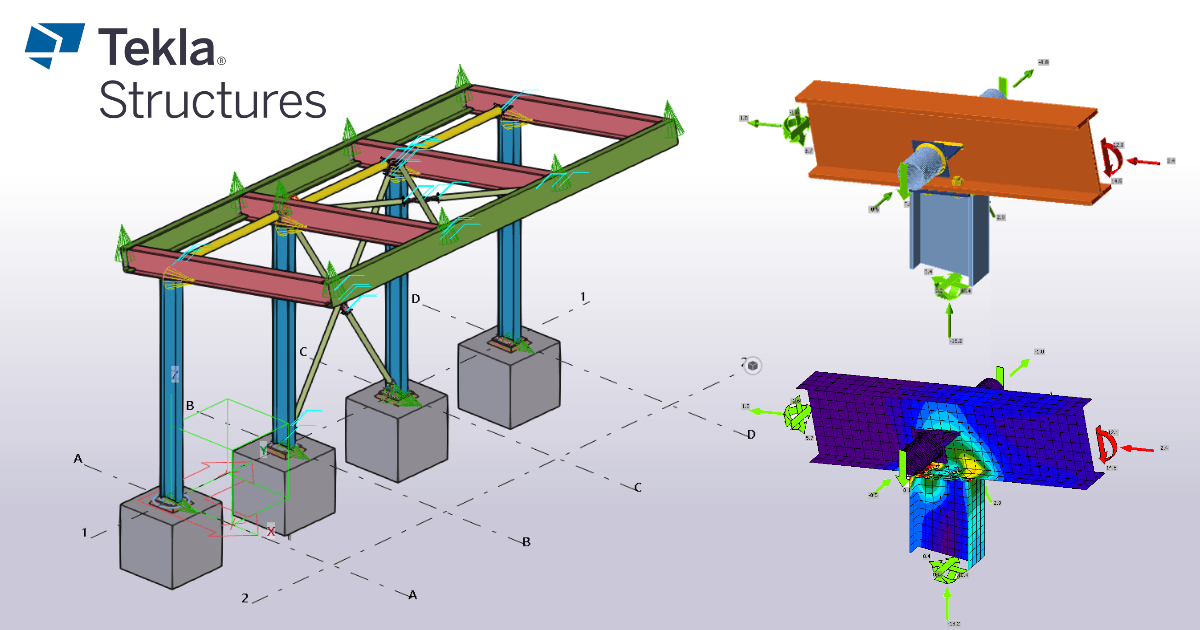


Widget #NaN: support_center_article
Name: General BIM Link tutorial - How to activate the link
ID: dd351d35-2833-4fa2-a88f-9c0c8769c77d
Show Raw Data
{
  "title": {
    "name": "Main headline (H1)",
    "type": "text",
    "value": "Come attivare il collegamento"
  },
  "preview_image": {
    "name": "Preview image",
    "type": "asset",
    "value": []
  },
  "post_date": {
    "name": "Post date",
    "type": "date_time",
    "value": null,
    "displayTimeZone": null
  },
  "perex_content": {
    "name": "Lead paragraph",
    "type": "text",
    "value": ""
  },
  "content": {
    "images": [
      {
        "description": null,
        "imageId": "9cad54c2-e42c-4598-bd6b-531f919390b4",
        "url": "https://assets-us-01.kc-usercontent.com:443/28eac049-c8ed-00e2-220c-12142a968dff/a344ea92-4286-44f1-88e1-669c6eb24d67/1-1.png",
        "height": 1200,
        "width": 1920
      },
      {
        "description": null,
        "imageId": "c8cad102-713d-4c84-b7f3-2ccfa81489e5",
        "url": "https://assets-us-01.kc-usercontent.com:443/28eac049-c8ed-00e2-220c-12142a968dff/556e9ea6-a817-41cf-9fc4-237a93e2a350/bim-link.png",
        "height": 1200,
        "width": 1143
      }
    ],
    "linkedItemCodenames": [],
    "linkedItems": [],
    "links": [
      {
        "codename": "landing_page___downloads",
        "linkId": "0dff6482-3e17-4ca2-bb66-b4abc6a8dde4",
        "urlSlug": "download",
        "type": "landing_page"
      },
      {
        "codename": "bim_links__supported_versions",
        "linkId": "eeb85fd1-4708-4f88-ad36-cbe30ac41eb7",
        "urlSlug": "collegamenti-bim-versioni-supportate-di-applicazioni-di-terze-parti",
        "type": "support_center_article"
      }
    ],
    "name": "Content",
    "type": "rich_text",
    "value": "<ul>\n  <li>Scaricare e installare l'<a data-item-id=\"0dff6482-3e17-4ca2-bb66-b4abc6a8dde4\" href=\"\">ultima versione di IDEA StatiCa</a>.</li>\n  <li>Assicurarsi di utilizzare una <a data-item-id=\"eeb85fd1-4708-4f88-ad36-cbe30ac41eb7\" href=\"\">versione supportata</a> della propria soluzione FEA/BIM.</li>\n</ul>\n<p>IDEA StatiCa integra i collegamenti BIM nelle soluzioni FEA/BIM durante la sua installazione. È possibile controllare lo stato e attivare altri collegamenti BIM per i software installati successivamente nel programma di installazione dei collegamenti BIM.</p>\n<p>Si noti che alcune soluzioni FEA richiedono ulteriori passaggi per attivare completamente il loro collegamento BIM a IDEA StatiCa.</p>\n<p>Apri IDEA StatiCa e naviga nella scheda <strong>BIM. </strong>Clicca su <strong>Attiva il tuo collegamento BIM... </strong>(Activate your BIM link...).</p>\n<figure data-asset-id=\"9cad54c2-e42c-4598-bd6b-531f919390b4\" data-image-id=\"9cad54c2-e42c-4598-bd6b-531f919390b4\"><img src=\"https://assets-us-01.kc-usercontent.com:443/28eac049-c8ed-00e2-220c-12142a968dff/a344ea92-4286-44f1-88e1-669c6eb24d67/1-1.png\" data-asset-id=\"9cad54c2-e42c-4598-bd6b-531f919390b4\" data-image-id=\"9cad54c2-e42c-4598-bd6b-531f919390b4\" alt=\"\"></figure>\n<p>Potrebbe apparire la notifica <em>\"Vuoi consentire a questa applicazione di apportare modifiche al tuo dispositivo?</em>\"; in tal caso, confermare con il pulsante <strong>Sì</strong>.</p>\n<p>Installare il collegamento BIM per il software selezionato (se trovato). La schermata indica anche lo stato di altri collegamenti BIM eventualmente già installati (Intalled).</p>\n<figure data-asset-id=\"c8cad102-713d-4c84-b7f3-2ccfa81489e5\" data-image-id=\"c8cad102-713d-4c84-b7f3-2ccfa81489e5\"><img src=\"https://assets-us-01.kc-usercontent.com:443/28eac049-c8ed-00e2-220c-12142a968dff/556e9ea6-a817-41cf-9fc4-237a93e2a350/bim-link.png\" data-asset-id=\"c8cad102-713d-4c84-b7f3-2ccfa81489e5\" data-image-id=\"c8cad102-713d-4c84-b7f3-2ccfa81489e5\" alt=\"\"></figure>"
  },
  "regions": {
    "name": "Region",
    "type": "taxonomy",
    "value": [
      {
        "name": "EMEA",
        "codename": "emea"
      },
      {
        "name": "AMER",
        "codename": "amer"
      },
      {
        "name": "APAC",
        "codename": "apac"
      }
    ],
    "taxonomyGroup": "region"
  },
  "product_groups": {
    "name": "Product group",
    "type": "taxonomy",
    "value": [
      {
        "name": "Steel",
        "codename": "steel"
      }
    ],
    "taxonomyGroup": "product_group"
  },
  "support_center_article_types": {
    "name": "Support center article",
    "type": "taxonomy",
    "value": [
      {
        "name": "Knowledge base",
        "codename": "knowledgebase_article"
      }
    ],
    "taxonomyGroup": "support_center_article"
  },
  "expertise_levels": {
    "name": "Expertise level",
    "type": "taxonomy",
    "value": [
      {
        "name": "Beginner",
        "codename": "beginner"
      },
      {
        "name": "Intermediate",
        "codename": "intermediate"
      }
    ],
    "taxonomyGroup": "expertise_level"
  },
  "labels": {
    "name": "Labels",
    "type": "taxonomy",
    "value": [
      {
        "name": "BIM link",
        "codename": "bim_links"
      }
    ],
    "taxonomyGroup": "labels"
  },
  "linked_items": {
    "name": "Linked items",
    "type": "modular_content",
    "value": [],
    "linkedItems": []
  },
  "attachments__files": {
    "name": "Attachments",
    "type": "asset",
    "value": []
  },
  "content_priority__value": {
    "name": "Content priority value",
    "type": "number",
    "value": null
  },
  "options": {
    "name": "Options",
    "type": "multiple_choice",
    "value": []
  },
  "url_slug": {
    "name": "Url slug",
    "type": "url_slug",
    "value": "come-attivare-il-collegamento"
  },
  "unique_url_slug": {
    "name": "Unique URL slug",
    "type": "custom",
    "value": "[\"how-to-activate-the-link\",\"[autogenerated]\"]"
  },
  "content_settings__sitemap": {
    "name": "Show in sitemap",
    "type": "multiple_choice",
    "value": [
      {
        "name": "default",
        "codename": "default"
      }
    ]
  },
  "content_settings__robots": {
    "name": "Search engine indexing",
    "type": "multiple_choice",
    "value": [
      {
        "name": "default",
        "codename": "default"
      }
    ]
  },
  "content_settings__is_hidden": {
    "name": "Hidden nested content",
    "type": "multiple_choice",
    "value": []
  },
  "metadata__page_title": {
    "name": "Page title",
    "type": "text",
    "value": ""
  },
  "metadata__page_description": {
    "name": "Page description",
    "type": "text",
    "value": ""
  },
  "metadata__page_keywords": {
    "name": "Page keywords",
    "type": "text",
    "value": ""
  },
  "metadata__canonical_url": {
    "name": "Canonical URL",
    "type": "text",
    "value": ""
  },
  "metadata__og_title": {
    "name": "OG:title",
    "type": "text",
    "value": ""
  },
  "metadata__og_description": {
    "name": "OG:description",
    "type": "text",
    "value": ""
  },
  "metadata__og_image": {
    "name": "OG:image",
    "type": "asset",
    "value": []
  },
  "translation__translation_connector": {
    "name": "Translation Connector",
    "type": "taxonomy",
    "value": [],
    "taxonomyGroup": "languages"
  },
  "translation__force_translation": {
    "name": "Force translation",
    "type": "multiple_choice",
    "value": []
  },
  "translation__last_translation": {
    "images": [],
    "linkedItemCodenames": [],
    "linkedItems": [],
    "links": [],
    "name": "Last translation",
    "type": "rich_text",
    "value": "<p><br></p>"
  },
  "translation__ai_translated": {
    "name": "AI translated",
    "type": "multiple_choice",
    "value": []
  },
  "page_tree_settings__page_label": {
    "name": "Page label",
    "type": "text",
    "value": ""
  },
  "page_tree_settings__path_segment": {
    "name": "Path segment",
    "type": "text",
    "value": "how-to-activate-the-link"
  },
  "page_tree_settings__breadcrumb_style": {
    "name": "Breadcrumb style",
    "type": "multiple_choice",
    "value": []
  },
  "page_tree_settings__hide_in_breadcrumbs": {
    "name": "Hide in breadcrumbs",
    "type": "multiple_choice",
    "value": []
  }
}
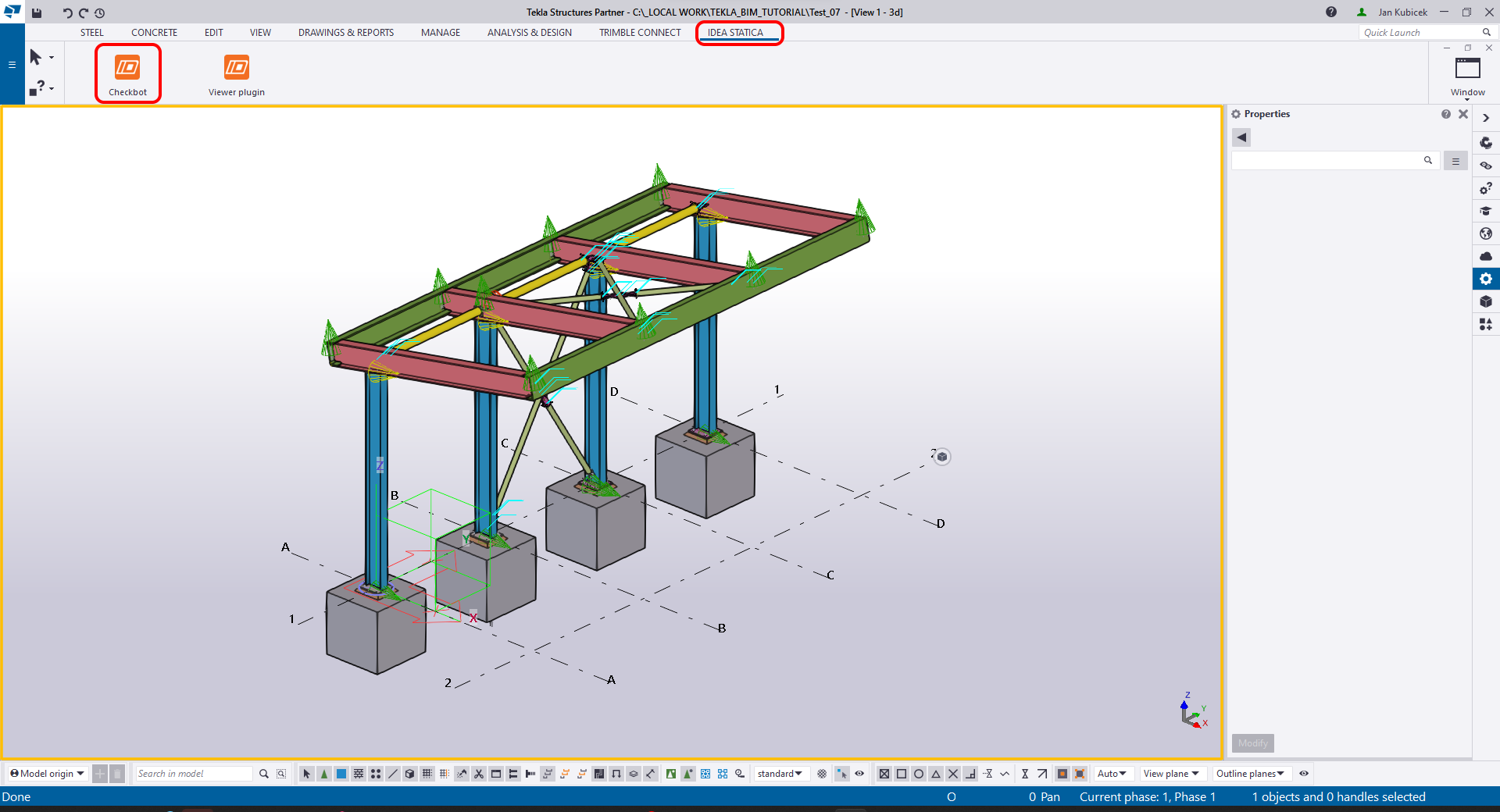
Scaricare il progetto allegato e aprirlo in Tekla Structures.
Il collegamento BIM viene integrato automaticamente. È possibile trovarlo nella barra multifunzione superiore sotto IDEA StatiCa -> Checkbot. Si aprirà l'applicazione Checkbot.
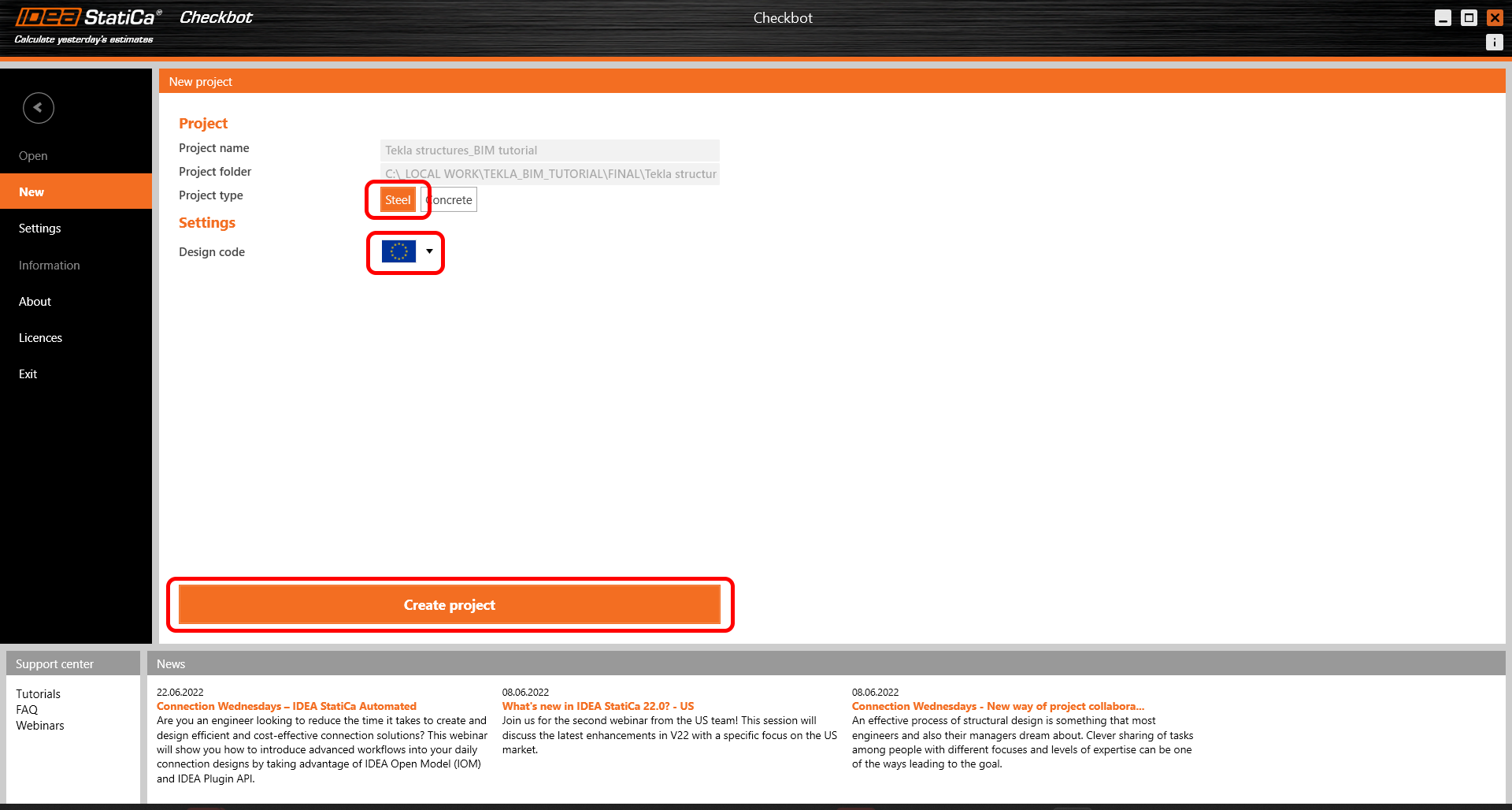
Selezionare l'opzione Nuovo con il tipo di progetto Acciaio e il codice di progetto IT. Selezionare quindi Crea progetto.
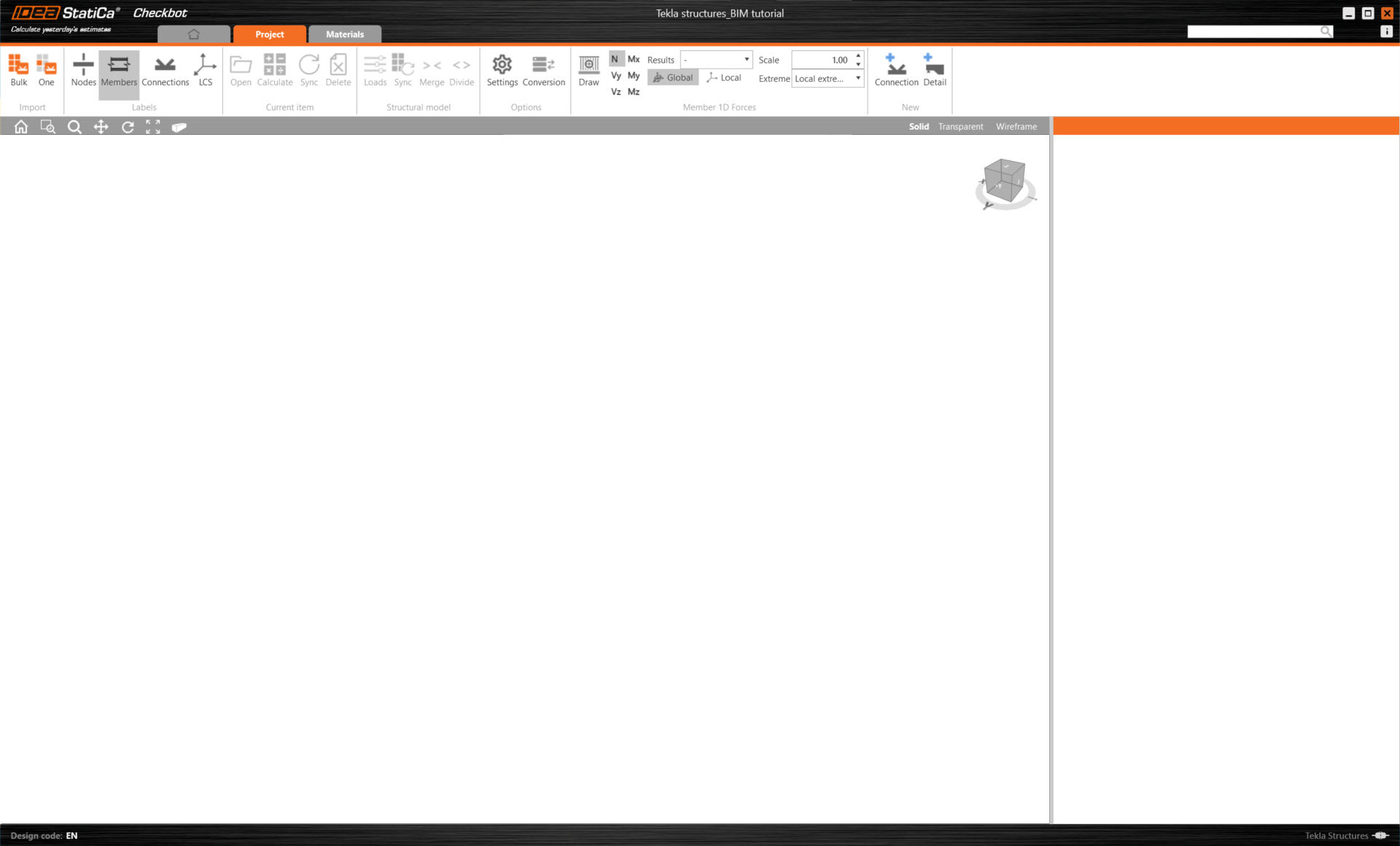
Il nuovo progetto Checkbot è pronto per importare le connessioni da Tekla Structures.
Widget #NaN: support_center_article
Name: Tekla Structures BIM Link tutorial - Import
ID: 8ae1be1f-aad5-4111-99f7-8a8d2c198a8a
Show Raw Data
{
  "title": {
    "name": "Main headline (H1)",
    "type": "text",
    "value": "Importa"
  },
  "preview_image": {
    "name": "Preview image",
    "type": "asset",
    "value": []
  },
  "post_date": {
    "name": "Post date",
    "type": "date_time",
    "value": null,
    "displayTimeZone": null
  },
  "perex_content": {
    "name": "Lead paragraph",
    "type": "text",
    "value": ""
  },
  "content": {
    "images": [
      {
        "description": null,
        "imageId": "c48a8a6a-4e33-41da-ab7b-d207eb81eae8",
        "url": "https://assets-us-01.kc-usercontent.com:443/28eac049-c8ed-00e2-220c-12142a968dff/79e03c99-94e0-4039-9064-3491da9827d9/Checkbot%20one%20window.png",
        "height": 1160,
        "width": 1920
      },
      {
        "description": null,
        "imageId": "73f0b116-5aae-4d6f-b05e-f9780e3514fb",
        "url": "https://assets-us-01.kc-usercontent.com:443/28eac049-c8ed-00e2-220c-12142a968dff/8269a3d1-9576-4919-ad3a-0b2cf0494a1d/12_Tekla%20structures.png",
        "height": 806,
        "width": 1300
      },
      {
        "description": null,
        "imageId": "df6a3293-6e04-47db-a952-dfb9d88d5b23",
        "url": "https://assets-us-01.kc-usercontent.com:443/28eac049-c8ed-00e2-220c-12142a968dff/895c2021-9047-4191-8d8a-142ecfa8d9ee/05_Tekla%20structures.png",
        "height": 1030,
        "width": 1920
      },
      {
        "description": null,
        "imageId": "48bf8d64-b68b-4885-971a-3c91ae2c0b54",
        "url": "https://assets-us-01.kc-usercontent.com:443/28eac049-c8ed-00e2-220c-12142a968dff/cd946a3a-b637-4cdc-b6ce-e7bfdf1dbcf1/CAD%20Import02.png",
        "height": 208,
        "width": 428
      },
      {
        "description": null,
        "imageId": "40f566fb-5809-41d0-a875-61f59a4cea86",
        "url": "https://assets-us-01.kc-usercontent.com:443/28eac049-c8ed-00e2-220c-12142a968dff/3262ef86-17ae-4af6-9dbf-716a1c2af343/0.png",
        "height": 1160,
        "width": 1920
      },
      {
        "description": null,
        "imageId": "622ec8a4-3922-4506-80da-52e92187e78e",
        "url": "https://assets-us-01.kc-usercontent.com:443/28eac049-c8ed-00e2-220c-12142a968dff/55d5e74d-015b-4966-87cc-e294fc1dcd7f/Checkbot%20bulk%20window.png",
        "height": 1160,
        "width": 1920
      },
      {
        "description": null,
        "imageId": "d722b622-88a6-4188-961e-bb5d986cecaa",
        "url": "https://assets-us-01.kc-usercontent.com:443/28eac049-c8ed-00e2-220c-12142a968dff/064f982c-d56c-4322-af01-7a38cfd15fc4/Bulk%20view.png",
        "height": 1166,
        "width": 1919
      },
      {
        "description": null,
        "imageId": "ffbd4f7e-aafa-496d-9f8d-67246485ea42",
        "url": "https://assets-us-01.kc-usercontent.com:443/28eac049-c8ed-00e2-220c-12142a968dff/3b9ace86-db18-432d-8bd3-0ea8b9694a59/Bulk%20view%20Checkbot.png",
        "height": 1160,
        "width": 1920
      }
    ],
    "linkedItemCodenames": [],
    "linkedItems": [],
    "links": [
      {
        "codename": "checkbot",
        "linkId": "caeb1a6c-2621-446f-8005-4d2799496a39",
        "urlSlug": "checkbot",
        "type": "landing_page"
      },
      {
        "codename": "design_v2",
        "linkId": "b0a659df-8f92-4d1f-abb6-2efa02bad946",
        "urlSlug": "connection-design",
        "type": "landing_page"
      }
    ],
    "name": "Content",
    "type": "rich_text",
    "value": "<p>Nell'applicazione <a data-item-id=\"caeb1a6c-2621-446f-8005-4d2799496a39\" href=\"\">Checkbot</a>, fare clic sul pulsante <strong>Uno </strong>nella barra multifunzione superiore.</p>\n<figure data-asset-id=\"c48a8a6a-4e33-41da-ab7b-d207eb81eae8\" data-image-id=\"c48a8a6a-4e33-41da-ab7b-d207eb81eae8\"><img src=\"https://assets-us-01.kc-usercontent.com:443/28eac049-c8ed-00e2-220c-12142a968dff/79e03c99-94e0-4039-9064-3491da9827d9/Checkbot%20one%20window.png\" data-asset-id=\"c48a8a6a-4e33-41da-ab7b-d207eb81eae8\" data-image-id=\"c48a8a6a-4e33-41da-ab7b-d207eb81eae8\" alt=\"\"></figure>\n<p>Quindi, nel modello delle strutture Tekla, segui i seguenti passaggi:</p>\n<ul>\n  <li>Seleziona la posizione del nodo che rappresenta il centro del collegamento.</li>\n  <li>Seleziona le membrature relative al giunto. In questo caso, sono stati selezionati nell'ordine della sequenza di costruzione: il primo sarà impostato come membratura resistente nell'applicazione Connection. Conferma con la barra spaziatrice.</li>\n</ul>\n<figure data-asset-id=\"73f0b116-5aae-4d6f-b05e-f9780e3514fb\" data-image-id=\"73f0b116-5aae-4d6f-b05e-f9780e3514fb\"><img src=\"https://assets-us-01.kc-usercontent.com:443/28eac049-c8ed-00e2-220c-12142a968dff/8269a3d1-9576-4919-ad3a-0b2cf0494a1d/12_Tekla%20structures.png\" data-asset-id=\"73f0b116-5aae-4d6f-b05e-f9780e3514fb\" data-image-id=\"73f0b116-5aae-4d6f-b05e-f9780e3514fb\" alt=\"\"></figure>\n<ul>\n  <li>Seleziona quindi tutti le componenti della connessione (bulloni, saldature, piastre, ecc.) trascinando il mouse dall'angolo superiore destro a quello inferiore sinistro e conferma con la barra spaziatrice.</li>\n</ul>\n<figure data-asset-id=\"df6a3293-6e04-47db-a952-dfb9d88d5b23\" data-image-id=\"df6a3293-6e04-47db-a952-dfb9d88d5b23\"><img src=\"https://assets-us-01.kc-usercontent.com:443/28eac049-c8ed-00e2-220c-12142a968dff/895c2021-9047-4191-8d8a-142ecfa8d9ee/05_Tekla%20structures.png\" data-asset-id=\"df6a3293-6e04-47db-a952-dfb9d88d5b23\" data-image-id=\"df6a3293-6e04-47db-a952-dfb9d88d5b23\" alt=\"\"></figure>\n<p>In questo modo, tutte le parti selezionate della struttura verranno importate in <a data-item-id=\"caeb1a6c-2621-446f-8005-4d2799496a39\" href=\"\">Checkbot</a>, con le stesse coordinate, orientamenti e dimensioni delle sezioni del modello BIM. Il centro del giunto viene specificato dall'utente in base all'intersezione delle membrature.</p>\n<p>Potrebbe apparire la notifica<em>\"Vuoi importare anche le saldature consigliate?</em>\". Poiché tutte le saldature sono state create nel modello BIM, seleziona il pulsante <strong>No</strong>.</p>\n<figure data-asset-id=\"48bf8d64-b68b-4885-971a-3c91ae2c0b54\" data-image-id=\"48bf8d64-b68b-4885-971a-3c91ae2c0b54\"><img src=\"https://assets-us-01.kc-usercontent.com:443/28eac049-c8ed-00e2-220c-12142a968dff/cd946a3a-b637-4cdc-b6ce-e7bfdf1dbcf1/CAD%20Import02.png\" data-asset-id=\"48bf8d64-b68b-4885-971a-3c91ae2c0b54\" data-image-id=\"48bf8d64-b68b-4885-971a-3c91ae2c0b54\" alt=\"\"></figure>\n<p>Si noti che l'area di lavoro 3D è progettata per mostrare una panoramica della struttura importata e non una vista dettagliata delle <a data-item-id=\"b0a659df-8f92-4d1f-abb6-2efa02bad946\" href=\"\">connessioni</a> effettive.</p>\n<figure data-asset-id=\"40f566fb-5809-41d0-a875-61f59a4cea86\" data-image-id=\"40f566fb-5809-41d0-a875-61f59a4cea86\"><img src=\"https://assets-us-01.kc-usercontent.com:443/28eac049-c8ed-00e2-220c-12142a968dff/3262ef86-17ae-4af6-9dbf-716a1c2af343/0.png\" data-asset-id=\"40f566fb-5809-41d0-a875-61f59a4cea86\" data-image-id=\"40f566fb-5809-41d0-a875-61f59a4cea86\" alt=\"\"></figure>\n<p>Un'altra opzione è quella di eseguire l'importazione <strong>massiva (Bulk).</strong> È più veloce,<strong> </strong>ma si noti che la numerazione dei nodi e delle membrature potrebbe essere diversa, il che influirebbe sulla corretta <strong>importazione XLS</strong> degli effetti di carico e dell'equilibrio nel giunto.</p>\n<figure data-asset-id=\"622ec8a4-3922-4506-80da-52e92187e78e\" data-image-id=\"622ec8a4-3922-4506-80da-52e92187e78e\"><img src=\"https://assets-us-01.kc-usercontent.com:443/28eac049-c8ed-00e2-220c-12142a968dff/55d5e74d-015b-4966-87cc-e294fc1dcd7f/Checkbot%20bulk%20window.png\" data-asset-id=\"622ec8a4-3922-4506-80da-52e92187e78e\" data-image-id=\"622ec8a4-3922-4506-80da-52e92187e78e\" alt=\"\"></figure>\n<p>Selezionate le colonne interne con controvento, assicurandoti di selezionare anche tutte le componenti della connessione (bulloni, saldature, piastre, ecc.). Tracciare l'area di selezione dall'angolo in alto a destra a quello in basso a sinistra.</p>\n<figure data-asset-id=\"d722b622-88a6-4188-961e-bb5d986cecaa\" data-image-id=\"d722b622-88a6-4188-961e-bb5d986cecaa\"><img src=\"https://assets-us-01.kc-usercontent.com:443/28eac049-c8ed-00e2-220c-12142a968dff/064f982c-d56c-4322-af01-7a38cfd15fc4/Bulk%20view.png\" data-asset-id=\"d722b622-88a6-4188-961e-bb5d986cecaa\" data-image-id=\"d722b622-88a6-4188-961e-bb5d986cecaa\" alt=\"\"></figure>\n<p>Dopo aver selezionato tutte le componenti della connessione, conferma la selezione con la barra spaziatrice. Il centro del giunto viene creato automaticamente dal software in base all'intersezione dell'elemento.</p>\n<figure data-asset-id=\"ffbd4f7e-aafa-496d-9f8d-67246485ea42\" data-image-id=\"ffbd4f7e-aafa-496d-9f8d-67246485ea42\"><img src=\"https://assets-us-01.kc-usercontent.com:443/28eac049-c8ed-00e2-220c-12142a968dff/3b9ace86-db18-432d-8bd3-0ea8b9694a59/Bulk%20view%20Checkbot.png\" data-asset-id=\"ffbd4f7e-aafa-496d-9f8d-67246485ea42\" data-image-id=\"ffbd4f7e-aafa-496d-9f8d-67246485ea42\" alt=\"\"></figure>\n<p>Per diverse soluzioni FEA/BIM, è possibile importare in <a data-item-id=\"caeb1a6c-2621-446f-8005-4d2799496a39\" href=\"\">Checkbot</a> anche connessioni multiple. Invece di selezionare un nodo e le membrature collegate, è possibile selezionare più nodi e membrature contemporaneamente utilizzando i metodi di selezione dell'applicazione.</p>\n<p>A causa del possibile consumo di tempo, si consiglia di <em>non</em> importare tutte le connessioni contemporaneamente, ma di creare le connessioni in modo incrementale.</p>"
  },
  "regions": {
    "name": "Region",
    "type": "taxonomy",
    "value": [
      {
        "name": "EMEA",
        "codename": "emea"
      },
      {
        "name": "AMER",
        "codename": "amer"
      },
      {
        "name": "APAC",
        "codename": "apac"
      }
    ],
    "taxonomyGroup": "region"
  },
  "product_groups": {
    "name": "Product group",
    "type": "taxonomy",
    "value": [
      {
        "name": "Connection design",
        "codename": "connection_design"
      },
      {
        "name": "Steel",
        "codename": "steel"
      }
    ],
    "taxonomyGroup": "product_group"
  },
  "support_center_article_types": {
    "name": "Support center article",
    "type": "taxonomy",
    "value": [
      {
        "name": "Knowledge base",
        "codename": "knowledgebase_article"
      }
    ],
    "taxonomyGroup": "support_center_article"
  },
  "expertise_levels": {
    "name": "Expertise level",
    "type": "taxonomy",
    "value": [
      {
        "name": "Beginner",
        "codename": "beginner"
      },
      {
        "name": "Intermediate",
        "codename": "intermediate"
      }
    ],
    "taxonomyGroup": "expertise_level"
  },
  "labels": {
    "name": "Labels",
    "type": "taxonomy",
    "value": [
      {
        "name": "BIM link",
        "codename": "bim_links"
      }
    ],
    "taxonomyGroup": "labels"
  },
  "linked_items": {
    "name": "Linked items",
    "type": "modular_content",
    "value": [],
    "linkedItems": []
  },
  "attachments__files": {
    "name": "Attachments",
    "type": "asset",
    "value": []
  },
  "content_priority__value": {
    "name": "Content priority value",
    "type": "number",
    "value": null
  },
  "options": {
    "name": "Options",
    "type": "multiple_choice",
    "value": []
  },
  "url_slug": {
    "name": "Url slug",
    "type": "url_slug",
    "value": "import"
  },
  "unique_url_slug": {
    "name": "Unique URL slug",
    "type": "custom",
    "value": "[\"import\",\"[autogenerated]\"]"
  },
  "content_settings__sitemap": {
    "name": "Show in sitemap",
    "type": "multiple_choice",
    "value": [
      {
        "name": "default",
        "codename": "default"
      }
    ]
  },
  "content_settings__robots": {
    "name": "Search engine indexing",
    "type": "multiple_choice",
    "value": [
      {
        "name": "default",
        "codename": "default"
      }
    ]
  },
  "content_settings__is_hidden": {
    "name": "Hidden nested content",
    "type": "multiple_choice",
    "value": [
      {
        "name": "yes",
        "codename": "yes"
      }
    ]
  },
  "metadata__page_title": {
    "name": "Page title",
    "type": "text",
    "value": "Tekla Structures  BIM Link tutorial - Steel connection import"
  },
  "metadata__page_description": {
    "name": "Page description",
    "type": "text",
    "value": "IDEA StatiCa step-by-step tutorial for importing steel connection from CAD into Checkbot. Structural design of welded and bolted steel connections."
  },
  "metadata__page_keywords": {
    "name": "Page keywords",
    "type": "text",
    "value": ""
  },
  "metadata__canonical_url": {
    "name": "Canonical URL",
    "type": "text",
    "value": ""
  },
  "metadata__og_title": {
    "name": "OG:title",
    "type": "text",
    "value": ""
  },
  "metadata__og_description": {
    "name": "OG:description",
    "type": "text",
    "value": ""
  },
  "metadata__og_image": {
    "name": "OG:image",
    "type": "asset",
    "value": []
  },
  "translation__translation_connector": {
    "name": "Translation Connector",
    "type": "taxonomy",
    "value": [],
    "taxonomyGroup": "languages"
  },
  "translation__force_translation": {
    "name": "Force translation",
    "type": "multiple_choice",
    "value": []
  },
  "translation__last_translation": {
    "images": [],
    "linkedItemCodenames": [],
    "linkedItems": [],
    "links": [],
    "name": "Last translation",
    "type": "rich_text",
    "value": "<p><br></p>"
  },
  "translation__ai_translated": {
    "name": "AI translated",
    "type": "multiple_choice",
    "value": []
  },
  "page_tree_settings__page_label": {
    "name": "Page label",
    "type": "text",
    "value": ""
  },
  "page_tree_settings__path_segment": {
    "name": "Path segment",
    "type": "text",
    "value": "import-cad"
  },
  "page_tree_settings__breadcrumb_style": {
    "name": "Breadcrumb style",
    "type": "multiple_choice",
    "value": []
  },
  "page_tree_settings__hide_in_breadcrumbs": {
    "name": "Hide in breadcrumbs",
    "type": "multiple_choice",
    "value": []
  }
}
Widget #NaN: support_center_article
Name: Tekla Structures BIM Link tutorial - Geometry
ID: 40de322c-cec8-46cb-9268-b9d1bb445e74
Show Raw Data
{
  "title": {
    "name": "Main headline (H1)",
    "type": "text",
    "value": "Geometria"
  },
  "preview_image": {
    "name": "Preview image",
    "type": "asset",
    "value": []
  },
  "post_date": {
    "name": "Post date",
    "type": "date_time",
    "value": null,
    "displayTimeZone": null
  },
  "perex_content": {
    "name": "Lead paragraph",
    "type": "text",
    "value": ""
  },
  "content": {
    "images": [
      {
        "description": null,
        "imageId": "a4934eb4-6339-47e0-9348-f8aa1c35743f",
        "url": "https://assets-us-01.kc-usercontent.com:443/28eac049-c8ed-00e2-220c-12142a968dff/02c4db79-bc0f-46c4-b306-faba1d74e093/29.png",
        "height": 1160,
        "width": 1920
      },
      {
        "description": null,
        "imageId": "a9edccc1-76d8-49ca-bf67-c61cab120633",
        "url": "https://assets-us-01.kc-usercontent.com:443/28eac049-c8ed-00e2-220c-12142a968dff/1b1140e1-9950-473b-bf6a-0fe1af370844/con%20view%20without%20welds.png",
        "height": 1160,
        "width": 1920
      },
      {
        "description": null,
        "imageId": "a3afab4b-5ab9-4768-bd9a-61d87c1704b3",
        "url": "https://assets-us-01.kc-usercontent.com:443/28eac049-c8ed-00e2-220c-12142a968dff/d3a89a60-841a-4fc5-a045-0fedd3aee835/Checking%20missing%20welds.png",
        "height": 1160,
        "width": 1920
      },
      {
        "description": null,
        "imageId": "0702a2c0-4530-4ccd-b404-1e656c1769e8",
        "url": "https://assets-us-01.kc-usercontent.com:443/28eac049-c8ed-00e2-220c-12142a968dff/c0f792e4-1cc1-4c2d-995a-0791f16ad0cf/3.png",
        "height": 600,
        "width": 480
      }
    ],
    "linkedItemCodenames": [],
    "linkedItems": [],
    "links": [
      {
        "codename": "checkbot",
        "linkId": "caeb1a6c-2621-446f-8005-4d2799496a39",
        "urlSlug": "checkbot",
        "type": "landing_page"
      },
      {
        "codename": "steel___v2",
        "linkId": "f6acf868-1f2d-48e6-8ccb-711f6883d5f7",
        "urlSlug": "progettazione-dell-acciaio-piu-rapida-e-accurata",
        "type": "landing_page"
      },
      {
        "codename": "code_check___v2",
        "linkId": "8111d61c-37e1-4ca1-8dec-e337e89e0c72",
        "urlSlug": "code-checking-connections",
        "type": "landing_page"
      }
    ],
    "name": "Content",
    "type": "rich_text",
    "value": "<p>Le impostazioni delle membrature sono importate da Tekla Structures. È tuttavia possibile modificare il profilo della sezione e l'eccentricità dell'asse di qualsiasi membratura nella parte destra della schermata del <a data-item-id=\"caeb1a6c-2621-446f-8005-4d2799496a39\" href=\"\">Checkbot</a>, ma questo interromperà il collegamento con l'applicazione BIM in questa sessione, a meno che non venga sincronizzato di nuovo.</p>\n<p>Nell'elenco degli elementi del progetto sotto Connessioni e con una connessione evidenziata in <a data-item-id=\"caeb1a6c-2621-446f-8005-4d2799496a39\" href=\"\">Checkbot</a>, è possibile fare clic con il tasto destro del mouse e selezionare <strong>Apri </strong>o fare clic sul comando della barra multifunzione <strong>Apri</strong> per avviare la <a data-item-id=\"f6acf868-1f2d-48e6-8ccb-711f6883d5f7\" href=\"\">progettazione</a>, la <a data-item-id=\"8111d61c-37e1-4ca1-8dec-e337e89e0c72\" href=\"\">verifica secondo codice</a> e la creazione delle relazioni.</p>\n<figure data-asset-id=\"a4934eb4-6339-47e0-9348-f8aa1c35743f\" data-image-id=\"a4934eb4-6339-47e0-9348-f8aa1c35743f\"><img src=\"https://assets-us-01.kc-usercontent.com:443/28eac049-c8ed-00e2-220c-12142a968dff/02c4db79-bc0f-46c4-b306-faba1d74e093/29.png\" data-asset-id=\"a4934eb4-6339-47e0-9348-f8aa1c35743f\" data-image-id=\"a4934eb4-6339-47e0-9348-f8aa1c35743f\" alt=\"\"></figure>\n<p>La connessione importata viene aperta nell'applicazione <a data-item-id=\"f6acf868-1f2d-48e6-8ccb-711f6883d5f7\" href=\"\">IDEA StatiCa Connection</a>.</p>\n<figure data-asset-id=\"a9edccc1-76d8-49ca-bf67-c61cab120633\" data-image-id=\"a9edccc1-76d8-49ca-bf67-c61cab120633\"><img src=\"https://assets-us-01.kc-usercontent.com:443/28eac049-c8ed-00e2-220c-12142a968dff/1b1140e1-9950-473b-bf6a-0fe1af370844/con%20view%20without%20welds.png\" data-asset-id=\"a9edccc1-76d8-49ca-bf67-c61cab120633\" data-image-id=\"a9edccc1-76d8-49ca-bf67-c61cab120633\" alt=\"\"></figure>\n<p>Al momento abbiamo notato che nel modello mancano alcune saldature, ma non c'è da preoccuparsi, perché è possibile correggerle utilizzando la funzione 'Controlla saldature mancanti'.</p>\n<figure data-asset-id=\"a3afab4b-5ab9-4768-bd9a-61d87c1704b3\" data-image-id=\"a3afab4b-5ab9-4768-bd9a-61d87c1704b3\"><img src=\"https://assets-us-01.kc-usercontent.com:443/28eac049-c8ed-00e2-220c-12142a968dff/d3a89a60-841a-4fc5-a045-0fedd3aee835/Checking%20missing%20welds.png\" data-asset-id=\"a3afab4b-5ab9-4768-bd9a-61d87c1704b3\" data-image-id=\"a3afab4b-5ab9-4768-bd9a-61d87c1704b3\" alt=\"\"></figure>\n<p>Selezionate tutte le caselle come mostrato nell'immagine seguente e fate clic su OK.</p>\n<figure data-asset-id=\"0702a2c0-4530-4ccd-b404-1e656c1769e8\" data-image-id=\"0702a2c0-4530-4ccd-b404-1e656c1769e8\"><img src=\"https://assets-us-01.kc-usercontent.com:443/28eac049-c8ed-00e2-220c-12142a968dff/c0f792e4-1cc1-4c2d-995a-0791f16ad0cf/3.png\" data-asset-id=\"0702a2c0-4530-4ccd-b404-1e656c1769e8\" data-image-id=\"0702a2c0-4530-4ccd-b404-1e656c1769e8\" alt=\"\"></figure>"
  },
  "regions": {
    "name": "Region",
    "type": "taxonomy",
    "value": [
      {
        "name": "EMEA",
        "codename": "emea"
      },
      {
        "name": "AMER",
        "codename": "amer"
      },
      {
        "name": "APAC",
        "codename": "apac"
      }
    ],
    "taxonomyGroup": "region"
  },
  "product_groups": {
    "name": "Product group",
    "type": "taxonomy",
    "value": [
      {
        "name": "Connection design",
        "codename": "connection_design"
      },
      {
        "name": "Steel",
        "codename": "steel"
      }
    ],
    "taxonomyGroup": "product_group"
  },
  "support_center_article_types": {
    "name": "Support center article",
    "type": "taxonomy",
    "value": [
      {
        "name": "Knowledge base",
        "codename": "knowledgebase_article"
      }
    ],
    "taxonomyGroup": "support_center_article"
  },
  "expertise_levels": {
    "name": "Expertise level",
    "type": "taxonomy",
    "value": [
      {
        "name": "Beginner",
        "codename": "beginner"
      },
      {
        "name": "Intermediate",
        "codename": "intermediate"
      }
    ],
    "taxonomyGroup": "expertise_level"
  },
  "labels": {
    "name": "Labels",
    "type": "taxonomy",
    "value": [
      {
        "name": "BIM link",
        "codename": "bim_links"
      }
    ],
    "taxonomyGroup": "labels"
  },
  "linked_items": {
    "name": "Linked items",
    "type": "modular_content",
    "value": [],
    "linkedItems": []
  },
  "attachments__files": {
    "name": "Attachments",
    "type": "asset",
    "value": []
  },
  "content_priority__value": {
    "name": "Content priority value",
    "type": "number",
    "value": null
  },
  "options": {
    "name": "Options",
    "type": "multiple_choice",
    "value": []
  },
  "url_slug": {
    "name": "Url slug",
    "type": "url_slug",
    "value": "Geometria"
  },
  "unique_url_slug": {
    "name": "Unique URL slug",
    "type": "custom",
    "value": "[\"Geometria\",\"[autogenerated]\"]"
  },
  "content_settings__sitemap": {
    "name": "Show in sitemap",
    "type": "multiple_choice",
    "value": [
      {
        "name": "default",
        "codename": "default"
      }
    ]
  },
  "content_settings__robots": {
    "name": "Search engine indexing",
    "type": "multiple_choice",
    "value": [
      {
        "name": "noindex, nofollow",
        "codename": "noindex__nofollow"
      }
    ]
  },
  "content_settings__is_hidden": {
    "name": "Hidden nested content",
    "type": "multiple_choice",
    "value": []
  },
  "metadata__page_title": {
    "name": "Page title",
    "type": "text",
    "value": "Tekla Structures BIM Link tutorial - Steel connection geometry"
  },
  "metadata__page_description": {
    "name": "Page description",
    "type": "text",
    "value": "IDEA StatiCa step-by-step tutorial for geometry adjustment of a steel connection in Checkbot. Structural design of welded and bolted steel connections."
  },
  "metadata__page_keywords": {
    "name": "Page keywords",
    "type": "text",
    "value": ""
  },
  "metadata__canonical_url": {
    "name": "Canonical URL",
    "type": "text",
    "value": ""
  },
  "metadata__og_title": {
    "name": "OG:title",
    "type": "text",
    "value": ""
  },
  "metadata__og_description": {
    "name": "OG:description",
    "type": "text",
    "value": ""
  },
  "metadata__og_image": {
    "name": "OG:image",
    "type": "asset",
    "value": []
  },
  "translation__translation_connector": {
    "name": "Translation Connector",
    "type": "taxonomy",
    "value": [],
    "taxonomyGroup": "languages"
  },
  "translation__force_translation": {
    "name": "Force translation",
    "type": "multiple_choice",
    "value": []
  },
  "translation__last_translation": {
    "images": [],
    "linkedItemCodenames": [],
    "linkedItems": [],
    "links": [],
    "name": "Last translation",
    "type": "rich_text",
    "value": "<p><br></p>"
  },
  "translation__ai_translated": {
    "name": "AI translated",
    "type": "multiple_choice",
    "value": []
  },
  "page_tree_settings__page_label": {
    "name": "Page label",
    "type": "text",
    "value": ""
  },
  "page_tree_settings__path_segment": {
    "name": "Path segment",
    "type": "text",
    "value": "geometry-cad-copy"
  },
  "page_tree_settings__breadcrumb_style": {
    "name": "Breadcrumb style",
    "type": "multiple_choice",
    "value": []
  },
  "page_tree_settings__hide_in_breadcrumbs": {
    "name": "Hide in breadcrumbs",
    "type": "multiple_choice",
    "value": []
  }
}
Widget #NaN: support_center_article
Name: Tekla Structures BIM Link tutorial - Load effects
ID: 292280d0-8ed2-413b-a1fa-8b425a1125a6
Show Raw Data
{
  "title": {
    "name": "Main headline (H1)",
    "type": "text",
    "value": "Effetti dei carichi"
  },
  "preview_image": {
    "name": "Preview image",
    "type": "asset",
    "value": []
  },
  "post_date": {
    "name": "Post date",
    "type": "date_time",
    "value": null,
    "displayTimeZone": null
  },
  "perex_content": {
    "name": "Lead paragraph",
    "type": "text",
    "value": ""
  },
  "content": {
    "images": [
      {
        "description": null,
        "imageId": "3e0290f8-8100-4e05-b540-47c525c42b34",
        "url": "https://assets-us-01.kc-usercontent.com:443/28eac049-c8ed-00e2-220c-12142a968dff/8dee2874-7f90-4f1d-880c-8ce7ebc50ea0/Load%20effects%20excel.png",
        "height": 457,
        "width": 876
      },
      {
        "description": null,
        "imageId": "9f229dce-7ce9-4561-b33e-50e8b3db53aa",
        "url": "https://assets-us-01.kc-usercontent.com:443/28eac049-c8ed-00e2-220c-12142a968dff/f37e6d05-a646-4383-a27f-fb6beb696db2/14.png",
        "height": 1160,
        "width": 1920
      },
      {
        "description": null,
        "imageId": "fce390ff-773b-481c-98b0-c139ef701e82",
        "url": "https://assets-us-01.kc-usercontent.com:443/28eac049-c8ed-00e2-220c-12142a968dff/2c9ee6be-11da-4c32-b55c-5b1038256ff7/16.png",
        "height": 580,
        "width": 950
      },
      {
        "description": null,
        "imageId": "801ef4e2-bbd1-4de2-b9a6-5aa303257ede",
        "url": "https://assets-us-01.kc-usercontent.com:443/28eac049-c8ed-00e2-220c-12142a968dff/386b5bbc-d671-4c3c-9abd-130569a1dcb2/con%20view%2C%20loads%20%2B%20welds.png",
        "height": 1160,
        "width": 1920
      }
    ],
    "linkedItemCodenames": [],
    "linkedItems": [],
    "links": [],
    "name": "Content",
    "type": "rich_text",
    "value": "<p>Scarica il foglio Excel allegato con gli effetti del carico e aprilo. Seleziona le celle contenenti i valori delle forze interne nella tabella e copiali (Ctrl + C).</p>\n<figure data-asset-id=\"3e0290f8-8100-4e05-b540-47c525c42b34\" data-image-id=\"3e0290f8-8100-4e05-b540-47c525c42b34\"><img src=\"https://assets-us-01.kc-usercontent.com:443/28eac049-c8ed-00e2-220c-12142a968dff/8dee2874-7f90-4f1d-880c-8ce7ebc50ea0/Load%20effects%20excel.png\" data-asset-id=\"3e0290f8-8100-4e05-b540-47c525c42b34\" data-image-id=\"3e0290f8-8100-4e05-b540-47c525c42b34\" alt=\"\"></figure>\n<p>Quindi, in IDEA StatiCa Connection, seleziona il pulsante <strong>Importa XLS</strong> nella barra multifunzione superiore.</p>\n<figure data-asset-id=\"9f229dce-7ce9-4561-b33e-50e8b3db53aa\" data-image-id=\"9f229dce-7ce9-4561-b33e-50e8b3db53aa\"><img src=\"https://assets-us-01.kc-usercontent.com:443/28eac049-c8ed-00e2-220c-12142a968dff/f37e6d05-a646-4383-a27f-fb6beb696db2/14.png\" data-asset-id=\"9f229dce-7ce9-4561-b33e-50e8b3db53aa\" data-image-id=\"9f229dce-7ce9-4561-b33e-50e8b3db53aa\" alt=\"\"></figure>\n<p>Fai clic con il tasto destro del mouse, seleziona la prima cella e incolla (Ctrl + V) i valori delle forze interne.</p>\n<figure data-asset-id=\"fce390ff-773b-481c-98b0-c139ef701e82\" data-image-id=\"fce390ff-773b-481c-98b0-c139ef701e82\"><img src=\"https://assets-us-01.kc-usercontent.com:443/28eac049-c8ed-00e2-220c-12142a968dff/2c9ee6be-11da-4c32-b55c-5b1038256ff7/16.png\" data-asset-id=\"fce390ff-773b-481c-98b0-c139ef701e82\" data-image-id=\"fce390ff-773b-481c-98b0-c139ef701e82\" alt=\"\"></figure>\n<p>È necessario che l'ordine delle righe e delle colonne della tabella Excel sia lo stesso della tabella degli effetti di carico nell'applicazione IDEA StatiCa Connection. Se le righe o le colonne vengono scambiate, si otterrà un'immissione errata delle forze interne sulle membrature.</p>\n<figure data-asset-id=\"801ef4e2-bbd1-4de2-b9a6-5aa303257ede\" data-image-id=\"801ef4e2-bbd1-4de2-b9a6-5aa303257ede\"><img src=\"https://assets-us-01.kc-usercontent.com:443/28eac049-c8ed-00e2-220c-12142a968dff/386b5bbc-d671-4c3c-9abd-130569a1dcb2/con%20view%2C%20loads%20%2B%20welds.png\" data-asset-id=\"801ef4e2-bbd1-4de2-b9a6-5aa303257ede\" data-image-id=\"801ef4e2-bbd1-4de2-b9a6-5aa303257ede\" alt=\"\"></figure>"
  },
  "regions": {
    "name": "Region",
    "type": "taxonomy",
    "value": [
      {
        "name": "AMER",
        "codename": "amer"
      },
      {
        "name": "EMEA",
        "codename": "emea"
      },
      {
        "name": "APAC",
        "codename": "apac"
      }
    ],
    "taxonomyGroup": "region"
  },
  "product_groups": {
    "name": "Product group",
    "type": "taxonomy",
    "value": [
      {
        "name": "Steel",
        "codename": "steel"
      },
      {
        "name": "Connection design",
        "codename": "connection_design"
      }
    ],
    "taxonomyGroup": "product_group"
  },
  "support_center_article_types": {
    "name": "Support center article",
    "type": "taxonomy",
    "value": [
      {
        "name": "Knowledge base",
        "codename": "knowledgebase_article"
      }
    ],
    "taxonomyGroup": "support_center_article"
  },
  "expertise_levels": {
    "name": "Expertise level",
    "type": "taxonomy",
    "value": [
      {
        "name": "Beginner",
        "codename": "beginner"
      },
      {
        "name": "Intermediate",
        "codename": "intermediate"
      }
    ],
    "taxonomyGroup": "expertise_level"
  },
  "labels": {
    "name": "Labels",
    "type": "taxonomy",
    "value": [
      {
        "name": "BIM link",
        "codename": "bim_links"
      }
    ],
    "taxonomyGroup": "labels"
  },
  "linked_items": {
    "name": "Linked items",
    "type": "modular_content",
    "value": [],
    "linkedItems": []
  },
  "attachments__files": {
    "name": "Attachments",
    "type": "asset",
    "value": []
  },
  "content_priority__value": {
    "name": "Content priority value",
    "type": "number",
    "value": null
  },
  "options": {
    "name": "Options",
    "type": "multiple_choice",
    "value": []
  },
  "url_slug": {
    "name": "Url slug",
    "type": "url_slug",
    "value": "effetti-dei-carichi"
  },
  "unique_url_slug": {
    "name": "Unique URL slug",
    "type": "custom",
    "value": "[\"load-effects\",\"[autogenerated]\"]"
  },
  "content_settings__sitemap": {
    "name": "Show in sitemap",
    "type": "multiple_choice",
    "value": [
      {
        "name": "default",
        "codename": "default"
      }
    ]
  },
  "content_settings__robots": {
    "name": "Search engine indexing",
    "type": "multiple_choice",
    "value": [
      {
        "name": "default",
        "codename": "default"
      }
    ]
  },
  "content_settings__is_hidden": {
    "name": "Hidden nested content",
    "type": "multiple_choice",
    "value": [
      {
        "name": "yes",
        "codename": "yes"
      }
    ]
  },
  "metadata__page_title": {
    "name": "Page title",
    "type": "text",
    "value": "Tekla Structures BIM Link tutorial - Steel connection internal forces import"
  },
  "metadata__page_description": {
    "name": "Page description",
    "type": "text",
    "value": ""
  },
  "metadata__page_keywords": {
    "name": "Page keywords",
    "type": "text",
    "value": "IDEA StatiCa step-by-step tutorial for importing internal forces of a steel connection. Structural design of welded and bolted steel connections."
  },
  "metadata__canonical_url": {
    "name": "Canonical URL",
    "type": "text",
    "value": ""
  },
  "metadata__og_title": {
    "name": "OG:title",
    "type": "text",
    "value": ""
  },
  "metadata__og_description": {
    "name": "OG:description",
    "type": "text",
    "value": ""
  },
  "metadata__og_image": {
    "name": "OG:image",
    "type": "asset",
    "value": []
  },
  "translation__translation_connector": {
    "name": "Translation Connector",
    "type": "taxonomy",
    "value": [],
    "taxonomyGroup": "languages"
  },
  "translation__force_translation": {
    "name": "Force translation",
    "type": "multiple_choice",
    "value": []
  },
  "translation__last_translation": {
    "images": [],
    "linkedItemCodenames": [],
    "linkedItems": [],
    "links": [],
    "name": "Last translation",
    "type": "rich_text",
    "value": "<p><br></p>"
  },
  "translation__ai_translated": {
    "name": "AI translated",
    "type": "multiple_choice",
    "value": []
  },
  "page_tree_settings__page_label": {
    "name": "Page label",
    "type": "text",
    "value": ""
  },
  "page_tree_settings__path_segment": {
    "name": "Path segment",
    "type": "text",
    "value": "load-effects-cad-bim-copy"
  },
  "page_tree_settings__breadcrumb_style": {
    "name": "Breadcrumb style",
    "type": "multiple_choice",
    "value": []
  },
  "page_tree_settings__hide_in_breadcrumbs": {
    "name": "Hide in breadcrumbs",
    "type": "multiple_choice",
    "value": []
  }
}
Widget #NaN: support_center_article
Name: Tekla Structures BIM Link tutorial - Design Example (EN)
ID: f9cc6ac1-cfa8-41fb-935e-d31f5232fc05
Show Raw Data
{
  "title": {
    "name": "Main headline (H1)",
    "type": "text",
    "value": "Progetto"
  },
  "preview_image": {
    "name": "Preview image",
    "type": "asset",
    "value": []
  },
  "post_date": {
    "name": "Post date",
    "type": "date_time",
    "value": null,
    "displayTimeZone": null
  },
  "perex_content": {
    "name": "Lead paragraph",
    "type": "text",
    "value": ""
  },
  "content": {
    "images": [
      {
        "description": null,
        "imageId": "3286b2e7-7c57-49ea-b55c-654ee5a9c34c",
        "url": "https://assets-us-01.kc-usercontent.com:443/28eac049-c8ed-00e2-220c-12142a968dff/b3d16154-8ae3-4dca-ae98-c32b7fb88c1b/4.png",
        "height": 1160,
        "width": 1920
      },
      {
        "description": null,
        "imageId": "3f2036ce-5dbb-4722-aa6a-0734cb1877ca",
        "url": "https://assets-us-01.kc-usercontent.com:443/28eac049-c8ed-00e2-220c-12142a968dff/9ab18b37-a0f9-4442-846d-12e5830f4eb5/5.png",
        "height": 1160,
        "width": 1920
      },
      {
        "description": null,
        "imageId": "ade1e335-0306-4fd2-b892-f90095b3e9e5",
        "url": "https://assets-us-01.kc-usercontent.com:443/28eac049-c8ed-00e2-220c-12142a968dff/c84083c4-1038-4127-93d2-e7dc1b1a9764/9.png",
        "height": 1160,
        "width": 1920
      },
      {
        "description": null,
        "imageId": "3670013f-7181-4412-9c3c-8f529cf971b1",
        "url": "https://assets-us-01.kc-usercontent.com:443/28eac049-c8ed-00e2-220c-12142a968dff/0b7be985-385c-4056-88d4-ae10412ff82c/11.png",
        "height": 1160,
        "width": 1920
      },
      {
        "description": null,
        "imageId": "1b277fb5-34f4-46e7-bbc9-33f7402d1534",
        "url": "https://assets-us-01.kc-usercontent.com:443/28eac049-c8ed-00e2-220c-12142a968dff/9c3df4bb-a4ee-4d4b-8d05-08eaa8b425be/7.png",
        "height": 1160,
        "width": 1920
      },
      {
        "description": null,
        "imageId": "6967a00f-3210-4de4-8d42-754a45925657",
        "url": "https://assets-us-01.kc-usercontent.com:443/28eac049-c8ed-00e2-220c-12142a968dff/3dc1d8d9-69f0-47af-a91b-e0bace38c153/wrong%20welds%20.png",
        "height": 1160,
        "width": 1920
      },
      {
        "description": null,
        "imageId": "88827cb7-a929-4b71-900b-dae1e2a19c73",
        "url": "https://assets-us-01.kc-usercontent.com:443/28eac049-c8ed-00e2-220c-12142a968dff/29621132-96b4-49bc-bfe9-a62c98f17f65/12.png",
        "height": 1160,
        "width": 1920
      },
      {
        "description": null,
        "imageId": "ec730715-9025-4abe-8368-9ee1d4861da8",
        "url": "https://assets-us-01.kc-usercontent.com:443/28eac049-c8ed-00e2-220c-12142a968dff/982af5bd-2a75-4c16-b92c-842d6b6fd852/13.png",
        "height": 1160,
        "width": 1920
      },
      {
        "description": null,
        "imageId": "7ae377c2-2997-48d2-8160-5f5c840b64f9",
        "url": "https://assets-us-01.kc-usercontent.com:443/28eac049-c8ed-00e2-220c-12142a968dff/ff14c9ad-3406-4319-81fc-21a52419d217/changing%20model%20type%20for%20strut.png",
        "height": 1160,
        "width": 1920
      },
      {
        "description": null,
        "imageId": "dc56893a-a7fd-4eaa-9d49-fc9699d93c94",
        "url": "https://assets-us-01.kc-usercontent.com:443/28eac049-c8ed-00e2-220c-12142a968dff/3445d936-f5f1-4eca-bad1-b01e4315b59e/22.png",
        "height": 1160,
        "width": 1920
      },
      {
        "description": null,
        "imageId": "151b9030-18df-4d63-9f9d-3371c710fafd",
        "url": "https://assets-us-01.kc-usercontent.com:443/28eac049-c8ed-00e2-220c-12142a968dff/0d8e924a-5f37-4b6c-946d-7f4b5622e38f/equivalent%20stress%20.png",
        "height": 1160,
        "width": 1920
      },
      {
        "description": null,
        "imageId": "99d35cd8-fdf4-4824-8082-accda36f5545",
        "url": "https://assets-us-01.kc-usercontent.com:443/28eac049-c8ed-00e2-220c-12142a968dff/033a30f0-5d61-47cf-a484-dee0a43159f4/Tekla%20structures_design_06.png",
        "height": 828,
        "width": 2100
      },
      {
        "description": null,
        "imageId": "bb01b922-decd-4ebb-910c-db05010079c7",
        "url": "https://assets-us-01.kc-usercontent.com:443/28eac049-c8ed-00e2-220c-12142a968dff/f2bb28d6-e27b-4ec4-b4ce-fa00b8a42b3b/24.png",
        "height": 1160,
        "width": 1920
      },
      {
        "description": null,
        "imageId": "1d5ee563-5d27-4adf-a386-d992b10eaebd",
        "url": "https://assets-us-01.kc-usercontent.com:443/28eac049-c8ed-00e2-220c-12142a968dff/ecd17e5f-7f18-495d-8aaa-9dcc50e8868f/25.png",
        "height": 1160,
        "width": 1920
      }
    ],
    "linkedItemCodenames": [],
    "linkedItems": [],
    "links": [
      {
        "codename": "landing_page___steel_verification",
        "linkId": "06158daa-1491-4e83-ac34-4964bd5a3c63",
        "urlSlug": "verifiche-dell-acciaio",
        "type": "landing_page"
      },
      {
        "codename": "design_v2",
        "linkId": "b0a659df-8f92-4d1f-abb6-2efa02bad946",
        "urlSlug": "connection-design",
        "type": "landing_page"
      },
      {
        "codename": "equivalent_stress_above_acceptable_levels__but_che",
        "linkId": "860ec761-ea54-58b4-b6d2-d42dc086669c",
        "urlSlug": "tensioni-nelle-piastre-superiori-al-limite-di-snervamento",
        "type": "support_center_article"
      },
      {
        "codename": "different_tension_forces_in_the_bolts",
        "linkId": "2c07f751-2638-5e69-a888-4cb8307741b0",
        "urlSlug": "effetto-leva-e-forza-di-trazione-elevata-nei-bulloni",
        "type": "support_center_article"
      },
      {
        "codename": "code_check___v2",
        "linkId": "8111d61c-37e1-4ca1-8dec-e337e89e0c72",
        "urlSlug": "code-checking-connections",
        "type": "landing_page"
      },
      {
        "codename": "checkbot",
        "linkId": "caeb1a6c-2621-446f-8005-4d2799496a39",
        "urlSlug": "checkbot",
        "type": "landing_page"
      }
    ],
    "name": "Content",
    "type": "rich_text",
    "value": "<p>Nel nostro modello di connessione importato, possiamo notare che alcune saldature sui tubi sono state importate in modo errato e devono essere corrette.</p>\n<figure data-asset-id=\"3286b2e7-7c57-49ea-b55c-654ee5a9c34c\" data-image-id=\"3286b2e7-7c57-49ea-b55c-654ee5a9c34c\"><img src=\"https://assets-us-01.kc-usercontent.com:443/28eac049-c8ed-00e2-220c-12142a968dff/b3d16154-8ae3-4dca-ae98-c32b7fb88c1b/4.png\" data-asset-id=\"3286b2e7-7c57-49ea-b55c-654ee5a9c34c\" data-image-id=\"3286b2e7-7c57-49ea-b55c-654ee5a9c34c\" alt=\"\"></figure>\n<p>Per l'elemento <strong>Puntone S1-1 </strong>cambiare la dimensione della saldatura a 4 mm e l'orientamento del lato anteriore.</p>\n<figure data-asset-id=\"3f2036ce-5dbb-4722-aa6a-0734cb1877ca\" data-image-id=\"3f2036ce-5dbb-4722-aa6a-0734cb1877ca\"><img src=\"https://assets-us-01.kc-usercontent.com:443/28eac049-c8ed-00e2-220c-12142a968dff/9ab18b37-a0f9-4442-846d-12e5830f4eb5/5.png\" data-asset-id=\"3f2036ce-5dbb-4722-aa6a-0734cb1877ca\" data-image-id=\"3f2036ce-5dbb-4722-aa6a-0734cb1877ca\" alt=\"\"></figure>\n<p>Per l'elemento <strong>Puntone S2-2 </strong>modificare la dimensione della saldatura a 4 mm e l'orientamento del lato anteriore.</p>\n<figure data-asset-id=\"ade1e335-0306-4fd2-b892-f90095b3e9e5\" data-image-id=\"ade1e335-0306-4fd2-b892-f90095b3e9e5\"><img src=\"https://assets-us-01.kc-usercontent.com:443/28eac049-c8ed-00e2-220c-12142a968dff/c84083c4-1038-4127-93d2-e7dc1b1a9764/9.png\" data-asset-id=\"ade1e335-0306-4fd2-b892-f90095b3e9e5\" data-image-id=\"ade1e335-0306-4fd2-b892-f90095b3e9e5\" alt=\"\"></figure>\n<p>Per l'elemento <strong>Diag 3-3 </strong>modificare la dimensione della saldatura a 4 mm e l'orientamento del lato anteriore.</p>\n<figure data-asset-id=\"3670013f-7181-4412-9c3c-8f529cf971b1\" data-image-id=\"3670013f-7181-4412-9c3c-8f529cf971b1\"><img src=\"https://assets-us-01.kc-usercontent.com:443/28eac049-c8ed-00e2-220c-12142a968dff/0b7be985-385c-4056-88d4-ae10412ff82c/11.png\" data-asset-id=\"3670013f-7181-4412-9c3c-8f529cf971b1\" data-image-id=\"3670013f-7181-4412-9c3c-8f529cf971b1\" alt=\"\"></figure>\n<p>Per l'elemento <strong>Diag 5-5 </strong>modificare la dimensione della saldatura a 4 mm e l'orientamento del lato anteriore.</p>\n<figure data-asset-id=\"1b277fb5-34f4-46e7-bbc9-33f7402d1534\" data-image-id=\"1b277fb5-34f4-46e7-bbc9-33f7402d1534\"><img src=\"https://assets-us-01.kc-usercontent.com:443/28eac049-c8ed-00e2-220c-12142a968dff/9c3df4bb-a4ee-4d4b-8d05-08eaa8b425be/7.png\" data-asset-id=\"1b277fb5-34f4-46e7-bbc9-33f7402d1534\" data-image-id=\"1b277fb5-34f4-46e7-bbc9-33f7402d1534\" alt=\"\"></figure>\n<p>Cambiare l'orientamento della saldatura tra la <strong>linguetta</strong> e la <strong>piastra del coperchio </strong>in una saldatura riempita a doppio T come mostrato nella seguente immagine.</p>\n<figure data-asset-id=\"6967a00f-3210-4de4-8d42-754a45925657\" data-image-id=\"6967a00f-3210-4de4-8d42-754a45925657\"><img src=\"https://assets-us-01.kc-usercontent.com:443/28eac049-c8ed-00e2-220c-12142a968dff/3dc1d8d9-69f0-47af-a91b-e0bace38c153/wrong%20welds%20.png\" data-asset-id=\"6967a00f-3210-4de4-8d42-754a45925657\" data-image-id=\"6967a00f-3210-4de4-8d42-754a45925657\" alt=\"\"></figure>\n<p>Modificare l'operazione di saldatura tra la <strong>piastra 3</strong> e la <strong>colonna C2-2</strong> come mostrato nella seguente immagine.</p>\n<figure data-asset-id=\"88827cb7-a929-4b71-900b-dae1e2a19c73\" data-image-id=\"88827cb7-a929-4b71-900b-dae1e2a19c73\"><img src=\"https://assets-us-01.kc-usercontent.com:443/28eac049-c8ed-00e2-220c-12142a968dff/29621132-96b4-49bc-bfe9-a62c98f17f65/12.png\" data-asset-id=\"88827cb7-a929-4b71-900b-dae1e2a19c73\" data-image-id=\"88827cb7-a929-4b71-900b-dae1e2a19c73\" alt=\"\"></figure>\n<p>Dopo le modifiche, l'aspetto dovrebbe essere quello della figura seguente.</p>\n<figure data-asset-id=\"ec730715-9025-4abe-8368-9ee1d4861da8\" data-image-id=\"ec730715-9025-4abe-8368-9ee1d4861da8\"><img src=\"https://assets-us-01.kc-usercontent.com:443/28eac049-c8ed-00e2-220c-12142a968dff/982af5bd-2a75-4c16-b92c-842d6b6fd852/13.png\" data-asset-id=\"ec730715-9025-4abe-8368-9ee1d4861da8\" data-image-id=\"ec730715-9025-4abe-8368-9ee1d4861da8\" alt=\"\"></figure>\n<p>Utilizzeremo una <a href=\"https://www.ideastatica.com/support-center/how-to-model-one-bolt-connection\" title=\"Single bolt connections\">connessione a bullone singolo</a> per il distanziatore e il controvento diagonale. Per questo tipo di connessione, è necessario modificare il <strong>tipo di modello</strong> dell'elemento di rinforzo in <strong>N-Vy-Vz</strong>. Selezionare i membri nell'elenco delle membrature: <strong>Puntone S1-1, Puntone S1-2, Diag D3-3, Diag D5-5</strong> e modificare il tipo di modello nell'elenco a discesa.</p>\n<figure data-asset-id=\"7ae377c2-2997-48d2-8160-5f5c840b64f9\" data-image-id=\"7ae377c2-2997-48d2-8160-5f5c840b64f9\"><img src=\"https://assets-us-01.kc-usercontent.com:443/28eac049-c8ed-00e2-220c-12142a968dff/ff14c9ad-3406-4319-81fc-21a52419d217/changing%20model%20type%20for%20strut.png\" data-asset-id=\"7ae377c2-2997-48d2-8160-5f5c840b64f9\" data-image-id=\"7ae377c2-2997-48d2-8160-5f5c840b64f9\" alt=\"\"></figure>\n<h2>Verifica secondo codice e relazione</h2>\n<p>Eseguite ora una verifica secondo codice utilizzando il pulsante <strong>Calcolo </strong>nel pannello <a data-item-id=\"06158daa-1491-4e83-ac34-4964bd5a3c63\" href=\"\">CBFEM</a> della barra multifunzione superiore. All'interno di <a data-item-id=\"b0a659df-8f92-4d1f-abb6-2efa02bad946\" href=\"\">IDEA StatiCa Connection</a> è possibile eseguire diversi tipi di analisi e verifiche normative. Per ulteriori informazioni, consulta <a href=\"https://www.ideastatica.com/support-center/checkbot-bulk-bim-workflows\" data-new-window=\"true\" title=\"Checkbot\" target=\"_blank\" rel=\"noopener noreferrer\">qui</a>.</p>\n<figure data-asset-id=\"dc56893a-a7fd-4eaa-9d49-fc9699d93c94\" data-image-id=\"dc56893a-a7fd-4eaa-9d49-fc9699d93c94\"><img src=\"https://assets-us-01.kc-usercontent.com:443/28eac049-c8ed-00e2-220c-12142a968dff/3445d936-f5f1-4eca-bad1-b01e4315b59e/22.png\" data-asset-id=\"dc56893a-a7fd-4eaa-9d49-fc9699d93c94\" data-image-id=\"dc56893a-a7fd-4eaa-9d49-fc9699d93c94\" alt=\"\"></figure>\n<p>Vai alla scheda di visualizzazione <strong>Verifica</strong> e attiva <a data-item-id=\"860ec761-ea54-58b4-b6d2-d42dc086669c\" href=\"\"><strong>Sforzi equivalenti</strong></a><strong>, </strong><a data-item-id=\"2c07f751-2638-5e69-a888-4cb8307741b0\" href=\"\"><strong>Forze del bullone</strong></a><strong>, </strong>Mesh e Deformata dalla barra multifunzione per avere un quadro completo di ciò che accade nel giunto.</p>\n<figure data-asset-id=\"151b9030-18df-4d63-9f9d-3371c710fafd\" data-image-id=\"151b9030-18df-4d63-9f9d-3371c710fafd\"><img src=\"https://assets-us-01.kc-usercontent.com:443/28eac049-c8ed-00e2-220c-12142a968dff/0d8e924a-5f37-4b6c-946d-7f4b5622e38f/equivalent%20stress%20.png\" data-asset-id=\"151b9030-18df-4d63-9f9d-3371c710fafd\" data-image-id=\"151b9030-18df-4d63-9f9d-3371c710fafd\" alt=\"\"></figure>\n<p>Una volta terminata la <a data-item-id=\"8111d61c-37e1-4ca1-8dec-e337e89e0c72\" href=\"\">verifica del codice</a>, nella scheda <strong>Report </strong>è possibile creare il report contenente i risultati e i diagrammi del modello di connessione.</p>\n<p>La relazione può essere stampata o salvata in diversi formati. Per ulteriori informazioni, vedere <a href=\"https://www.ideastatica.com/support-center/how-to-export-report-to-ms-word-dxf-or-pdf-files\" title=\"Report formats\">qui</a>.</p>\n<figure data-asset-id=\"99d35cd8-fdf4-4824-8082-accda36f5545\" data-image-id=\"99d35cd8-fdf4-4824-8082-accda36f5545\"><img src=\"https://assets-us-01.kc-usercontent.com:443/28eac049-c8ed-00e2-220c-12142a968dff/033a30f0-5d61-47cf-a484-dee0a43159f4/Tekla%20structures_design_06.png\" data-asset-id=\"99d35cd8-fdf4-4824-8082-accda36f5545\" data-image-id=\"99d35cd8-fdf4-4824-8082-accda36f5545\" alt=\"\"></figure>\n<p><strong>Salvare </strong>e uscire da questa connessione per tornare a <a data-item-id=\"caeb1a6c-2621-446f-8005-4d2799496a39\" href=\"\">Checkbot</a>.</p>\n<p>In <a data-item-id=\"caeb1a6c-2621-446f-8005-4d2799496a39\" href=\"\">Checkbot</a>, si noterà che accanto alla connessione è presente un segno di spunta verde. Ciò significa che la connessione è valida e ha superato tutti i controlli di codice. Nel pannello Connessione è possibile vedere anche una rappresentazione della connessione e un riepilogo dei risultati dei controlli di codice.</p>\n<figure data-asset-id=\"bb01b922-decd-4ebb-910c-db05010079c7\" data-image-id=\"bb01b922-decd-4ebb-910c-db05010079c7\"><img src=\"https://assets-us-01.kc-usercontent.com:443/28eac049-c8ed-00e2-220c-12142a968dff/f2bb28d6-e27b-4ec4-b4ce-fa00b8a42b3b/24.png\" data-asset-id=\"bb01b922-decd-4ebb-910c-db05010079c7\" data-image-id=\"bb01b922-decd-4ebb-910c-db05010079c7\" alt=\"\"></figure>\n<p>Se in <a data-item-id=\"caeb1a6c-2621-446f-8005-4d2799496a39\" href=\"\">Checkbot</a> sono presenti più connessioni, ciascuna di esse deve essere aperta, progettata e calcolata.</p>\n<figure data-asset-id=\"1d5ee563-5d27-4adf-a386-d992b10eaebd\" data-image-id=\"1d5ee563-5d27-4adf-a386-d992b10eaebd\"><img src=\"https://assets-us-01.kc-usercontent.com:443/28eac049-c8ed-00e2-220c-12142a968dff/ecd17e5f-7f18-495d-8aaa-9dcc50e8868f/25.png\" data-asset-id=\"1d5ee563-5d27-4adf-a386-d992b10eaebd\" data-image-id=\"1d5ee563-5d27-4adf-a386-d992b10eaebd\" alt=\"\"></figure>\n<p>È possibile continuare a progettare altre connessioni utilizzando lo stesso approccio presentato in precedenza.</p>"
  },
  "regions": {
    "name": "Region",
    "type": "taxonomy",
    "value": [
      {
        "name": "EMEA",
        "codename": "emea"
      },
      {
        "name": "APAC",
        "codename": "apac"
      }
    ],
    "taxonomyGroup": "region"
  },
  "product_groups": {
    "name": "Product group",
    "type": "taxonomy",
    "value": [
      {
        "name": "Connection design",
        "codename": "connection_design"
      },
      {
        "name": "Steel",
        "codename": "steel"
      }
    ],
    "taxonomyGroup": "product_group"
  },
  "support_center_article_types": {
    "name": "Support center article",
    "type": "taxonomy",
    "value": [
      {
        "name": "Knowledge base",
        "codename": "knowledgebase_article"
      }
    ],
    "taxonomyGroup": "support_center_article"
  },
  "expertise_levels": {
    "name": "Expertise level",
    "type": "taxonomy",
    "value": [
      {
        "name": "Beginner",
        "codename": "beginner"
      },
      {
        "name": "Intermediate",
        "codename": "intermediate"
      }
    ],
    "taxonomyGroup": "expertise_level"
  },
  "labels": {
    "name": "Labels",
    "type": "taxonomy",
    "value": [
      {
        "name": "BIM link",
        "codename": "bim_links"
      }
    ],
    "taxonomyGroup": "labels"
  },
  "linked_items": {
    "name": "Linked items",
    "type": "modular_content",
    "value": [],
    "linkedItems": []
  },
  "attachments__files": {
    "name": "Attachments",
    "type": "asset",
    "value": []
  },
  "content_priority__value": {
    "name": "Content priority value",
    "type": "number",
    "value": null
  },
  "options": {
    "name": "Options",
    "type": "multiple_choice",
    "value": []
  },
  "url_slug": {
    "name": "Url slug",
    "type": "url_slug",
    "value": "Progetto"
  },
  "unique_url_slug": {
    "name": "Unique URL slug",
    "type": "custom",
    "value": "[\"Progetto\",\"[autogenerated]\"]"
  },
  "content_settings__sitemap": {
    "name": "Show in sitemap",
    "type": "multiple_choice",
    "value": [
      {
        "name": "default",
        "codename": "default"
      }
    ]
  },
  "content_settings__robots": {
    "name": "Search engine indexing",
    "type": "multiple_choice",
    "value": [
      {
        "name": "default",
        "codename": "default"
      }
    ]
  },
  "content_settings__is_hidden": {
    "name": "Hidden nested content",
    "type": "multiple_choice",
    "value": [
      {
        "name": "yes",
        "codename": "yes"
      }
    ]
  },
  "metadata__page_title": {
    "name": "Page title",
    "type": "text",
    "value": "Tekla Structures BIM Link tutorial - A steel connection design example"
  },
  "metadata__page_description": {
    "name": "Page description",
    "type": "text",
    "value": "IDEA StatiCa step-by-step tutorial for a steel connection example design and check. Structural design of bolted steel connections for bracing detail."
  },
  "metadata__page_keywords": {
    "name": "Page keywords",
    "type": "text",
    "value": ""
  },
  "metadata__canonical_url": {
    "name": "Canonical URL",
    "type": "text",
    "value": ""
  },
  "metadata__og_title": {
    "name": "OG:title",
    "type": "text",
    "value": ""
  },
  "metadata__og_description": {
    "name": "OG:description",
    "type": "text",
    "value": ""
  },
  "metadata__og_image": {
    "name": "OG:image",
    "type": "asset",
    "value": []
  },
  "translation__translation_connector": {
    "name": "Translation Connector",
    "type": "taxonomy",
    "value": [],
    "taxonomyGroup": "languages"
  },
  "translation__force_translation": {
    "name": "Force translation",
    "type": "multiple_choice",
    "value": []
  },
  "translation__last_translation": {
    "images": [],
    "linkedItemCodenames": [],
    "linkedItems": [],
    "links": [],
    "name": "Last translation",
    "type": "rich_text",
    "value": "<p><br></p>"
  },
  "translation__ai_translated": {
    "name": "AI translated",
    "type": "multiple_choice",
    "value": []
  },
  "page_tree_settings__page_label": {
    "name": "Page label",
    "type": "text",
    "value": ""
  },
  "page_tree_settings__path_segment": {
    "name": "Path segment",
    "type": "text",
    "value": "design-cad-copy"
  },
  "page_tree_settings__breadcrumb_style": {
    "name": "Breadcrumb style",
    "type": "multiple_choice",
    "value": []
  },
  "page_tree_settings__hide_in_breadcrumbs": {
    "name": "Hide in breadcrumbs",
    "type": "multiple_choice",
    "value": []
  }
}
Widget #NaN: support_center_article
Name: Tekla CAD BIM Link tutorial - Synchronize model
ID: 7edf72d7-3577-4812-ad36-f9995b0933a8
Show Raw Data
{
  "title": {
    "name": "Main headline (H1)",
    "type": "text",
    "value": "Sincronizzazione del modello"
  },
  "preview_image": {
    "name": "Preview image",
    "type": "asset",
    "value": []
  },
  "post_date": {
    "name": "Post date",
    "type": "date_time",
    "value": null,
    "displayTimeZone": null
  },
  "perex_content": {
    "name": "Lead paragraph",
    "type": "text",
    "value": ""
  },
  "content": {
    "images": [
      {
        "description": null,
        "imageId": "06d20ca4-2fb6-4f94-882d-66634084d102",
        "url": "https://assets-us-01.kc-usercontent.com:443/28eac049-c8ed-00e2-220c-12142a968dff/ff009b18-fc87-4bf8-990c-1f3d5a554cd0/Synchronize1F.png",
        "height": 161,
        "width": 862
      },
      {
        "description": null,
        "imageId": "2a1e8bfc-e6aa-4146-bf55-78ce3d3d8941",
        "url": "https://assets-us-01.kc-usercontent.com:443/28eac049-c8ed-00e2-220c-12142a968dff/0e46c326-40b0-45d9-8c80-0cb6019572f9/smaller%20section.png",
        "height": 707,
        "width": 1231
      },
      {
        "description": null,
        "imageId": "39dc0448-0ee2-46d7-9602-cf7938b6f993",
        "url": "https://assets-us-01.kc-usercontent.com:443/28eac049-c8ed-00e2-220c-12142a968dff/34fc89cc-a4e0-4840-a24b-dfd9c94ff533/smaller%20section%20checkbot.png",
        "height": 1160,
        "width": 1920
      },
      {
        "description": null,
        "imageId": "44bf104d-2a0e-46d2-bb11-31a35f37d1a7",
        "url": "https://assets-us-01.kc-usercontent.com:443/28eac049-c8ed-00e2-220c-12142a968dff/602d9426-058c-42e9-9b4a-979a30176f2f/Synchronize4B.png",
        "height": 202,
        "width": 331
      }
    ],
    "linkedItemCodenames": [],
    "linkedItems": [],
    "links": [
      {
        "codename": "checkbot",
        "linkId": "caeb1a6c-2621-446f-8005-4d2799496a39",
        "urlSlug": "checkbot",
        "type": "landing_page"
      },
      {
        "codename": "bim_links__supported_versions",
        "linkId": "eeb85fd1-4708-4f88-ad36-cbe30ac41eb7",
        "urlSlug": "collegamenti-bim-versioni-supportate-di-applicazioni-di-terze-parti",
        "type": "support_center_article"
      },
      {
        "codename": "design_v2",
        "linkId": "b0a659df-8f92-4d1f-abb6-2efa02bad946",
        "urlSlug": "connection-design",
        "type": "landing_page"
      },
      {
        "codename": "supported_integrations",
        "linkId": "4a9855d4-6081-4707-86d5-7f4ad2bb3a57",
        "urlSlug": "bim-integrations-old",
        "type": "landing_page"
      },
      {
        "codename": "fabrication___v2",
        "linkId": "aa5365b6-eee0-41ad-8f98-c3f4843f90b0",
        "urlSlug": "fabrication-optimization",
        "type": "landing_page"
      }
    ],
    "name": "Content",
    "type": "rich_text",
    "value": "<p>A volte il modello FEA/BIM viene modificato, ad esempio per quanto riguarda le dimensioni delle sezioni o i carichi. Queste modifiche possono essere sincronizzate tra <a data-item-id=\"caeb1a6c-2621-446f-8005-4d2799496a39\" href=\"\">Checkbot</a> e il modello FEA/BIM.</p>\n<p>Esistono due alternative possibili:</p>\n<ul>\n  <li>Sincronizzare l'elemento corrente (se sono selezionati uno o più giunti).</li>\n  <li>Sincronizzare l'intero modello strutturale importato</li>\n</ul>\n<figure data-asset-id=\"06d20ca4-2fb6-4f94-882d-66634084d102\" data-image-id=\"06d20ca4-2fb6-4f94-882d-66634084d102\"><img src=\"https://assets-us-01.kc-usercontent.com:443/28eac049-c8ed-00e2-220c-12142a968dff/ff009b18-fc87-4bf8-990c-1f3d5a554cd0/Synchronize1F.png\" data-asset-id=\"06d20ca4-2fb6-4f94-882d-66634084d102\" data-image-id=\"06d20ca4-2fb6-4f94-882d-66634084d102\" alt=\"\"></figure>\n<p>Per testare questa funzione è possibile modificare la dimensione o la forma di una sezione dell'elemento nell'<a data-item-id=\"eeb85fd1-4708-4f88-ad36-cbe30ac41eb7\" href=\"\">applicazione BIM</a> o modificare un caso di carico o una combinazione, ecc: <strong>cambiare la colonna selezionata con una sezione più piccola</strong>.</p>\n<figure data-asset-id=\"2a1e8bfc-e6aa-4146-bf55-78ce3d3d8941\" data-image-id=\"2a1e8bfc-e6aa-4146-bf55-78ce3d3d8941\"><img src=\"https://assets-us-01.kc-usercontent.com:443/28eac049-c8ed-00e2-220c-12142a968dff/0e46c326-40b0-45d9-8c80-0cb6019572f9/smaller%20section.png\" data-asset-id=\"2a1e8bfc-e6aa-4146-bf55-78ce3d3d8941\" data-image-id=\"2a1e8bfc-e6aa-4146-bf55-78ce3d3d8941\" alt=\"\"></figure>\n<p>In <a data-item-id=\"caeb1a6c-2621-446f-8005-4d2799496a39\" href=\"\">Checkbot</a> seleziona le <a data-item-id=\"b0a659df-8f92-4d1f-abb6-2efa02bad946\" href=\"\">connessioni progettate</a> (potrebbero essercene più di una) e dal pannello Elemento corrente selezionare <strong>Sincronizza</strong>.</p>\n<p>Il progetto Checkbot viene aggiornato, il progetto delle connessioni viene mantenuto ma i risultati vengono invalidati. Si può notare che la colonna è ora aggiornata, in corrispondenza della modifica nel modello <a data-item-id=\"4a9855d4-6081-4707-86d5-7f4ad2bb3a57\" href=\"\">BIM</a>.</p>\n<figure data-asset-id=\"39dc0448-0ee2-46d7-9602-cf7938b6f993\" data-image-id=\"39dc0448-0ee2-46d7-9602-cf7938b6f993\"><img src=\"https://assets-us-01.kc-usercontent.com:443/28eac049-c8ed-00e2-220c-12142a968dff/34fc89cc-a4e0-4840-a24b-dfd9c94ff533/smaller%20section%20checkbot.png\" data-asset-id=\"39dc0448-0ee2-46d7-9602-cf7938b6f993\" data-image-id=\"39dc0448-0ee2-46d7-9602-cf7938b6f993\" alt=\"\"></figure>\n<p>È sufficiente ricontrollare le connessioni evidenziate selezionando <strong>Calcola </strong>dal pannello dell'elemento corrente. Ricorda che modifiche più importanti nel modello potrebbero richiedere ulteriori passaggi di convalida con le connessioni interessate (come sopra).</p>\n<figure data-asset-id=\"44bf104d-2a0e-46d2-bb11-31a35f37d1a7\" data-image-id=\"44bf104d-2a0e-46d2-bb11-31a35f37d1a7\"><img src=\"https://assets-us-01.kc-usercontent.com:443/28eac049-c8ed-00e2-220c-12142a968dff/602d9426-058c-42e9-9b4a-979a30176f2f/Synchronize4B.png\" data-asset-id=\"44bf104d-2a0e-46d2-bb11-31a35f37d1a7\" data-image-id=\"44bf104d-2a0e-46d2-bb11-31a35f37d1a7\" alt=\"\"></figure>\n<p>Se le connessioni non danno i risultati desiderati, è possibile riaprirle per <a data-item-id=\"aa5365b6-eee0-41ad-8f98-c3f4843f90b0\" href=\"\">ottimizzare il progetto</a> (ad esempio, rafforzarle se non superano la verifica normativa o alleggerirle se l'utilizzo è troppo basso).</p>"
  },
  "regions": {
    "name": "Region",
    "type": "taxonomy",
    "value": [
      {
        "name": "EMEA",
        "codename": "emea"
      },
      {
        "name": "AMER",
        "codename": "amer"
      },
      {
        "name": "APAC",
        "codename": "apac"
      }
    ],
    "taxonomyGroup": "region"
  },
  "product_groups": {
    "name": "Product group",
    "type": "taxonomy",
    "value": [
      {
        "name": "Connection design",
        "codename": "connection_design"
      },
      {
        "name": "Steel",
        "codename": "steel"
      }
    ],
    "taxonomyGroup": "product_group"
  },
  "support_center_article_types": {
    "name": "Support center article",
    "type": "taxonomy",
    "value": [
      {
        "name": "Knowledge base",
        "codename": "knowledgebase_article"
      }
    ],
    "taxonomyGroup": "support_center_article"
  },
  "expertise_levels": {
    "name": "Expertise level",
    "type": "taxonomy",
    "value": [
      {
        "name": "Beginner",
        "codename": "beginner"
      },
      {
        "name": "Intermediate",
        "codename": "intermediate"
      }
    ],
    "taxonomyGroup": "expertise_level"
  },
  "labels": {
    "name": "Labels",
    "type": "taxonomy",
    "value": [
      {
        "name": "BIM link",
        "codename": "bim_links"
      }
    ],
    "taxonomyGroup": "labels"
  },
  "linked_items": {
    "name": "Linked items",
    "type": "modular_content",
    "value": [],
    "linkedItems": []
  },
  "attachments__files": {
    "name": "Attachments",
    "type": "asset",
    "value": []
  },
  "content_priority__value": {
    "name": "Content priority value",
    "type": "number",
    "value": null
  },
  "options": {
    "name": "Options",
    "type": "multiple_choice",
    "value": []
  },
  "url_slug": {
    "name": "Url slug",
    "type": "url_slug",
    "value": "sincronizzazione-del-modello"
  },
  "unique_url_slug": {
    "name": "Unique URL slug",
    "type": "custom",
    "value": "[\"synchronize-model\",\"[autogenerated]\"]"
  },
  "content_settings__sitemap": {
    "name": "Show in sitemap",
    "type": "multiple_choice",
    "value": [
      {
        "name": "default",
        "codename": "default"
      }
    ]
  },
  "content_settings__robots": {
    "name": "Search engine indexing",
    "type": "multiple_choice",
    "value": [
      {
        "name": "default",
        "codename": "default"
      }
    ]
  },
  "content_settings__is_hidden": {
    "name": "Hidden nested content",
    "type": "multiple_choice",
    "value": [
      {
        "name": "yes",
        "codename": "yes"
      }
    ]
  },
  "metadata__page_title": {
    "name": "Page title",
    "type": "text",
    "value": "Tutorial generale CAD BIM Link - Sincronizzazione delle connessioni in acciaio"
  },
  "metadata__page_description": {
    "name": "Page description",
    "type": "text",
    "value": "Tutorial IDEA StatiCa passo-passo per la sincronizzazione delle connessioni in acciaio tra Checkbot e il modello FEA/BIM. Progettazione strutturale di connessioni in acciaio saldate e bullonate."
  },
  "metadata__page_keywords": {
    "name": "Page keywords",
    "type": "text",
    "value": ""
  },
  "metadata__canonical_url": {
    "name": "Canonical URL",
    "type": "text",
    "value": ""
  },
  "metadata__og_title": {
    "name": "OG:title",
    "type": "text",
    "value": ""
  },
  "metadata__og_description": {
    "name": "OG:description",
    "type": "text",
    "value": ""
  },
  "metadata__og_image": {
    "name": "OG:image",
    "type": "asset",
    "value": []
  },
  "translation__translation_connector": {
    "name": "Translation Connector",
    "type": "taxonomy",
    "value": [],
    "taxonomyGroup": "languages"
  },
  "translation__force_translation": {
    "name": "Force translation",
    "type": "multiple_choice",
    "value": []
  },
  "translation__last_translation": {
    "images": [],
    "linkedItemCodenames": [],
    "linkedItems": [],
    "links": [],
    "name": "Last translation",
    "type": "rich_text",
    "value": "<p><br></p>"
  },
  "translation__ai_translated": {
    "name": "AI translated",
    "type": "multiple_choice",
    "value": []
  },
  "page_tree_settings__page_label": {
    "name": "Page label",
    "type": "text",
    "value": ""
  },
  "page_tree_settings__path_segment": {
    "name": "Path segment",
    "type": "text",
    "value": "synchronize-model-tekla"
  },
  "page_tree_settings__breadcrumb_style": {
    "name": "Breadcrumb style",
    "type": "multiple_choice",
    "value": []
  },
  "page_tree_settings__hide_in_breadcrumbs": {
    "name": "Hide in breadcrumbs",
    "type": "multiple_choice",
    "value": []
  }
}
Hai attivato con successo il link tra Tekla Structures e IDEA StatiCa Connection tramite Checkbot.
Per ulteriori informazioni su Checkbot, consulta qui.
Ulteriori informazioni sulle limitazioni note per Tekla Structures BIM link.
Scopri come utilizzare IDEA StatiCa in modo efficace con i nostri corsi di e-learning di autoapprendimento
Inizia ad imparareCONTENUTI CORRELATI
- Steel
- Knowledge base
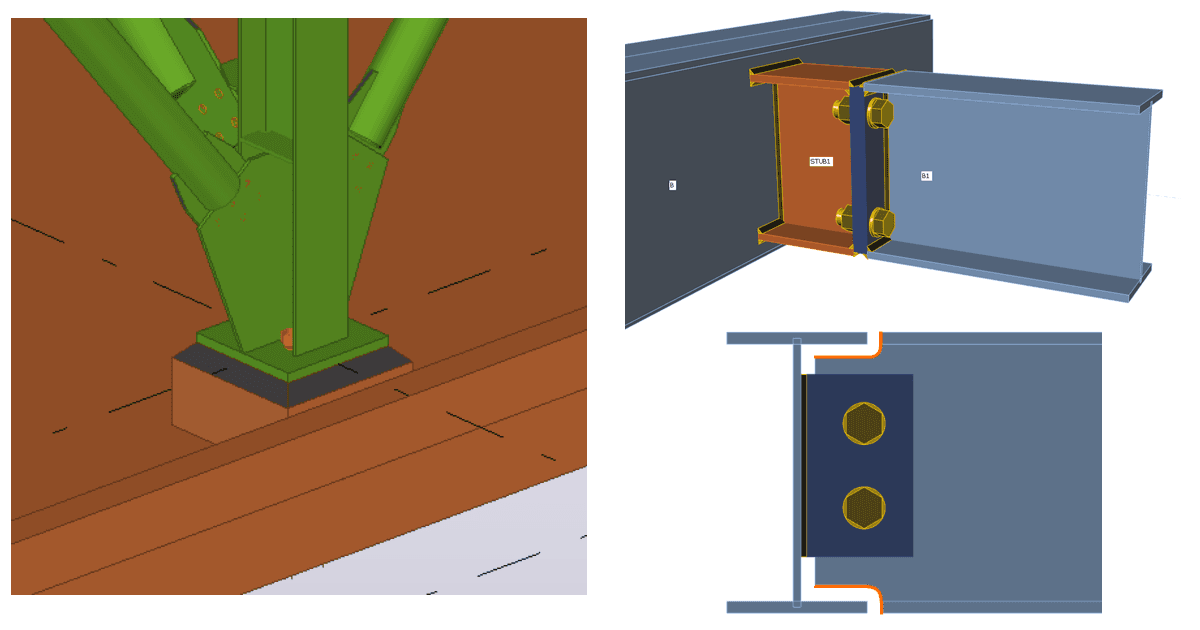
Limitazioni note per Tekla Structures
Leggi di più
- Connection design
- Steel
- Webinar
Combina Tekla Structures e IDEA StatiCa per velocizzare la progettazione di connessioni complesse
Leggi di più
- Steel
- Knowledge base