


Come attivare il link
- Scarica e installa l'ultima versione di IDEA StatiCa.
- Assicurati di utilizzare una versione supportata della soluzione FEA/BIM in uso.
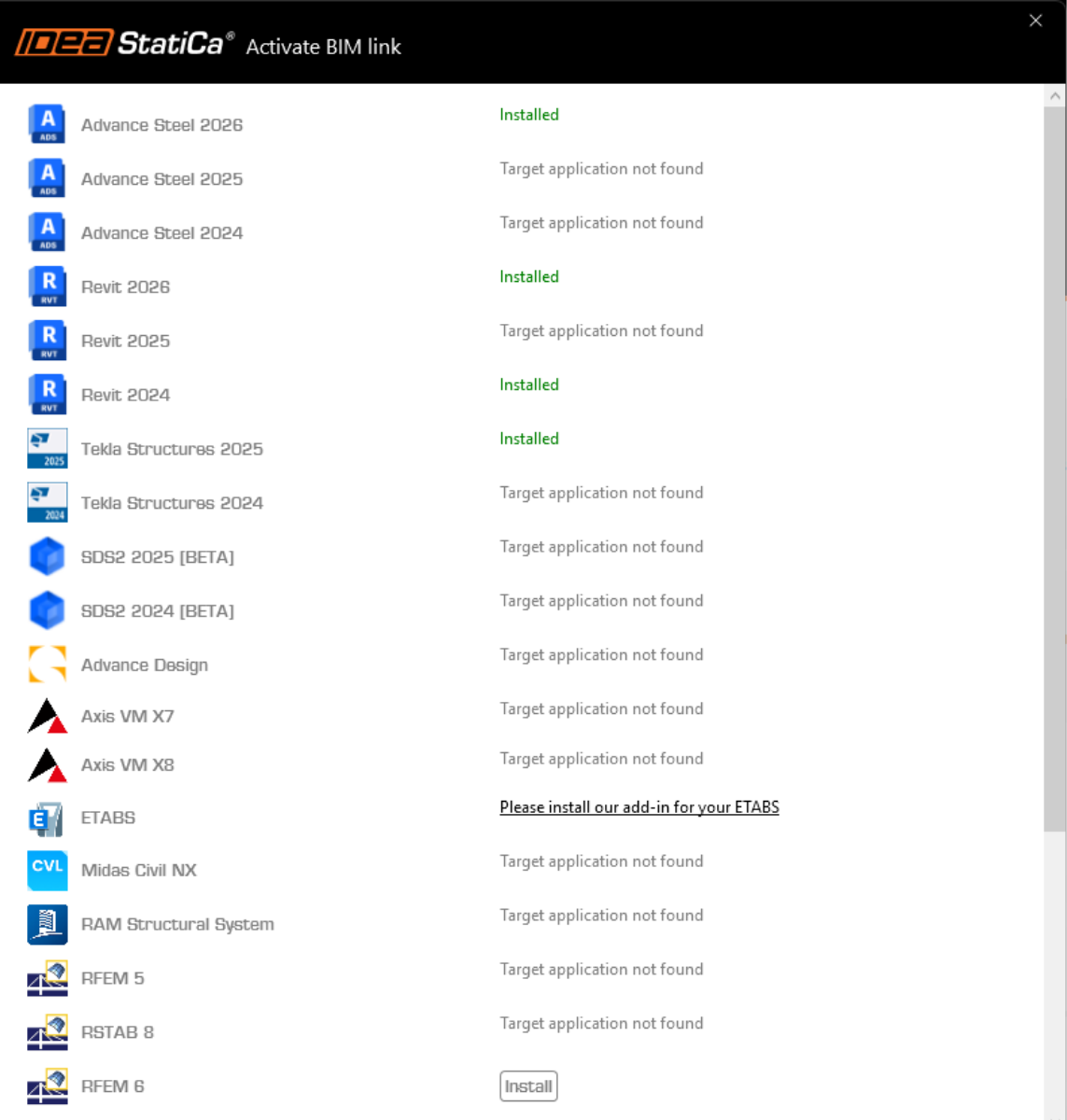
IDEA StatiCa integra i collegamenti BIM nelle soluzioni FEA/BIM durante la sua installazione. È possibile controllare lo stato e attivare altri collegamenti BIM per i software installati successivamente nel programma di installazione dei collegamenti BIM.
Si noti che alcune soluzioni FEA richiedono ulteriori passaggi per attivare completamente il loro collegamento BIM a IDEA StatiCa.
Aprire IDEA StatiCa e navigare nella scheda BIM e aprire il programma di installazione dei collegamenti BIM (Activate your BIM link...).
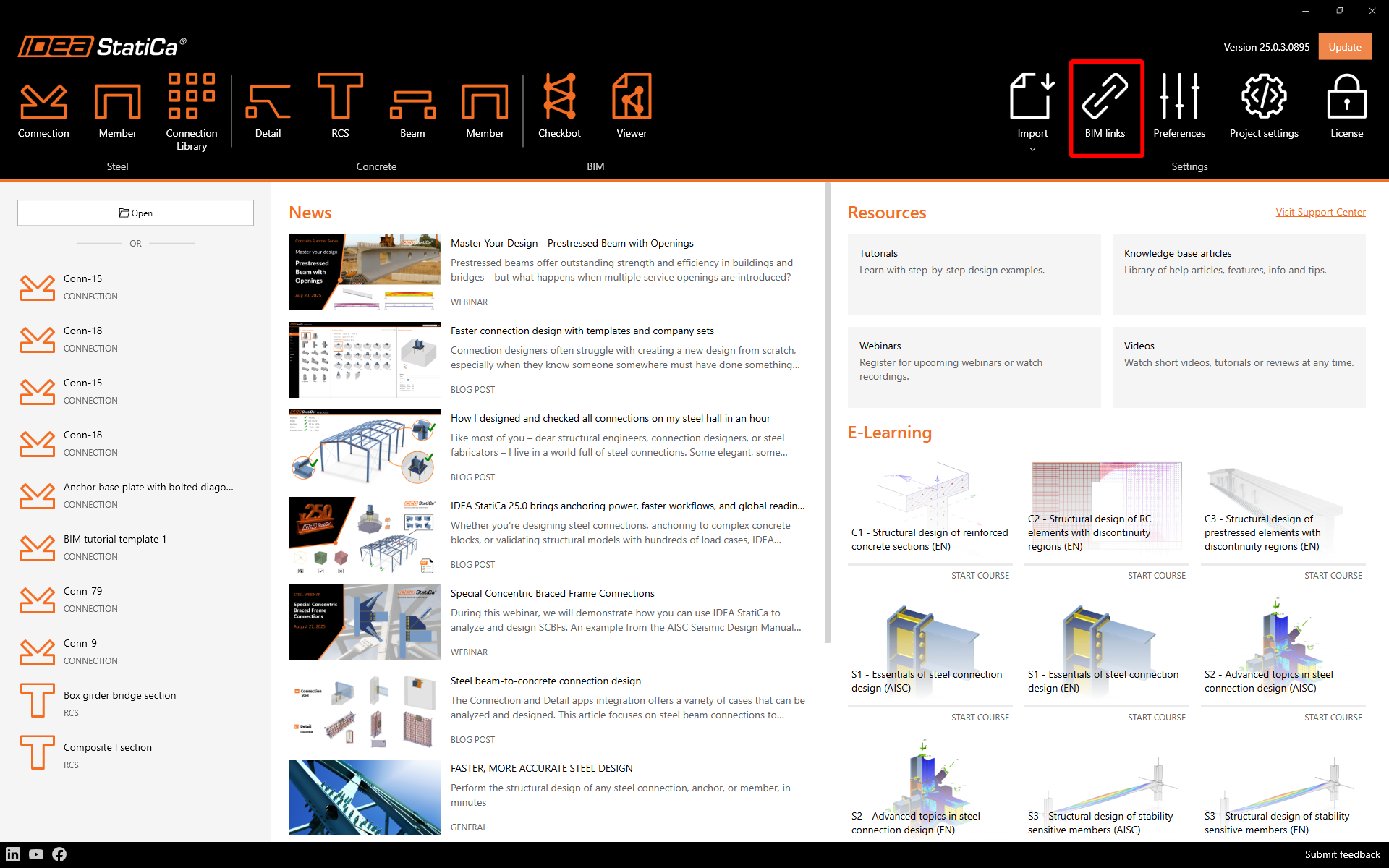
Potrebbe apparire la notifica"Vuoi consentire a questa applicazione di apportare modifiche al tuo dispositivo?"; in tal caso, confermare con il pulsante Sì.
Come attivare il collegamento - RFEM 5 e RSTAB 8
Il collegamento BIM per il software selezionato (se trovato) viene installato. La schermata indica anche lo stato di altri collegamenti BIM eventualmente già installati. Fare eventualmente clic su Installa per attivare qualsiasi collegamento BIM.
Come attivare il collegamento - RFEM 6 e RSTAB 9
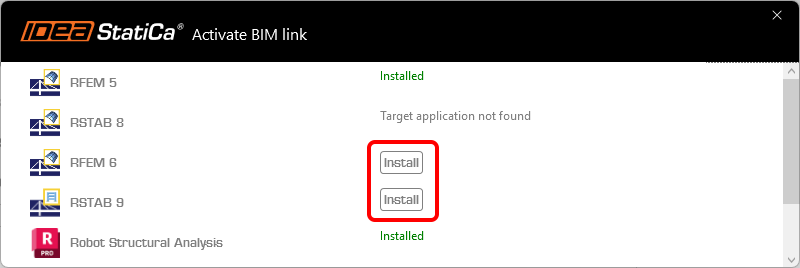
Nel programma di installazione del collegamento BIM, fare clic su Installa per creare un'icona di collegamento IDEA StatiCa 2X.X per RFEM 6/IDEAStatiCa 2X.X per RSTAB 9 sul desktop.
Nota: il file originale si trova nel percorso C:\Program Files\IDEA StatiCa\StatiCa 2X.X\net6.0-windows\IdeaRFEMLink.exe o IdeaRSTABLink.exe
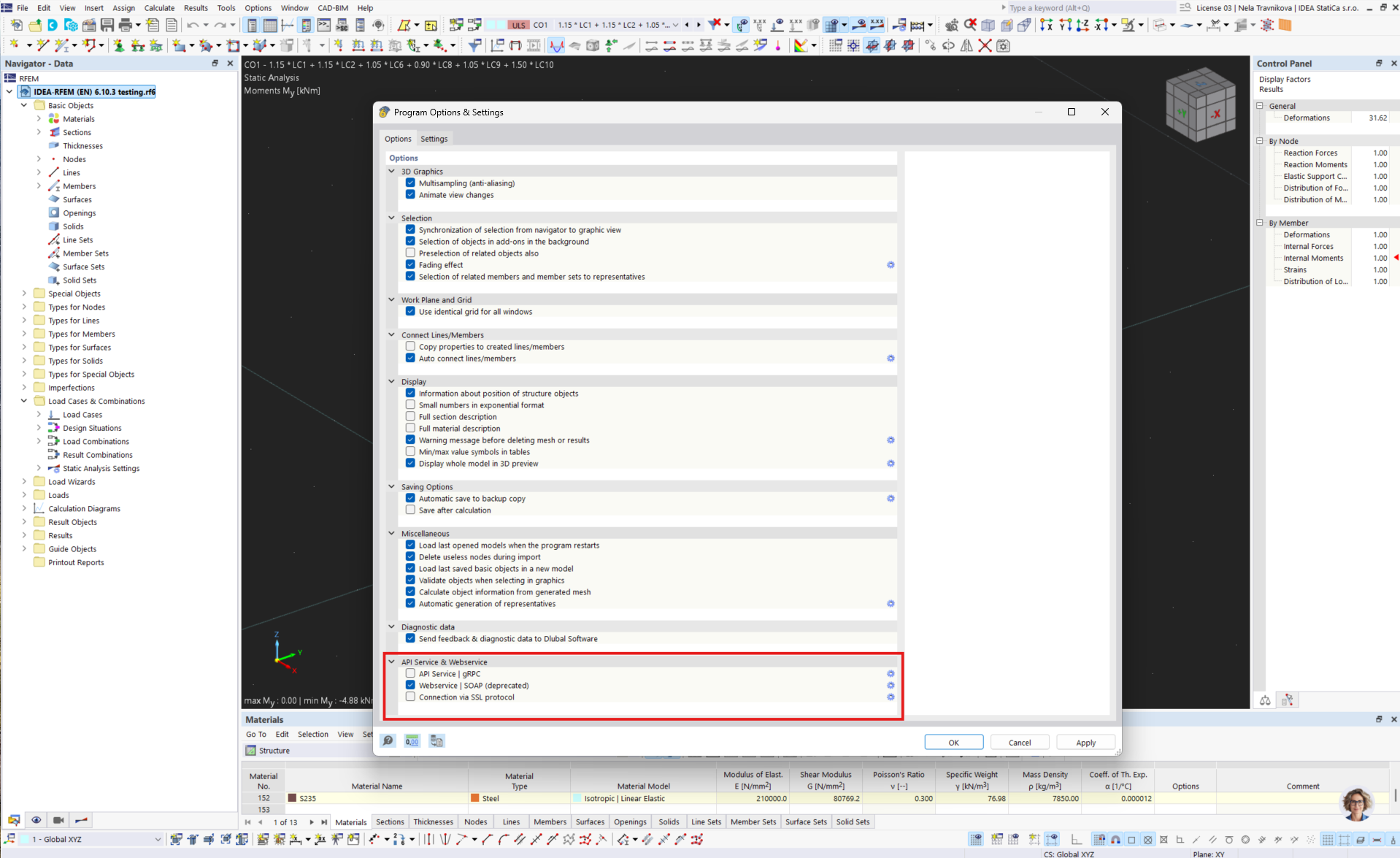
Aprire RFEM 6/RSTAB 9 e navigare nel menu Opzioni e Opzioni programma, quindi attivare il WebService per abilitare il trasferimento dei dati.
Come utilizzare il link
Scaricare e aprire il progetto allegato ed eseguire il calcolo per ottenere le forze interne alla struttura.
Come utilizzare il link - RFEM 5 e RSTAB 8
Nel menu a tendina spostarsi su Moduli aggiuntivi e Moduli esterni e IDEA StatiCa Checkbot.
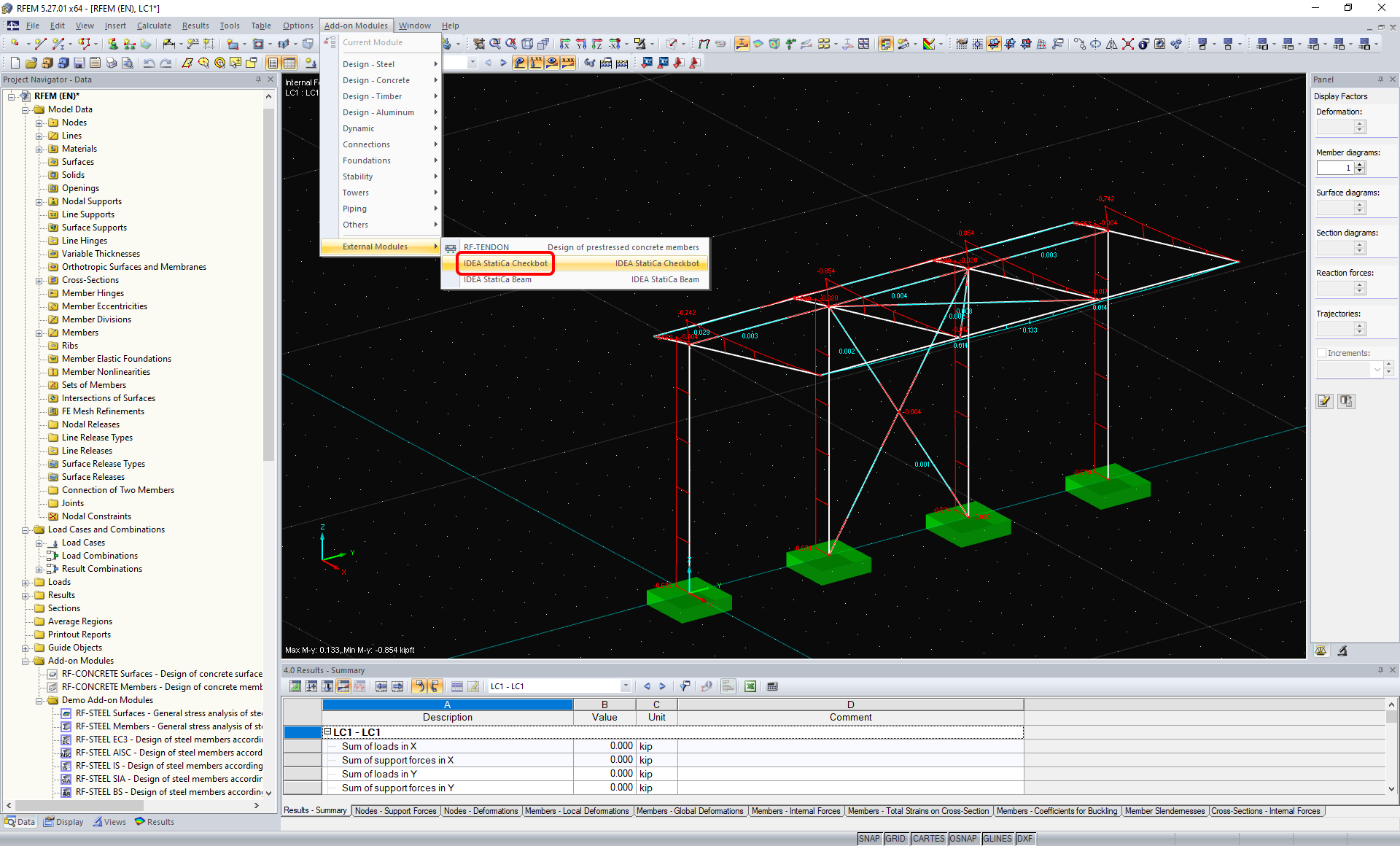
Come utilizzare il collegamento - RFEM 6 e RSTAB 9
In RFEM 6/RSTAB 9 non esiste un comando del menu a nastro. Invece, con il progetto RFEM 6/RSTAB 9 aperto, andate sul desktop ed eseguite l'icona di collegamento IDEA StatiCa 2X.X per RFEM 6/IDEAStatiCa 2X.X per RSTAB 9.
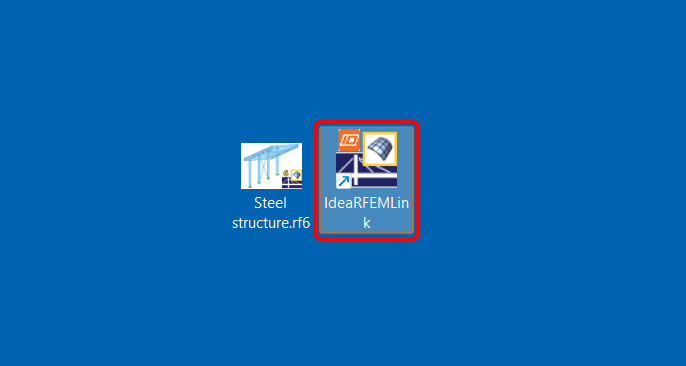
Si apre l'applicazione Checkbot, che funge da gestore dei collegamenti BIM, e si può avviare un nuovo progetto.
Selezionare l'opzione Nuovo con tipo di progetto Acciaio e codice di progetto EN. Selezionare quindi Crea progetto.
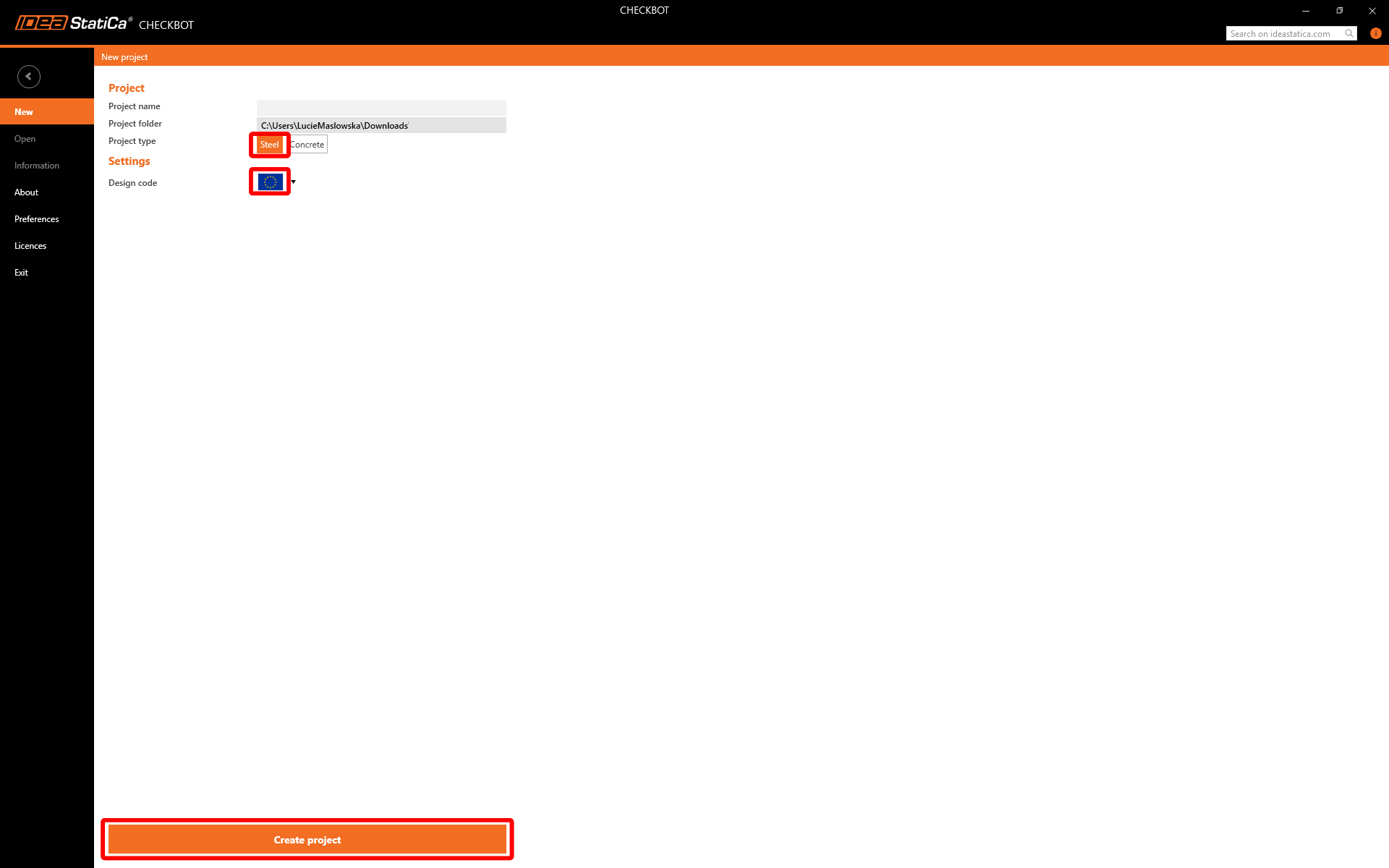
Il nuovo progetto Checkbot è pronto per importare le connessioni da RFEM/RSTAB.
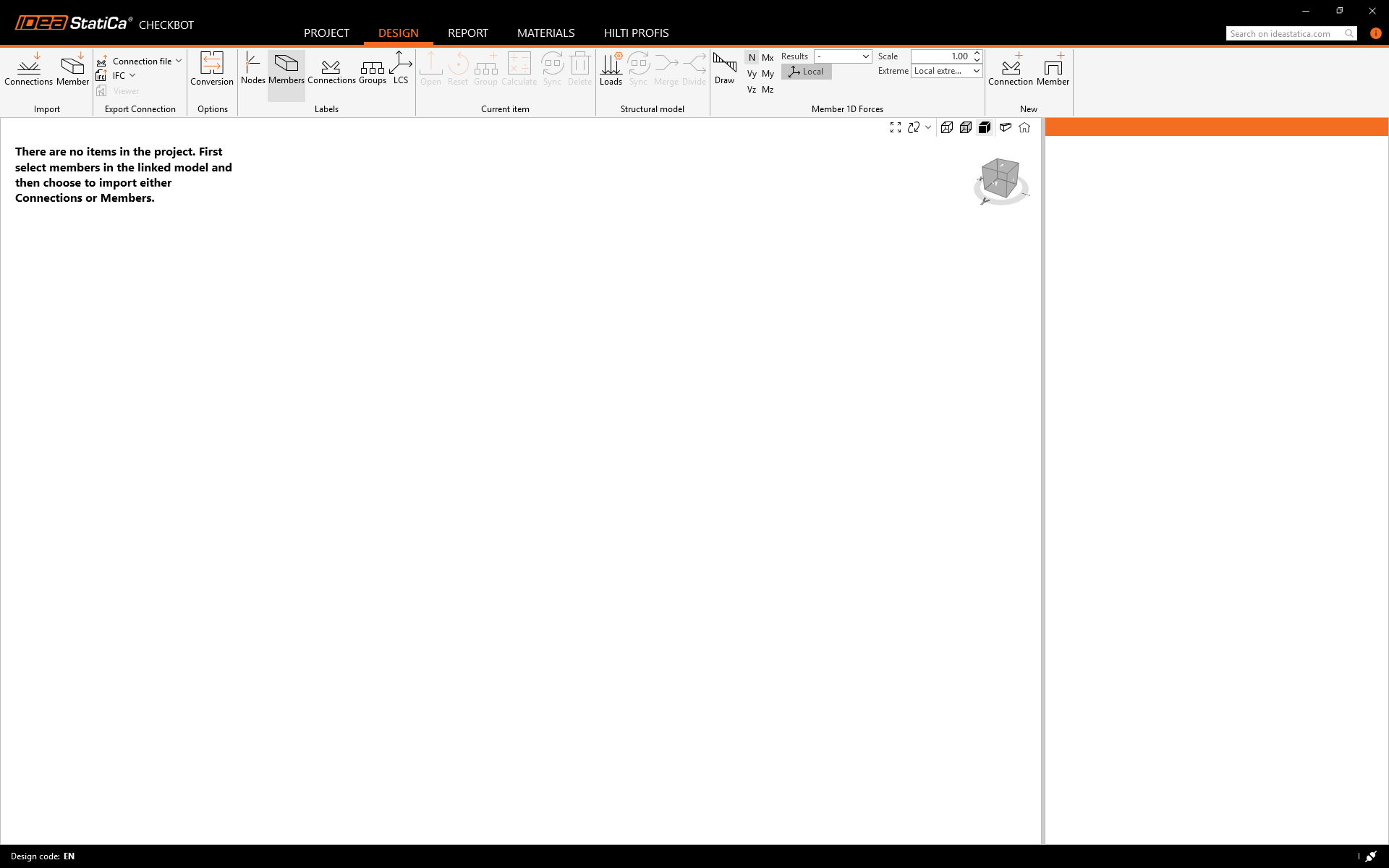
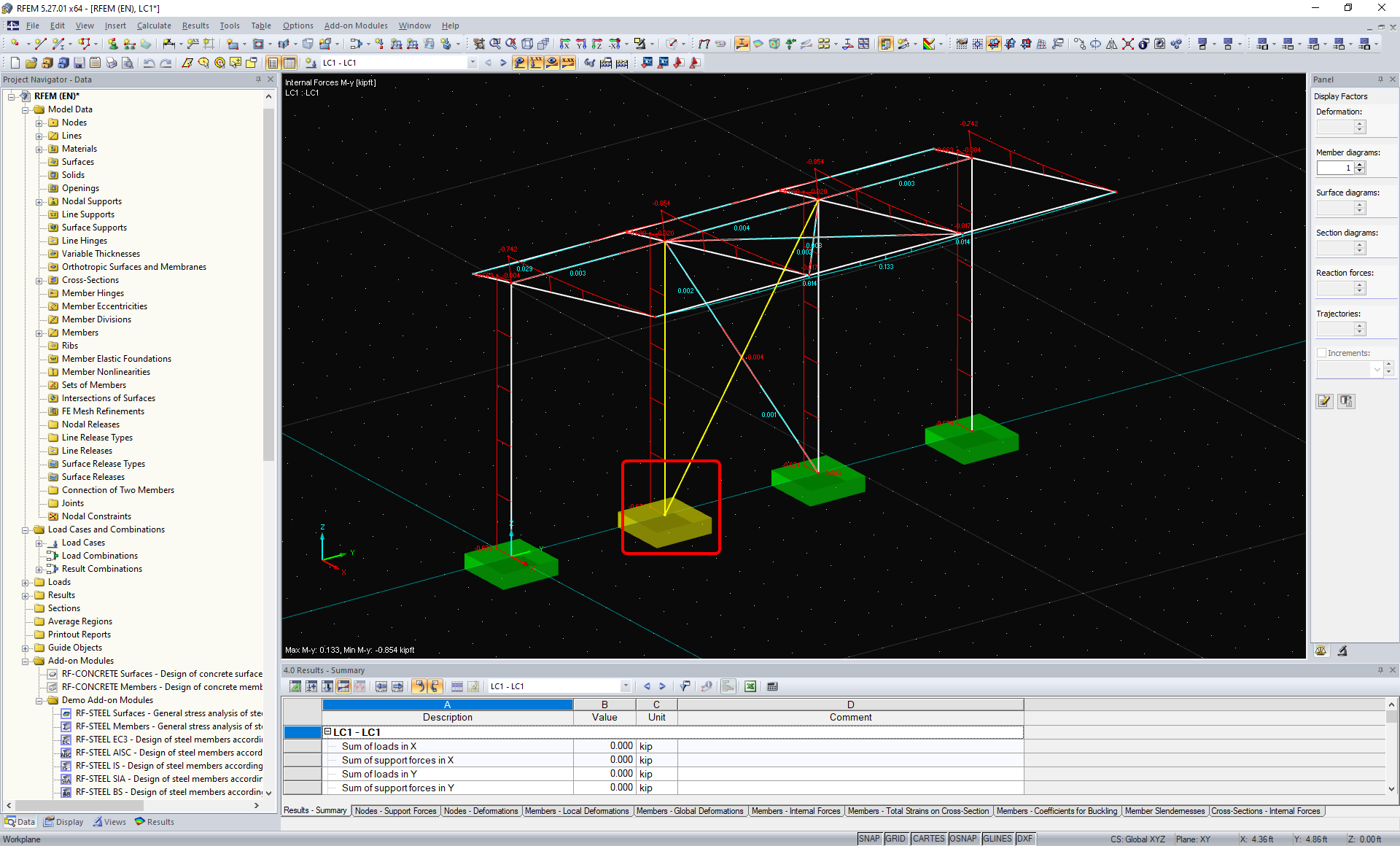
In RFEM/RSTAB, selezionare una delle colonne interne con controventatura, assicurandosi di selezionare anche il nodo più basso.
Widget #NaN: support_center_article
Name: General BIM Link tutorial - Import
ID: 4014d755-0bf0-43d9-a46c-da9ce928f004
Show Raw Data
{
"title": {
"name": "Main headline (H1)",
"type": "text",
"value": "Importa"
},
"preview_image": {
"name": "Preview image",
"type": "asset",
"value": []
},
"post_date": {
"name": "Post date",
"type": "date_time",
"value": null,
"displayTimeZone": null
},
"perex_content": {
"name": "Lead paragraph",
"type": "text",
"value": ""
},
"content": {
"images": [
{
"description": null,
"imageId": "21e07468-7040-4555-8c03-d9b7962d0993",
"url": "https://assets-us-01.kc-usercontent.com:443/28eac049-c8ed-00e2-220c-12142a968dff/4cf7bf4e-c89a-4356-86fe-da1d17afb304/Import01B.png",
"height": 1150,
"width": 1920
},
{
"description": null,
"imageId": "c1d1ae92-ebb4-4914-851d-8c26f1867010",
"url": "https://assets-us-01.kc-usercontent.com:443/28eac049-c8ed-00e2-220c-12142a968dff/d1cb6562-7d5c-492c-be82-31f9a3a0ee07/Import02C.png",
"height": 1040,
"width": 1920
},
{
"description": null,
"imageId": "3c0ae619-acfc-46c8-b6a6-5bfd39b35350",
"url": "https://assets-us-01.kc-usercontent.com:443/28eac049-c8ed-00e2-220c-12142a968dff/3ef3c65f-33e0-4e25-aa4d-be27b1232559/Import04.png",
"height": 1040,
"width": 1920
}
],
"linkedItemCodenames": [],
"linkedItems": [],
"links": [],
"name": "Content",
"type": "rich_text",
"value": "<p>Quindi in Checkbot seleziona <strong>Connessioni</strong>.</p>\n<figure data-asset-id=\"21e07468-7040-4555-8c03-d9b7962d0993\" data-image-id=\"21e07468-7040-4555-8c03-d9b7962d0993\"><img src=\"https://assets-us-01.kc-usercontent.com:443/28eac049-c8ed-00e2-220c-12142a968dff/4cf7bf4e-c89a-4356-86fe-da1d17afb304/Import01B.png\" data-asset-id=\"21e07468-7040-4555-8c03-d9b7962d0993\" data-image-id=\"21e07468-7040-4555-8c03-d9b7962d0993\" alt=\"\"></figure>\n<p>Ciò importerà la colonna e i suoi effetti di carico in Checkbot, con le stesse coordinate, orientamenti e dimensioni della sezione del modello FEA/BIM.</p>\n<p>Tieni presente che la numerazione del nodo e dei membri potrebbe essere diversa.</p>\n<figure data-asset-id=\"c1d1ae92-ebb4-4914-851d-8c26f1867010\" data-image-id=\"c1d1ae92-ebb4-4914-851d-8c26f1867010\"><img src=\"https://assets-us-01.kc-usercontent.com:443/28eac049-c8ed-00e2-220c-12142a968dff/d1cb6562-7d5c-492c-be82-31f9a3a0ee07/Import02C.png\" data-asset-id=\"c1d1ae92-ebb4-4914-851d-8c26f1867010\" data-image-id=\"c1d1ae92-ebb4-4914-851d-8c26f1867010\" alt=\"\"></figure>\n<p>Tieni presente che l'area di lavoro 3D è progettata per mostrare una panoramica della struttura importata e non una vista dettagliata delle connessioni effettive.</p>\n<p>Per ulteriori informazioni su Checkbot, vedi <a href=\"https://www.ideastatica.com/it/support-center/checkbot-flussi-di-lavoro-bim-di-massa\" title=\"Checkbot\">qui</a>.</p>\n<p>Per diverse soluzioni FEA/BIM, puoi anche importare più connessioni in Checkbot nello stesso modo come sopra descritto. Invece di selezionare un nodo e le membrature connesse, è possibile selezionare più nodi e membrature utilizzando i metodi di selezione all'interno dell'applicazione.</p>\n<figure data-asset-id=\"3c0ae619-acfc-46c8-b6a6-5bfd39b35350\" data-image-id=\"3c0ae619-acfc-46c8-b6a6-5bfd39b35350\"><img src=\"https://assets-us-01.kc-usercontent.com:443/28eac049-c8ed-00e2-220c-12142a968dff/3ef3c65f-33e0-4e25-aa4d-be27b1232559/Import04.png\" data-asset-id=\"3c0ae619-acfc-46c8-b6a6-5bfd39b35350\" data-image-id=\"3c0ae619-acfc-46c8-b6a6-5bfd39b35350\" alt=\"\"></figure>\n<p>Si consiglia di <em>non </em>importare tutte le connessioni contemporaneamente ma di crearle in modo incrementale, cioè selezionando alcune connessioni e successivamente importando altri gruppi di connessioni.</p>"
},
"regions": {
"name": "Region",
"type": "taxonomy",
"value": [
{
"name": "EMEA",
"codename": "emea"
},
{
"name": "AMER",
"codename": "amer"
},
{
"name": "APAC",
"codename": "apac"
}
],
"taxonomyGroup": "region"
},
"product_groups": {
"name": "Product group",
"type": "taxonomy",
"value": [
{
"name": "Connection design",
"codename": "connection_design"
},
{
"name": "Steel",
"codename": "steel"
}
],
"taxonomyGroup": "product_group"
},
"support_center_article_types": {
"name": "Support center article",
"type": "taxonomy",
"value": [
{
"name": "Knowledge base",
"codename": "knowledgebase_article"
}
],
"taxonomyGroup": "support_center_article"
},
"expertise_levels": {
"name": "Expertise level",
"type": "taxonomy",
"value": [
{
"name": "Beginner",
"codename": "beginner"
},
{
"name": "Intermediate",
"codename": "intermediate"
}
],
"taxonomyGroup": "expertise_level"
},
"labels": {
"name": "Labels",
"type": "taxonomy",
"value": [
{
"name": "Connection",
"codename": "connection"
},
{
"name": "Checkbot",
"codename": "checkbot"
},
{
"name": "EN (Eurocode)",
"codename": "eurocode"
},
{
"name": "BIM link",
"codename": "bim_links"
},
{
"name": "AISC (USA)",
"codename": "aisc"
}
],
"taxonomyGroup": "labels"
},
"linked_items": {
"name": "Linked items",
"type": "modular_content",
"value": [],
"linkedItems": []
},
"attachments__files": {
"name": "Attachments",
"type": "asset",
"value": []
},
"content_priority__value": {
"name": "Content priority value",
"type": "number",
"value": null
},
"options": {
"name": "Options",
"type": "multiple_choice",
"value": []
},
"url_slug": {
"name": "Url slug",
"type": "url_slug",
"value": "import"
},
"unique_url_slug": {
"name": "Unique URL slug",
"type": "custom",
"value": "[\"import\",\"[autogenerated]\"]"
},
"content_settings__sitemap": {
"name": "Show in sitemap",
"type": "multiple_choice",
"value": [
{
"name": "default",
"codename": "default"
}
]
},
"content_settings__robots": {
"name": "Search engine indexing",
"type": "multiple_choice",
"value": [
{
"name": "default",
"codename": "default"
}
]
},
"content_settings__is_hidden": {
"name": "Hidden nested content",
"type": "multiple_choice",
"value": [
{
"name": "yes",
"codename": "yes"
}
]
},
"metadata__page_title": {
"name": "Page title",
"type": "text",
"value": "Import of steel connection from FEA/CAD into Checkbot"
},
"metadata__page_description": {
"name": "Page description",
"type": "text",
"value": "IDEA StatiCa step-by-step tutorial for importing steel connection and its load effects from FEA/CAD into Checkbot. Structural design of welded and bolted steel connections."
},
"metadata__page_keywords": {
"name": "Page keywords",
"type": "text",
"value": ""
},
"metadata__canonical_url": {
"name": "Canonical URL",
"type": "text",
"value": ""
},
"metadata__og_title": {
"name": "OG:title",
"type": "text",
"value": ""
},
"metadata__og_description": {
"name": "OG:description",
"type": "text",
"value": ""
},
"metadata__og_image": {
"name": "OG:image",
"type": "asset",
"value": []
},
"translation__translation_connector": {
"name": "Translation Connector",
"type": "taxonomy",
"value": [],
"taxonomyGroup": "languages"
},
"translation__force_translation": {
"name": "Force translation",
"type": "multiple_choice",
"value": []
},
"translation__last_translation": {
"images": [],
"linkedItemCodenames": [],
"linkedItems": [],
"links": [],
"name": "Last translation",
"type": "rich_text",
"value": "<p><br></p>"
},
"translation__ai_translated": {
"name": "AI translated",
"type": "multiple_choice",
"value": []
},
"page_tree_settings__page_label": {
"name": "Page label",
"type": "text",
"value": ""
},
"page_tree_settings__path_segment": {
"name": "Path segment",
"type": "text",
"value": "import-legacy"
},
"page_tree_settings__breadcrumb_style": {
"name": "Breadcrumb style",
"type": "multiple_choice",
"value": []
},
"page_tree_settings__hide_in_breadcrumbs": {
"name": "Hide in breadcrumbs",
"type": "multiple_choice",
"value": []
}
}Widget #NaN: support_center_article
Name: General BIM Link tutorial - Geometry
ID: c25dad44-9532-49cb-8c34-b7d536fec247
Show Raw Data
{
"title": {
"name": "Main headline (H1)",
"type": "text",
"value": "Geometria"
},
"preview_image": {
"name": "Preview image",
"type": "asset",
"value": []
},
"post_date": {
"name": "Post date",
"type": "date_time",
"value": null,
"displayTimeZone": null
},
"perex_content": {
"name": "Lead paragraph",
"type": "text",
"value": ""
},
"content": {
"images": [
{
"description": null,
"imageId": "fa8f49a4-0bfe-42b8-bd19-e487f10a6879",
"url": "https://assets-us-01.kc-usercontent.com:443/28eac049-c8ed-00e2-220c-12142a968dff/6ceb308b-c0e6-44ff-9c35-79ed924d7854/Geometry01E.png",
"height": 368,
"width": 958
},
{
"description": null,
"imageId": "b3a4fdd5-894c-4657-abd6-4504db460f1d",
"url": "https://assets-us-01.kc-usercontent.com:443/28eac049-c8ed-00e2-220c-12142a968dff/4d522bb0-80a8-4a61-aeee-a951291fea04/Geometry03A.png",
"height": 1040,
"width": 1920
}
],
"linkedItemCodenames": [],
"linkedItems": [],
"links": [],
"name": "Content",
"type": "rich_text",
"value": "<p>Nell'elenco degli elementi del progetto in Connessioni e con una connessione evidenziata in Checkbot puoi fare clic con il pulsante destro del mouse e selezionare <strong>Apri </strong>oppure fare clic sul comando <strong>Apri </strong>della barra multifunzione per avviare la progettazione, la verifica e la relazione.</p>\n<figure data-asset-id=\"fa8f49a4-0bfe-42b8-bd19-e487f10a6879\" data-image-id=\"fa8f49a4-0bfe-42b8-bd19-e487f10a6879\"><img src=\"https://assets-us-01.kc-usercontent.com:443/28eac049-c8ed-00e2-220c-12142a968dff/6ceb308b-c0e6-44ff-9c35-79ed924d7854/Geometry01E.png\" data-asset-id=\"fa8f49a4-0bfe-42b8-bd19-e487f10a6879\" data-image-id=\"fa8f49a4-0bfe-42b8-bd19-e487f10a6879\" alt=\"\"></figure>\n<p>Le impostazioni delle membrature vengono prese dall'applicazione FEA/BIM originale. Puoi, tuttavia, modificare la dimensione della sezione di qualsiasi membratura nella schermata principale del Checkbot, ma ciò interromperà il collegamento con l'applicazione FEA/BIM in questa sessione a meno che non venga nuovamente sincronizzata.</p>\n<p>La connessione importata viene aperta nell'applicazione IDEA StatiCa Connection.</p>\n<figure data-asset-id=\"b3a4fdd5-894c-4657-abd6-4504db460f1d\" data-image-id=\"b3a4fdd5-894c-4657-abd6-4504db460f1d\"><img src=\"https://assets-us-01.kc-usercontent.com:443/28eac049-c8ed-00e2-220c-12142a968dff/4d522bb0-80a8-4a61-aeee-a951291fea04/Geometry03A.png\" data-asset-id=\"b3a4fdd5-894c-4657-abd6-4504db460f1d\" data-image-id=\"b3a4fdd5-894c-4657-abd6-4504db460f1d\" alt=\"\"></figure>\n<p>Potresti non vedere nessuno o differenti Effetti di carico rispetto alla tua soluzione FEA/BIM* preferita a seconda di come sono state definite le combinazioni dei casi di carico. Per impostazione predefinita, IDEA StatiCa sceglierà il più critico ai fini del controllo del codice. </p>\n<p>(* Alcune soluzioni BIM non sono in grado di memorizzare i risultati della combinazione dei casi di carico)</p>\n<p>Per ulteriori informazioni sugli effetti di carico vedi <a href=\"https://www.ideastatica.com/it/support-center/checkbot-flussi-di-lavoro-bim-di-massa\" title=\"Checkbot\">qui</a>.</p>"
},
"regions": {
"name": "Region",
"type": "taxonomy",
"value": [
{
"name": "EMEA",
"codename": "emea"
},
{
"name": "AMER",
"codename": "amer"
},
{
"name": "APAC",
"codename": "apac"
}
],
"taxonomyGroup": "region"
},
"product_groups": {
"name": "Product group",
"type": "taxonomy",
"value": [
{
"name": "Connection design",
"codename": "connection_design"
},
{
"name": "Steel",
"codename": "steel"
}
],
"taxonomyGroup": "product_group"
},
"support_center_article_types": {
"name": "Support center article",
"type": "taxonomy",
"value": [
{
"name": "Knowledge base",
"codename": "knowledgebase_article"
}
],
"taxonomyGroup": "support_center_article"
},
"expertise_levels": {
"name": "Expertise level",
"type": "taxonomy",
"value": [
{
"name": "Beginner",
"codename": "beginner"
},
{
"name": "Intermediate",
"codename": "intermediate"
}
],
"taxonomyGroup": "expertise_level"
},
"labels": {
"name": "Labels",
"type": "taxonomy",
"value": [
{
"name": "Connection",
"codename": "connection"
},
{
"name": "EN (Eurocode)",
"codename": "eurocode"
},
{
"name": "AISC (USA)",
"codename": "aisc"
},
{
"name": "BIM link",
"codename": "bim_links"
},
{
"name": "Checkbot",
"codename": "checkbot"
}
],
"taxonomyGroup": "labels"
},
"linked_items": {
"name": "Linked items",
"type": "modular_content",
"value": [],
"linkedItems": []
},
"attachments__files": {
"name": "Attachments",
"type": "asset",
"value": []
},
"content_priority__value": {
"name": "Content priority value",
"type": "number",
"value": null
},
"options": {
"name": "Options",
"type": "multiple_choice",
"value": []
},
"url_slug": {
"name": "Url slug",
"type": "url_slug",
"value": "geometria"
},
"unique_url_slug": {
"name": "Unique URL slug",
"type": "custom",
"value": "[\"geometry\",\"[autogenerated]\"]"
},
"content_settings__sitemap": {
"name": "Show in sitemap",
"type": "multiple_choice",
"value": [
{
"name": "default",
"codename": "default"
}
]
},
"content_settings__robots": {
"name": "Search engine indexing",
"type": "multiple_choice",
"value": [
{
"name": "default",
"codename": "default"
}
]
},
"content_settings__is_hidden": {
"name": "Hidden nested content",
"type": "multiple_choice",
"value": [
{
"name": "yes",
"codename": "yes"
}
]
},
"metadata__page_title": {
"name": "Page title",
"type": "text",
"value": "Import of steel connection from FEA/CAD into Checkbot"
},
"metadata__page_description": {
"name": "Page description",
"type": "text",
"value": "IDEA StatiCa step-by-step tutorial for importing steel connection and its load effects from FEA/CAD into Checkbot. Structural design of welded and bolted steel connections."
},
"metadata__page_keywords": {
"name": "Page keywords",
"type": "text",
"value": ""
},
"metadata__canonical_url": {
"name": "Canonical URL",
"type": "text",
"value": ""
},
"metadata__og_title": {
"name": "OG:title",
"type": "text",
"value": ""
},
"metadata__og_description": {
"name": "OG:description",
"type": "text",
"value": ""
},
"metadata__og_image": {
"name": "OG:image",
"type": "asset",
"value": []
},
"translation__translation_connector": {
"name": "Translation Connector",
"type": "taxonomy",
"value": [],
"taxonomyGroup": "languages"
},
"translation__force_translation": {
"name": "Force translation",
"type": "multiple_choice",
"value": []
},
"translation__last_translation": {
"images": [],
"linkedItemCodenames": [],
"linkedItems": [],
"links": [],
"name": "Last translation",
"type": "rich_text",
"value": "<p><br></p>"
},
"translation__ai_translated": {
"name": "AI translated",
"type": "multiple_choice",
"value": []
},
"page_tree_settings__page_label": {
"name": "Page label",
"type": "text",
"value": ""
},
"page_tree_settings__path_segment": {
"name": "Path segment",
"type": "text",
"value": "geometry-legacy"
},
"page_tree_settings__breadcrumb_style": {
"name": "Breadcrumb style",
"type": "multiple_choice",
"value": []
},
"page_tree_settings__hide_in_breadcrumbs": {
"name": "Hide in breadcrumbs",
"type": "multiple_choice",
"value": []
}
}Widget #NaN: support_center_article
Name: General BIM Link tutorial - Design Example (EN)
ID: e07071db-5126-40e2-a3ab-7d86be4a2f24
Show Raw Data
{
"title": {
"name": "Main headline (H1)",
"type": "text",
"value": "Progetto"
},
"preview_image": {
"name": "Preview image",
"type": "asset",
"value": []
},
"post_date": {
"name": "Post date",
"type": "date_time",
"value": null,
"displayTimeZone": null
},
"perex_content": {
"name": "Lead paragraph",
"type": "text",
"value": ""
},
"content": {
"images": [
{
"description": null,
"imageId": "bbabfd09-f9a5-4505-acb6-b7f4a7ec2297",
"url": "https://assets-us-01.kc-usercontent.com:443/28eac049-c8ed-00e2-220c-12142a968dff/b4977ea7-fd6c-49ea-9cee-687dfee9d099/Design13C.png",
"height": 437,
"width": 537
},
{
"description": null,
"imageId": "4790f7e4-eb9a-485e-b559-8f9d9055b336",
"url": "https://assets-us-01.kc-usercontent.com:443/28eac049-c8ed-00e2-220c-12142a968dff/0735a52c-2649-46c3-93dd-8c854222a01c/Design1A.png",
"height": 216,
"width": 454
},
{
"description": null,
"imageId": "aa53b13b-04e3-40c0-9da7-40d545a500d4",
"url": "https://assets-us-01.kc-usercontent.com:443/28eac049-c8ed-00e2-220c-12142a968dff/94d4a2a5-4eeb-49dd-8dbf-489fd86fa331/Design2B.png",
"height": 630,
"width": 1045
},
{
"description": null,
"imageId": "178ad4a1-c1e9-4b13-8349-e433e78c8082",
"url": "https://assets-us-01.kc-usercontent.com:443/28eac049-c8ed-00e2-220c-12142a968dff/36cb511f-fbd3-4a48-9e45-33afc2035cc5/Design3B.png",
"height": 400,
"width": 500
},
{
"description": null,
"imageId": "ea6a1001-d9e3-4937-ac65-536c343963d8",
"url": "https://assets-us-01.kc-usercontent.com:443/28eac049-c8ed-00e2-220c-12142a968dff/a2e47259-b053-4eec-b68f-185b2e9a57ce/Design4A.png",
"height": 686,
"width": 667
},
{
"description": null,
"imageId": "402f295e-c3f5-4434-bb1c-dc2c7d09b719",
"url": "https://assets-us-01.kc-usercontent.com:443/28eac049-c8ed-00e2-220c-12142a968dff/24c76107-3884-41ff-bdc5-58dd04bad856/Design5Bpng.png",
"height": 781,
"width": 705
},
{
"description": null,
"imageId": "5dfb0159-8f65-418a-9bad-429c0f03783d",
"url": "https://assets-us-01.kc-usercontent.com:443/28eac049-c8ed-00e2-220c-12142a968dff/88d701b0-1829-4748-bb9e-f53cf827f465/Design8.png",
"height": 938,
"width": 710
},
{
"description": null,
"imageId": "960d3582-3b1a-4829-ac66-542f3d73a3ae",
"url": "https://assets-us-01.kc-usercontent.com:443/28eac049-c8ed-00e2-220c-12142a968dff/891494ba-30cb-4c30-a472-2ed8408bf894/Design9A.png",
"height": 124,
"width": 159
},
{
"description": null,
"imageId": "6fa34dc4-49ea-4ad2-9953-c38200d4cc14",
"url": "https://assets-us-01.kc-usercontent.com:443/28eac049-c8ed-00e2-220c-12142a968dff/9d3e1d2d-3e37-4319-b0cd-4af890e44a55/Design10A.png",
"height": 824,
"width": 841
},
{
"description": null,
"imageId": "8dc80efc-d9f4-4782-8dbd-1cb3883723ab",
"url": "https://assets-us-01.kc-usercontent.com:443/28eac049-c8ed-00e2-220c-12142a968dff/669d8e3e-8841-4610-aec4-fa4ade412a73/Design12A.png",
"height": 1040,
"width": 1920
},
{
"description": null,
"imageId": "f526a572-6b32-4bb0-9a72-098fc6dc1046",
"url": "https://assets-us-01.kc-usercontent.com:443/28eac049-c8ed-00e2-220c-12142a968dff/2d3204f3-6309-40ea-b7b3-27afc7939faf/Changing%20properties%20of%20base%20plate%20.png",
"height": 1160,
"width": 1920
},
{
"description": null,
"imageId": "05487145-7845-4976-bda1-f8835daa7ed9",
"url": "https://assets-us-01.kc-usercontent.com:443/28eac049-c8ed-00e2-220c-12142a968dff/653d70f3-3a97-433a-a5ee-c593fd3e68a9/result%20of%20calculation.png",
"height": 899,
"width": 931
},
{
"description": null,
"imageId": "ec3c22eb-e36b-4e1b-a211-aaeaa717f217",
"url": "https://assets-us-01.kc-usercontent.com:443/28eac049-c8ed-00e2-220c-12142a968dff/62bdf5f1-914d-42ee-beb6-e4e427141441/report%20picture.png",
"height": 900,
"width": 1920
},
{
"description": null,
"imageId": "16505b38-b915-4383-955f-f7415d3ede1b",
"url": "https://assets-us-01.kc-usercontent.com:443/28eac049-c8ed-00e2-220c-12142a968dff/ee0722bd-27ad-4132-813b-5bef39281620/view%20from%20checkbot.png",
"height": 1160,
"width": 1920
},
{
"description": null,
"imageId": "d2faaf81-e31e-4387-9177-a4e794bc51b9",
"url": "https://assets-us-01.kc-usercontent.com:443/28eac049-c8ed-00e2-220c-12142a968dff/98cff117-b8ef-4e51-983a-4f0a92efb96e/Design15.png",
"height": 1040,
"width": 1920
},
{
"description": null,
"imageId": "efea58e6-fb20-46ce-aef0-366289de49f9",
"url": "https://assets-us-01.kc-usercontent.com:443/28eac049-c8ed-00e2-220c-12142a968dff/40b8ad86-d22d-4456-9279-f334085c6d01/Design1-1A.png",
"height": 792,
"width": 824
}
],
"linkedItemCodenames": [],
"linkedItems": [],
"links": [
{
"codename": "landing_page___steel_verification",
"linkId": "06158daa-1491-4e83-ac34-4964bd5a3c63",
"urlSlug": "verifiche-dell-acciaio",
"type": "landing_page"
},
{
"codename": "design_v2",
"linkId": "b0a659df-8f92-4d1f-abb6-2efa02bad946",
"urlSlug": "connection-design",
"type": "landing_page"
},
{
"codename": "how_to_export_report_to_ms_word__dxf_or_pdf_files",
"linkId": "dfedaf85-c16f-5228-849c-0bfe09e9e8d1",
"urlSlug": "come-creare-ed-esportare-un-report-in-file-ms-word-pdf-o-dxf",
"type": "support_center_article"
}
],
"name": "Content",
"type": "rich_text",
"value": "<p>Utilizzeremo una <a href=\"https://www.ideastatica.com/support-center/how-to-model-one-bolt-connection\" title=\"Single bolt connections\">connessione a bullone singolo</a> per il controvento diagonale. Per questo tipo di connessione, dobbiamo anche cambiare il <strong>Tipo di modello</strong> dell'elemento controvento in <strong>N-Vy-Vz</strong>. Selezionare il controvento nell'elenco delle Membrature e modificare il Tipo di modello nell'elenco a discesa.</p>\n<figure data-asset-id=\"bbabfd09-f9a5-4505-acb6-b7f4a7ec2297\" data-image-id=\"bbabfd09-f9a5-4505-acb6-b7f4a7ec2297\"><img src=\"https://assets-us-01.kc-usercontent.com:443/28eac049-c8ed-00e2-220c-12142a968dff/b4977ea7-fd6c-49ea-9cee-687dfee9d099/Design13C.png\" data-asset-id=\"bbabfd09-f9a5-4505-acb6-b7f4a7ec2297\" data-image-id=\"bbabfd09-f9a5-4505-acb6-b7f4a7ec2297\" alt=\"\"></figure>\n<p>Utilizzeremo la Connection Library per generare una connessione. Seleziona <strong>Proposta </strong>e IDEA StatiCa proporrà possibili soluzioni per la geometria corrente.</p>\n<figure data-asset-id=\"4790f7e4-eb9a-485e-b559-8f9d9055b336\" data-image-id=\"4790f7e4-eb9a-485e-b559-8f9d9055b336\"><img src=\"https://assets-us-01.kc-usercontent.com:443/28eac049-c8ed-00e2-220c-12142a968dff/0735a52c-2649-46c3-93dd-8c854222a01c/Design1A.png\" data-asset-id=\"4790f7e4-eb9a-485e-b559-8f9d9055b336\" data-image-id=\"4790f7e4-eb9a-485e-b559-8f9d9055b336\" alt=\"\"></figure>\n<p>La <a href=\"https://www.ideastatica.com/support-center/connection-browser-new-library-of-connections\" title=\"Connection Browser\">Connection Library</a> mostra le possibili soluzioni per la geometria corrente. Scegli il modello offerto e premi <strong>OK</strong>.</p>\n<figure data-asset-id=\"aa53b13b-04e3-40c0-9da7-40d545a500d4\" data-image-id=\"aa53b13b-04e3-40c0-9da7-40d545a500d4\"><img src=\"https://assets-us-01.kc-usercontent.com:443/28eac049-c8ed-00e2-220c-12142a968dff/94d4a2a5-4eeb-49dd-8dbf-489fd86fa331/Design2B.png\" data-asset-id=\"aa53b13b-04e3-40c0-9da7-40d545a500d4\" data-image-id=\"aa53b13b-04e3-40c0-9da7-40d545a500d4\" alt=\"\"></figure>\n<p>Accetta i valori proposti per i bulloni e il blocco di calcestruzzo e premere <strong>OK</strong>.</p>\n<figure data-asset-id=\"178ad4a1-c1e9-4b13-8349-e433e78c8082\" data-image-id=\"178ad4a1-c1e9-4b13-8349-e433e78c8082\"><img src=\"https://assets-us-01.kc-usercontent.com:443/28eac049-c8ed-00e2-220c-12142a968dff/36cb511f-fbd3-4a48-9e45-33afc2035cc5/Design3B.png\" data-asset-id=\"178ad4a1-c1e9-4b13-8349-e433e78c8082\" data-image-id=\"178ad4a1-c1e9-4b13-8349-e433e78c8082\" alt=\"\"></figure>\n<p>Ecco come appare la connessione iniziale.</p>\n<figure data-asset-id=\"ea6a1001-d9e3-4937-ac65-536c343963d8\" data-image-id=\"ea6a1001-d9e3-4937-ac65-536c343963d8\"><img src=\"https://assets-us-01.kc-usercontent.com:443/28eac049-c8ed-00e2-220c-12142a968dff/a2e47259-b053-4eec-b68f-185b2e9a57ce/Design4A.png\" data-asset-id=\"ea6a1001-d9e3-4937-ac65-536c343963d8\" data-image-id=\"ea6a1001-d9e3-4937-ac65-536c343963d8\" alt=\"\"></figure>\n<p>Con questi parametri predefiniti per la Piastra di base.</p>\n<figure data-asset-id=\"402f295e-c3f5-4434-bb1c-dc2c7d09b719\" data-image-id=\"402f295e-c3f5-4434-bb1c-dc2c7d09b719\"><img src=\"https://assets-us-01.kc-usercontent.com:443/28eac049-c8ed-00e2-220c-12142a968dff/24c76107-3884-41ff-bdc5-58dd04bad856/Design5Bpng.png\" data-asset-id=\"402f295e-c3f5-4434-bb1c-dc2c7d09b719\" data-image-id=\"402f295e-c3f5-4434-bb1c-dc2c7d09b719\" alt=\"\"></figure>\n<p>Questi sono i parametri per la Piastra di connessione.</p>\n<figure data-asset-id=\"5dfb0159-8f65-418a-9bad-429c0f03783d\" data-image-id=\"5dfb0159-8f65-418a-9bad-429c0f03783d\"><img src=\"https://assets-us-01.kc-usercontent.com:443/28eac049-c8ed-00e2-220c-12142a968dff/88d701b0-1829-4748-bb9e-f53cf827f465/Design8.png\" data-asset-id=\"5dfb0159-8f65-418a-9bad-429c0f03783d\" data-image-id=\"5dfb0159-8f65-418a-9bad-429c0f03783d\" alt=\"\"></figure>\n<p>Ciò completa la progettazione della connessione per la piastra di base della colonna con un controvento diagonale.</p>\n<h2>Code-check and Report</h2>\n<p>Ora lancia l'analisi ed ottieni le verifiche secondo codice utilizzando l'icona <strong>Calcola </strong>nel pannello <a data-item-id=\"06158daa-1491-4e83-ac34-4964bd5a3c63\" href=\"\">CBFEM</a> dalla barra multifunzione in alto. All'interno di <a data-item-id=\"b0a659df-8f92-4d1f-abb6-2efa02bad946\" href=\"\">IDEA StatiCa Connection</a>, puoi eseguire molti tipi di analisi diversi e verifiche con molte altre normative di progetto. Per ulteriori informazioni, vedere <a href=\"https://www.ideastatica.com/support-center/checkbot-bulk-bim-workflows\" data-new-window=\"true\" title=\"Checkbot\" target=\"_blank\" rel=\"noopener noreferrer\">qui</a>.</p>\n<figure data-asset-id=\"960d3582-3b1a-4829-ac66-542f3d73a3ae\" data-image-id=\"960d3582-3b1a-4829-ac66-542f3d73a3ae\"><img src=\"https://assets-us-01.kc-usercontent.com:443/28eac049-c8ed-00e2-220c-12142a968dff/891494ba-30cb-4c30-a472-2ed8408bf894/Design9A.png\" data-asset-id=\"960d3582-3b1a-4829-ac66-542f3d73a3ae\" data-image-id=\"960d3582-3b1a-4829-ac66-542f3d73a3ae\" alt=\"\"></figure>\n<p>I risultati potrebbero non essere accettabili. In questo caso gli ancoraggi cedono a causa della loro scarsa capacità di resistenza.</p>\n<figure data-asset-id=\"6fa34dc4-49ea-4ad2-9953-c38200d4cc14\" data-image-id=\"6fa34dc4-49ea-4ad2-9953-c38200d4cc14\"><img src=\"https://assets-us-01.kc-usercontent.com:443/28eac049-c8ed-00e2-220c-12142a968dff/9d3e1d2d-3e37-4319-b0cd-4af890e44a55/Design10A.png\" data-asset-id=\"6fa34dc4-49ea-4ad2-9953-c38200d4cc14\" data-image-id=\"6fa34dc4-49ea-4ad2-9953-c38200d4cc14\" alt=\"\"></figure>\n<p>Puoi andare alla scheda <strong>Verifica </strong>per rivedere i risultati e dare un'occhiata più da vicino agli ancoraggi espandendo il calcolo utilizzando il simbolo \"+\". Puoi vedere che gli ancoraggi cedono in trazione nel blocco di calcestruzzo.</p>\n<figure data-asset-id=\"8dc80efc-d9f4-4782-8dbd-1cb3883723ab\" data-image-id=\"8dc80efc-d9f4-4782-8dbd-1cb3883723ab\"><img src=\"https://assets-us-01.kc-usercontent.com:443/28eac049-c8ed-00e2-220c-12142a968dff/669d8e3e-8841-4610-aec4-fa4ade412a73/Design12A.png\" data-asset-id=\"8dc80efc-d9f4-4782-8dbd-1cb3883723ab\" data-image-id=\"8dc80efc-d9f4-4782-8dbd-1cb3883723ab\" alt=\"\"></figure>\n<p>Bisogna ottimizzare la progettazione per trovare la soluzione che sia verificata. Torna nella scheda <strong>Progetto</strong>, seleziona l'operazione di produzione della <strong>Piastra di base</strong> e modifica la <strong>Lunghezza di ancoraggio</strong> in 200 mm e l'<strong>Offset</strong> del blocco di calcestruzzo in 300 mm, quindi esegui nuovamente l'analisi e le verifiche normative.</p>\n<figure data-asset-id=\"f526a572-6b32-4bb0-9a72-098fc6dc1046\" data-image-id=\"f526a572-6b32-4bb0-9a72-098fc6dc1046\"><img src=\"https://assets-us-01.kc-usercontent.com:443/28eac049-c8ed-00e2-220c-12142a968dff/2d3204f3-6309-40ea-b7b3-27afc7939faf/Changing%20properties%20of%20base%20plate%20.png\" data-asset-id=\"f526a572-6b32-4bb0-9a72-098fc6dc1046\" data-image-id=\"f526a572-6b32-4bb0-9a72-098fc6dc1046\" alt=\"\"></figure>\n<p>Una volta terminato la verifica nella scheda <strong>Relazione</strong>, puoi creare la tua relazione contenente i risultati e idiagrammi per il tuo modello di <a data-item-id=\"b0a659df-8f92-4d1f-abb6-2efa02bad946\" href=\"\">connessione</a>. </p>\n<figure data-asset-id=\"05487145-7845-4976-bda1-f8835daa7ed9\" data-image-id=\"05487145-7845-4976-bda1-f8835daa7ed9\"><img src=\"https://assets-us-01.kc-usercontent.com:443/28eac049-c8ed-00e2-220c-12142a968dff/653d70f3-3a97-433a-a5ee-c593fd3e68a9/result%20of%20calculation.png\" data-asset-id=\"05487145-7845-4976-bda1-f8835daa7ed9\" data-image-id=\"05487145-7845-4976-bda1-f8835daa7ed9\" alt=\"\"></figure>\n<p>Il report può essere stampato o salvato in diversi formati. Per ulteriori informazioni, vedere <a data-item-id=\"dfedaf85-c16f-5228-849c-0bfe09e9e8d1\" href=\"\">qui</a>.</p>\n<figure data-asset-id=\"ec3c22eb-e36b-4e1b-a211-aaeaa717f217\" data-image-id=\"ec3c22eb-e36b-4e1b-a211-aaeaa717f217\"><img src=\"https://assets-us-01.kc-usercontent.com:443/28eac049-c8ed-00e2-220c-12142a968dff/62bdf5f1-914d-42ee-beb6-e4e427141441/report%20picture.png\" data-asset-id=\"ec3c22eb-e36b-4e1b-a211-aaeaa717f217\" data-image-id=\"ec3c22eb-e36b-4e1b-a211-aaeaa717f217\" alt=\"\"></figure>\n<p><strong>Salva </strong>ed esci da questa connessione, torna nel Checkbot.</p>\n<p>In Checkbot vedrai un segno di spunta verde accanto alla connessione che indica che la connessione è verificata e ha superato tutti le verifiche normative. Nel pannello Connessione puoi anche vedere una rappresentazione della connessione e un riepilogo dei risultati dell'analisi.</p>\n<figure data-asset-id=\"16505b38-b915-4383-955f-f7415d3ede1b\" data-image-id=\"16505b38-b915-4383-955f-f7415d3ede1b\"><img src=\"https://assets-us-01.kc-usercontent.com:443/28eac049-c8ed-00e2-220c-12142a968dff/ee0722bd-27ad-4132-813b-5bef39281620/view%20from%20checkbot.png\" data-asset-id=\"16505b38-b915-4383-955f-f7415d3ede1b\" data-image-id=\"16505b38-b915-4383-955f-f7415d3ede1b\" alt=\"\"></figure>\n<p>Se nel Checkbot sono presenti più connessioni, ciascuna deve essere aperta, progettata e verificata.</p>\n<p>Nell'esempio seguente, puoi vedere che entrambe le connessioni della piastra base hanno superato i rispettivi controlli di codice mentre le restanti connessioni devono ancora essere convalidate.</p>\n<figure data-asset-id=\"d2faaf81-e31e-4387-9177-a4e794bc51b9\" data-image-id=\"d2faaf81-e31e-4387-9177-a4e794bc51b9\"><img src=\"https://assets-us-01.kc-usercontent.com:443/28eac049-c8ed-00e2-220c-12142a968dff/98cff117-b8ef-4e51-983a-4f0a92efb96e/Design15.png\" data-asset-id=\"d2faaf81-e31e-4387-9177-a4e794bc51b9\" data-image-id=\"d2faaf81-e31e-4387-9177-a4e794bc51b9\" alt=\"\"></figure>\n<p>È possibile continuare con la progettazione delle ulteriori connessioni - <a href=\"https://www.ideastatica.com/support-center/design-column-to-rafter-connection\" data-new-window=\"true\" title=\"Roof Connection\" target=\"_blank\" rel=\"noopener noreferrer\">Vedi come modellare le connessioni con controventi di una copertura</a></p>\n<figure data-asset-id=\"efea58e6-fb20-46ce-aef0-366289de49f9\" data-image-id=\"efea58e6-fb20-46ce-aef0-366289de49f9\"><img src=\"https://assets-us-01.kc-usercontent.com:443/28eac049-c8ed-00e2-220c-12142a968dff/40b8ad86-d22d-4456-9279-f334085c6d01/Design1-1A.png\" data-asset-id=\"efea58e6-fb20-46ce-aef0-366289de49f9\" data-image-id=\"efea58e6-fb20-46ce-aef0-366289de49f9\" alt=\"\"></figure>"
},
"regions": {
"name": "Region",
"type": "taxonomy",
"value": [
{
"name": "EMEA",
"codename": "emea"
},
{
"name": "APAC",
"codename": "apac"
}
],
"taxonomyGroup": "region"
},
"product_groups": {
"name": "Product group",
"type": "taxonomy",
"value": [
{
"name": "Connection design",
"codename": "connection_design"
},
{
"name": "Steel",
"codename": "steel"
}
],
"taxonomyGroup": "product_group"
},
"support_center_article_types": {
"name": "Support center article",
"type": "taxonomy",
"value": [
{
"name": "Knowledge base",
"codename": "knowledgebase_article"
}
],
"taxonomyGroup": "support_center_article"
},
"expertise_levels": {
"name": "Expertise level",
"type": "taxonomy",
"value": [
{
"name": "Beginner",
"codename": "beginner"
},
{
"name": "Intermediate",
"codename": "intermediate"
}
],
"taxonomyGroup": "expertise_level"
},
"labels": {
"name": "Labels",
"type": "taxonomy",
"value": [
{
"name": "BIM link",
"codename": "bim_links"
}
],
"taxonomyGroup": "labels"
},
"linked_items": {
"name": "Linked items",
"type": "modular_content",
"value": [],
"linkedItems": []
},
"attachments__files": {
"name": "Attachments",
"type": "asset",
"value": []
},
"content_priority__value": {
"name": "Content priority value",
"type": "number",
"value": null
},
"options": {
"name": "Options",
"type": "multiple_choice",
"value": []
},
"url_slug": {
"name": "Url slug",
"type": "url_slug",
"value": "progetto"
},
"unique_url_slug": {
"name": "Unique URL slug",
"type": "custom",
"value": "[\"design\",\"[autogenerated]\"]"
},
"content_settings__sitemap": {
"name": "Show in sitemap",
"type": "multiple_choice",
"value": [
{
"name": "default",
"codename": "default"
}
]
},
"content_settings__robots": {
"name": "Search engine indexing",
"type": "multiple_choice",
"value": [
{
"name": "default",
"codename": "default"
}
]
},
"content_settings__is_hidden": {
"name": "Hidden nested content",
"type": "multiple_choice",
"value": [
{
"name": "yes",
"codename": "yes"
}
]
},
"metadata__page_title": {
"name": "Page title",
"type": "text",
"value": "Progetto strutturale della connessione bullonata"
},
"metadata__page_description": {
"name": "Page description",
"type": "text",
"value": "Tutorial passo-passo di IDEA StatiCa per la progettazione strutturale di connessioni bullonate nel software di analisi delle sollecitazioni."
},
"metadata__page_keywords": {
"name": "Page keywords",
"type": "text",
"value": ""
},
"metadata__canonical_url": {
"name": "Canonical URL",
"type": "text",
"value": ""
},
"metadata__og_title": {
"name": "OG:title",
"type": "text",
"value": ""
},
"metadata__og_description": {
"name": "OG:description",
"type": "text",
"value": ""
},
"metadata__og_image": {
"name": "OG:image",
"type": "asset",
"value": []
},
"translation__translation_connector": {
"name": "Translation Connector",
"type": "taxonomy",
"value": [],
"taxonomyGroup": "languages"
},
"translation__force_translation": {
"name": "Force translation",
"type": "multiple_choice",
"value": []
},
"translation__last_translation": {
"images": [],
"linkedItemCodenames": [],
"linkedItems": [],
"links": [],
"name": "Last translation",
"type": "rich_text",
"value": "<p><br></p>"
},
"translation__ai_translated": {
"name": "AI translated",
"type": "multiple_choice",
"value": []
},
"page_tree_settings__page_label": {
"name": "Page label",
"type": "text",
"value": ""
},
"page_tree_settings__path_segment": {
"name": "Path segment",
"type": "text",
"value": "design-bim"
},
"page_tree_settings__breadcrumb_style": {
"name": "Breadcrumb style",
"type": "multiple_choice",
"value": []
},
"page_tree_settings__hide_in_breadcrumbs": {
"name": "Hide in breadcrumbs",
"type": "multiple_choice",
"value": []
}
}Widget #NaN: support_center_article
Name: General BIM Link connection tutorial - Synchronize model
ID: 69626664-8ef3-4051-80e0-33bc98c97204
Show Raw Data
{
  "title": {
    "name": "Main headline (H1)",
    "type": "text",
    "value": "Sincronizza le connessioni"
  },
  "preview_image": {
    "name": "Preview image",
    "type": "asset",
    "value": []
  },
  "post_date": {
    "name": "Post date",
    "type": "date_time",
    "value": null,
    "displayTimeZone": null
  },
  "perex_content": {
    "name": "Lead paragraph",
    "type": "text",
    "value": ""
  },
  "content": {
    "images": [
      {
        "description": null,
        "imageId": "06d20ca4-2fb6-4f94-882d-66634084d102",
        "url": "https://assets-us-01.kc-usercontent.com:443/28eac049-c8ed-00e2-220c-12142a968dff/ff009b18-fc87-4bf8-990c-1f3d5a554cd0/Synchronize1F.png",
        "height": 161,
        "width": 862
      },
      {
        "description": null,
        "imageId": "18a161cd-b9f4-4804-94c8-b0d5cd4daa30",
        "url": "https://assets-us-01.kc-usercontent.com:443/28eac049-c8ed-00e2-220c-12142a968dff/38ea9cc2-af57-4394-b1b7-35e74da0f274/Synchronize7E.png",
        "height": 572,
        "width": 699
      },
      {
        "description": null,
        "imageId": "2dd5ffd4-d30e-495b-aa0e-eba0cab6f5da",
        "url": "https://assets-us-01.kc-usercontent.com:443/28eac049-c8ed-00e2-220c-12142a968dff/f8ab1c63-2749-4070-b50f-074fca51f515/Synchronize7D.png",
        "height": 1164,
        "width": 1920
      },
      {
        "description": null,
        "imageId": "44bf104d-2a0e-46d2-bb11-31a35f37d1a7",
        "url": "https://assets-us-01.kc-usercontent.com:443/28eac049-c8ed-00e2-220c-12142a968dff/602d9426-058c-42e9-9b4a-979a30176f2f/Synchronize4B.png",
        "height": 202,
        "width": 331
      }
    ],
    "linkedItemCodenames": [],
    "linkedItems": [],
    "links": [],
    "name": "Content",
    "type": "rich_text",
    "value": "<p>A volte, ci vengono apportate modifiche al modello FEA/BIM, come dimensioni o carichi diversi oppure nella sezione della membratura. Queste modifiche possono essere sincronizzate tra Checkbot e modello FEA/BIM.</p>\n<p>Ci sono due possibili alternative:</p>\n<ul>\n  <li>Sincronizzare l'elemento corrente (se sono selezionati uno o più giunti)</li>\n  <li>Sincronizzare l'intero modello strutturale importato</li>\n</ul>\n<figure data-asset-id=\"06d20ca4-2fb6-4f94-882d-66634084d102\" data-image-id=\"06d20ca4-2fb6-4f94-882d-66634084d102\"><img src=\"https://assets-us-01.kc-usercontent.com:443/28eac049-c8ed-00e2-220c-12142a968dff/ff009b18-fc87-4bf8-990c-1f3d5a554cd0/Synchronize1F.png\" data-asset-id=\"06d20ca4-2fb6-4f94-882d-66634084d102\" data-image-id=\"06d20ca4-2fb6-4f94-882d-66634084d102\" alt=\"\"></figure>\n<p>Per testare questa funzionalità, è possibile modificare la dimensione o la forma di una sezione dell'elemento nell'applicazione FEA/BIM o modificare un caso o una combinazione di carico, ecc.: <strong>modifica le colonne in una sezione più piccola</strong>. Ricordati di <strong>ricalcolare il modello FEA.</strong></p>\n<figure data-asset-id=\"18a161cd-b9f4-4804-94c8-b0d5cd4daa30\" data-image-id=\"18a161cd-b9f4-4804-94c8-b0d5cd4daa30\"><img src=\"https://assets-us-01.kc-usercontent.com:443/28eac049-c8ed-00e2-220c-12142a968dff/38ea9cc2-af57-4394-b1b7-35e74da0f274/Synchronize7E.png\" data-asset-id=\"18a161cd-b9f4-4804-94c8-b0d5cd4daa30\" data-image-id=\"18a161cd-b9f4-4804-94c8-b0d5cd4daa30\" alt=\"\"></figure>\n<p>In Checkbot seleziona le connessioni progettate (potrebbero essercene più di una) e dal pannello <strong>Elemento corrente</strong> seleziona <strong>Sync </strong>per sincronizzare.</p>\n<p>Il progetto Checkbot verrà aggiornato, la progettazione della connessione verrà preservata, ma i risultati verranno invalidati. Puoi vedere che la colonna è ora aggiornata e corrispondente alla modifica nel modello FEA.</p>\n<figure data-asset-id=\"2dd5ffd4-d30e-495b-aa0e-eba0cab6f5da\" data-image-id=\"2dd5ffd4-d30e-495b-aa0e-eba0cab6f5da\"><img src=\"https://assets-us-01.kc-usercontent.com:443/28eac049-c8ed-00e2-220c-12142a968dff/f8ab1c63-2749-4070-b50f-074fca51f515/Synchronize7D.png\" data-asset-id=\"2dd5ffd4-d30e-495b-aa0e-eba0cab6f5da\" data-image-id=\"2dd5ffd4-d30e-495b-aa0e-eba0cab6f5da\" alt=\"\"></figure>\n<p>È sufficiente verificare nuovamente le connessioni evidenziate selezionando <strong>Calcola </strong>dal pannello <strong>Elemento corrente</strong>. Tieni presente che cambiamenti più importanti nel modello potrebbero richiedere ulteriori passaggi di convalida con le connessioni interessate (come sopra).</p>\n<figure data-asset-id=\"44bf104d-2a0e-46d2-bb11-31a35f37d1a7\" data-image-id=\"44bf104d-2a0e-46d2-bb11-31a35f37d1a7\"><img src=\"https://assets-us-01.kc-usercontent.com:443/28eac049-c8ed-00e2-220c-12142a968dff/602d9426-058c-42e9-9b4a-979a30176f2f/Synchronize4B.png\" data-asset-id=\"44bf104d-2a0e-46d2-bb11-31a35f37d1a7\" data-image-id=\"44bf104d-2a0e-46d2-bb11-31a35f37d1a7\" alt=\"\"></figure>\n<p>Se le connessioni non danno i risultati desiderati, è possibile riaprirle per ottimizzare la progettazione (ad esempio rafforzarle se non sono verificate o alleggerirle e ottimizzare i materiali se l'utilizzo è troppo basso).</p>"
  },
  "regions": {
    "name": "Region",
    "type": "taxonomy",
    "value": [
      {
        "name": "EMEA",
        "codename": "emea"
      },
      {
        "name": "AMER",
        "codename": "amer"
      },
      {
        "name": "APAC",
        "codename": "apac"
      }
    ],
    "taxonomyGroup": "region"
  },
  "product_groups": {
    "name": "Product group",
    "type": "taxonomy",
    "value": [
      {
        "name": "Connection design",
        "codename": "connection_design"
      },
      {
        "name": "Steel",
        "codename": "steel"
      }
    ],
    "taxonomyGroup": "product_group"
  },
  "support_center_article_types": {
    "name": "Support center article",
    "type": "taxonomy",
    "value": [
      {
        "name": "Knowledge base",
        "codename": "knowledgebase_article"
      }
    ],
    "taxonomyGroup": "support_center_article"
  },
  "expertise_levels": {
    "name": "Expertise level",
    "type": "taxonomy",
    "value": [
      {
        "name": "Beginner",
        "codename": "beginner"
      },
      {
        "name": "Intermediate",
        "codename": "intermediate"
      }
    ],
    "taxonomyGroup": "expertise_level"
  },
  "labels": {
    "name": "Labels",
    "type": "taxonomy",
    "value": [
      {
        "name": "Connection",
        "codename": "connection"
      },
      {
        "name": "Checkbot",
        "codename": "checkbot"
      }
    ],
    "taxonomyGroup": "labels"
  },
  "linked_items": {
    "name": "Linked items",
    "type": "modular_content",
    "value": [],
    "linkedItems": []
  },
  "attachments__files": {
    "name": "Attachments",
    "type": "asset",
    "value": []
  },
  "content_priority__value": {
    "name": "Content priority value",
    "type": "number",
    "value": null
  },
  "options": {
    "name": "Options",
    "type": "multiple_choice",
    "value": []
  },
  "url_slug": {
    "name": "Url slug",
    "type": "url_slug",
    "value": "sincronizza-le-connessioni"
  },
  "unique_url_slug": {
    "name": "Unique URL slug",
    "type": "custom",
    "value": "[\"synchronize-connections\",\"[autogenerated]\"]"
  },
  "content_settings__sitemap": {
    "name": "Show in sitemap",
    "type": "multiple_choice",
    "value": [
      {
        "name": "default",
        "codename": "default"
      }
    ]
  },
  "content_settings__robots": {
    "name": "Search engine indexing",
    "type": "multiple_choice",
    "value": [
      {
        "name": "default",
        "codename": "default"
      }
    ]
  },
  "content_settings__is_hidden": {
    "name": "Hidden nested content",
    "type": "multiple_choice",
    "value": [
      {
        "name": "yes",
        "codename": "yes"
      }
    ]
  },
  "metadata__page_title": {
    "name": "Page title",
    "type": "text",
    "value": "Steel connection model synchronizing between CAD/FEA and Checkbot"
  },
  "metadata__page_description": {
    "name": "Page description",
    "type": "text",
    "value": "IDEA Statica Step-by-step tutorial for synchronizing steel connection between FEA/CAD and Checkbot. Structural design of welded and bolted steel connections."
  },
  "metadata__page_keywords": {
    "name": "Page keywords",
    "type": "text",
    "value": ""
  },
  "metadata__canonical_url": {
    "name": "Canonical URL",
    "type": "text",
    "value": ""
  },
  "metadata__og_title": {
    "name": "OG:title",
    "type": "text",
    "value": ""
  },
  "metadata__og_description": {
    "name": "OG:description",
    "type": "text",
    "value": ""
  },
  "metadata__og_image": {
    "name": "OG:image",
    "type": "asset",
    "value": []
  },
  "translation__translation_connector": {
    "name": "Translation Connector",
    "type": "taxonomy",
    "value": [],
    "taxonomyGroup": "languages"
  },
  "translation__force_translation": {
    "name": "Force translation",
    "type": "multiple_choice",
    "value": []
  },
  "translation__last_translation": {
    "images": [],
    "linkedItemCodenames": [],
    "linkedItems": [],
    "links": [],
    "name": "Last translation",
    "type": "rich_text",
    "value": "<p><br></p>"
  },
  "translation__ai_translated": {
    "name": "AI translated",
    "type": "multiple_choice",
    "value": []
  },
  "page_tree_settings__page_label": {
    "name": "Page label",
    "type": "text",
    "value": ""
  },
  "page_tree_settings__path_segment": {
    "name": "Path segment",
    "type": "text",
    "value": ""
  },
  "page_tree_settings__breadcrumb_style": {
    "name": "Breadcrumb style",
    "type": "multiple_choice",
    "value": []
  },
  "page_tree_settings__hide_in_breadcrumbs": {
    "name": "Hide in breadcrumbs",
    "type": "multiple_choice",
    "value": []
  }
}
È stato effettuato con successo il collegamento di RFEM/RSTAB con IDEA StatiCa Connection tramite Checkbot.
Per saperne di più sulle limitazioni da conoscere del collegamento BIM di RFEM/RSTAB.
Scopri come utilizzare IDEA StatiCa in modo efficace con i nostri corsi di e-learning di autoapprendimento
Inizia ad imparare