
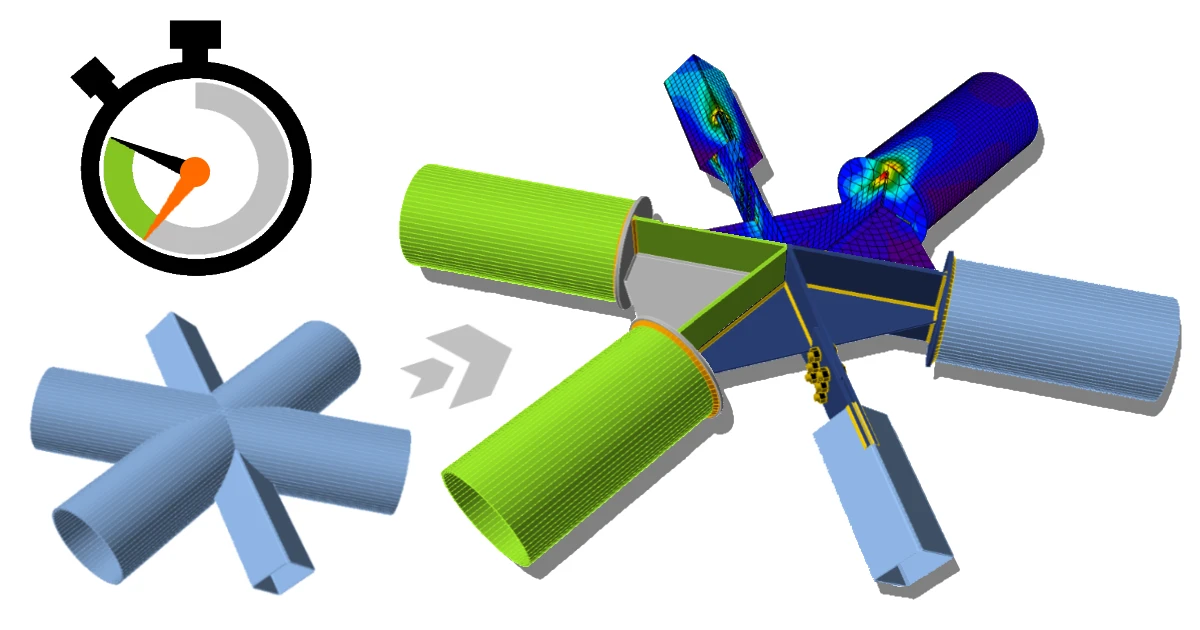


Permettez-moi de vous présenter 5 des raccourcis les plus récents dans le flux de travail de conception des assemblages que vous pouvez utiliser pour économiser un temps précieux.
#1 Liens BIM
Les interconnexions BIM entre les logiciels de calcul par éléments finis et les applications CAO de modélisation sont bien connues. Vous pouvez utiliser la géométrie globale de la structure, les conditions aux limites, les propriétés des matériaux et des sections transversales d'un logiciel et les utiliser dans l'autre.
Mais qu'en est-il de l'évaluation des assemblages d'éléments ?
Il existe plusieurs applications de modélisation des assemblages qui permettent de créer un modèle 3D de chaque assemblage dans les moindres détails. Mais lorsque vous souhaitez vérifier que tout fonctionne comme prévu, vous deviez créer un modèle de calcul séparé avec un degré d'imprécision élevé.
Cela peut désormais appartenir au passé !
Il n'existe pas de moyen plus rapide d'évaluer n'importe quel assemblage acier complexe et de générer le rapport de vérification normative. Grâce à la fonctionnalité de lien BIM développée et intégrée dans les produits IDEA StatiCa, vous pouvez éviter la duplication du travail.
Cela ne nécessite pas plus de trois étapes de base :
- Exportez l'assemblage depuis votre application CAO vers IDEA StatiCa Connection. Vous pouvez simplement utiliser le modèle 3D que vous avez déjà modélisé dans l'application CAO.
- Exportez les charges depuis votre application de calcul par éléments finis vers IDEA StatiCa Connection, où vous appliquez les efforts internes aux nœuds déjà calculés dans votre modèle de calcul global.
- Vous combinez enfin ces deux données dans IDEA StatiCa et vous pourrez vérifier tout ce qui vous intéresse.
Bien sûr, il faut parfois optimiser l'assemblage après la première tentative, mais avec la fonction « synchroniser », le processus itératif ressemble davantage à un plaisir qu'à un travail.
D'accord - ce n'est peut-être plus aussi agréable si vous devez encore effectuer cette vérification pour plusieurs assemblages les uns après les autres. C'est pourquoi la « sélection groupée » a été créée ! Grâce à cette fonctionnalité, vous pouvez sélectionner plusieurs assemblages à la fois et les évaluer automatiquement. Notre article de blog - Sélection groupée traite ce sujet plus en détail.
C'est un rêve devenu réalité pour tous ceux qui travaillent sur les assemblages structurels ! Ce type de flux de travail semi-automatique est particulièrement bénéfique pour les personnes responsables de la conception, de l'évaluation et des vérifications normatives des assemblages.
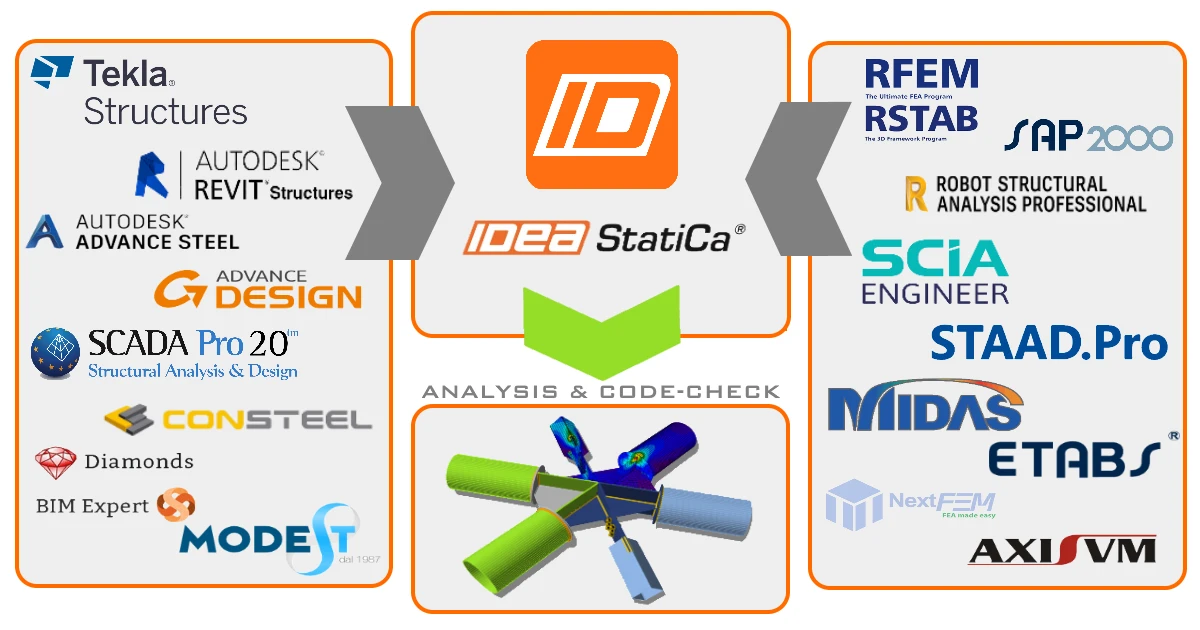
Les ingénieurs utilisent de nombreux logiciels différents. En conséquence, vous pouvez trouver de nombreux tutoriels décrivant leur connexion avec IDEA StatiCa. Tutoriel - Comment combiner Tekla et SAP fait partie des plus populaires.
Comme les liens BIM sont essentiels pour un flux de travail efficace, le développement de fonctionnalités progresse sans cesse pour une utilisation encore meilleure par les ingénieurs. C'est pourquoi il est utile de consulter l'un de nos webinaires récents - Les dernières fonctionnalités des liens BIM CAO - pour ne manquer aucun nouvel outil.
#2 Utiliser des modèles préparés
Vous n'avez pas à réinventer la roue encore et encore et encore...
Bien que chaque structure soit unique d'une certaine façon, il est très probable que le type d'assemblage que vous allez concevoir ait déjà été réalisé par quelqu'un auparavant.
Assistant de démarrage
Dans de nombreux cas, les modèles de l'écran de l'assistant de démarrage peuvent effectuer la majeure partie du travail de modélisation à votre place. Dès le lancement du logiciel, vous pouvez trouver plus de 250 modèles en attente d'une optimisation finale.
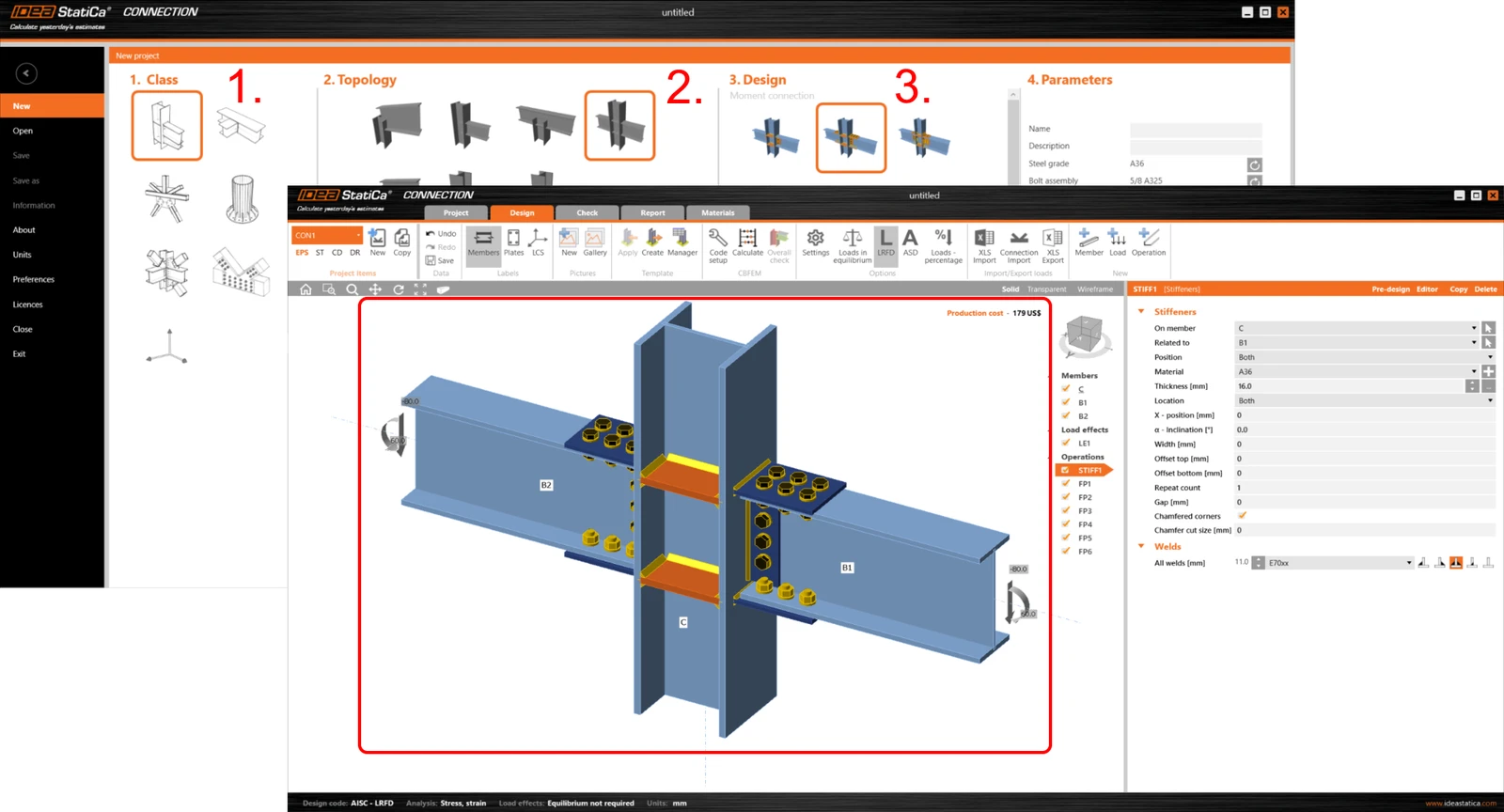
Pour une introduction à ces modèles, consultez notre article de blog sur les Nouveaux modèles de l'assistant.
Modèles dynamiques (clic droit)
Une excellente fonctionnalité de modèles dynamiques est activée par le bouton droit de la souris. C'est comme dire à l'application : « ok, et maintenant assemblez ces deux éléments ensemble, s'il vous plaît », mais beaucoup plus rapidement. En quelques clics de souris, vous créez plusieurs opérations de modélisation à la fois.
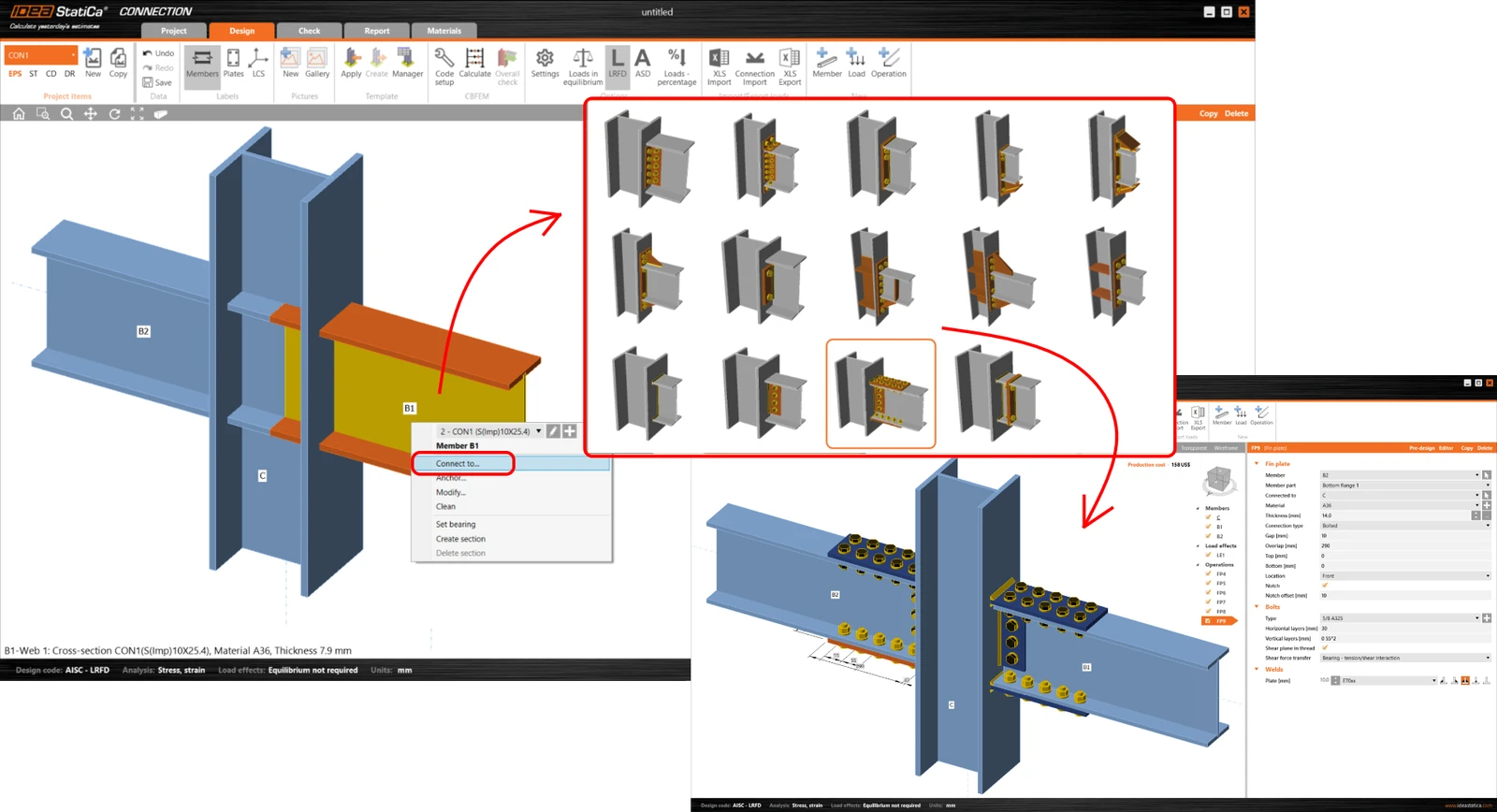
Il est fortement recommandé de se familiariser avec les fonctionnalités du bouton droit de la souris, car elles incluent les fonctions les plus utiles et les plus nécessaires.
Pré-dimensionnement
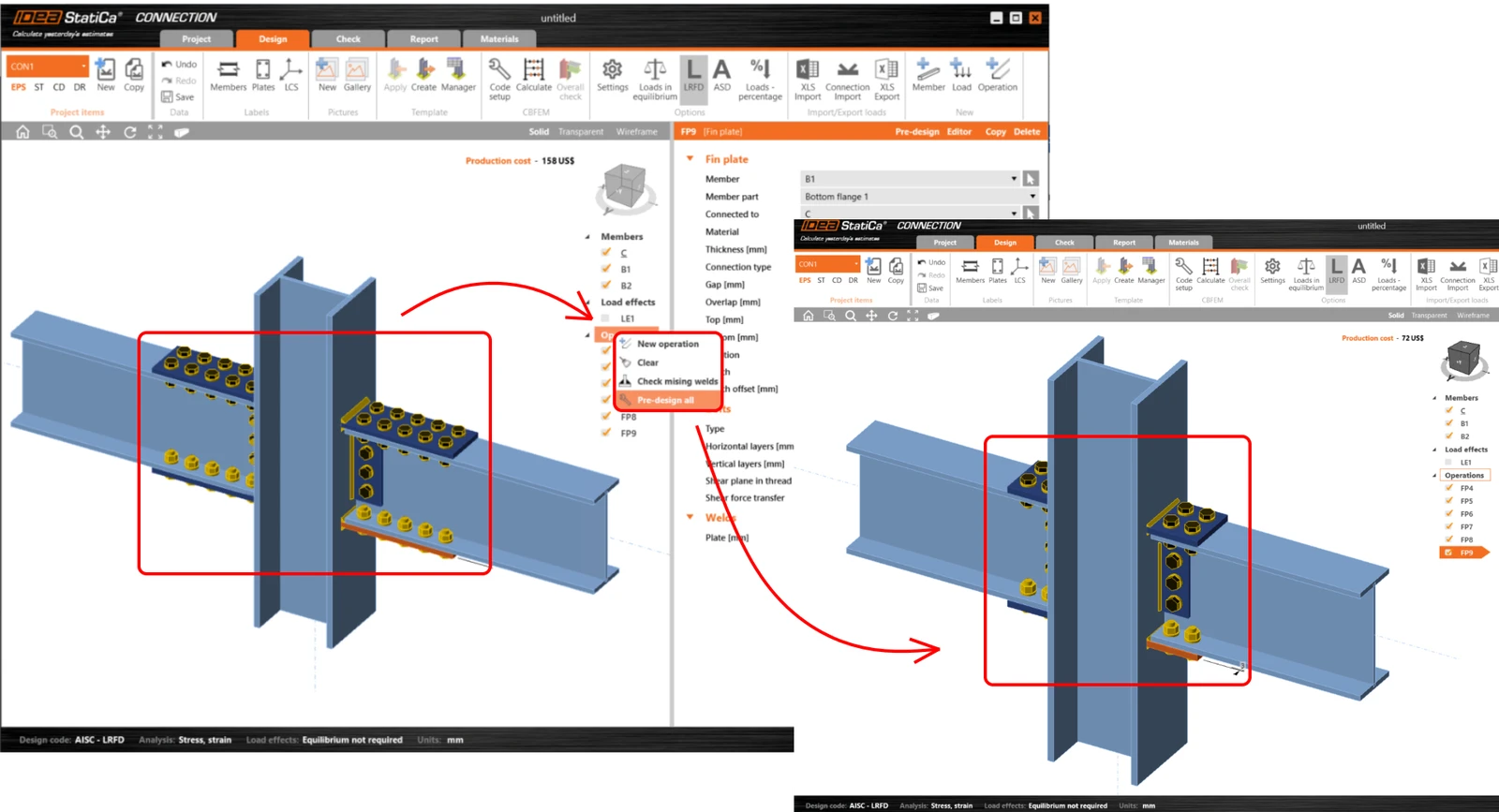
Cette fonctionnalité avancée crée les assemblages selon des paramètres prédéfinis - essentiellement basés sur un pourcentage de la résistance de la section transversale de l'élément.
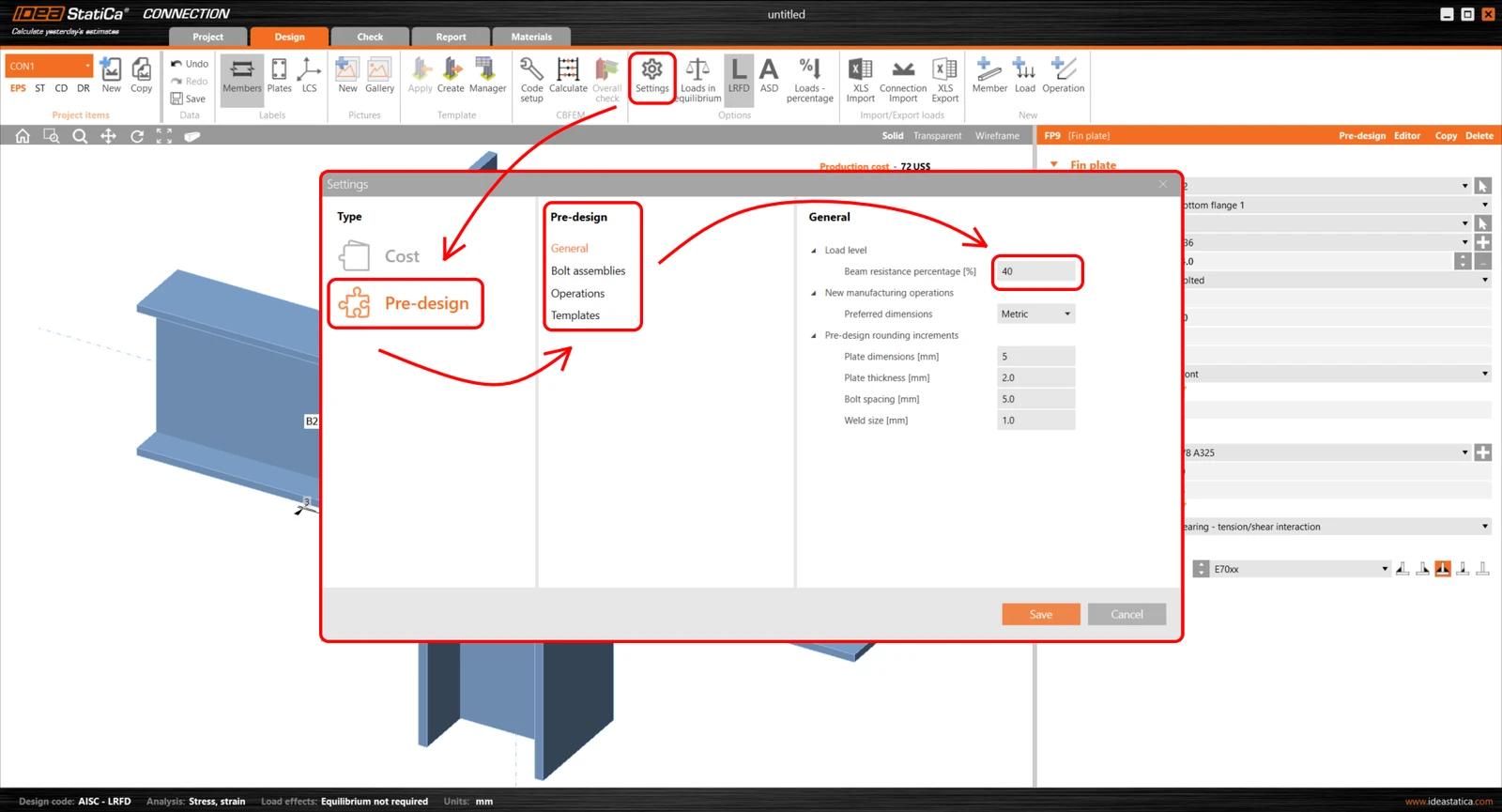
Une fois que vous aurez découvert et utilisé cette fonction, vous ne pourrez plus vous en passer. Accédez-y dès maintenant via notre article dédié au Pré-dimensionnement.
Modèles utilisateur
Il est assez courant que chaque ingénieur structure ou entreprise de construction ait son propre style spécifique dans lequel les assemblages acier sont conçus et fabriqués. Ces spécificités varient selon les régions et les usages. C'est pourquoi il n'est pas possible de créer un ensemble d'assemblages qui convienne également à tous les utilisateurs.
Mais il est possible (et fortement recommandé) pour tous les utilisateurs de travailler avec des modèles créés par leurs propres soins. Cette fonction est assurée par le gestionnaire de modèles.
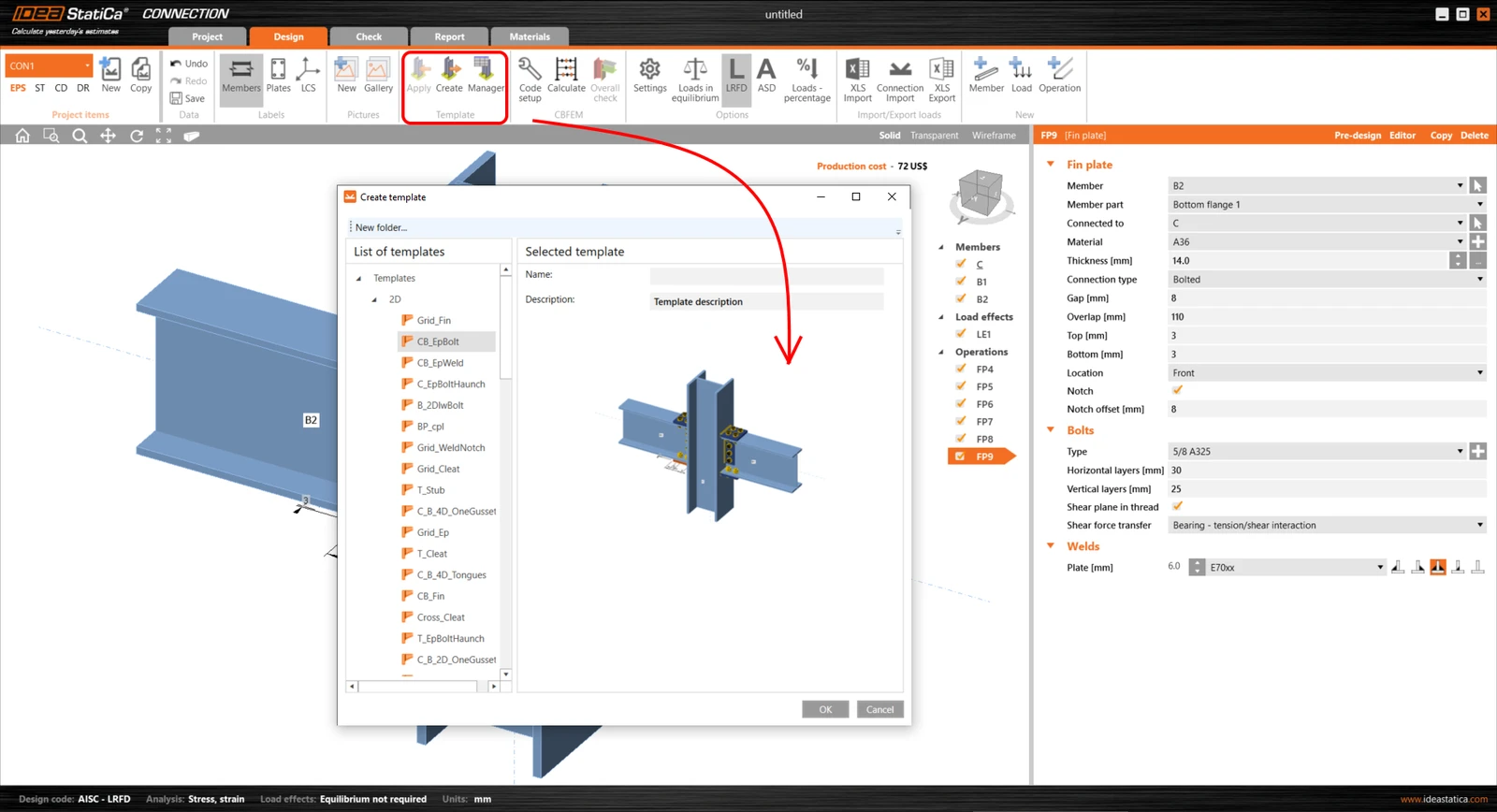
Vous pouvez y stocker et gérer des modèles d'assemblages selon vos habitudes et vos besoins. La façon de les enregistrer et de les réutiliser est abordée dans notre webinaire - Modèles et partage.
Exemples de projets
Des dizaines d'exemples de projets de conception d'assemblages sont disponibles dans le Centre de support, et nous en ajoutons continuellement de nouveaux. Assemblages articulés, boulonnés ou soudés, ossatures à rotules, poutres, platines de base, ancrages, tout ce dont vous avez besoin...
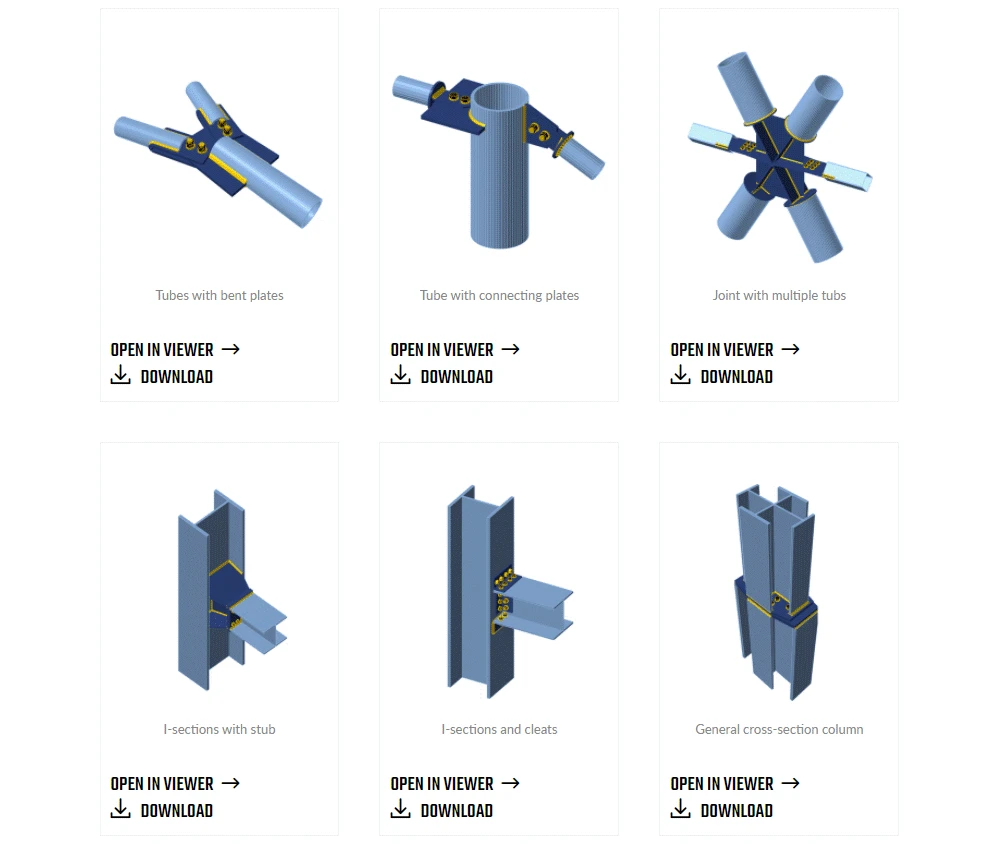
Il ne vous reste plus qu'à trouver celui qui convient le mieux à votre conception, à le télécharger et à l'adapter à votre propre projet. Simple, direct, gratuit. La catégorie Exemples de projets est un excellent type de contenu, où vous pouvez trouver de nouvelles inspirations ainsi qu'un aperçu des capacités des applications IDEA StatiCa présentées dans des cas d'utilisation pratiques réels.
#3 Centre de support
Souvent, une part importante du temps de conception est consacrée à la recherche d'informations appropriées relatives à la structure particulière, aux exigences normatives ou aux spécificités de la conception. Cela pourrait être le gain de temps décisif : une source d'information fiable (sans recherche fastidieuse dans des manuels de conception ou plusieurs ressources internet différentes).
Le Centre de support IDEA StatiCa est une source d'information complète et de qualité - il contient une multitude d'informations dédiées à la conception des assemblages. Et grâce à un algorithme de recherche robuste et sophistiqué, vous obtenez les meilleurs résultats adaptés à vos besoins.
Un seul mot et vous obtenez de nombreuses ressources utiles.
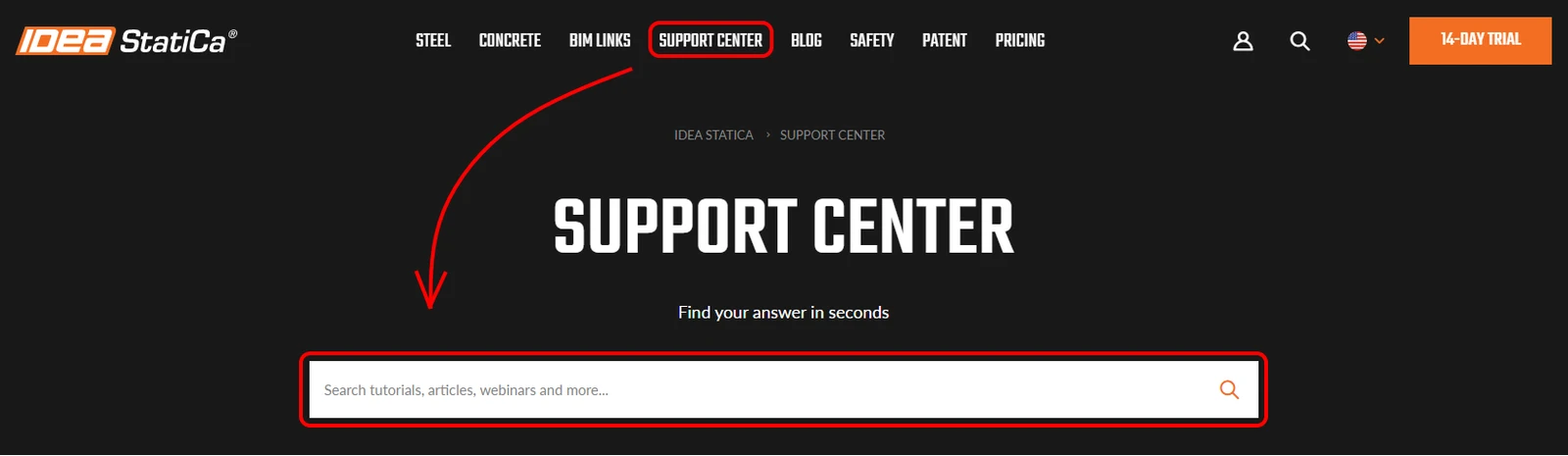
Comme nous avons tous des préférences différentes en matière de sources, vous pouvez choisir la forme d'information adaptée à vos besoins actuels. Les informations sont disponibles sous différentes formes.
Voyez simplement la quantité de contenu relatif à la conception des assemblages disponible rien que pour vous (données de février 2021) :
- et bien d'autres encore.
#4 Visionneuse de projet
L'un des moyens les plus rapides de communiquer vos idées sur la conception des assemblages est de montrer votre modèle 3D à vos partenaires commerciaux dans le cloud via un navigateur web (voir par exemple article de blog - Visionneuse de projet).
Les avantages de ce type de communication sont assez évidents :
- votre partenaire commercial n'a pas besoin d'avoir l'application IDEA StatiCa achetée ou installée,
- une connexion internet et un navigateur web sont les seules nécessités,
- c'est gratuit pour les deux parties,
- pas besoin d'exporter le modèle 3D en dessins 2D via un logiciel tiers, tandis que la visionneuse peut l'exporter directement au format DWG standard.
#5 GitHub IDEA Open Model
Si vous utilisez votre propre application de calcul par éléments finis ou si vous modélisez vos assemblages dans votre propre logiciel CAO, vous pouvez toujours utiliser la puissance et les avantages des produits IDEA StatiCa. Nos développeurs ont préparé une interface de programmation d'application (API) pour l'interconnexion entre différents logiciels via l'IDEA Open Model (IOM).
Et quel est le principal avantage de la mise en œuvre de cette fonctionnalité ?
Vous pouvez continuer à utiliser votre propre logiciel pour lequel vous avez déjà payé ainsi que les produits IDEA StatiCa – les deux logiciels de manière indépendante. Mais vous devrez alors effectuer certaines tâches deux fois.
Ou vous pouvez implémenter l'IDEA Open Model et commencer à profiter des avantages des interconnexions d'import-export directes, évitant ainsi la nécessité de tout modéliser deux fois.
Vous pouvez trouver tous les détails nécessaires dans notre article de blog - IDEA Open Model dédié à ce sujet ou directement sur la page web GitHub.
Widget #NaN: widget_iframe
Name: iframe widget - Newsletter Subscription
ID: a1697b47-e5f7-4009-8b18-a29b3b27db65
Show Raw Data
{
  "iframe_title": {
    "name": "Title",
    "type": "text",
    "value": "Rejoignez 10 000 ingénieurs"
  },
  "iframe_description": {
    "name": "Description",
    "type": "text",
    "value": "Recevez des conseils d'ingénierie experts directement dans votre boîte mail.\nAbonnez-vous à la newsletter IDEA StatiCa ci-dessous."
  },
  "iframe_url": {
    "name": "iframe URL",
    "type": "text",
    "value": "https://campaign.ideastatica.com/newsletter-subscription"
  },
  "iframe_height": {
    "name": "Height",
    "type": "number",
    "value": 650
  },
  "iframe_width": {
    "name": "Width",
    "type": "number",
    "value": 850
  },
  "visibleinregion": {
    "name": "VisibleInRegion",
    "type": "multiple_choice",
    "value": []
  },
  "regions": {
    "name": "Region",
    "type": "taxonomy",
    "value": [],
    "taxonomyGroup": "region"
  },
  "translation__translation_connector": {
    "name": "Translation Connector",
    "type": "taxonomy",
    "value": [],
    "taxonomyGroup": "languages"
  },
  "translation__force_translation": {
    "name": "Force translation",
    "type": "multiple_choice",
    "value": []
  },
  "translation__translate_standalone_nested_content_items": {
    "name": "Translate standalone nested content items",
    "type": "multiple_choice",
    "value": []
  },
  "translation__last_translation": {
    "images": [],
    "linkedItemCodenames": [],
    "linkedItems": [],
    "links": [],
    "name": "Last translation",
    "type": "rich_text",
    "value": "<p>Translation info:</p>\n<ul>\n  <li>cs-CZ: Translated on 29.5.2026 12:04</li>\n  <li>de-DE: Translated on 29.5.2026 12:42</li>\n  <li>en-US: Never translated</li>\n  <li>es-ES: Never translated</li>\n  <li>fr-FR: Translated on 29.5.2026 13:20</li>\n  <li>hu-HU: Never translated</li>\n  <li>it-IT: Never translated</li>\n  <li>ko-KR: Never translated</li>\n  <li>nl-NL: Never translated</li>\n  <li>pl-PL: Never translated</li>\n  <li>pt-PT: Never translated</li>\n  <li>ro-RO: Never translated</li>\n  <li>ru-RU: Never translated</li>\n  <li>th-TH: Never translated</li>\n  <li>tr-TR: Never translated</li>\n  <li>vi-VN: Never translated</li>\n  <li>zh-CN: Never translated</li>\n</ul>\n<p>Publish info:</p>\n<ul>\n  <li>Publish info is available only in the main language</li>\n</ul>"
  },
  "translation__ai_translated": {
    "name": "AI translated",
    "type": "multiple_choice",
    "value": [
      {
        "name": "Translated",
        "codename": "translated"
      }
    ]
  },
  "translation___experimental__synchronize_content_references": {
    "name": "[Experimental] Synchronize content references",
    "type": "multiple_choice",
    "value": []
  },
  "translation___experimental__selective_element_translation": {
    "name": "[Experimental] Selective translation",
    "type": "multiple_choice",
    "value": []
  },
  "translation__selectivetranslationelementid": {
    "name": "selectiveTranslationElementId",
    "type": "custom",
    "value": null
  }
}