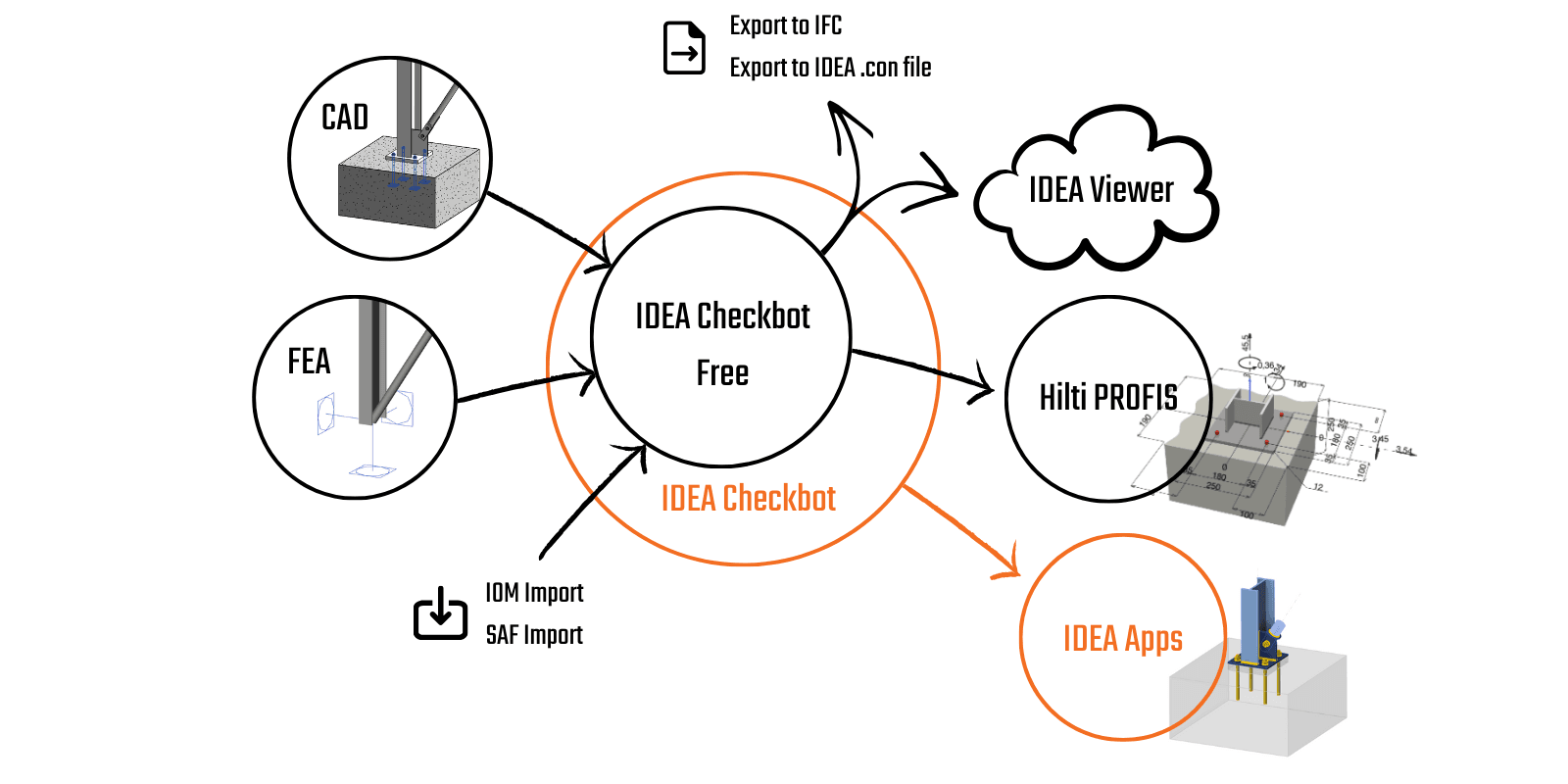
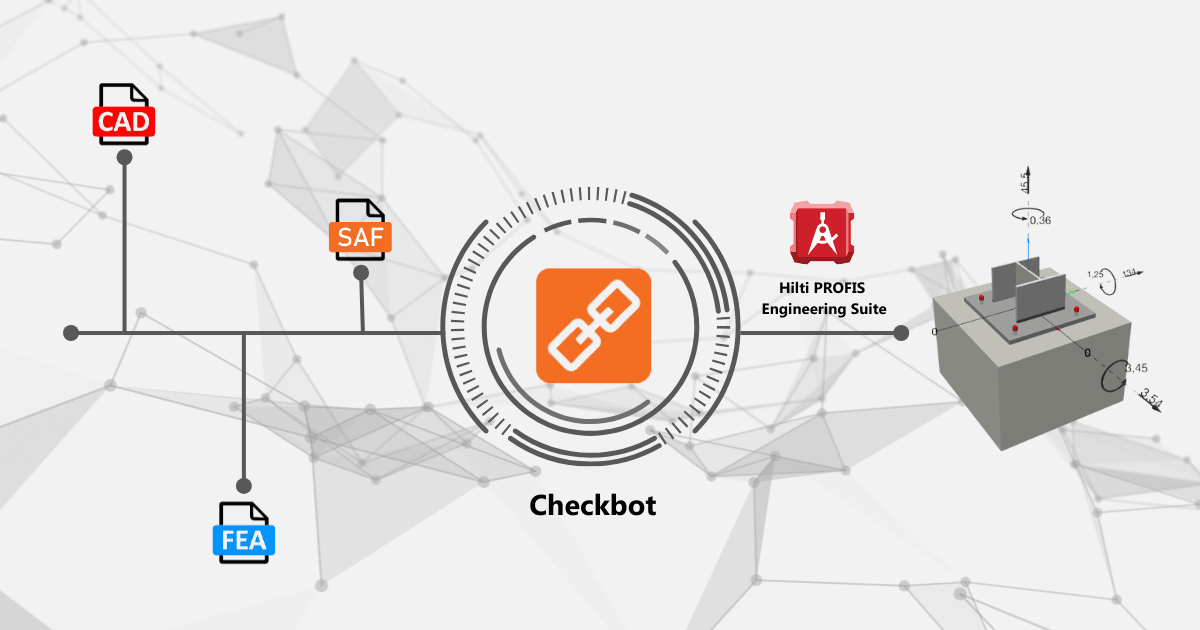
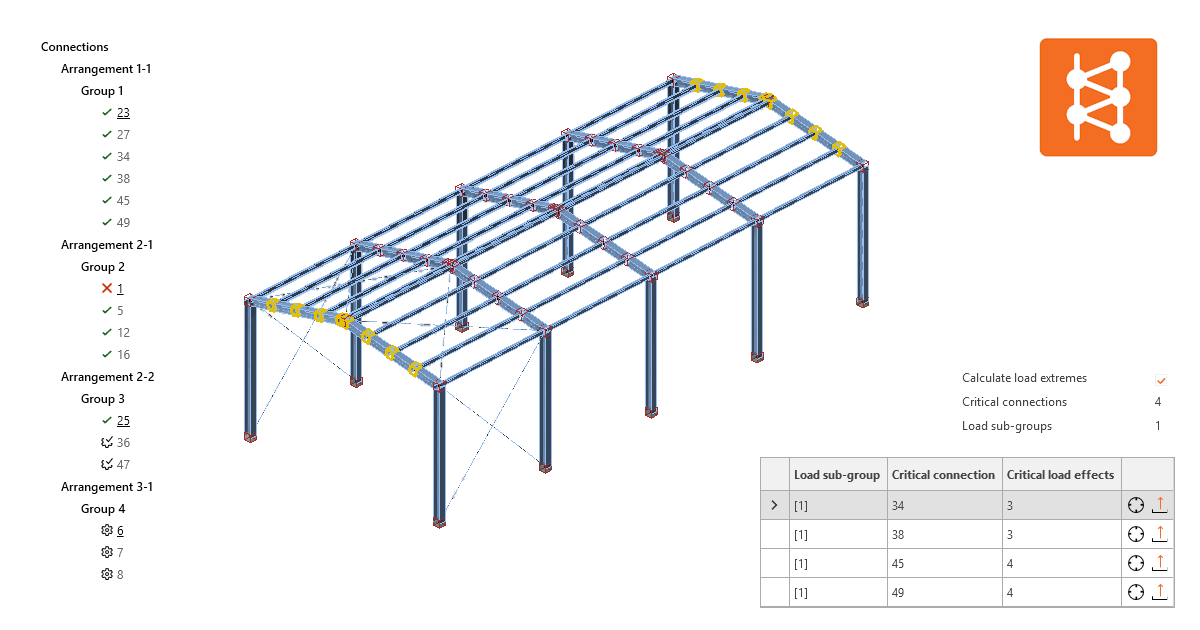
Widget #NaN: support_center_article
Name: Space Gass BIM Link tutorial - How to activate the link
ID: c3636c58-b6c4-41e9-9e2d-f90b42082f95
Show Raw Data
{
"title": {
"name": "Main headline (H1)",
"type": "text",
"value": "How to activate the link"
},
"preview_image": {
"name": "Preview image",
"type": "asset",
"value": []
},
"post_date": {
"name": "Post date",
"type": "date_time",
"value": null,
"displayTimeZone": null
},
"perex_content": {
"name": "Lead paragraph",
"type": "text",
"value": ""
},
"content": {
"images": [],
"linkedItemCodenames": [],
"linkedItems": [],
"links": [
{
"codename": "landing_page___downloads",
"linkId": "0dff6482-3e17-4ca2-bb66-b4abc6a8dde4",
"urlSlug": "product-downloads",
"type": "landing_page"
},
{
"codename": "bim_links__supported_versions",
"linkId": "eeb85fd1-4708-4f88-ad36-cbe30ac41eb7",
"urlSlug": "bim-links-supported-versions-of-3rd-party-applications",
"type": "support_center_article"
}
],
"name": "Content",
"type": "rich_text",
"value": "<ul>\n <li>Download and install the <a data-item-id=\"0dff6482-3e17-4ca2-bb66-b4abc6a8dde4\" href=\"\">latest version of IDEA StatiCa</a></li>\n <li>Make sure that you are using a <a data-item-id=\"eeb85fd1-4708-4f88-ad36-cbe30ac41eb7\" href=\"\">supported version</a> of your FEA/BIM solution</li>\n</ul>"
},
"regions": {
"name": "Region",
"type": "taxonomy",
"value": [
{
"name": "EMEA",
"codename": "emea"
},
{
"name": "AMER",
"codename": "amer"
},
{
"name": "APAC",
"codename": "apac"
}
],
"taxonomyGroup": "region"
},
"product_groups": {
"name": "Product group",
"type": "taxonomy",
"value": [
{
"name": "Steel",
"codename": "steel"
}
],
"taxonomyGroup": "product_group"
},
"support_center_article_types": {
"name": "Support center article",
"type": "taxonomy",
"value": [
{
"name": "Knowledge base",
"codename": "knowledgebase_article"
}
],
"taxonomyGroup": "support_center_article"
},
"expertise_levels": {
"name": "Expertise level",
"type": "taxonomy",
"value": [
{
"name": "Beginner",
"codename": "beginner"
},
{
"name": "Intermediate",
"codename": "intermediate"
}
],
"taxonomyGroup": "expertise_level"
},
"labels": {
"name": "Labels",
"type": "taxonomy",
"value": [
{
"name": "BIM link",
"codename": "bim_links"
}
],
"taxonomyGroup": "labels"
},
"linked_items": {
"name": "Linked items",
"type": "modular_content",
"value": [],
"linkedItems": []
},
"attachments__files": {
"name": "Attachments",
"type": "asset",
"value": []
},
"content_priority__value": {
"name": "Content priority value",
"type": "number",
"value": null
},
"options": {
"name": "Options",
"type": "multiple_choice",
"value": []
},
"url_slug": {
"name": "Url slug",
"type": "url_slug",
"value": "how-to-activate-the-link"
},
"unique_url_slug": {
"name": "Unique URL slug",
"type": "custom",
"value": "[\"how-to-activate-the-link\",\"[autogenerated]\"]"
},
"content_settings__sitemap": {
"name": "Show in sitemap",
"type": "multiple_choice",
"value": [
{
"name": "default",
"codename": "default"
}
]
},
"content_settings__robots": {
"name": "Search engine indexing",
"type": "multiple_choice",
"value": [
{
"name": "default",
"codename": "default"
}
]
},
"content_settings__is_hidden": {
"name": "Hidden nested content",
"type": "multiple_choice",
"value": []
},
"metadata__page_title": {
"name": "Page title",
"type": "text",
"value": ""
},
"metadata__page_description": {
"name": "Page description",
"type": "text",
"value": ""
},
"metadata__page_keywords": {
"name": "Page keywords",
"type": "text",
"value": ""
},
"metadata__canonical_url": {
"name": "Canonical URL",
"type": "text",
"value": ""
},
"metadata__og_title": {
"name": "OG:title",
"type": "text",
"value": ""
},
"metadata__og_description": {
"name": "OG:description",
"type": "text",
"value": ""
},
"metadata__og_image": {
"name": "OG:image",
"type": "asset",
"value": []
},
"translation__translation_connector": {
"name": "Translation Connector",
"type": "taxonomy",
"value": [],
"taxonomyGroup": "languages"
},
"translation__force_translation": {
"name": "Force translation",
"type": "multiple_choice",
"value": []
},
"translation__last_translation": {
"images": [],
"linkedItemCodenames": [],
"linkedItems": [],
"links": [],
"name": "Last translation",
"type": "rich_text",
"value": "<p><br></p>"
},
"translation__ai_translated": {
"name": "AI translated",
"type": "multiple_choice",
"value": []
},
"page_tree_settings__page_label": {
"name": "Page label",
"type": "text",
"value": ""
},
"page_tree_settings__path_segment": {
"name": "Path segment",
"type": "text",
"value": "how-to-activate-the-link-space-gass"
},
"page_tree_settings__breadcrumb_style": {
"name": "Breadcrumb style",
"type": "multiple_choice",
"value": []
},
"page_tree_settings__hide_in_breadcrumbs": {
"name": "Hide in breadcrumbs",
"type": "multiple_choice",
"value": []
}
}How to use the link
Open the attached AS Project in Space Gass and run the calculation.
The BIM link should be automatically integrated. You can find it in the top ribbon under Design -> IDEA StatiCa Checkbot. This will open the Checkbot application.
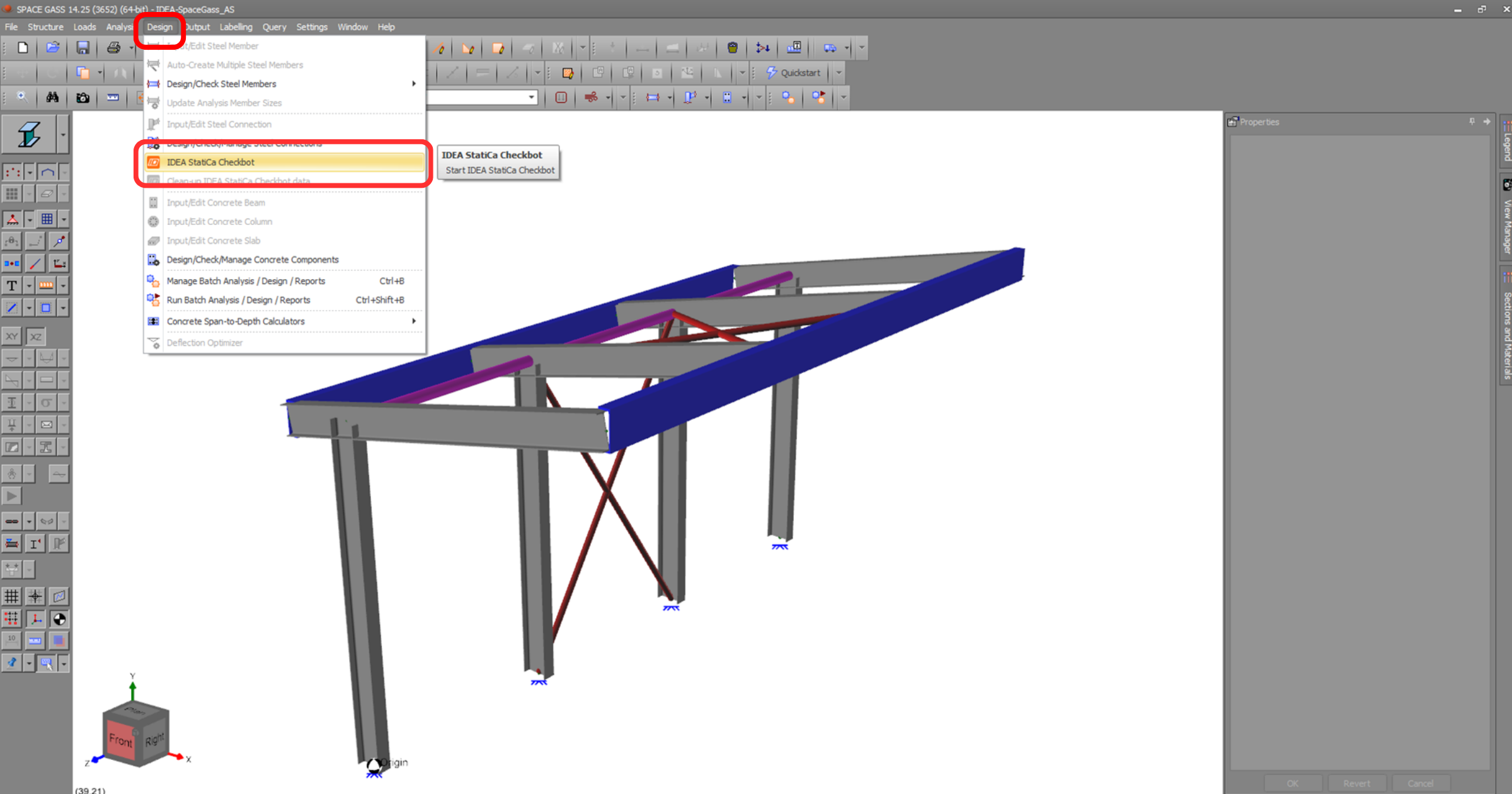
Select the New option with project type Steel, AS design code. Then select Create project.
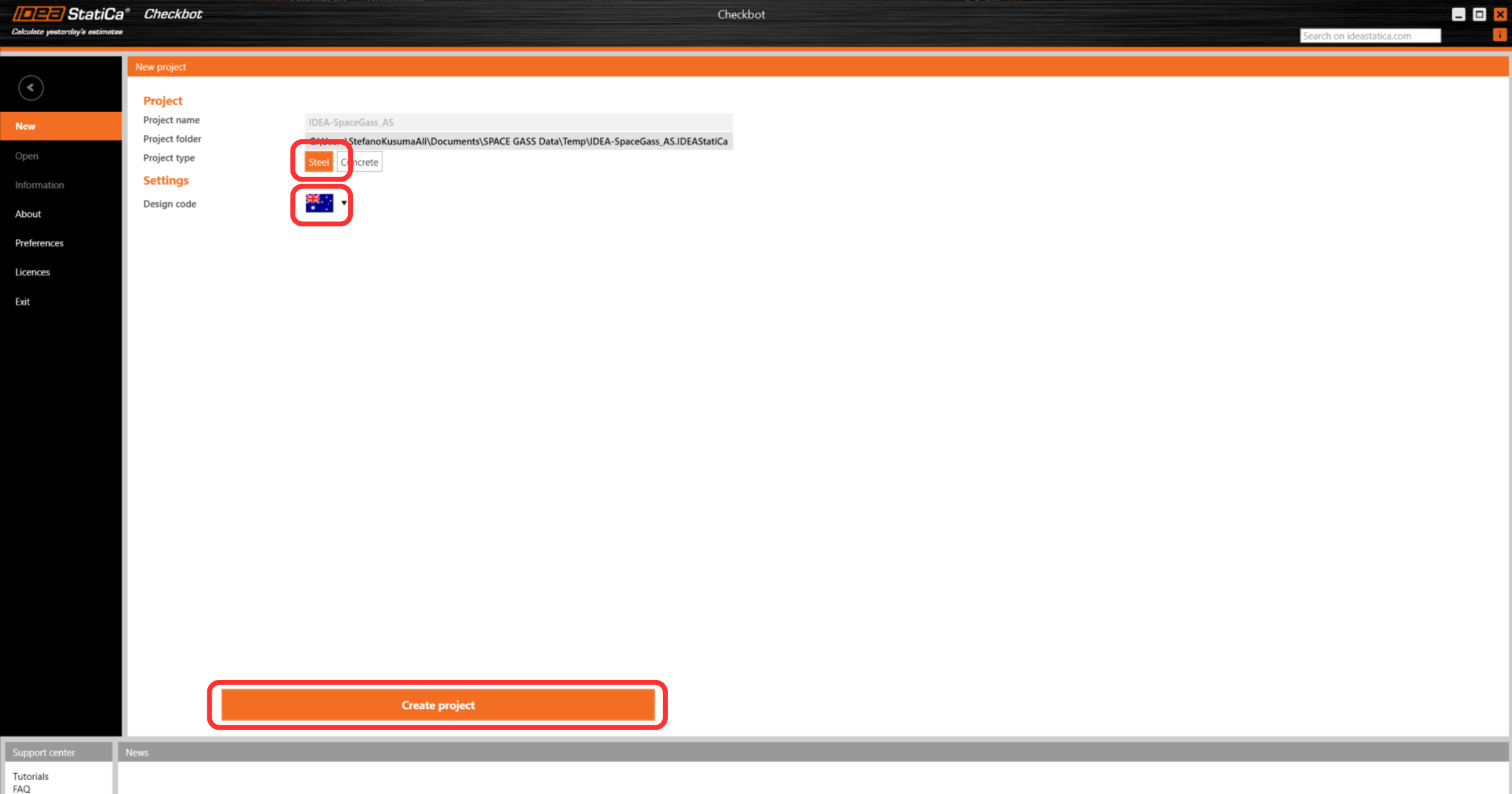
The new Checkbot project is ready to import connections from Space Gass.
Widget #NaN: support_center_article
Name: Space Gass BIM Link tutorial - Import
ID: 3c0d291f-d5c1-4921-b00f-cc63a80a5e54
Show Raw Data
{
"title": {
"name": "Main headline (H1)",
"type": "text",
"value": "Import"
},
"preview_image": {
"name": "Preview image",
"type": "asset",
"value": []
},
"post_date": {
"name": "Post date",
"type": "date_time",
"value": null,
"displayTimeZone": null
},
"perex_content": {
"name": "Lead paragraph",
"type": "text",
"value": ""
},
"content": {
"images": [
{
"description": "checkbot import connections",
"imageId": "248ab3e3-6162-4911-a526-f5e2ad0f1de1",
"url": "https://assets-us-01.kc-usercontent.com:443/28eac049-c8ed-00e2-220c-12142a968dff/8ea4aa85-3e45-4625-914d-dbc05a226152/Untitled%20design%20%282%29.png",
"height": 1260,
"width": 2400
},
{
"description": "select nodes in space gass",
"imageId": "7afcf50d-857a-4af5-8fa3-57cd8cc9f558",
"url": "https://assets-us-01.kc-usercontent.com:443/28eac049-c8ed-00e2-220c-12142a968dff/8e621456-5599-4b07-a940-e1da5e9c7747/Untitled%20design%20%283%29.png",
"height": 1260,
"width": 2400
},
{
"description": "node imported to checkbot",
"imageId": "ff71a91d-a82a-44ea-bb29-46931d0fc04d",
"url": "https://assets-us-01.kc-usercontent.com:443/28eac049-c8ed-00e2-220c-12142a968dff/7768ccfc-ff86-4410-a2db-c8b7e0f37d15/Untitled%20design%20%284%29.png",
"height": 1260,
"width": 2400
},
{
"description": null,
"imageId": "84b01e3d-e08e-4807-9d9d-48403fd236d7",
"url": "https://assets-us-01.kc-usercontent.com:443/28eac049-c8ed-00e2-220c-12142a968dff/ed52afae-d482-4425-bdc0-eda01bca1acb/Space%20gass%20bimlink%20tutorial.png",
"height": 1969,
"width": 3750
},
{
"description": null,
"imageId": "a62df208-443f-4944-9a75-4f5d1bce37b7",
"url": "https://assets-us-01.kc-usercontent.com:443/28eac049-c8ed-00e2-220c-12142a968dff/363dbec8-a77a-4d7a-8d0c-13f0ad388a33/Space%20gass%20bimlink%20tutorial%20%282%29.png",
"height": 1969,
"width": 3750
},
{
"description": "import more nodes to checkbot",
"imageId": "fff12110-f591-4ce7-b0f8-add2ae91e0e3",
"url": "https://assets-us-01.kc-usercontent.com:443/28eac049-c8ed-00e2-220c-12142a968dff/e737caee-cba1-4079-ac58-0a238266183f/Untitled%20design%20%285%29.png",
"height": 1260,
"width": 2400
}
],
"linkedItemCodenames": [],
"linkedItems": [],
"links": [],
"name": "Content",
"type": "rich_text",
"value": "<p>In Checkbot select <strong>Connections.</strong></p>\n<figure data-asset-id=\"248ab3e3-6162-4911-a526-f5e2ad0f1de1\" data-image-id=\"248ab3e3-6162-4911-a526-f5e2ad0f1de1\"><img src=\"https://assets-us-01.kc-usercontent.com:443/28eac049-c8ed-00e2-220c-12142a968dff/8ea4aa85-3e45-4625-914d-dbc05a226152/Untitled%20design%20%282%29.png\" data-asset-id=\"248ab3e3-6162-4911-a526-f5e2ad0f1de1\" data-image-id=\"248ab3e3-6162-4911-a526-f5e2ad0f1de1\" alt=\"checkbot import connections\"></figure>\n<p>Then in Space Gass, select one of the inside columns lowest node, then <strong>right-click</strong>, select <strong>OK.</strong></p>\n<figure data-asset-id=\"7afcf50d-857a-4af5-8fa3-57cd8cc9f558\" data-image-id=\"7afcf50d-857a-4af5-8fa3-57cd8cc9f558\"><img src=\"https://assets-us-01.kc-usercontent.com:443/28eac049-c8ed-00e2-220c-12142a968dff/8e621456-5599-4b07-a940-e1da5e9c7747/Untitled%20design%20%283%29.png\" data-asset-id=\"7afcf50d-857a-4af5-8fa3-57cd8cc9f558\" data-image-id=\"7afcf50d-857a-4af5-8fa3-57cd8cc9f558\" alt=\"select nodes in space gass\"></figure>\n<p>This will import the column and its load effects into Checkbot - with the same coordinates, orientations, and section sizes as per the FEA/BIM model.</p>\n<p>Please note that your node and member numbering might be different.</p>\n<figure data-asset-id=\"ff71a91d-a82a-44ea-bb29-46931d0fc04d\" data-image-id=\"ff71a91d-a82a-44ea-bb29-46931d0fc04d\"><img src=\"https://assets-us-01.kc-usercontent.com:443/28eac049-c8ed-00e2-220c-12142a968dff/7768ccfc-ff86-4410-a2db-c8b7e0f37d15/Untitled%20design%20%284%29.png\" data-asset-id=\"ff71a91d-a82a-44ea-bb29-46931d0fc04d\" data-image-id=\"ff71a91d-a82a-44ea-bb29-46931d0fc04d\" alt=\"node imported to checkbot\"></figure>\n<p>Please note the 3D workspace is designed to show an overview of the imported structure and not a detailed view of the actual connections.</p>\n<p>All the load cases and load combinations will be imported into Checkbot. Click <strong>Loads </strong>to view them. Result class \"All ULS Fund\" will be used for checking the connections, hence we need to remove load cases and only keep load combinations.</p>\n<figure data-asset-id=\"84b01e3d-e08e-4807-9d9d-48403fd236d7\" data-image-id=\"84b01e3d-e08e-4807-9d9d-48403fd236d7\"><img src=\"https://assets-us-01.kc-usercontent.com:443/28eac049-c8ed-00e2-220c-12142a968dff/ed52afae-d482-4425-bdc0-eda01bca1acb/Space%20gass%20bimlink%20tutorial.png\" data-asset-id=\"84b01e3d-e08e-4807-9d9d-48403fd236d7\" data-image-id=\"84b01e3d-e08e-4807-9d9d-48403fd236d7\" alt=\"\"></figure>\n<p>Choose multiple load cases to remove, then right click and <strong>Delete </strong>then click <strong>Save</strong>.</p>\n<figure data-asset-id=\"a62df208-443f-4944-9a75-4f5d1bce37b7\" data-image-id=\"a62df208-443f-4944-9a75-4f5d1bce37b7\"><img src=\"https://assets-us-01.kc-usercontent.com:443/28eac049-c8ed-00e2-220c-12142a968dff/363dbec8-a77a-4d7a-8d0c-13f0ad388a33/Space%20gass%20bimlink%20tutorial%20%282%29.png\" data-asset-id=\"a62df208-443f-4944-9a75-4f5d1bce37b7\" data-image-id=\"a62df208-443f-4944-9a75-4f5d1bce37b7\" alt=\"\"></figure>\n<p>For more information on Checkbot, see <a href=\"https://www.ideastatica.com/support-center/checkbot-bulk-bim-workflows\" title=\"Checkbot\">here</a>.</p>\n<p>For several FEA/BIM solutions, you can also import multiple connections into Checkbot in the same manner as above. Instead of selecting one node and the connected members, you can select several nodes and members using the selection methods within the application.</p>\n<figure data-asset-id=\"fff12110-f591-4ce7-b0f8-add2ae91e0e3\" data-image-id=\"fff12110-f591-4ce7-b0f8-add2ae91e0e3\"><img src=\"https://assets-us-01.kc-usercontent.com:443/28eac049-c8ed-00e2-220c-12142a968dff/e737caee-cba1-4079-ac58-0a238266183f/Untitled%20design%20%285%29.png\" data-asset-id=\"fff12110-f591-4ce7-b0f8-add2ae91e0e3\" data-image-id=\"fff12110-f591-4ce7-b0f8-add2ae91e0e3\" alt=\"import more nodes to checkbot\"></figure>\n<p>We recommend <em>not</em> importing all of the connections at the same time but building up the connections incrementally.</p>"
},
"regions": {
"name": "Region",
"type": "taxonomy",
"value": [
{
"name": "EMEA",
"codename": "emea"
},
{
"name": "AMER",
"codename": "amer"
},
{
"name": "APAC",
"codename": "apac"
}
],
"taxonomyGroup": "region"
},
"product_groups": {
"name": "Product group",
"type": "taxonomy",
"value": [
{
"name": "Connection design",
"codename": "connection_design"
},
{
"name": "Steel",
"codename": "steel"
}
],
"taxonomyGroup": "product_group"
},
"support_center_article_types": {
"name": "Support center article",
"type": "taxonomy",
"value": [
{
"name": "Knowledge base",
"codename": "knowledgebase_article"
}
],
"taxonomyGroup": "support_center_article"
},
"expertise_levels": {
"name": "Expertise level",
"type": "taxonomy",
"value": [
{
"name": "Beginner",
"codename": "beginner"
},
{
"name": "Intermediate",
"codename": "intermediate"
}
],
"taxonomyGroup": "expertise_level"
},
"labels": {
"name": "Labels",
"type": "taxonomy",
"value": [
{
"name": "Connection",
"codename": "connection"
},
{
"name": "Checkbot",
"codename": "checkbot"
},
{
"name": "EN (Eurocode)",
"codename": "eurocode"
},
{
"name": "BIM link",
"codename": "bim_links"
},
{
"name": "AISC (USA)",
"codename": "aisc"
}
],
"taxonomyGroup": "labels"
},
"linked_items": {
"name": "Linked items",
"type": "modular_content",
"value": [],
"linkedItems": []
},
"attachments__files": {
"name": "Attachments",
"type": "asset",
"value": []
},
"content_priority__value": {
"name": "Content priority value",
"type": "number",
"value": null
},
"options": {
"name": "Options",
"type": "multiple_choice",
"value": []
},
"url_slug": {
"name": "Url slug",
"type": "url_slug",
"value": "import"
},
"unique_url_slug": {
"name": "Unique URL slug",
"type": "custom",
"value": "[\"import\",\"[autogenerated]\"]"
},
"content_settings__sitemap": {
"name": "Show in sitemap",
"type": "multiple_choice",
"value": [
{
"name": "default",
"codename": "default"
}
]
},
"content_settings__robots": {
"name": "Search engine indexing",
"type": "multiple_choice",
"value": [
{
"name": "default",
"codename": "default"
}
]
},
"content_settings__is_hidden": {
"name": "Hidden nested content",
"type": "multiple_choice",
"value": [
{
"name": "yes",
"codename": "yes"
}
]
},
"metadata__page_title": {
"name": "Page title",
"type": "text",
"value": "Import of steel connection from FEA/CAD into Checkbot"
},
"metadata__page_description": {
"name": "Page description",
"type": "text",
"value": "IDEA StatiCa step-by-step tutorial for importing steel connection and its load effects from FEA/CAD into Checkbot. Structural design of welded and bolted steel connections."
},
"metadata__page_keywords": {
"name": "Page keywords",
"type": "text",
"value": ""
},
"metadata__canonical_url": {
"name": "Canonical URL",
"type": "text",
"value": ""
},
"metadata__og_title": {
"name": "OG:title",
"type": "text",
"value": ""
},
"metadata__og_description": {
"name": "OG:description",
"type": "text",
"value": ""
},
"metadata__og_image": {
"name": "OG:image",
"type": "asset",
"value": []
},
"translation__translation_connector": {
"name": "Translation Connector",
"type": "taxonomy",
"value": [],
"taxonomyGroup": "languages"
},
"translation__force_translation": {
"name": "Force translation",
"type": "multiple_choice",
"value": []
},
"translation__last_translation": {
"images": [],
"linkedItemCodenames": [],
"linkedItems": [],
"links": [],
"name": "Last translation",
"type": "rich_text",
"value": "<p><br></p>"
},
"translation__ai_translated": {
"name": "AI translated",
"type": "multiple_choice",
"value": []
},
"page_tree_settings__page_label": {
"name": "Page label",
"type": "text",
"value": ""
},
"page_tree_settings__path_segment": {
"name": "Path segment",
"type": "text",
"value": "import-bim"
},
"page_tree_settings__breadcrumb_style": {
"name": "Breadcrumb style",
"type": "multiple_choice",
"value": []
},
"page_tree_settings__hide_in_breadcrumbs": {
"name": "Hide in breadcrumbs",
"type": "multiple_choice",
"value": []
}
}Widget #NaN: support_center_article
Name: Space Gass BIM Link tutorial - Geometry
ID: 77f01373-3ca1-4771-92a6-836f404d5c70
Show Raw Data
{
"title": {
"name": "Main headline (H1)",
"type": "text",
"value": "Geometry"
},
"preview_image": {
"name": "Preview image",
"type": "asset",
"value": []
},
"post_date": {
"name": "Post date",
"type": "date_time",
"value": null,
"displayTimeZone": null
},
"perex_content": {
"name": "Lead paragraph",
"type": "text",
"value": ""
},
"content": {
"images": [
{
"description": "open connection application",
"imageId": "4e2335d7-da9c-4d5b-92e0-e408660a2b0a",
"url": "https://assets-us-01.kc-usercontent.com:443/28eac049-c8ed-00e2-220c-12142a968dff/951cc7d5-0bcb-4f3a-9d44-672ef835afb1/Untitled%20design%20%2821%29.png",
"height": 1890,
"width": 3600
},
{
"description": null,
"imageId": "96dcf595-27dd-4cf1-adfb-1897beb2ae79",
"url": "https://assets-us-01.kc-usercontent.com:443/28eac049-c8ed-00e2-220c-12142a968dff/53a04954-8619-4294-bf1e-fe88ff1bc94a/Space%20gass%20bimlink%20tutorial%20%283%29.png",
"height": 1969,
"width": 3750
}
],
"linkedItemCodenames": [],
"linkedItems": [],
"links": [],
"name": "Content",
"type": "rich_text",
"value": "<p>In the list of project items under Connections and with a connection highlighted in Checkbot you can either right-mouse click and select <strong>Open </strong>or click the ribbon command <strong>Open</strong> to start designing, code-checking, and reporting.</p>\n<figure data-asset-id=\"4e2335d7-da9c-4d5b-92e0-e408660a2b0a\" data-image-id=\"4e2335d7-da9c-4d5b-92e0-e408660a2b0a\"><img src=\"https://assets-us-01.kc-usercontent.com:443/28eac049-c8ed-00e2-220c-12142a968dff/951cc7d5-0bcb-4f3a-9d44-672ef835afb1/Untitled%20design%20%2821%29.png\" data-asset-id=\"4e2335d7-da9c-4d5b-92e0-e408660a2b0a\" data-image-id=\"4e2335d7-da9c-4d5b-92e0-e408660a2b0a\" alt=\"open connection application\"></figure>\n<p>The settings of members are taken from the original FEA/BIM application. You can, however, change the section size of any member on the main Checkbot screen, but this will break the link with FEA/BIM application in this session unless it's synchronized again.</p>\n<p>The imported connection is opened in the IDEA StatiCa Connection application.</p>\n<figure data-asset-id=\"96dcf595-27dd-4cf1-adfb-1897beb2ae79\" data-image-id=\"96dcf595-27dd-4cf1-adfb-1897beb2ae79\"><img src=\"https://assets-us-01.kc-usercontent.com:443/28eac049-c8ed-00e2-220c-12142a968dff/53a04954-8619-4294-bf1e-fe88ff1bc94a/Space%20gass%20bimlink%20tutorial%20%283%29.png\" data-asset-id=\"96dcf595-27dd-4cf1-adfb-1897beb2ae79\" data-image-id=\"96dcf595-27dd-4cf1-adfb-1897beb2ae79\" alt=\"\"></figure>\n<p>You may see none or different Load effects from your preferred FEA/BIM* solution depending on how the load case combinations have been defined. By default, IDEA StatiCa will choose the most critical for code-checking purposes. (* Some BIM solutions are not able to store the load case combination results)</p>\n<p>For more information on Load effects see <a href=\"https://www.ideastatica.com/support-center/checkbot-bulk-bim-workflows\" title=\"Checkbot\">here</a>.</p>"
},
"regions": {
"name": "Region",
"type": "taxonomy",
"value": [
{
"name": "EMEA",
"codename": "emea"
},
{
"name": "AMER",
"codename": "amer"
},
{
"name": "APAC",
"codename": "apac"
}
],
"taxonomyGroup": "region"
},
"product_groups": {
"name": "Product group",
"type": "taxonomy",
"value": [
{
"name": "Connection design",
"codename": "connection_design"
},
{
"name": "Steel",
"codename": "steel"
}
],
"taxonomyGroup": "product_group"
},
"support_center_article_types": {
"name": "Support center article",
"type": "taxonomy",
"value": [
{
"name": "Knowledge base",
"codename": "knowledgebase_article"
}
],
"taxonomyGroup": "support_center_article"
},
"expertise_levels": {
"name": "Expertise level",
"type": "taxonomy",
"value": [
{
"name": "Beginner",
"codename": "beginner"
},
{
"name": "Intermediate",
"codename": "intermediate"
}
],
"taxonomyGroup": "expertise_level"
},
"labels": {
"name": "Labels",
"type": "taxonomy",
"value": [
{
"name": "Connection",
"codename": "connection"
},
{
"name": "EN (Eurocode)",
"codename": "eurocode"
},
{
"name": "AISC (USA)",
"codename": "aisc"
},
{
"name": "BIM link",
"codename": "bim_links"
},
{
"name": "Checkbot",
"codename": "checkbot"
}
],
"taxonomyGroup": "labels"
},
"linked_items": {
"name": "Linked items",
"type": "modular_content",
"value": [],
"linkedItems": []
},
"attachments__files": {
"name": "Attachments",
"type": "asset",
"value": []
},
"content_priority__value": {
"name": "Content priority value",
"type": "number",
"value": null
},
"options": {
"name": "Options",
"type": "multiple_choice",
"value": []
},
"url_slug": {
"name": "Url slug",
"type": "url_slug",
"value": "geometry"
},
"unique_url_slug": {
"name": "Unique URL slug",
"type": "custom",
"value": "[\"geometry\",\"[autogenerated]\"]"
},
"content_settings__sitemap": {
"name": "Show in sitemap",
"type": "multiple_choice",
"value": [
{
"name": "default",
"codename": "default"
}
]
},
"content_settings__robots": {
"name": "Search engine indexing",
"type": "multiple_choice",
"value": [
{
"name": "default",
"codename": "default"
}
]
},
"content_settings__is_hidden": {
"name": "Hidden nested content",
"type": "multiple_choice",
"value": [
{
"name": "yes",
"codename": "yes"
}
]
},
"metadata__page_title": {
"name": "Page title",
"type": "text",
"value": "Import of steel connection from FEA/CAD into Checkbot"
},
"metadata__page_description": {
"name": "Page description",
"type": "text",
"value": "IDEA StatiCa step-by-step tutorial for importing steel connection and its load effects from FEA/CAD into Checkbot. Structural design of welded and bolted steel connections."
},
"metadata__page_keywords": {
"name": "Page keywords",
"type": "text",
"value": ""
},
"metadata__canonical_url": {
"name": "Canonical URL",
"type": "text",
"value": ""
},
"metadata__og_title": {
"name": "OG:title",
"type": "text",
"value": ""
},
"metadata__og_description": {
"name": "OG:description",
"type": "text",
"value": ""
},
"metadata__og_image": {
"name": "OG:image",
"type": "asset",
"value": []
},
"translation__translation_connector": {
"name": "Translation Connector",
"type": "taxonomy",
"value": [],
"taxonomyGroup": "languages"
},
"translation__force_translation": {
"name": "Force translation",
"type": "multiple_choice",
"value": []
},
"translation__last_translation": {
"images": [],
"linkedItemCodenames": [],
"linkedItems": [],
"links": [],
"name": "Last translation",
"type": "rich_text",
"value": "<p><br></p>"
},
"translation__ai_translated": {
"name": "AI translated",
"type": "multiple_choice",
"value": []
},
"page_tree_settings__page_label": {
"name": "Page label",
"type": "text",
"value": ""
},
"page_tree_settings__path_segment": {
"name": "Path segment",
"type": "text",
"value": "geometry-bim"
},
"page_tree_settings__breadcrumb_style": {
"name": "Breadcrumb style",
"type": "multiple_choice",
"value": []
},
"page_tree_settings__hide_in_breadcrumbs": {
"name": "Hide in breadcrumbs",
"type": "multiple_choice",
"value": []
}
}Widget #NaN: support_center_article
Name: Space Gass BIM Link tutorial - Design Example (AS)
ID: 8b91404f-4265-4a2b-81da-612385ab03c7
Show Raw Data
{
"title": {
"name": "Main headline (H1)",
"type": "text",
"value": "Design"
},
"preview_image": {
"name": "Preview image",
"type": "asset",
"value": []
},
"post_date": {
"name": "Post date",
"type": "date_time",
"value": null,
"displayTimeZone": null
},
"perex_content": {
"name": "Lead paragraph",
"type": "text",
"value": ""
},
"content": {
"images": [
{
"description": null,
"imageId": "2b859eb0-7673-48f2-8840-8211521ded76",
"url": "https://assets-us-01.kc-usercontent.com:443/28eac049-c8ed-00e2-220c-12142a968dff/152ce133-a458-42fe-a09b-b8e99246e8e8/Untitled%20design%20%281%29.png",
"height": 1260,
"width": 2400
},
{
"description": null,
"imageId": "690fd686-9e66-495f-9fc6-4953cc9e3778",
"url": "https://assets-us-01.kc-usercontent.com:443/28eac049-c8ed-00e2-220c-12142a968dff/2213a4cf-0798-40fd-9ad4-3566d688fc42/Untitled%20design%20%2822%29.png",
"height": 1890,
"width": 3600
},
{
"description": null,
"imageId": "0c58a06c-a1f1-4b33-aa16-58e7cdd860db",
"url": "https://assets-us-01.kc-usercontent.com:443/28eac049-c8ed-00e2-220c-12142a968dff/aa02ce6d-498a-47a6-9fd1-60e82e90dc59/Untitled%20design%20%2825%29.png",
"height": 1890,
"width": 3600
},
{
"description": null,
"imageId": "215e1e64-8cbd-4001-bb62-4cc71ab4d3a9",
"url": "https://assets-us-01.kc-usercontent.com:443/28eac049-c8ed-00e2-220c-12142a968dff/1284b853-994f-4b3c-8b6b-d53c3581ad84/Untitled%20design%20%2826%29.png",
"height": 1890,
"width": 3600
},
{
"description": null,
"imageId": "4bcc4c95-cae9-4ab6-9ba0-95987cb5f25a",
"url": "https://assets-us-01.kc-usercontent.com:443/28eac049-c8ed-00e2-220c-12142a968dff/9b2a5e0f-0818-4d88-aae5-44e44962b540/Untitled%20design%20%288%29.png",
"height": 1260,
"width": 2400
},
{
"description": null,
"imageId": "baa1d6db-f68b-4a2a-a533-65c35b3858db",
"url": "https://assets-us-01.kc-usercontent.com:443/28eac049-c8ed-00e2-220c-12142a968dff/f12f4784-ce8a-48f5-bcf7-8b043bb3a759/Space%20gass%20bimlink%20tutorial%20%284%29.png",
"height": 1969,
"width": 3750
},
{
"description": null,
"imageId": "2ae21d48-b47e-4a7b-a3f8-1fd429b463f8",
"url": "https://assets-us-01.kc-usercontent.com:443/28eac049-c8ed-00e2-220c-12142a968dff/a7e37b83-91a4-4b0b-9d61-b6fcccc1b9c4/Untitled%20design%20%2824%29.png",
"height": 1890,
"width": 3600
},
{
"description": null,
"imageId": "1bf899bb-4698-485a-b623-a468cdedff42",
"url": "https://assets-us-01.kc-usercontent.com:443/28eac049-c8ed-00e2-220c-12142a968dff/3177abc7-6c1c-4418-a3a9-7f9f4e0093e3/Space%20gass%20bimlink%20tutorial%20%2810%29.png",
"height": 1969,
"width": 3750
},
{
"description": null,
"imageId": "626f182e-2151-4080-b2ed-d39cc2459ff7",
"url": "https://assets-us-01.kc-usercontent.com:443/28eac049-c8ed-00e2-220c-12142a968dff/c7196137-f2a2-408c-8b8e-4809e35518ef/Space%20gass%20bimlink%20tutorial%20%287%29.png",
"height": 1969,
"width": 3750
},
{
"description": null,
"imageId": "3369edd0-c163-47fa-ad96-85a084c57f9b",
"url": "https://assets-us-01.kc-usercontent.com:443/28eac049-c8ed-00e2-220c-12142a968dff/ff78c1fd-aa25-4466-bc69-86ae0cb6bdb2/Space%20gass%20bimlink%20tutorial%20%288%29.png",
"height": 1969,
"width": 3750
},
{
"description": null,
"imageId": "0433ac1b-e6de-4f62-b256-0fd23d9d10d3",
"url": "https://assets-us-01.kc-usercontent.com:443/28eac049-c8ed-00e2-220c-12142a968dff/451f6d0b-c00c-4fb4-8df0-3082a2f50226/Space%20gass%20bimlink%20tutorial%20%289%29.png",
"height": 1969,
"width": 3750
},
{
"description": null,
"imageId": "89f066ac-5812-4b70-b728-e928978fb9f5",
"url": "https://assets-us-01.kc-usercontent.com:443/28eac049-c8ed-00e2-220c-12142a968dff/391ad0fb-96fb-407b-8a63-59cc030ac264/report%20picture.png",
"height": 900,
"width": 1920
},
{
"description": null,
"imageId": "fa97b02c-f0e7-4670-850d-3e802dc9daa6",
"url": "https://assets-us-01.kc-usercontent.com:443/28eac049-c8ed-00e2-220c-12142a968dff/eb5f6f15-6ce8-414f-9e08-25997666ddba/Untitled%20design%20%2814%29.png",
"height": 1260,
"width": 2400
},
{
"description": null,
"imageId": "49afcc11-b92f-47ca-b747-3c2022bd1bb1",
"url": "https://assets-us-01.kc-usercontent.com:443/28eac049-c8ed-00e2-220c-12142a968dff/dafaa127-242f-4424-b229-e7f984d4a9a7/Untitled%20design%20%2815%29.png",
"height": 1260,
"width": 2400
},
{
"description": null,
"imageId": "efea58e6-fb20-46ce-aef0-366289de49f9",
"url": "https://assets-us-01.kc-usercontent.com:443/28eac049-c8ed-00e2-220c-12142a968dff/40b8ad86-d22d-4456-9279-f334085c6d01/Design1-1A.png",
"height": 792,
"width": 824
}
],
"linkedItemCodenames": [],
"linkedItems": [],
"links": [
{
"codename": "rn_23_1__connection_library___the_largest_database",
"linkId": "37fb73bf-dfd3-46d7-ae57-ee0e9c4cdb75",
"urlSlug": "connection-library-the-largest-database-of-downloadable-steel-connections",
"type": "support_center_article"
},
{
"codename": "landing_page___steel_verification",
"linkId": "06158daa-1491-4e83-ac34-4964bd5a3c63",
"urlSlug": "steel-verification",
"type": "landing_page"
},
{
"codename": "design_v2",
"linkId": "b0a659df-8f92-4d1f-abb6-2efa02bad946",
"urlSlug": "connection-design",
"type": "landing_page"
},
{
"codename": "how_to_export_report_to_ms_word__dxf_or_pdf_files",
"linkId": "dfedaf85-c16f-5228-849c-0bfe09e9e8d1",
"urlSlug": "how-to-create-and-export-a-report-to-ms-word-pdf-or-dxf-files",
"type": "support_center_article"
}
],
"name": "Content",
"type": "rich_text",
"value": "<p>We are going to be using a <a href=\"https://www.ideastatica.com/support-center/how-to-model-one-bolt-connection\" title=\"Single bolt connections\">single bolt connection</a> for the diagonal brace. For this type of connection, we must also change the <strong>Model type</strong> of the brace member to <strong>N-Vy-Vz</strong>. Select the brace in the list of Members and modify the Model type in the drop-down list.</p>\n<figure data-asset-id=\"2b859eb0-7673-48f2-8840-8211521ded76\" data-image-id=\"2b859eb0-7673-48f2-8840-8211521ded76\"><img src=\"https://assets-us-01.kc-usercontent.com:443/28eac049-c8ed-00e2-220c-12142a968dff/152ce133-a458-42fe-a09b-b8e99246e8e8/Untitled%20design%20%281%29.png\" data-asset-id=\"2b859eb0-7673-48f2-8840-8211521ded76\" data-image-id=\"2b859eb0-7673-48f2-8840-8211521ded76\" alt=\"\"></figure>\n<p>We are going to use the Connection Library to generate a connection. Select <strong>Propose</strong> and IDEA StatiCa will put forward possible solutions for the current geometry.</p>\n<figure data-asset-id=\"690fd686-9e66-495f-9fc6-4953cc9e3778\" data-image-id=\"690fd686-9e66-495f-9fc6-4953cc9e3778\"><img src=\"https://assets-us-01.kc-usercontent.com:443/28eac049-c8ed-00e2-220c-12142a968dff/2213a4cf-0798-40fd-9ad4-3566d688fc42/Untitled%20design%20%2822%29.png\" data-asset-id=\"690fd686-9e66-495f-9fc6-4953cc9e3778\" data-image-id=\"690fd686-9e66-495f-9fc6-4953cc9e3778\" alt=\"\"></figure>\n<p><a data-item-id=\"37fb73bf-dfd3-46d7-ae57-ee0e9c4cdb75\" href=\"\">Connection Library</a> shows you the possible solutions for the current geometry. Choose the template offered and press <strong>OK</strong>.</p>\n<figure data-asset-id=\"0c58a06c-a1f1-4b33-aa16-58e7cdd860db\" data-image-id=\"0c58a06c-a1f1-4b33-aa16-58e7cdd860db\"><img src=\"https://assets-us-01.kc-usercontent.com:443/28eac049-c8ed-00e2-220c-12142a968dff/aa02ce6d-498a-47a6-9fd1-60e82e90dc59/Untitled%20design%20%2825%29.png\" data-asset-id=\"0c58a06c-a1f1-4b33-aa16-58e7cdd860db\" data-image-id=\"0c58a06c-a1f1-4b33-aa16-58e7cdd860db\" alt=\"\"></figure>\n<p>Accept the proposed values for the bolts and concrete block and press <strong>OK</strong>.</p>\n<figure data-asset-id=\"215e1e64-8cbd-4001-bb62-4cc71ab4d3a9\" data-image-id=\"215e1e64-8cbd-4001-bb62-4cc71ab4d3a9\"><img src=\"https://assets-us-01.kc-usercontent.com:443/28eac049-c8ed-00e2-220c-12142a968dff/1284b853-994f-4b3c-8b6b-d53c3581ad84/Untitled%20design%20%2826%29.png\" data-asset-id=\"215e1e64-8cbd-4001-bb62-4cc71ab4d3a9\" data-image-id=\"215e1e64-8cbd-4001-bb62-4cc71ab4d3a9\" alt=\"\"></figure>\n<p>This is what the initial connection looks like.</p>\n<figure data-asset-id=\"4bcc4c95-cae9-4ab6-9ba0-95987cb5f25a\" data-image-id=\"4bcc4c95-cae9-4ab6-9ba0-95987cb5f25a\"><img src=\"https://assets-us-01.kc-usercontent.com:443/28eac049-c8ed-00e2-220c-12142a968dff/9b2a5e0f-0818-4d88-aae5-44e44962b540/Untitled%20design%20%288%29.png\" data-asset-id=\"4bcc4c95-cae9-4ab6-9ba0-95987cb5f25a\" data-image-id=\"4bcc4c95-cae9-4ab6-9ba0-95987cb5f25a\" alt=\"\"></figure>\n<p>With these default parameters.</p>\n<figure data-asset-id=\"baa1d6db-f68b-4a2a-a533-65c35b3858db\" data-image-id=\"baa1d6db-f68b-4a2a-a533-65c35b3858db\"><img src=\"https://assets-us-01.kc-usercontent.com:443/28eac049-c8ed-00e2-220c-12142a968dff/f12f4784-ce8a-48f5-bcf7-8b043bb3a759/Space%20gass%20bimlink%20tutorial%20%284%29.png\" data-asset-id=\"baa1d6db-f68b-4a2a-a533-65c35b3858db\" data-image-id=\"baa1d6db-f68b-4a2a-a533-65c35b3858db\" alt=\"\"></figure>\n<p>That completes the design of the connection for the column base plate with a diagonal brace.</p>\n<h2>Code-check and Report</h2>\n<p>Now run a code-check using the <strong>Calculate </strong>icon in the <a data-item-id=\"06158daa-1491-4e83-ac34-4964bd5a3c63\" href=\"\">CBFEM</a> panel from the top ribbon.<br>\nWithin <a data-item-id=\"b0a659df-8f92-4d1f-abb6-2efa02bad946\" href=\"\">IDEA StatiCa Connection</a>, you can carry out many different types of analysis and code-checks. For more information, please see <a href=\"https://www.ideastatica.com/support-center/checkbot-bulk-bim-workflows\" data-new-window=\"true\" title=\"Checkbot\" target=\"_blank\" rel=\"noopener noreferrer\">here</a>.</p>\n<figure data-asset-id=\"2ae21d48-b47e-4a7b-a3f8-1fd429b463f8\" data-image-id=\"2ae21d48-b47e-4a7b-a3f8-1fd429b463f8\"><img src=\"https://assets-us-01.kc-usercontent.com:443/28eac049-c8ed-00e2-220c-12142a968dff/a7e37b83-91a4-4b0b-9d61-b6fcccc1b9c4/Untitled%20design%20%2824%29.png\" data-asset-id=\"2ae21d48-b47e-4a7b-a3f8-1fd429b463f8\" data-image-id=\"2ae21d48-b47e-4a7b-a3f8-1fd429b463f8\" alt=\"\"></figure>\n<p>The results might not be acceptable. In this case, the anchors fail because of their low design capacity.</p>\n<figure data-asset-id=\"1bf899bb-4698-485a-b623-a468cdedff42\" data-image-id=\"1bf899bb-4698-485a-b623-a468cdedff42\"><img src=\"https://assets-us-01.kc-usercontent.com:443/28eac049-c8ed-00e2-220c-12142a968dff/3177abc7-6c1c-4418-a3a9-7f9f4e0093e3/Space%20gass%20bimlink%20tutorial%20%2810%29.png\" data-asset-id=\"1bf899bb-4698-485a-b623-a468cdedff42\" data-image-id=\"1bf899bb-4698-485a-b623-a468cdedff42\" alt=\"\"></figure>\n<p>You can go to the <strong>Check </strong>tab to review the results and take a closer look at the anchors by expanding the calculation using the '<strong>+</strong>' symbol. You can see that the anchors are failing in tension in the concrete block.</p>\n<figure data-asset-id=\"626f182e-2151-4080-b2ed-d39cc2459ff7\" data-image-id=\"626f182e-2151-4080-b2ed-d39cc2459ff7\"><img src=\"https://assets-us-01.kc-usercontent.com:443/28eac049-c8ed-00e2-220c-12142a968dff/c7196137-f2a2-408c-8b8e-4809e35518ef/Space%20gass%20bimlink%20tutorial%20%287%29.png\" data-asset-id=\"626f182e-2151-4080-b2ed-d39cc2459ff7\" data-image-id=\"626f182e-2151-4080-b2ed-d39cc2459ff7\" alt=\"\"></figure>\n<p>We must optimize the design to find the passing solution. Go back to the <strong>Design </strong>tab, click<strong> Operations</strong>, and change the <strong>Anchor length</strong> to 200 mm.</p>\n<figure data-asset-id=\"3369edd0-c163-47fa-ad96-85a084c57f9b\" data-image-id=\"3369edd0-c163-47fa-ad96-85a084c57f9b\"><img src=\"https://assets-us-01.kc-usercontent.com:443/28eac049-c8ed-00e2-220c-12142a968dff/ff78c1fd-aa25-4466-bc69-86ae0cb6bdb2/Space%20gass%20bimlink%20tutorial%20%288%29.png\" data-asset-id=\"3369edd0-c163-47fa-ad96-85a084c57f9b\" data-image-id=\"3369edd0-c163-47fa-ad96-85a084c57f9b\" alt=\"\"></figure>\n<p>Run the analysis and code-check again.</p>\n<figure data-asset-id=\"0433ac1b-e6de-4f62-b256-0fd23d9d10d3\" data-image-id=\"0433ac1b-e6de-4f62-b256-0fd23d9d10d3\"><img src=\"https://assets-us-01.kc-usercontent.com:443/28eac049-c8ed-00e2-220c-12142a968dff/451f6d0b-c00c-4fb4-8df0-3082a2f50226/Space%20gass%20bimlink%20tutorial%20%289%29.png\" data-asset-id=\"0433ac1b-e6de-4f62-b256-0fd23d9d10d3\" data-image-id=\"0433ac1b-e6de-4f62-b256-0fd23d9d10d3\" alt=\"\"></figure>\n<p>Once the code-check is finished in the <strong>Report </strong>tab, you can create the report containing results and diagrams for your <a data-item-id=\"b0a659df-8f92-4d1f-abb6-2efa02bad946\" href=\"\">connection</a> model.</p>\n<p>The report can be printed or saved in several formats. For more information, please see <a data-item-id=\"dfedaf85-c16f-5228-849c-0bfe09e9e8d1\" href=\"\">here</a>.</p>\n<figure data-asset-id=\"89f066ac-5812-4b70-b728-e928978fb9f5\" data-image-id=\"89f066ac-5812-4b70-b728-e928978fb9f5\"><img src=\"https://assets-us-01.kc-usercontent.com:443/28eac049-c8ed-00e2-220c-12142a968dff/391ad0fb-96fb-407b-8a63-59cc030ac264/report%20picture.png\" data-asset-id=\"89f066ac-5812-4b70-b728-e928978fb9f5\" data-image-id=\"89f066ac-5812-4b70-b728-e928978fb9f5\" alt=\"\"></figure>\n<p><strong>Save </strong>and Exit this connection back to Checkbot.</p>\n<p>In Checkbot, you will see a green tick next to the connection. This means that the connection is valid and has passed all code-checks. In the Connection panel, you can also see a representation of the connection and a summary of the code-check results.</p>\n<figure data-asset-id=\"fa97b02c-f0e7-4670-850d-3e802dc9daa6\" data-image-id=\"fa97b02c-f0e7-4670-850d-3e802dc9daa6\"><img src=\"https://assets-us-01.kc-usercontent.com:443/28eac049-c8ed-00e2-220c-12142a968dff/eb5f6f15-6ce8-414f-9e08-25997666ddba/Untitled%20design%20%2814%29.png\" data-asset-id=\"fa97b02c-f0e7-4670-850d-3e802dc9daa6\" data-image-id=\"fa97b02c-f0e7-4670-850d-3e802dc9daa6\" alt=\"\"></figure>\n<p>If multiple connections are present in Checkbot, then each must be opened, designed, and code-checked.</p>\n<p>In the example below, you can see that baseplate connections have passed their respective code-checks whilst the remaining connections are yet to be validated.</p>\n<figure data-asset-id=\"49afcc11-b92f-47ca-b747-3c2022bd1bb1\" data-image-id=\"49afcc11-b92f-47ca-b747-3c2022bd1bb1\"><img src=\"https://assets-us-01.kc-usercontent.com:443/28eac049-c8ed-00e2-220c-12142a968dff/dafaa127-242f-4424-b229-e7f984d4a9a7/Untitled%20design%20%2815%29.png\" data-asset-id=\"49afcc11-b92f-47ca-b747-3c2022bd1bb1\" data-image-id=\"49afcc11-b92f-47ca-b747-3c2022bd1bb1\" alt=\"\"></figure>\n<p>You can continue with the design of additional connections - <a href=\"https://www.ideastatica.com/support-center/design-column-to-rafter-connection\" data-new-window=\"true\" title=\"Roof Connection\" target=\"_blank\" rel=\"noopener noreferrer\">See how to model the roof connection with braces</a></p>\n<figure data-asset-id=\"efea58e6-fb20-46ce-aef0-366289de49f9\" data-image-id=\"efea58e6-fb20-46ce-aef0-366289de49f9\"><img src=\"https://assets-us-01.kc-usercontent.com:443/28eac049-c8ed-00e2-220c-12142a968dff/40b8ad86-d22d-4456-9279-f334085c6d01/Design1-1A.png\" data-asset-id=\"efea58e6-fb20-46ce-aef0-366289de49f9\" data-image-id=\"efea58e6-fb20-46ce-aef0-366289de49f9\" alt=\"\"></figure>"
},
"regions": {
"name": "Region",
"type": "taxonomy",
"value": [
{
"name": "EMEA",
"codename": "emea"
},
{
"name": "APAC",
"codename": "apac"
}
],
"taxonomyGroup": "region"
},
"product_groups": {
"name": "Product group",
"type": "taxonomy",
"value": [
{
"name": "Connection design",
"codename": "connection_design"
},
{
"name": "Steel",
"codename": "steel"
}
],
"taxonomyGroup": "product_group"
},
"support_center_article_types": {
"name": "Support center article",
"type": "taxonomy",
"value": [
{
"name": "Knowledge base",
"codename": "knowledgebase_article"
}
],
"taxonomyGroup": "support_center_article"
},
"expertise_levels": {
"name": "Expertise level",
"type": "taxonomy",
"value": [
{
"name": "Beginner",
"codename": "beginner"
},
{
"name": "Intermediate",
"codename": "intermediate"
}
],
"taxonomyGroup": "expertise_level"
},
"labels": {
"name": "Labels",
"type": "taxonomy",
"value": [
{
"name": "BIM link",
"codename": "bim_links"
}
],
"taxonomyGroup": "labels"
},
"linked_items": {
"name": "Linked items",
"type": "modular_content",
"value": [],
"linkedItems": []
},
"attachments__files": {
"name": "Attachments",
"type": "asset",
"value": []
},
"content_priority__value": {
"name": "Content priority value",
"type": "number",
"value": null
},
"options": {
"name": "Options",
"type": "multiple_choice",
"value": []
},
"url_slug": {
"name": "Url slug",
"type": "url_slug",
"value": "design"
},
"unique_url_slug": {
"name": "Unique URL slug",
"type": "custom",
"value": "[\"design\",\"[autogenerated]\"]"
},
"content_settings__sitemap": {
"name": "Show in sitemap",
"type": "multiple_choice",
"value": [
{
"name": "default",
"codename": "default"
}
]
},
"content_settings__robots": {
"name": "Search engine indexing",
"type": "multiple_choice",
"value": [
{
"name": "default",
"codename": "default"
}
]
},
"content_settings__is_hidden": {
"name": "Hidden nested content",
"type": "multiple_choice",
"value": [
{
"name": "yes",
"codename": "yes"
}
]
},
"metadata__page_title": {
"name": "Page title",
"type": "text",
"value": "Structural design of bolted connection"
},
"metadata__page_description": {
"name": "Page description",
"type": "text",
"value": "IDEA StatiCa step-by-step tutorial for the structural design of bolted connection in stress analysis software."
},
"metadata__page_keywords": {
"name": "Page keywords",
"type": "text",
"value": ""
},
"metadata__canonical_url": {
"name": "Canonical URL",
"type": "text",
"value": ""
},
"metadata__og_title": {
"name": "OG:title",
"type": "text",
"value": ""
},
"metadata__og_description": {
"name": "OG:description",
"type": "text",
"value": ""
},
"metadata__og_image": {
"name": "OG:image",
"type": "asset",
"value": []
},
"translation__translation_connector": {
"name": "Translation Connector",
"type": "taxonomy",
"value": [],
"taxonomyGroup": "languages"
},
"translation__force_translation": {
"name": "Force translation",
"type": "multiple_choice",
"value": []
},
"translation__last_translation": {
"images": [],
"linkedItemCodenames": [],
"linkedItems": [],
"links": [],
"name": "Last translation",
"type": "rich_text",
"value": "<p><br></p>"
},
"translation__ai_translated": {
"name": "AI translated",
"type": "multiple_choice",
"value": []
},
"page_tree_settings__page_label": {
"name": "Page label",
"type": "text",
"value": ""
},
"page_tree_settings__path_segment": {
"name": "Path segment",
"type": "text",
"value": "design-bim-copy"
},
"page_tree_settings__breadcrumb_style": {
"name": "Breadcrumb style",
"type": "multiple_choice",
"value": []
},
"page_tree_settings__hide_in_breadcrumbs": {
"name": "Hide in breadcrumbs",
"type": "multiple_choice",
"value": []
}
}Widget #NaN: support_center_article
Name: General BIM Link connection tutorial - Synchronize model
ID: 69626664-8ef3-4051-80e0-33bc98c97204
Show Raw Data
{
"title": {
"name": "Main headline (H1)",
"type": "text",
"value": "Synchronizace modelu"
},
"preview_image": {
"name": "Preview image",
"type": "asset",
"value": []
},
"post_date": {
"name": "Post date",
"type": "date_time",
"value": null,
"displayTimeZone": null
},
"perex_content": {
"name": "Lead paragraph",
"type": "text",
"value": ""
},
"content": {
"images": [
{
"description": "synchronizace",
"imageId": "06d20ca4-2fb6-4f94-882d-66634084d102",
"url": "https://assets-us-01.kc-usercontent.com:443/28eac049-c8ed-00e2-220c-12142a968dff/ff009b18-fc87-4bf8-990c-1f3d5a554cd0/Synchronize1F.png",
"height": 161,
"width": 862
},
{
"description": "synchronizace",
"imageId": "18a161cd-b9f4-4804-94c8-b0d5cd4daa30",
"url": "https://assets-us-01.kc-usercontent.com:443/28eac049-c8ed-00e2-220c-12142a968dff/38ea9cc2-af57-4394-b1b7-35e74da0f274/Synchronize7E.png",
"height": 572,
"width": 699
},
{
"description": "synchronizace",
"imageId": "2dd5ffd4-d30e-495b-aa0e-eba0cab6f5da",
"url": "https://assets-us-01.kc-usercontent.com:443/28eac049-c8ed-00e2-220c-12142a968dff/f8ab1c63-2749-4070-b50f-074fca51f515/Synchronize7D.png",
"height": 1164,
"width": 1920
},
{
"description": "výpočet",
"imageId": "44bf104d-2a0e-46d2-bb11-31a35f37d1a7",
"url": "https://assets-us-01.kc-usercontent.com:443/28eac049-c8ed-00e2-220c-12142a968dff/602d9426-058c-42e9-9b4a-979a30176f2f/Synchronize4B.png",
"height": 202,
"width": 331
}
],
"linkedItemCodenames": [],
"linkedItems": [],
"links": [
{
"codename": "checkbot",
"linkId": "caeb1a6c-2621-446f-8005-4d2799496a39",
"urlSlug": "checkbot",
"type": "landing_page"
},
{
"codename": "design_v2",
"linkId": "b0a659df-8f92-4d1f-abb6-2efa02bad946",
"urlSlug": "navrh-pripoju",
"type": "landing_page"
},
{
"codename": "fabrication___v2",
"linkId": "aa5365b6-eee0-41ad-8f98-c3f4843f90b0",
"urlSlug": "vyroba-optimalizace",
"type": "landing_page"
}
],
"name": "Content",
"type": "rich_text",
"value": "<p>Někdy dojde ke změnám v modelu FEM/BIM, například se změní velikost průřezu prutu nebo zatížení. Tyto změny lze synchronizovat mezi <a data-item-id=\"caeb1a6c-2621-446f-8005-4d2799496a39\" href=\"\">Checkbotem</a> a modelem FEM/BIM.</p>\n<p>Existují dvě možné alternativy:</p>\n<ul>\n <li>Synchronizace aktuální položky (pokud je vybrán jeden nebo více uzlů)</li>\n <li>Synchronizovat celý importovaný model konstrukce</li>\n</ul>\n<figure data-asset-id=\"06d20ca4-2fb6-4f94-882d-66634084d102\" data-image-id=\"06d20ca4-2fb6-4f94-882d-66634084d102\"><img src=\"https://assets-us-01.kc-usercontent.com:443/28eac049-c8ed-00e2-220c-12142a968dff/ff009b18-fc87-4bf8-990c-1f3d5a554cd0/Synchronize1F.png\" data-asset-id=\"06d20ca4-2fb6-4f94-882d-66634084d102\" data-image-id=\"06d20ca4-2fb6-4f94-882d-66634084d102\" alt=\"synchronizace\"></figure>\n<p>Chcete-li tuto funkci vyzkoušet, můžete v aplikaci FEM/BIM změnit velikost nebo tvar průřezu prutu případně změnit zatěžovací stav nebo kombinaci atd.: <strong>změnit u sloupů profil na menší průřez</strong>. Nezapomeňte <strong>znovu analyzovat model FEM</strong>.</p>\n<figure data-asset-id=\"18a161cd-b9f4-4804-94c8-b0d5cd4daa30\" data-image-id=\"18a161cd-b9f4-4804-94c8-b0d5cd4daa30\"><img src=\"https://assets-us-01.kc-usercontent.com:443/28eac049-c8ed-00e2-220c-12142a968dff/38ea9cc2-af57-4394-b1b7-35e74da0f274/Synchronize7E.png\" data-asset-id=\"18a161cd-b9f4-4804-94c8-b0d5cd4daa30\" data-image-id=\"18a161cd-b9f4-4804-94c8-b0d5cd4daa30\" alt=\"synchronizace\"></figure>\n<p>V aplikaci <a data-item-id=\"caeb1a6c-2621-446f-8005-4d2799496a39\" href=\"\">Checkbot</a> vyberte navržené připoje (může jich být více) a na panelu Aktuální položka vyberte možnost <strong>Synchronizace</strong>.</p>\n<p>Projekt Checkbot bude aktualizován, <a data-item-id=\"b0a659df-8f92-4d1f-abb6-2efa02bad946\" href=\"\">návrh přípoje</a> zůstane zachován, ale výsledky budou zneplatněny. Vidíte, že sloupec je nyní aktualizován - odpovídá změně v modelu FEM.</p>\n<figure data-asset-id=\"2dd5ffd4-d30e-495b-aa0e-eba0cab6f5da\" data-image-id=\"2dd5ffd4-d30e-495b-aa0e-eba0cab6f5da\"><img src=\"https://assets-us-01.kc-usercontent.com:443/28eac049-c8ed-00e2-220c-12142a968dff/f8ab1c63-2749-4070-b50f-074fca51f515/Synchronize7D.png\" data-asset-id=\"2dd5ffd4-d30e-495b-aa0e-eba0cab6f5da\" data-image-id=\"2dd5ffd4-d30e-495b-aa0e-eba0cab6f5da\" alt=\"synchronizace\"></figure>\n<p>Zvýrazněné přípoje jednoduše znovu posuďte výběrem možnosti <strong>Vypočítat</strong> na panelu Aktuální položka. Nezapomeňte, že větší změny v modelu mohou vyžadovat další kroky validace s dotčenými přípoji (jak je uvedeno výše).</p>\n<figure data-asset-id=\"44bf104d-2a0e-46d2-bb11-31a35f37d1a7\" data-image-id=\"44bf104d-2a0e-46d2-bb11-31a35f37d1a7\"><img src=\"https://assets-us-01.kc-usercontent.com:443/28eac049-c8ed-00e2-220c-12142a968dff/602d9426-058c-42e9-9b4a-979a30176f2f/Synchronize4B.png\" data-asset-id=\"44bf104d-2a0e-46d2-bb11-31a35f37d1a7\" data-image-id=\"44bf104d-2a0e-46d2-bb11-31a35f37d1a7\" alt=\"výpočet\"></figure>\n<p>Pokud přípoje neposkytnou požadované výsledky, můžete je znovu otevřít a <a data-item-id=\"aa5365b6-eee0-41ad-8f98-c3f4843f90b0\" href=\"\">optimalizovat návrh</a> (tj. zesílit, pokud neprojdou posouzením, nebo odlehčit, pokud je využití některých částí příliš nízké).</p>"
},
"regions": {
"name": "Region",
"type": "taxonomy",
"value": [
{
"name": "CZ/SK",
"codename": "cz_sk"
}
],
"taxonomyGroup": "region"
},
"product_groups": {
"name": "Product group",
"type": "taxonomy",
"value": [
{
"name": "Connection design",
"codename": "connection_design"
},
{
"name": "Steel",
"codename": "steel"
}
],
"taxonomyGroup": "product_group"
},
"support_center_article_types": {
"name": "Support center article",
"type": "taxonomy",
"value": [
{
"name": "Knowledge base",
"codename": "knowledgebase_article"
}
],
"taxonomyGroup": "support_center_article"
},
"expertise_levels": {
"name": "Expertise level",
"type": "taxonomy",
"value": [
{
"name": "Beginner",
"codename": "beginner"
},
{
"name": "Intermediate",
"codename": "intermediate"
}
],
"taxonomyGroup": "expertise_level"
},
"labels": {
"name": "Labels",
"type": "taxonomy",
"value": [
{
"name": "BIM link",
"codename": "bim_links"
}
],
"taxonomyGroup": "labels"
},
"linked_items": {
"name": "Linked items",
"type": "modular_content",
"value": [],
"linkedItems": []
},
"attachments__files": {
"name": "Attachments",
"type": "asset",
"value": []
},
"content_priority__value": {
"name": "Content priority value",
"type": "number",
"value": null
},
"options": {
"name": "Options",
"type": "multiple_choice",
"value": []
},
"url_slug": {
"name": "Url slug",
"type": "url_slug",
"value": "synchronizace-modelu"
},
"unique_url_slug": {
"name": "Unique URL slug",
"type": "custom",
"value": "[\"synchronizace-modelu\",\"[autogenerated]\"]"
},
"content_settings__sitemap": {
"name": "Show in sitemap",
"type": "multiple_choice",
"value": [
{
"name": "default",
"codename": "default"
}
]
},
"content_settings__robots": {
"name": "Search engine indexing",
"type": "multiple_choice",
"value": [
{
"name": "noindex, nofollow",
"codename": "noindex__nofollow"
}
]
},
"content_settings__is_hidden": {
"name": "Hidden nested content",
"type": "multiple_choice",
"value": []
},
"metadata__page_title": {
"name": "Page title",
"type": "text",
"value": ""
},
"metadata__page_description": {
"name": "Page description",
"type": "text",
"value": ""
},
"metadata__page_keywords": {
"name": "Page keywords",
"type": "text",
"value": ""
},
"metadata__canonical_url": {
"name": "Canonical URL",
"type": "text",
"value": ""
},
"metadata__og_title": {
"name": "OG:title",
"type": "text",
"value": ""
},
"metadata__og_description": {
"name": "OG:description",
"type": "text",
"value": ""
},
"metadata__og_image": {
"name": "OG:image",
"type": "asset",
"value": []
},
"translation__translation_connector": {
"name": "Translation Connector",
"type": "taxonomy",
"value": [],
"taxonomyGroup": "languages"
},
"translation__force_translation": {
"name": "Force translation",
"type": "multiple_choice",
"value": []
},
"translation__last_translation": {
"images": [],
"linkedItemCodenames": [],
"linkedItems": [],
"links": [],
"name": "Last translation",
"type": "rich_text",
"value": "<p><br></p>"
},
"translation__ai_translated": {
"name": "AI translated",
"type": "multiple_choice",
"value": []
},
"page_tree_settings__page_label": {
"name": "Page label",
"type": "text",
"value": ""
},
"page_tree_settings__path_segment": {
"name": "Path segment",
"type": "text",
"value": ""
},
"page_tree_settings__breadcrumb_style": {
"name": "Breadcrumb style",
"type": "multiple_choice",
"value": []
},
"page_tree_settings__hide_in_breadcrumbs": {
"name": "Hide in breadcrumbs",
"type": "multiple_choice",
"value": []
}
}You have successfully linked Space Gass with IDEA StatiCa Connection via Checkbot.
Naučte se efektivně používat IDEA StatiCa díky našim e-learningových kurzům
Více o kurzech