


How to activate the link
BIM link activation for SAP2000 (v23 and newer)
BIM link activation for SAP2000 (v22 and older)
How to use IDEA StatiCa Checkbot
Download the attached project, open it in SAP2000, and run the calculation to get the internal forces over the structure.
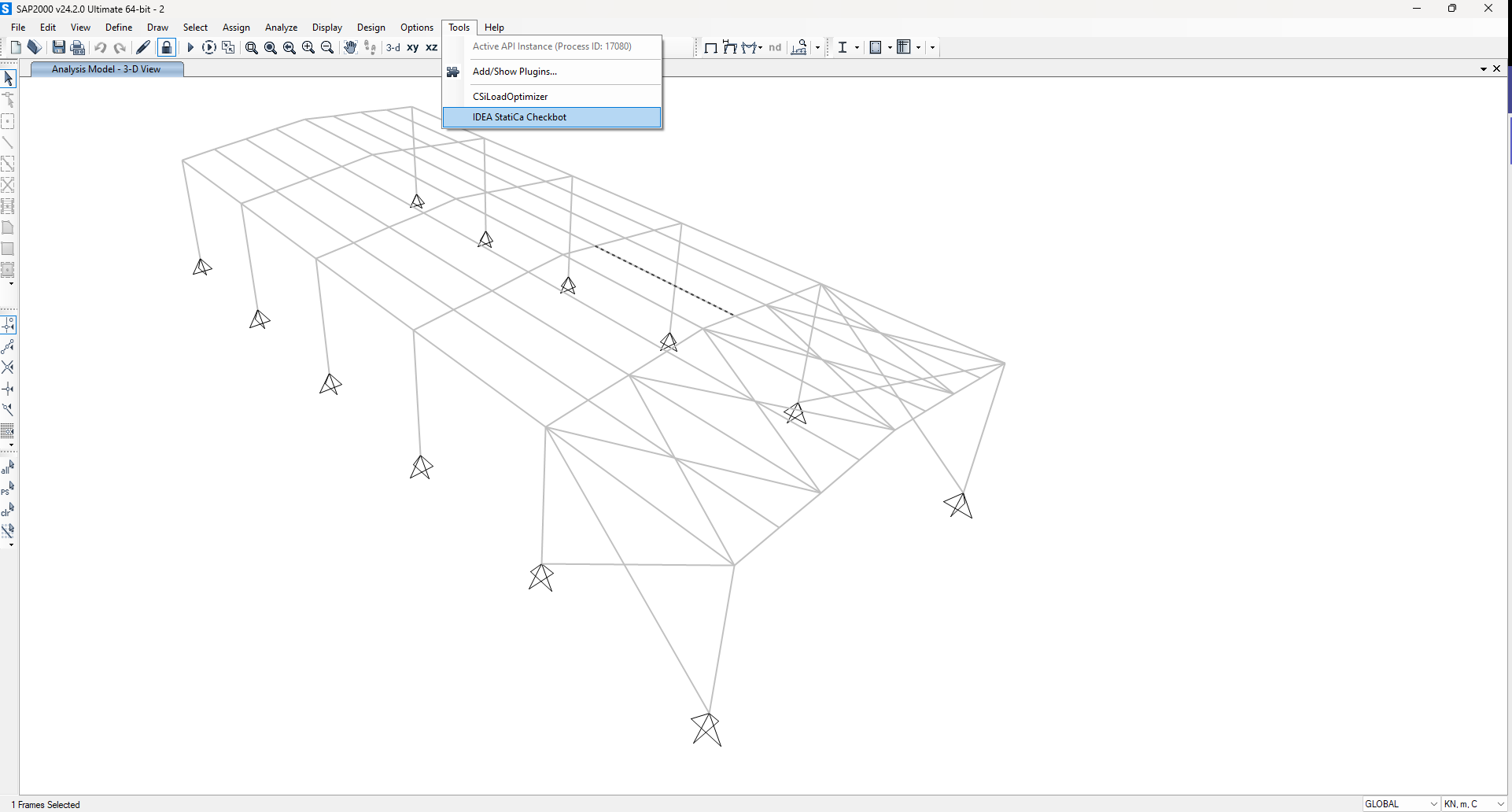
The BIM link is already integrated. It is in the top ribbon under Tools -> IDEA StatiCa Checkbot.
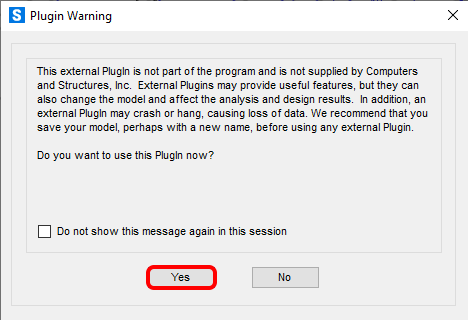
After that, you will see an informative notification from SAP2000, accept it by clicking OK.
Consequently, Checkbot application will be started.
Select the New option with project type Steel and design code EN. Then select Create project.
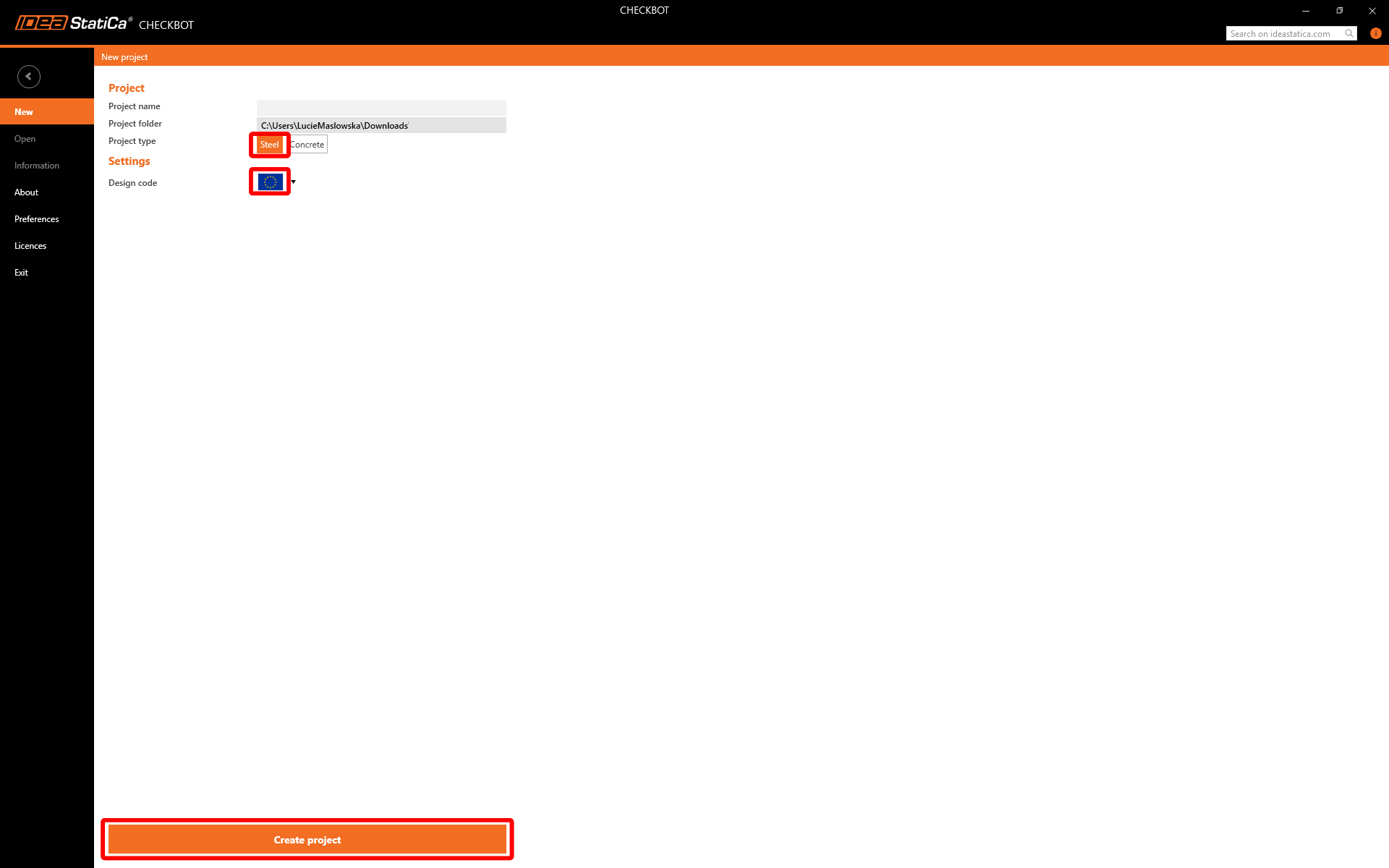
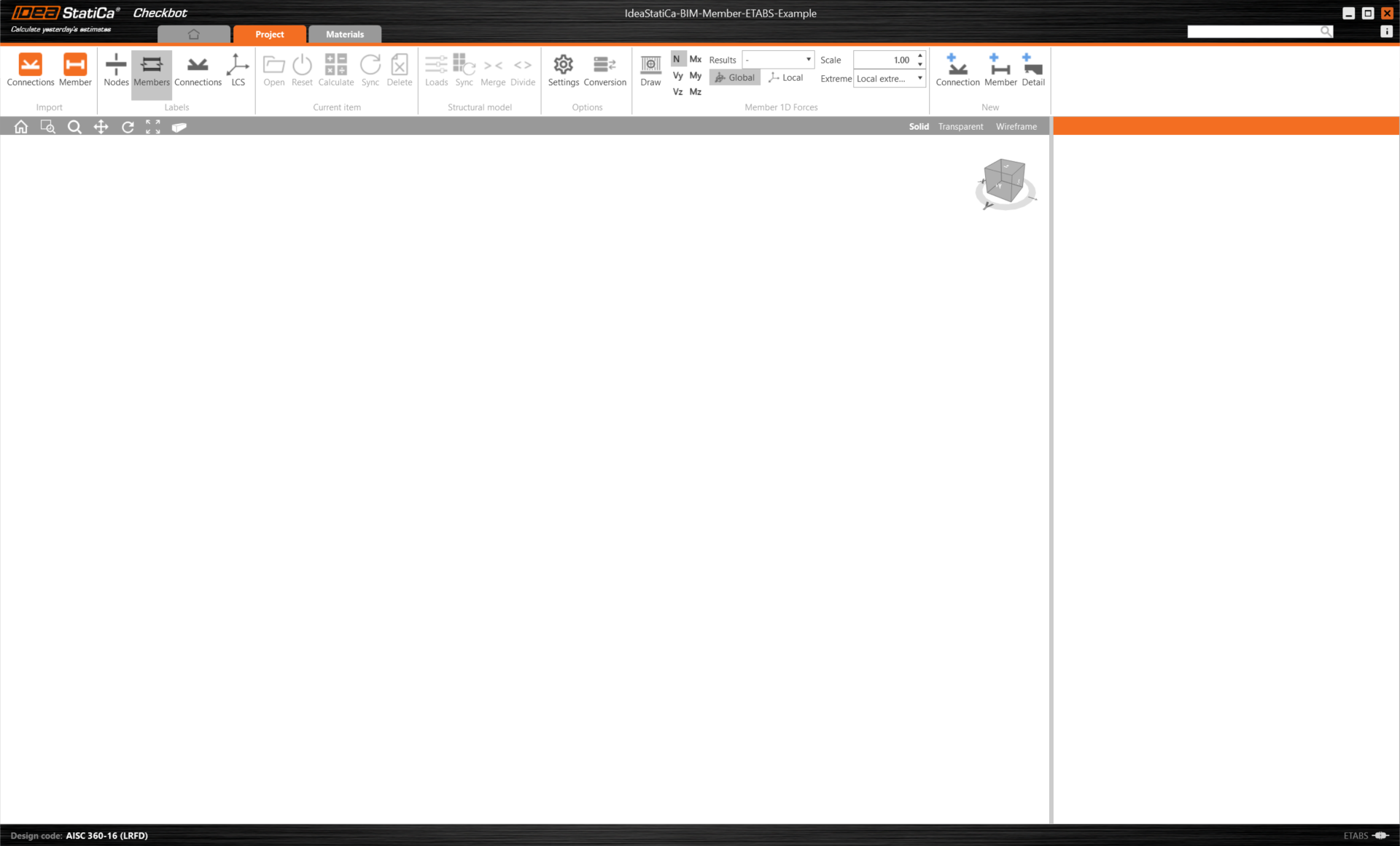
The new Checkbot project is ready to import members from SAP2000.
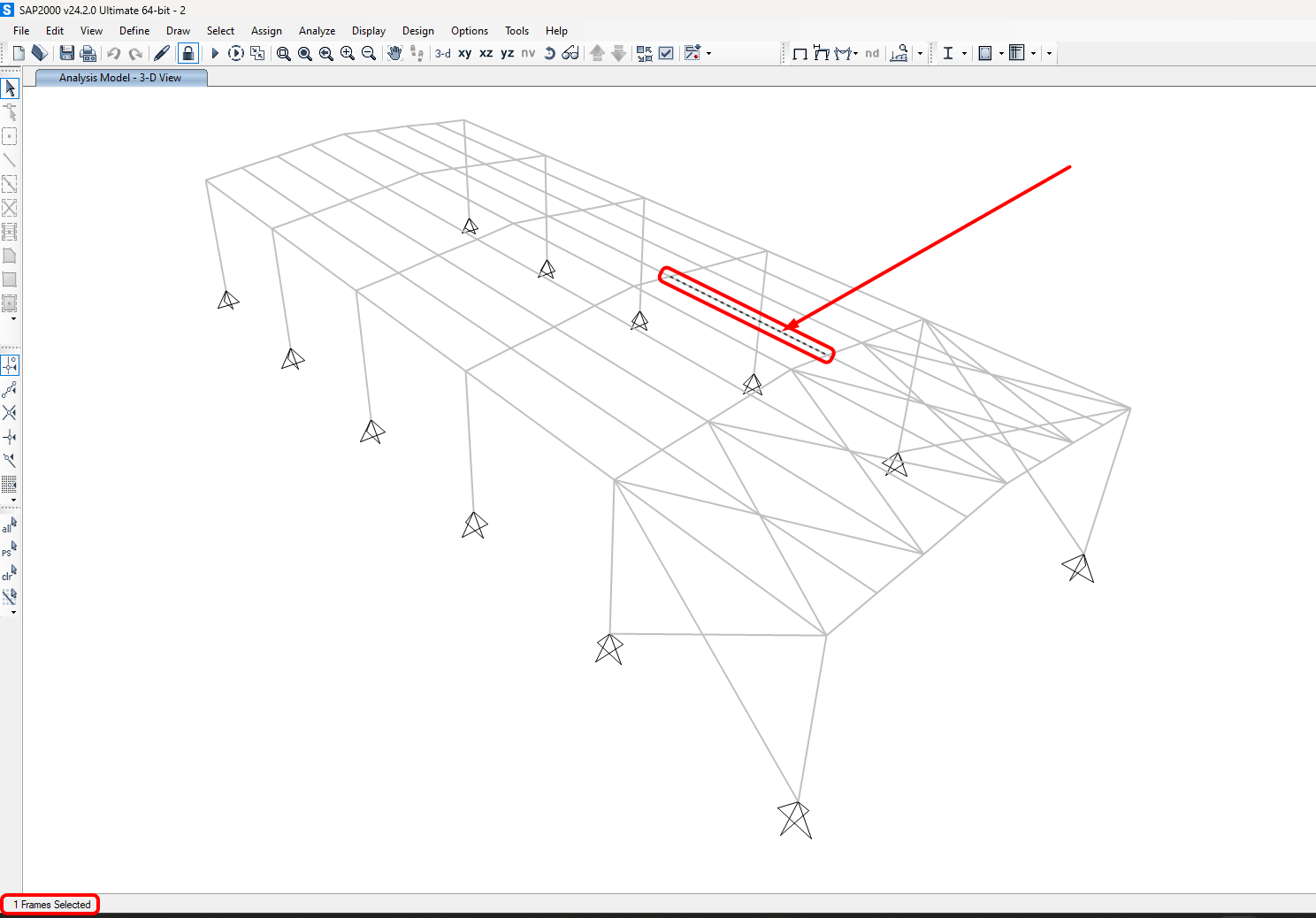
In SAP2000, select one of the inside members, as shown in the picture.
Widget #NaN: support_center_article
Name: General BIM Link tutorial - Import EN (steel member)
ID: df9576bc-4eae-4cf7-b6c0-c87d195a18e5
Show Raw Data
{
"title": {
"name": "Main headline (H1)",
"type": "text",
"value": "Import"
},
"preview_image": {
"name": "Preview image",
"type": "asset",
"value": []
},
"post_date": {
"name": "Post date",
"type": "date_time",
"value": null,
"displayTimeZone": null
},
"perex_content": {
"name": "Lead paragraph",
"type": "text",
"value": ""
},
"content": {
"images": [
{
"description": null,
"imageId": "0b34811c-3ec8-49aa-8619-758a73adcf55",
"url": "https://assets-us-01.kc-usercontent.com:443/28eac049-c8ed-00e2-220c-12142a968dff/36e44b50-db84-49b0-8344-ee0e3094345a/1.png",
"height": 1160,
"width": 1920
},
{
"description": null,
"imageId": "7bf2e73a-3e73-4d41-a75d-62daa6ff2325",
"url": "https://assets-us-01.kc-usercontent.com:443/28eac049-c8ed-00e2-220c-12142a968dff/dab64a0a-98c7-43d1-8ec9-c1282eda1fc2/SAP-1.png",
"height": 1147,
"width": 1915
},
{
"description": null,
"imageId": "7393cb5c-91a8-4f41-a71b-4566682a1013",
"url": "https://assets-us-01.kc-usercontent.com:443/28eac049-c8ed-00e2-220c-12142a968dff/0fc77307-237f-4895-8cfd-3f06bb8a5306/SAP-2.png",
"height": 1144,
"width": 1911
},
{
"description": null,
"imageId": "5706ed52-3568-43ef-8955-fcda04d8df4b",
"url": "https://assets-us-01.kc-usercontent.com:443/28eac049-c8ed-00e2-220c-12142a968dff/567f874e-c533-4e1e-9864-b4644203bd37/SAP-3.png",
"height": 1149,
"width": 1917
},
{
"description": null,
"imageId": "e1bd1d78-7f8d-4853-8d69-f745bd08e40f",
"url": "https://assets-us-01.kc-usercontent.com:443/28eac049-c8ed-00e2-220c-12142a968dff/4ddf09f7-4410-43c3-a6b5-a0c284c85cc3/SAP-4.png",
"height": 178,
"width": 356
},
{
"description": null,
"imageId": "aa8c68fa-38a0-4b1b-8cb8-8614ac618d10",
"url": "https://assets-us-01.kc-usercontent.com:443/28eac049-c8ed-00e2-220c-12142a968dff/3bb9329a-de01-4385-bfb2-9d415e01c2ac/SCIA-merge.png",
"height": 1020,
"width": 1216
},
{
"description": null,
"imageId": "b125e53b-ee6a-48a8-b25f-dd4bc2c8bf0c",
"url": "https://assets-us-01.kc-usercontent.com:443/28eac049-c8ed-00e2-220c-12142a968dff/db58cf00-8aa0-4e39-8650-aec8641724a6/4-5.png",
"height": 288,
"width": 740
},
{
"description": null,
"imageId": "49b99924-8088-4b3b-bc92-3d4f8f2bc758",
"url": "https://assets-us-01.kc-usercontent.com:443/28eac049-c8ed-00e2-220c-12142a968dff/2d4c4a8a-b557-4eec-9301-aaf44213079c/critical%20effects.png",
"height": 850,
"width": 980
}
],
"linkedItemCodenames": [],
"linkedItems": [],
"links": [
{
"codename": "checkbot",
"linkId": "caeb1a6c-2621-446f-8005-4d2799496a39",
"urlSlug": "checkbot",
"type": "landing_page"
}
],
"name": "Content",
"type": "rich_text",
"value": "<p>Then in Checkbot select <strong>Member</strong>.</p>\n<figure data-asset-id=\"0b34811c-3ec8-49aa-8619-758a73adcf55\" data-image-id=\"0b34811c-3ec8-49aa-8619-758a73adcf55\"><img src=\"https://assets-us-01.kc-usercontent.com:443/28eac049-c8ed-00e2-220c-12142a968dff/36e44b50-db84-49b0-8344-ee0e3094345a/1.png\" data-asset-id=\"0b34811c-3ec8-49aa-8619-758a73adcf55\" data-image-id=\"0b34811c-3ec8-49aa-8619-758a73adcf55\" alt=\"\"></figure>\n<p>This will import the beam and its load effects into <a data-item-id=\"caeb1a6c-2621-446f-8005-4d2799496a39\" href=\"\">Checkbot</a> - with the exact coordinates, orientations, and section sizes as per the FEA/BIM model.</p>\n<p><strong>Please note that your node and member numbering might be different.</strong></p>\n<figure data-asset-id=\"7bf2e73a-3e73-4d41-a75d-62daa6ff2325\" data-image-id=\"7bf2e73a-3e73-4d41-a75d-62daa6ff2325\"><img src=\"https://assets-us-01.kc-usercontent.com:443/28eac049-c8ed-00e2-220c-12142a968dff/dab64a0a-98c7-43d1-8ec9-c1282eda1fc2/SAP-1.png\" data-asset-id=\"7bf2e73a-3e73-4d41-a75d-62daa6ff2325\" data-image-id=\"7bf2e73a-3e73-4d41-a75d-62daa6ff2325\" alt=\"\"></figure>\n<p>As you can see, the selected member with all related members has been imported.</p>\n<p>You can check the internal forces. Select <strong>Draw</strong>, then the desired internal force and combination, then left-click on the connection box, and follow the steps below in the picture.</p>\n<figure data-asset-id=\"7393cb5c-91a8-4f41-a71b-4566682a1013\" data-image-id=\"7393cb5c-91a8-4f41-a71b-4566682a1013\"><img src=\"https://assets-us-01.kc-usercontent.com:443/28eac049-c8ed-00e2-220c-12142a968dff/0fc77307-237f-4895-8cfd-3f06bb8a5306/SAP-2.png\" data-asset-id=\"7393cb5c-91a8-4f41-a71b-4566682a1013\" data-image-id=\"7393cb5c-91a8-4f41-a71b-4566682a1013\" alt=\"\"></figure>\n<p>Elements can be merged together directly in Checkbot, then in the Member application; they will be a single continuous element.</p>\n<p>Merge both perpendicular related members. Left-click the I-profile <strong>M-82</strong>, select Merge operation, then tick the M83 box in the merge design window, and follow the steps as shown in the picture. </p>\n<figure data-asset-id=\"5706ed52-3568-43ef-8955-fcda04d8df4b\" data-image-id=\"5706ed52-3568-43ef-8955-fcda04d8df4b\"><img src=\"https://assets-us-01.kc-usercontent.com:443/28eac049-c8ed-00e2-220c-12142a968dff/567f874e-c533-4e1e-9864-b4644203bd37/SAP-3.png\" data-asset-id=\"5706ed52-3568-43ef-8955-fcda04d8df4b\" data-image-id=\"5706ed52-3568-43ef-8955-fcda04d8df4b\" alt=\"\"></figure>\n<p>In this window, you will see an informative alert about the operation that will occur, accept it.</p>\n<figure data-asset-id=\"e1bd1d78-7f8d-4853-8d69-f745bd08e40f\" data-image-id=\"e1bd1d78-7f8d-4853-8d69-f745bd08e40f\"><img src=\"https://assets-us-01.kc-usercontent.com:443/28eac049-c8ed-00e2-220c-12142a968dff/4ddf09f7-4410-43c3-a6b5-a0c284c85cc3/SAP-4.png\" data-asset-id=\"e1bd1d78-7f8d-4853-8d69-f745bd08e40f\" data-image-id=\"e1bd1d78-7f8d-4853-8d69-f745bd08e40f\" alt=\"\"></figure>\n<p>Make the same merging action for another group of I-profile. After changes, our model should look as in the following picture.</p>\n<figure data-asset-id=\"aa8c68fa-38a0-4b1b-8cb8-8614ac618d10\" data-image-id=\"aa8c68fa-38a0-4b1b-8cb8-8614ac618d10\"><img src=\"https://assets-us-01.kc-usercontent.com:443/28eac049-c8ed-00e2-220c-12142a968dff/3bb9329a-de01-4385-bfb2-9d415e01c2ac/SCIA-merge.png\" data-asset-id=\"aa8c68fa-38a0-4b1b-8cb8-8614ac618d10\" data-image-id=\"aa8c68fa-38a0-4b1b-8cb8-8614ac618d10\" alt=\"\"></figure>\n<p>You can control what load case or combination will be loaded to the Member application by clicking on Loads and managing Result classes for checks. </p>\n<figure data-asset-id=\"b125e53b-ee6a-48a8-b25f-dd4bc2c8bf0c\" data-image-id=\"b125e53b-ee6a-48a8-b25f-dd4bc2c8bf0c\"><img src=\"https://assets-us-01.kc-usercontent.com:443/28eac049-c8ed-00e2-220c-12142a968dff/db58cf00-8aa0-4e39-8650-aec8641724a6/4-5.png\" data-asset-id=\"b125e53b-ee6a-48a8-b25f-dd4bc2c8bf0c\" data-image-id=\"b125e53b-ee6a-48a8-b25f-dd4bc2c8bf0c\" alt=\"\"></figure>\n<p>Here in Load Configurator, you can add load cases for the member application. Please notice by default the <strong>Evaluate</strong> <strong>critical results</strong> function is enabled, which filters critical combinations to speed up the calculation. You can turn it off and all combinations will be included in the calculation. </p>\n<figure data-asset-id=\"49b99924-8088-4b3b-bc92-3d4f8f2bc758\" data-image-id=\"49b99924-8088-4b3b-bc92-3d4f8f2bc758\"><img src=\"https://assets-us-01.kc-usercontent.com:443/28eac049-c8ed-00e2-220c-12142a968dff/2d4c4a8a-b557-4eec-9301-aaf44213079c/critical%20effects.png\" data-asset-id=\"49b99924-8088-4b3b-bc92-3d4f8f2bc758\" data-image-id=\"49b99924-8088-4b3b-bc92-3d4f8f2bc758\" alt=\"\"></figure>"
},
"regions": {
"name": "Region",
"type": "taxonomy",
"value": [
{
"name": "EMEA",
"codename": "emea"
},
{
"name": "AMER",
"codename": "amer"
},
{
"name": "APAC",
"codename": "apac"
}
],
"taxonomyGroup": "region"
},
"product_groups": {
"name": "Product group",
"type": "taxonomy",
"value": [
{
"name": "Steel",
"codename": "steel"
},
{
"name": "Member design",
"codename": "member_design"
}
],
"taxonomyGroup": "product_group"
},
"support_center_article_types": {
"name": "Support center article",
"type": "taxonomy",
"value": [
{
"name": "Knowledge base",
"codename": "knowledgebase_article"
}
],
"taxonomyGroup": "support_center_article"
},
"expertise_levels": {
"name": "Expertise level",
"type": "taxonomy",
"value": [
{
"name": "Beginner",
"codename": "beginner"
},
{
"name": "Intermediate",
"codename": "intermediate"
}
],
"taxonomyGroup": "expertise_level"
},
"labels": {
"name": "Labels",
"type": "taxonomy",
"value": [
{
"name": "Checkbot",
"codename": "checkbot"
},
{
"name": "EN (Eurocode)",
"codename": "eurocode"
},
{
"name": "AISC (USA)",
"codename": "aisc"
},
{
"name": "BIM link",
"codename": "bim_links"
},
{
"name": "Member",
"codename": "member"
}
],
"taxonomyGroup": "labels"
},
"linked_items": {
"name": "Linked items",
"type": "modular_content",
"value": [],
"linkedItems": []
},
"attachments__files": {
"name": "Attachments",
"type": "asset",
"value": []
},
"content_priority__value": {
"name": "Content priority value",
"type": "number",
"value": null
},
"options": {
"name": "Options",
"type": "multiple_choice",
"value": []
},
"url_slug": {
"name": "Url slug",
"type": "url_slug",
"value": "import-member"
},
"unique_url_slug": {
"name": "Unique URL slug",
"type": "custom",
"value": "[\"import-member\",\"[autogenerated]\"]"
},
"content_settings__sitemap": {
"name": "Show in sitemap",
"type": "multiple_choice",
"value": [
{
"name": "default",
"codename": "default"
}
]
},
"content_settings__robots": {
"name": "Search engine indexing",
"type": "multiple_choice",
"value": [
{
"name": "default",
"codename": "default"
}
]
},
"content_settings__is_hidden": {
"name": "Hidden nested content",
"type": "multiple_choice",
"value": [
{
"name": "yes",
"codename": "yes"
}
]
},
"metadata__page_title": {
"name": "Page title",
"type": "text",
"value": "Import of steel connection from FEA/CAD into Checkbot"
},
"metadata__page_description": {
"name": "Page description",
"type": "text",
"value": "IDEA StatiCa step-by-step tutorial for importing steel connection and its load effects from FEA/CAD into Checkbot. Structural design of welded and bolted steel connections."
},
"metadata__page_keywords": {
"name": "Page keywords",
"type": "text",
"value": ""
},
"metadata__canonical_url": {
"name": "Canonical URL",
"type": "text",
"value": ""
},
"metadata__og_title": {
"name": "OG:title",
"type": "text",
"value": ""
},
"metadata__og_description": {
"name": "OG:description",
"type": "text",
"value": ""
},
"metadata__og_image": {
"name": "OG:image",
"type": "asset",
"value": []
},
"translation__translation_connector": {
"name": "Translation Connector",
"type": "taxonomy",
"value": [],
"taxonomyGroup": "languages"
},
"translation__force_translation": {
"name": "Force translation",
"type": "multiple_choice",
"value": []
},
"translation__last_translation": {
"images": [],
"linkedItemCodenames": [],
"linkedItems": [],
"links": [],
"name": "Last translation",
"type": "rich_text",
"value": "<p><br></p>"
},
"translation__ai_translated": {
"name": "AI translated",
"type": "multiple_choice",
"value": []
},
"page_tree_settings__page_label": {
"name": "Page label",
"type": "text",
"value": ""
},
"page_tree_settings__path_segment": {
"name": "Path segment",
"type": "text",
"value": ""
},
"page_tree_settings__breadcrumb_style": {
"name": "Breadcrumb style",
"type": "multiple_choice",
"value": []
},
"page_tree_settings__hide_in_breadcrumbs": {
"name": "Hide in breadcrumbs",
"type": "multiple_choice",
"value": []
}
}Widget #NaN: support_center_article
Name: General BIM Link tutorial - Open Member EN (steel member)
ID: db255fff-5116-4b8f-b858-6019cdba20ce
Show Raw Data
{
"title": {
"name": "Main headline (H1)",
"type": "text",
"value": "Members modul"
},
"preview_image": {
"name": "Preview image",
"type": "asset",
"value": []
},
"post_date": {
"name": "Post date",
"type": "date_time",
"value": null,
"displayTimeZone": "Europe/Prague"
},
"perex_content": {
"name": "Lead paragraph",
"type": "text",
"value": ""
},
"content": {
"images": [
{
"description": null,
"imageId": "2b217b82-6bcc-4899-8eef-8bf761a245a8",
"url": "https://assets-us-01.kc-usercontent.com:443/28eac049-c8ed-00e2-220c-12142a968dff/c50be293-7381-4433-a8b4-7bbd1c5f0134/8.png",
"height": 1160,
"width": 1920
},
{
"description": null,
"imageId": "fd2a0583-aad2-4a0c-b774-bde8ece75ba0",
"url": "https://assets-us-01.kc-usercontent.com:443/28eac049-c8ed-00e2-220c-12142a968dff/a978f647-0484-4945-9bb9-f977a1615d8f/12.png",
"height": 1160,
"width": 1920
},
{
"description": null,
"imageId": "bff884dd-defc-4cea-9b88-5497fc601a30",
"url": "https://assets-us-01.kc-usercontent.com:443/28eac049-c8ed-00e2-220c-12142a968dff/04f22084-9df8-47c9-b33e-24b172844af0/13.png",
"height": 1160,
"width": 1920
}
],
"linkedItemCodenames": [],
"linkedItems": [],
"links": [],
"name": "Content",
"type": "rich_text",
"value": "<p>Now we can open the Member application. Just left-click on <strong>Open</strong>.</p>\n<figure data-asset-id=\"2b217b82-6bcc-4899-8eef-8bf761a245a8\" data-image-id=\"2b217b82-6bcc-4899-8eef-8bf761a245a8\"><img src=\"https://assets-us-01.kc-usercontent.com:443/28eac049-c8ed-00e2-220c-12142a968dff/c50be293-7381-4433-a8b4-7bbd1c5f0134/8.png\" data-asset-id=\"2b217b82-6bcc-4899-8eef-8bf761a245a8\" data-image-id=\"2b217b82-6bcc-4899-8eef-8bf761a245a8\" alt=\"\"></figure>\n<p>Here you can see our Member application.</p>\n<figure data-asset-id=\"fd2a0583-aad2-4a0c-b774-bde8ece75ba0\" data-image-id=\"fd2a0583-aad2-4a0c-b774-bde8ece75ba0\"><img src=\"https://assets-us-01.kc-usercontent.com:443/28eac049-c8ed-00e2-220c-12142a968dff/a978f647-0484-4945-9bb9-f977a1615d8f/12.png\" data-asset-id=\"fd2a0583-aad2-4a0c-b774-bde8ece75ba0\" data-image-id=\"fd2a0583-aad2-4a0c-b774-bde8ece75ba0\" alt=\"\"></figure>\n<p>In the beginning, let us design the joints of the member U-profile, so please select the first connection and click on <strong>Edit connection</strong>. As you can see now I-profiles are represented by one continuous element, thanks to the merging we made.</p>\n<figure data-asset-id=\"bff884dd-defc-4cea-9b88-5497fc601a30\" data-image-id=\"bff884dd-defc-4cea-9b88-5497fc601a30\"><img src=\"https://assets-us-01.kc-usercontent.com:443/28eac049-c8ed-00e2-220c-12142a968dff/04f22084-9df8-47c9-b33e-24b172844af0/13.png\" data-asset-id=\"bff884dd-defc-4cea-9b88-5497fc601a30\" data-image-id=\"bff884dd-defc-4cea-9b88-5497fc601a30\" alt=\"\"></figure>\n<p><br></p>"
},
"regions": {
"name": "Region",
"type": "taxonomy",
"value": [],
"taxonomyGroup": "region"
},
"product_groups": {
"name": "Product group",
"type": "taxonomy",
"value": [
{
"name": "Member design",
"codename": "member_design"
}
],
"taxonomyGroup": "product_group"
},
"support_center_article_types": {
"name": "Support center article",
"type": "taxonomy",
"value": [
{
"name": "Tutorials",
"codename": "tutorial"
}
],
"taxonomyGroup": "support_center_article"
},
"expertise_levels": {
"name": "Expertise level",
"type": "taxonomy",
"value": [],
"taxonomyGroup": "expertise_level"
},
"labels": {
"name": "Labels",
"type": "taxonomy",
"value": [
{
"name": "Checkbot",
"codename": "checkbot"
}
],
"taxonomyGroup": "labels"
},
"linked_items": {
"name": "Linked items",
"type": "modular_content",
"value": [],
"linkedItems": []
},
"attachments__files": {
"name": "Attachments",
"type": "asset",
"value": []
},
"content_priority__value": {
"name": "Content priority value",
"type": "number",
"value": null
},
"options": {
"name": "Options",
"type": "multiple_choice",
"value": []
},
"url_slug": {
"name": "Url slug",
"type": "url_slug",
"value": "members-modul"
},
"unique_url_slug": {
"name": "Unique URL slug",
"type": "custom",
"value": "[\"members-modul\",\"[autogenerated]\"]"
},
"content_settings__sitemap": {
"name": "Show in sitemap",
"type": "multiple_choice",
"value": []
},
"content_settings__robots": {
"name": "Search engine indexing",
"type": "multiple_choice",
"value": []
},
"content_settings__is_hidden": {
"name": "Hidden nested content",
"type": "multiple_choice",
"value": [
{
"name": "yes",
"codename": "yes"
}
]
},
"metadata__page_title": {
"name": "Page title",
"type": "text",
"value": ""
},
"metadata__page_description": {
"name": "Page description",
"type": "text",
"value": ""
},
"metadata__page_keywords": {
"name": "Page keywords",
"type": "text",
"value": ""
},
"metadata__canonical_url": {
"name": "Canonical URL",
"type": "text",
"value": ""
},
"metadata__og_title": {
"name": "OG:title",
"type": "text",
"value": ""
},
"metadata__og_description": {
"name": "OG:description",
"type": "text",
"value": ""
},
"metadata__og_image": {
"name": "OG:image",
"type": "asset",
"value": []
},
"translation__translation_connector": {
"name": "Translation Connector",
"type": "taxonomy",
"value": [],
"taxonomyGroup": "languages"
},
"translation__force_translation": {
"name": "Force translation",
"type": "multiple_choice",
"value": []
},
"translation__last_translation": {
"images": [],
"linkedItemCodenames": [],
"linkedItems": [],
"links": [],
"name": "Last translation",
"type": "rich_text",
"value": "<p><br></p>"
},
"translation__ai_translated": {
"name": "AI translated",
"type": "multiple_choice",
"value": []
},
"page_tree_settings__page_label": {
"name": "Page label",
"type": "text",
"value": ""
},
"page_tree_settings__path_segment": {
"name": "Path segment",
"type": "text",
"value": ""
},
"page_tree_settings__breadcrumb_style": {
"name": "Breadcrumb style",
"type": "multiple_choice",
"value": []
},
"page_tree_settings__hide_in_breadcrumbs": {
"name": "Hide in breadcrumbs",
"type": "multiple_choice",
"value": []
}
}Widget #NaN: support_center_article
Name: General BIM Link tutorial - Joint Design EN (steel member)
ID: 6e330bdf-931e-4344-8528-51aab8d38b03
Show Raw Data
{
"title": {
"name": "Main headline (H1)",
"type": "text",
"value": "Connections design"
},
"preview_image": {
"name": "Preview image",
"type": "asset",
"value": []
},
"post_date": {
"name": "Post date",
"type": "date_time",
"value": null,
"displayTimeZone": "Europe/Prague"
},
"perex_content": {
"name": "Lead paragraph",
"type": "text",
"value": ""
},
"content": {
"images": [
{
"description": null,
"imageId": "d2e02768-df99-43f3-a32d-b5f556922469",
"url": "https://assets-us-01.kc-usercontent.com:443/28eac049-c8ed-00e2-220c-12142a968dff/e02b7314-047e-4e31-a797-0a71f81e2de0/SAP2000%20BIM%20Operation.png",
"height": 920,
"width": 1305
},
{
"description": null,
"imageId": "554e77fb-2ce0-487f-a1a8-605214167395",
"url": "https://assets-us-01.kc-usercontent.com:443/28eac049-c8ed-00e2-220c-12142a968dff/fc4498ec-a176-48c8-a79c-4a97e6ca93db/SAP2000%20BIM%20Explode.png",
"height": 677,
"width": 1422
},
{
"description": null,
"imageId": "2272f649-9686-4b2e-92f5-2ad3ac4d40d4",
"url": "https://assets-us-01.kc-usercontent.com:443/28eac049-c8ed-00e2-220c-12142a968dff/55421e96-dd5c-4793-ac60-025b12946be6/SAP2000%20BIM%20Bolts.png",
"height": 680,
"width": 1418
},
{
"description": null,
"imageId": "ada6d2d4-edaa-4f70-a432-1d09b8100c25",
"url": "https://assets-us-01.kc-usercontent.com:443/28eac049-c8ed-00e2-220c-12142a968dff/9583f76e-4b30-4bca-a395-230d59fc6dc0/SAP2000%20BIM%20SM.png",
"height": 595,
"width": 1340
},
{
"description": null,
"imageId": "ed4747c5-486c-43a1-bb50-110698abfe9d",
"url": "https://assets-us-01.kc-usercontent.com:443/28eac049-c8ed-00e2-220c-12142a968dff/c30d28c2-9760-4037-858a-ea8202eba2d2/SAP2000%20BIM%20GRD1.png",
"height": 770,
"width": 1538
},
{
"description": null,
"imageId": "90edab1b-9a2c-44f4-b7a2-d9ad07c4a3ae",
"url": "https://assets-us-01.kc-usercontent.com:443/28eac049-c8ed-00e2-220c-12142a968dff/db5b15fe-acb6-47b0-a2df-cf033d5141c0/grd2%20opr.png",
"height": 742,
"width": 1331
},
{
"description": null,
"imageId": "f5be9ad4-1731-4d03-81dc-c90077b32705",
"url": "https://assets-us-01.kc-usercontent.com:443/28eac049-c8ed-00e2-220c-12142a968dff/f41742da-f792-43e1-9268-d3674a91cfcf/SAP2000%20BIM%20SP.png",
"height": 765,
"width": 1518
},
{
"description": null,
"imageId": "5e34e273-43a6-4516-b3e8-c9763d4fb18c",
"url": "https://assets-us-01.kc-usercontent.com:443/28eac049-c8ed-00e2-220c-12142a968dff/8db5d1de-ad5e-4848-80f2-1a91b2b80c74/chamfer.png",
"height": 526,
"width": 673
},
{
"description": null,
"imageId": "8bf5f6aa-c0f9-4937-bd11-7cfbc1ffb13c",
"url": "https://assets-us-01.kc-usercontent.com:443/28eac049-c8ed-00e2-220c-12142a968dff/e2696bdf-f608-4e09-ba0f-22bdcc0019bd/SAP2000%20BIM%20CP.png",
"height": 772,
"width": 1412
},
{
"description": null,
"imageId": "3e43efc1-08bb-40a1-a011-039124a06a60",
"url": "https://assets-us-01.kc-usercontent.com:443/28eac049-c8ed-00e2-220c-12142a968dff/44123cdf-415e-4a7f-9fbb-aa0b962e15d7/ETABS%20BIM%20close%20%281%29.png",
"height": 1034,
"width": 1918
}
],
"linkedItemCodenames": [],
"linkedItems": [],
"links": [],
"name": "Content",
"type": "rich_text",
"value": "<p>Click on <strong>Operation</strong> and select <strong>Plate to plate</strong>. Change the values according to the picture, then click on<strong> Editor.</strong></p>\n<figure data-asset-id=\"d2e02768-df99-43f3-a32d-b5f556922469\" data-image-id=\"d2e02768-df99-43f3-a32d-b5f556922469\"><img src=\"https://assets-us-01.kc-usercontent.com:443/28eac049-c8ed-00e2-220c-12142a968dff/e02b7314-047e-4e31-a797-0a71f81e2de0/SAP2000%20BIM%20Operation.png\" data-asset-id=\"d2e02768-df99-43f3-a32d-b5f556922469\" data-image-id=\"d2e02768-df99-43f3-a32d-b5f556922469\" alt=\"\"></figure>\n<p>Click on <strong>Explode</strong>, delete the bolts Nr. 1 and 3, and set the values for bolts Nr.2 and 4 according to the picture.</p>\n<figure data-asset-id=\"554e77fb-2ce0-487f-a1a8-605214167395\" data-image-id=\"554e77fb-2ce0-487f-a1a8-605214167395\"><img src=\"https://assets-us-01.kc-usercontent.com:443/28eac049-c8ed-00e2-220c-12142a968dff/fc4498ec-a176-48c8-a79c-4a97e6ca93db/SAP2000%20BIM%20Explode.png\" data-asset-id=\"554e77fb-2ce0-487f-a1a8-605214167395\" data-image-id=\"554e77fb-2ce0-487f-a1a8-605214167395\" alt=\"\"></figure>\n<p>After you make the changes, the element should look like this. Continue by clicking ok. </p>\n<figure data-asset-id=\"2272f649-9686-4b2e-92f5-2ad3ac4d40d4\" data-image-id=\"2272f649-9686-4b2e-92f5-2ad3ac4d40d4\"><img src=\"https://assets-us-01.kc-usercontent.com:443/28eac049-c8ed-00e2-220c-12142a968dff/55421e96-dd5c-4793-ac60-025b12946be6/SAP2000%20BIM%20Bolts.png\" data-asset-id=\"2272f649-9686-4b2e-92f5-2ad3ac4d40d4\" data-image-id=\"2272f649-9686-4b2e-92f5-2ad3ac4d40d4\" alt=\"\"></figure>\n<p>The next operation is the<strong> Stiffening member.</strong> First, you need to add a new <strong>L80x6 </strong>cross-section, click the white cross in the cross-section row, select L-profile, and enter the necessary name in the search. After that, fill in the values as shown in the following picture. Consequently, our model should look as shown in the picture below.</p>\n<figure data-asset-id=\"ada6d2d4-edaa-4f70-a432-1d09b8100c25\" data-image-id=\"ada6d2d4-edaa-4f70-a432-1d09b8100c25\"><img src=\"https://assets-us-01.kc-usercontent.com:443/28eac049-c8ed-00e2-220c-12142a968dff/9583f76e-4b30-4bca-a395-230d59fc6dc0/SAP2000%20BIM%20SM.png\" data-asset-id=\"ada6d2d4-edaa-4f70-a432-1d09b8100c25\" data-image-id=\"ada6d2d4-edaa-4f70-a432-1d09b8100c25\" alt=\"\"></figure>\n<p>Add the operation <strong>Bolt/Anchor grid.</strong></p>\n<figure data-asset-id=\"ed4747c5-486c-43a1-bb50-110698abfe9d\" data-image-id=\"ed4747c5-486c-43a1-bb50-110698abfe9d\"><img src=\"https://assets-us-01.kc-usercontent.com:443/28eac049-c8ed-00e2-220c-12142a968dff/c30d28c2-9760-4037-858a-ea8202eba2d2/SAP2000%20BIM%20GRD1.png\" data-asset-id=\"ed4747c5-486c-43a1-bb50-110698abfe9d\" data-image-id=\"ed4747c5-486c-43a1-bb50-110698abfe9d\" alt=\"\"></figure>\n<p><strong>Copy </strong>this operation and change the selected values.</p>\n<figure data-asset-id=\"90edab1b-9a2c-44f4-b7a2-d9ad07c4a3ae\" data-image-id=\"90edab1b-9a2c-44f4-b7a2-d9ad07c4a3ae\"><img src=\"https://assets-us-01.kc-usercontent.com:443/28eac049-c8ed-00e2-220c-12142a968dff/db5b15fe-acb6-47b0-a2df-cf033d5141c0/grd2%20opr.png\" data-asset-id=\"90edab1b-9a2c-44f4-b7a2-d9ad07c4a3ae\" data-image-id=\"90edab1b-9a2c-44f4-b7a2-d9ad07c4a3ae\" alt=\"\"></figure>\n<p>Now add a <strong>Stiffening plate</strong> to the joint and set the values according to the picture.</p>\n<figure data-asset-id=\"f5be9ad4-1731-4d03-81dc-c90077b32705\" data-image-id=\"f5be9ad4-1731-4d03-81dc-c90077b32705\"><img src=\"https://assets-us-01.kc-usercontent.com:443/28eac049-c8ed-00e2-220c-12142a968dff/f41742da-f792-43e1-9268-d3674a91cfcf/SAP2000%20BIM%20SP.png\" data-asset-id=\"f5be9ad4-1731-4d03-81dc-c90077b32705\" data-image-id=\"f5be9ad4-1731-4d03-81dc-c90077b32705\" alt=\"\"></figure>\n<p> Then go to the <strong>Editor</strong>, select the chamfer operation, and set it according to the image. </p>\n<figure data-asset-id=\"5e34e273-43a6-4516-b3e8-c9763d4fb18c\" data-image-id=\"5e34e273-43a6-4516-b3e8-c9763d4fb18c\"><img src=\"https://assets-us-01.kc-usercontent.com:443/28eac049-c8ed-00e2-220c-12142a968dff/8db5d1de-ad5e-4848-80f2-1a91b2b80c74/chamfer.png\" data-asset-id=\"5e34e273-43a6-4516-b3e8-c9763d4fb18c\" data-image-id=\"5e34e273-43a6-4516-b3e8-c9763d4fb18c\" alt=\"\"></figure>\n<p>The last operation is <strong>Cut</strong> of plate operation.</p>\n<figure data-asset-id=\"8bf5f6aa-c0f9-4937-bd11-7cfbc1ffb13c\" data-image-id=\"8bf5f6aa-c0f9-4937-bd11-7cfbc1ffb13c\"><img src=\"https://assets-us-01.kc-usercontent.com:443/28eac049-c8ed-00e2-220c-12142a968dff/e2696bdf-f608-4e09-ba0f-22bdcc0019bd/SAP2000%20BIM%20CP.png\" data-asset-id=\"8bf5f6aa-c0f9-4937-bd11-7cfbc1ffb13c\" data-image-id=\"8bf5f6aa-c0f9-4937-bd11-7cfbc1ffb13c\" alt=\"\"></figure>\n<p>Now click on <strong>Save</strong> and close the module <strong>Connection</strong>.</p>\n<figure data-asset-id=\"3e43efc1-08bb-40a1-a011-039124a06a60\" data-image-id=\"3e43efc1-08bb-40a1-a011-039124a06a60\"><img src=\"https://assets-us-01.kc-usercontent.com:443/28eac049-c8ed-00e2-220c-12142a968dff/44123cdf-415e-4a7f-9fbb-aa0b962e15d7/ETABS%20BIM%20close%20%281%29.png\" data-asset-id=\"3e43efc1-08bb-40a1-a011-039124a06a60\" data-image-id=\"3e43efc1-08bb-40a1-a011-039124a06a60\" alt=\"\"></figure>"
},
"regions": {
"name": "Region",
"type": "taxonomy",
"value": [
{
"name": "AMER",
"codename": "amer"
},
{
"name": "EMEA",
"codename": "emea"
},
{
"name": "APAC",
"codename": "apac"
}
],
"taxonomyGroup": "region"
},
"product_groups": {
"name": "Product group",
"type": "taxonomy",
"value": [
{
"name": "Member design",
"codename": "member_design"
}
],
"taxonomyGroup": "product_group"
},
"support_center_article_types": {
"name": "Support center article",
"type": "taxonomy",
"value": [
{
"name": "Tutorials",
"codename": "tutorial"
}
],
"taxonomyGroup": "support_center_article"
},
"expertise_levels": {
"name": "Expertise level",
"type": "taxonomy",
"value": [
{
"name": "Intermediate",
"codename": "intermediate"
},
{
"name": "Expert",
"codename": "expert"
}
],
"taxonomyGroup": "expertise_level"
},
"labels": {
"name": "Labels",
"type": "taxonomy",
"value": [
{
"name": "Checkbot",
"codename": "checkbot"
},
{
"name": "BIM link",
"codename": "bim_links"
}
],
"taxonomyGroup": "labels"
},
"linked_items": {
"name": "Linked items",
"type": "modular_content",
"value": [],
"linkedItems": []
},
"attachments__files": {
"name": "Attachments",
"type": "asset",
"value": []
},
"content_priority__value": {
"name": "Content priority value",
"type": "number",
"value": null
},
"options": {
"name": "Options",
"type": "multiple_choice",
"value": []
},
"url_slug": {
"name": "Url slug",
"type": "url_slug",
"value": "connections-design"
},
"unique_url_slug": {
"name": "Unique URL slug",
"type": "custom",
"value": "[\"connections-design\",\"[autogenerated]\"]"
},
"content_settings__sitemap": {
"name": "Show in sitemap",
"type": "multiple_choice",
"value": []
},
"content_settings__robots": {
"name": "Search engine indexing",
"type": "multiple_choice",
"value": []
},
"content_settings__is_hidden": {
"name": "Hidden nested content",
"type": "multiple_choice",
"value": [
{
"name": "yes",
"codename": "yes"
}
]
},
"metadata__page_title": {
"name": "Page title",
"type": "text",
"value": ""
},
"metadata__page_description": {
"name": "Page description",
"type": "text",
"value": ""
},
"metadata__page_keywords": {
"name": "Page keywords",
"type": "text",
"value": ""
},
"metadata__canonical_url": {
"name": "Canonical URL",
"type": "text",
"value": ""
},
"metadata__og_title": {
"name": "OG:title",
"type": "text",
"value": ""
},
"metadata__og_description": {
"name": "OG:description",
"type": "text",
"value": ""
},
"metadata__og_image": {
"name": "OG:image",
"type": "asset",
"value": []
},
"translation__translation_connector": {
"name": "Translation Connector",
"type": "taxonomy",
"value": [],
"taxonomyGroup": "languages"
},
"translation__force_translation": {
"name": "Force translation",
"type": "multiple_choice",
"value": []
},
"translation__last_translation": {
"images": [],
"linkedItemCodenames": [],
"linkedItems": [],
"links": [],
"name": "Last translation",
"type": "rich_text",
"value": "<p><br></p>"
},
"translation__ai_translated": {
"name": "AI translated",
"type": "multiple_choice",
"value": []
},
"page_tree_settings__page_label": {
"name": "Page label",
"type": "text",
"value": ""
},
"page_tree_settings__path_segment": {
"name": "Path segment",
"type": "text",
"value": ""
},
"page_tree_settings__breadcrumb_style": {
"name": "Breadcrumb style",
"type": "multiple_choice",
"value": []
},
"page_tree_settings__hide_in_breadcrumbs": {
"name": "Hide in breadcrumbs",
"type": "multiple_choice",
"value": []
}
}Widget #NaN: support_center_article
Name: General BIM Link tutorial - Operations and analysis EN (steel member)
ID: 63b05416-9800-42e9-ae83-03677d691eb6
Show Raw Data
{
"title": {
"name": "Main headline (H1)",
"type": "text",
"value": "Check and Control"
},
"preview_image": {
"name": "Preview image",
"type": "asset",
"value": []
},
"post_date": {
"name": "Post date",
"type": "date_time",
"value": null,
"displayTimeZone": "Europe/Prague"
},
"perex_content": {
"name": "Lead paragraph",
"type": "text",
"value": ""
},
"content": {
"images": [
{
"description": null,
"imageId": "c924a579-3586-4c4d-a85b-00acaa25af75",
"url": "https://assets-us-01.kc-usercontent.com:443/28eac049-c8ed-00e2-220c-12142a968dff/8aa405f8-658d-4941-ab21-3cd6e9e2174c/ETABS%20BIM%20apply.png",
"height": 659,
"width": 879
},
{
"description": null,
"imageId": "da206b3f-1818-4486-8ab4-58c0446d4ca6",
"url": "https://assets-us-01.kc-usercontent.com:443/28eac049-c8ed-00e2-220c-12142a968dff/8e8f996e-ace9-47a7-8276-eb8b0fe2022f/SAP2000%20BIM%20LR.png",
"height": 838,
"width": 1336
},
{
"description": null,
"imageId": "20841332-26d0-4bfa-989d-d840562e9dc9",
"url": "https://assets-us-01.kc-usercontent.com:443/28eac049-c8ed-00e2-220c-12142a968dff/9cbcd22f-fe6a-442b-a02c-34b66d561193/SAP2000%20BIM%20ST.png",
"height": 868,
"width": 1322
},
{
"description": null,
"imageId": "454e9fa7-c28e-4619-9795-1e83ab40f2de",
"url": "https://assets-us-01.kc-usercontent.com:443/28eac049-c8ed-00e2-220c-12142a968dff/0e7cb65a-65f8-49c7-b755-8384bd5d5c95/SAP2000%20BIM%20Supports.png",
"height": 357,
"width": 660
},
{
"description": null,
"imageId": "f1e743ca-c794-4867-a2c5-a868b9dae456",
"url": "https://assets-us-01.kc-usercontent.com:443/28eac049-c8ed-00e2-220c-12142a968dff/e42b2e2e-dba0-4aae-af9f-750429384e15/restrict%20supports.png",
"height": 502,
"width": 896
},
{
"description": null,
"imageId": "3b3e6169-b1e0-47dd-a970-555dec6b9600",
"url": "https://assets-us-01.kc-usercontent.com:443/28eac049-c8ed-00e2-220c-12142a968dff/14f07781-3a1c-4e82-92ff-2e8dba94b77d/ETABS%20BIM%20calc0.png",
"height": 831,
"width": 993
},
{
"description": null,
"imageId": "040afa45-6bd2-459b-aa36-14ddcb51cabd",
"url": "https://assets-us-01.kc-usercontent.com:443/28eac049-c8ed-00e2-220c-12142a968dff/1caa2b1d-e541-492d-a92d-c4dce3c1d2e9/SAP2000%20BIM%20MNA.png",
"height": 832,
"width": 1434
},
{
"description": null,
"imageId": "e52522b0-fc71-42e7-be02-65d564caa1ff",
"url": "https://assets-us-01.kc-usercontent.com:443/28eac049-c8ed-00e2-220c-12142a968dff/32e6ebcb-4e24-4e84-b70c-65fd0ee41c6f/SAP2000%20BIM%20LBA.png",
"height": 819,
"width": 1438
},
{
"description": null,
"imageId": "ad99f74f-5a2e-4e9c-9f38-8c6b332ea7ce",
"url": "https://assets-us-01.kc-usercontent.com:443/28eac049-c8ed-00e2-220c-12142a968dff/05ec7bc3-e5ed-4997-ae19-6cb110330555/SAP2000%20BIM%20GMNIA.png",
"height": 915,
"width": 1748
}
],
"linkedItemCodenames": [],
"linkedItems": [],
"links": [
{
"codename": "lateral_torsional_restraint__theoretical_backgroun",
"linkId": "b0ec62ed-a543-448b-8e82-c2352cd91daf",
"urlSlug": "lateral-torsional-restraint",
"type": "support_center_article"
},
{
"codename": "buckling",
"linkId": "7264c6af-2992-4866-b1e4-b8ca79ab1c57",
"urlSlug": "buckling-needs-critical-thinking",
"type": "blog_post"
},
{
"codename": "theoretical_background_47e9c7c",
"linkId": "47e9c7cc-0685-507d-855f-fce85ba6b34d",
"urlSlug": "idea-statica-member-theoretical-background",
"type": "support_center_article"
},
{
"codename": "lateral_torsional_buckling",
"linkId": "f91fda51-8880-42ba-8247-ab0f268c9c11",
"urlSlug": "lateral-torsional-buckling",
"type": "blog_post"
}
],
"name": "Content",
"type": "rich_text",
"value": "<p>As we have similar joints on both sides of the member, you can copy the operations from the first joint to another by clicking <strong>Apply</strong>. </p>\n<figure data-asset-id=\"c924a579-3586-4c4d-a85b-00acaa25af75\" data-image-id=\"c924a579-3586-4c4d-a85b-00acaa25af75\"><img src=\"https://assets-us-01.kc-usercontent.com:443/28eac049-c8ed-00e2-220c-12142a968dff/8aa405f8-658d-4941-ab21-3cd6e9e2174c/ETABS%20BIM%20apply.png\" data-asset-id=\"c924a579-3586-4c4d-a85b-00acaa25af75\" data-image-id=\"c924a579-3586-4c4d-a85b-00acaa25af75\" alt=\"\"></figure>\n<p>Before starting the analysis, firstly left-click on the U-member, add operation<a data-item-id=\"b0ec62ed-a543-448b-8e82-c2352cd91daf\" href=\"\"><strong> Lateral Restraint</strong></a>, and set up the values according to the picture.</p>\n<figure data-asset-id=\"da206b3f-1818-4486-8ab4-58c0446d4ca6\" data-image-id=\"da206b3f-1818-4486-8ab4-58c0446d4ca6\"><img src=\"https://assets-us-01.kc-usercontent.com:443/28eac049-c8ed-00e2-220c-12142a968dff/8e8f996e-ace9-47a7-8276-eb8b0fe2022f/SAP2000%20BIM%20LR.png\" data-asset-id=\"da206b3f-1818-4486-8ab4-58c0446d4ca6\" data-image-id=\"da206b3f-1818-4486-8ab4-58c0446d4ca6\" alt=\"\"></figure>\n<p>In the next step add operation <strong>Stiffeners </strong>the<strong> </strong>same way as in the previous step, and configure the values as shown</p>\n<figure data-asset-id=\"20841332-26d0-4bfa-989d-d840562e9dc9\" data-image-id=\"20841332-26d0-4bfa-989d-d840562e9dc9\"><img src=\"https://assets-us-01.kc-usercontent.com:443/28eac049-c8ed-00e2-220c-12142a968dff/9cbcd22f-fe6a-442b-a02c-34b66d561193/SAP2000%20BIM%20ST.png\" data-asset-id=\"20841332-26d0-4bfa-989d-d840562e9dc9\" data-image-id=\"20841332-26d0-4bfa-989d-d840562e9dc9\" alt=\"\"></figure>\n<p>For the realistic behavior of the related members, restrict the supports of the connecting purlins to <strong>X</strong>, <strong>Y</strong>, <strong>Z</strong>, and <strong>Rx</strong>. </p>\n<figure data-asset-id=\"454e9fa7-c28e-4619-9795-1e83ab40f2de\" data-image-id=\"454e9fa7-c28e-4619-9795-1e83ab40f2de\"><img src=\"https://assets-us-01.kc-usercontent.com:443/28eac049-c8ed-00e2-220c-12142a968dff/0e7cb65a-65f8-49c7-b755-8384bd5d5c95/SAP2000%20BIM%20Supports.png\" data-asset-id=\"454e9fa7-c28e-4619-9795-1e83ab40f2de\" data-image-id=\"454e9fa7-c28e-4619-9795-1e83ab40f2de\" alt=\"\"></figure>\n<p>Do the same for the I-profiles frame members; restrict them to <strong>X</strong>, <strong>Y</strong>, <strong>Z</strong>, and <strong>Rx, Ry, Rz</strong>. </p>\n<figure data-asset-id=\"f1e743ca-c794-4867-a2c5-a868b9dae456\" data-image-id=\"f1e743ca-c794-4867-a2c5-a868b9dae456\"><img src=\"https://assets-us-01.kc-usercontent.com:443/28eac049-c8ed-00e2-220c-12142a968dff/e42b2e2e-dba0-4aae-af9f-750429384e15/restrict%20supports.png\" data-asset-id=\"f1e743ca-c794-4867-a2c5-a868b9dae456\" data-image-id=\"f1e743ca-c794-4867-a2c5-a868b9dae456\" alt=\"\"></figure>\n<p>Now the member is ready to be analyzed.</p>\n<figure data-asset-id=\"3b3e6169-b1e0-47dd-a970-555dec6b9600\" data-image-id=\"3b3e6169-b1e0-47dd-a970-555dec6b9600\"><img src=\"https://assets-us-01.kc-usercontent.com:443/28eac049-c8ed-00e2-220c-12142a968dff/14f07781-3a1c-4e82-92ff-2e8dba94b77d/ETABS%20BIM%20calc0.png\" data-asset-id=\"3b3e6169-b1e0-47dd-a970-555dec6b9600\" data-image-id=\"3b3e6169-b1e0-47dd-a970-555dec6b9600\" alt=\"\"></figure>\n<p> Select the Tab <strong>Check</strong> and run the <strong>MNA</strong> (materially non-linear) Analysis. </p>\n<figure data-asset-id=\"040afa45-6bd2-459b-aa36-14ddcb51cabd\" data-image-id=\"040afa45-6bd2-459b-aa36-14ddcb51cabd\"><img src=\"https://assets-us-01.kc-usercontent.com:443/28eac049-c8ed-00e2-220c-12142a968dff/1caa2b1d-e541-492d-a92d-c4dce3c1d2e9/SAP2000%20BIM%20MNA.png\" data-asset-id=\"040afa45-6bd2-459b-aa36-14ddcb51cabd\" data-image-id=\"040afa45-6bd2-459b-aa36-14ddcb51cabd\" alt=\"\"></figure>\n<p>The second analysis is <a data-item-id=\"7264c6af-2992-4866-b1e4-b8ca79ab1c57\" href=\"\"><strong>LBA</strong></a><strong> </strong>(lateral buckling analysis), where we get a critical factor of less than 15.</p>\n<figure data-asset-id=\"e52522b0-fc71-42e7-be02-65d564caa1ff\" data-image-id=\"e52522b0-fc71-42e7-be02-65d564caa1ff\"><img src=\"https://assets-us-01.kc-usercontent.com:443/28eac049-c8ed-00e2-220c-12142a968dff/32e6ebcb-4e24-4e84-b70c-65fd0ee41c6f/SAP2000%20BIM%20LBA.png\" data-asset-id=\"e52522b0-fc71-42e7-be02-65d564caa1ff\" data-image-id=\"e52522b0-fc71-42e7-be02-65d564caa1ff\" alt=\"\"></figure>\n<p>This result shows the necessity of running the<strong> GMNIA </strong>(geometrically and materially non-linear analysis).</p>\n<p>Because lateral-torsional buckling is investigated, factor <em>k</em>0 = 0.5 may be used. Amplitude 0.5 • 5000 / 200 = <strong>12,5 mm</strong> is applied to the first buckling mode. </p>\n<p>Click on the <strong>imperfection </strong>field for the critical buckling factor, and fill the value we calculated above in the row, as shown in the following picture. Then you can run the last <strong>GMNIA</strong> (geometrically and materially non-linear) analysis. </p>\n<p>Read more about:</p>\n<ul>\n <li>Member stability in <a data-item-id=\"47e9c7cc-0685-507d-855f-fce85ba6b34d\" href=\"\">IDEA StatiCa Member</a>.</li>\n <li><a data-item-id=\"f91fda51-8880-42ba-8247-ab0f268c9c11\" href=\"\">Lateral torsional buckling</a></li>\n</ul>\n<figure data-asset-id=\"ad99f74f-5a2e-4e9c-9f38-8c6b332ea7ce\" data-image-id=\"ad99f74f-5a2e-4e9c-9f38-8c6b332ea7ce\"><img src=\"https://assets-us-01.kc-usercontent.com:443/28eac049-c8ed-00e2-220c-12142a968dff/05ec7bc3-e5ed-4997-ae19-6cb110330555/SAP2000%20BIM%20GMNIA.png\" data-asset-id=\"ad99f74f-5a2e-4e9c-9f38-8c6b332ea7ce\" data-image-id=\"ad99f74f-5a2e-4e9c-9f38-8c6b332ea7ce\" alt=\"\"></figure>"
},
"regions": {
"name": "Region",
"type": "taxonomy",
"value": [
{
"name": "EMEA",
"codename": "emea"
},
{
"name": "APAC",
"codename": "apac"
}
],
"taxonomyGroup": "region"
},
"product_groups": {
"name": "Product group",
"type": "taxonomy",
"value": [
{
"name": "Member design",
"codename": "member_design"
}
],
"taxonomyGroup": "product_group"
},
"support_center_article_types": {
"name": "Support center article",
"type": "taxonomy",
"value": [
{
"name": "Tutorials",
"codename": "tutorial"
}
],
"taxonomyGroup": "support_center_article"
},
"expertise_levels": {
"name": "Expertise level",
"type": "taxonomy",
"value": [
{
"name": "Intermediate",
"codename": "intermediate"
},
{
"name": "Expert",
"codename": "expert"
}
],
"taxonomyGroup": "expertise_level"
},
"labels": {
"name": "Labels",
"type": "taxonomy",
"value": [
{
"name": "Checkbot",
"codename": "checkbot"
},
{
"name": "BIM link",
"codename": "bim_links"
}
],
"taxonomyGroup": "labels"
},
"linked_items": {
"name": "Linked items",
"type": "modular_content",
"value": [],
"linkedItems": []
},
"attachments__files": {
"name": "Attachments",
"type": "asset",
"value": []
},
"content_priority__value": {
"name": "Content priority value",
"type": "number",
"value": null
},
"options": {
"name": "Options",
"type": "multiple_choice",
"value": []
},
"url_slug": {
"name": "Url slug",
"type": "url_slug",
"value": "check-and-control"
},
"unique_url_slug": {
"name": "Unique URL slug",
"type": "custom",
"value": "[\"check-and-control\",\"[autogenerated]\"]"
},
"content_settings__sitemap": {
"name": "Show in sitemap",
"type": "multiple_choice",
"value": []
},
"content_settings__robots": {
"name": "Search engine indexing",
"type": "multiple_choice",
"value": []
},
"content_settings__is_hidden": {
"name": "Hidden nested content",
"type": "multiple_choice",
"value": [
{
"name": "yes",
"codename": "yes"
}
]
},
"metadata__page_title": {
"name": "Page title",
"type": "text",
"value": ""
},
"metadata__page_description": {
"name": "Page description",
"type": "text",
"value": ""
},
"metadata__page_keywords": {
"name": "Page keywords",
"type": "text",
"value": ""
},
"metadata__canonical_url": {
"name": "Canonical URL",
"type": "text",
"value": ""
},
"metadata__og_title": {
"name": "OG:title",
"type": "text",
"value": ""
},
"metadata__og_description": {
"name": "OG:description",
"type": "text",
"value": ""
},
"metadata__og_image": {
"name": "OG:image",
"type": "asset",
"value": []
},
"translation__translation_connector": {
"name": "Translation Connector",
"type": "taxonomy",
"value": [],
"taxonomyGroup": "languages"
},
"translation__force_translation": {
"name": "Force translation",
"type": "multiple_choice",
"value": []
},
"translation__last_translation": {
"images": [],
"linkedItemCodenames": [],
"linkedItems": [],
"links": [],
"name": "Last translation",
"type": "rich_text",
"value": "<p><br></p>"
},
"translation__ai_translated": {
"name": "AI translated",
"type": "multiple_choice",
"value": []
},
"page_tree_settings__page_label": {
"name": "Page label",
"type": "text",
"value": ""
},
"page_tree_settings__path_segment": {
"name": "Path segment",
"type": "text",
"value": ""
},
"page_tree_settings__breadcrumb_style": {
"name": "Breadcrumb style",
"type": "multiple_choice",
"value": []
},
"page_tree_settings__hide_in_breadcrumbs": {
"name": "Hide in breadcrumbs",
"type": "multiple_choice",
"value": []
}
}We have successfully imported and checked a purlin from SAP2000.
Start your trial today and enjoy 14 days of full access and services free of charge.
Start free trial