Widget #NaN: support_center_article
Name: General BIM Link tutorial - How to activate the link
ID: dd351d35-2833-4fa2-a88f-9c0c8769c77d
Show Raw Data
{
"title": {
"name": "Main headline (H1)",
"type": "text",
"value": "Comment activer le lien"
},
"preview_image": {
"name": "Preview image",
"type": "asset",
"value": []
},
"post_date": {
"name": "Post date",
"type": "date_time",
"value": null,
"displayTimeZone": null
},
"perex_content": {
"name": "Lead paragraph",
"type": "text",
"value": ""
},
"content": {
"images": [
{
"description": null,
"imageId": "9cad54c2-e42c-4598-bd6b-531f919390b4",
"url": "https://assets-us-01.kc-usercontent.com:443/28eac049-c8ed-00e2-220c-12142a968dff/a344ea92-4286-44f1-88e1-669c6eb24d67/1-1.png",
"height": 1200,
"width": 1920
},
{
"description": null,
"imageId": "c8cad102-713d-4c84-b7f3-2ccfa81489e5",
"url": "https://assets-us-01.kc-usercontent.com:443/28eac049-c8ed-00e2-220c-12142a968dff/556e9ea6-a817-41cf-9fc4-237a93e2a350/bim-link.png",
"height": 1200,
"width": 1143
}
],
"linkedItemCodenames": [],
"linkedItems": [],
"links": [
{
"codename": "landing_page___downloads",
"linkId": "0dff6482-3e17-4ca2-bb66-b4abc6a8dde4",
"urlSlug": "telechargement-produits",
"type": "landing_page"
},
{
"codename": "bim_links__supported_versions",
"linkId": "eeb85fd1-4708-4f88-ad36-cbe30ac41eb7",
"urlSlug": "bim-links-supported-versions-of-3rd-party-applications",
"type": "support_center_article"
}
],
"name": "Content",
"type": "rich_text",
"value": "<ul>\n <li>Téléchargez et installez <a data-item-id=\"0dff6482-3e17-4ca2-bb66-b4abc6a8dde4\" href=\"\">la dernière version de IDEA StatiCa</a></li>\n <li>Vérifiez que vous utilisez une <a data-item-id=\"eeb85fd1-4708-4f88-ad36-cbe30ac41eb7\" href=\"\">version autorisée</a> de votre solution MEF/BIM </li>\n</ul>\n<p>IDEA StatiCa intègre les liens BIM dans vos solutions MEF/BIM lors de l'installation. Vous pouvez voir le statut et activer autres liens BIM pour des logiciels installés aussi plus tard dans l'outil d'installation des liens BIM.</p>\n<p>Veuillez noter qu'il faut des étapes supplémentaires pour activer des liens BIM de quelques solutions MEF avec IDEA StatiCa.</p>\n<p>Ouvrez IDEA StatiCa et allez à l'onglet <strong>BIM</strong> et ouvrez l'<strong>outil d'installation des liens BIM</strong> (Activation du lien BIM...).</p>\n<figure data-asset-id=\"9cad54c2-e42c-4598-bd6b-531f919390b4\" data-image-id=\"9cad54c2-e42c-4598-bd6b-531f919390b4\"><img src=\"https://assets-us-01.kc-usercontent.com:443/28eac049-c8ed-00e2-220c-12142a968dff/a344ea92-4286-44f1-88e1-669c6eb24d67/1-1.png\" data-asset-id=\"9cad54c2-e42c-4598-bd6b-531f919390b4\" data-image-id=\"9cad54c2-e42c-4598-bd6b-531f919390b4\" alt=\"\"></figure>\n<p>Une notification avec le texte « <em>Voulez-vous autoriser cette application à apporter des modifications à votre appareil ? </em>» peut apparaître. Dans ce cas, veuillez confirmer avec le bouton <strong>Oui</strong>.</p>\n<p>Le lien BIM pour le logiciel sélectionné (si trouvé) sera installé. L'écran vous montrera aussi le statut d'autres liens BIM qui peuvent être déjà installés.</p>\n<figure data-asset-id=\"c8cad102-713d-4c84-b7f3-2ccfa81489e5\" data-image-id=\"c8cad102-713d-4c84-b7f3-2ccfa81489e5\"><img src=\"https://assets-us-01.kc-usercontent.com:443/28eac049-c8ed-00e2-220c-12142a968dff/556e9ea6-a817-41cf-9fc4-237a93e2a350/bim-link.png\" data-asset-id=\"c8cad102-713d-4c84-b7f3-2ccfa81489e5\" data-image-id=\"c8cad102-713d-4c84-b7f3-2ccfa81489e5\" alt=\"\"></figure>"
},
"regions": {
"name": "Region",
"type": "taxonomy",
"value": [
{
"name": "EMEA",
"codename": "emea"
},
{
"name": "AMER",
"codename": "amer"
},
{
"name": "APAC",
"codename": "apac"
}
],
"taxonomyGroup": "region"
},
"product_groups": {
"name": "Product group",
"type": "taxonomy",
"value": [
{
"name": "Steel",
"codename": "steel"
}
],
"taxonomyGroup": "product_group"
},
"support_center_article_types": {
"name": "Support center article",
"type": "taxonomy",
"value": [
{
"name": "Knowledge base",
"codename": "knowledgebase_article"
}
],
"taxonomyGroup": "support_center_article"
},
"expertise_levels": {
"name": "Expertise level",
"type": "taxonomy",
"value": [
{
"name": "Beginner",
"codename": "beginner"
},
{
"name": "Intermediate",
"codename": "intermediate"
}
],
"taxonomyGroup": "expertise_level"
},
"labels": {
"name": "Labels",
"type": "taxonomy",
"value": [
{
"name": "BIM link",
"codename": "bim_links"
}
],
"taxonomyGroup": "labels"
},
"linked_items": {
"name": "Linked items",
"type": "modular_content",
"value": [],
"linkedItems": []
},
"attachments__files": {
"name": "Attachments",
"type": "asset",
"value": []
},
"content_priority__value": {
"name": "Content priority value",
"type": "number",
"value": null
},
"options": {
"name": "Options",
"type": "multiple_choice",
"value": []
},
"url_slug": {
"name": "Url slug",
"type": "url_slug",
"value": "comment-activer-le-lien"
},
"unique_url_slug": {
"name": "Unique URL slug",
"type": "custom",
"value": "[\"comment-activer-le-lien\",\"[autogenerated]\"]"
},
"content_settings__sitemap": {
"name": "Show in sitemap",
"type": "multiple_choice",
"value": [
{
"name": "default",
"codename": "default"
}
]
},
"content_settings__robots": {
"name": "Search engine indexing",
"type": "multiple_choice",
"value": [
{
"name": "default",
"codename": "default"
}
]
},
"content_settings__is_hidden": {
"name": "Hidden nested content",
"type": "multiple_choice",
"value": []
},
"metadata__page_title": {
"name": "Page title",
"type": "text",
"value": ""
},
"metadata__page_description": {
"name": "Page description",
"type": "text",
"value": ""
},
"metadata__page_keywords": {
"name": "Page keywords",
"type": "text",
"value": ""
},
"metadata__canonical_url": {
"name": "Canonical URL",
"type": "text",
"value": ""
},
"metadata__og_title": {
"name": "OG:title",
"type": "text",
"value": ""
},
"metadata__og_description": {
"name": "OG:description",
"type": "text",
"value": ""
},
"metadata__og_image": {
"name": "OG:image",
"type": "asset",
"value": []
},
"translation__translation_connector": {
"name": "Translation Connector",
"type": "taxonomy",
"value": [],
"taxonomyGroup": "languages"
},
"translation__force_translation": {
"name": "Force translation",
"type": "multiple_choice",
"value": []
},
"translation__last_translation": {
"images": [],
"linkedItemCodenames": [],
"linkedItems": [],
"links": [],
"name": "Last translation",
"type": "rich_text",
"value": "<p><br></p>"
},
"translation__ai_translated": {
"name": "AI translated",
"type": "multiple_choice",
"value": []
},
"page_tree_settings__page_label": {
"name": "Page label",
"type": "text",
"value": ""
},
"page_tree_settings__path_segment": {
"name": "Path segment",
"type": "text",
"value": "how-to-activate-the-link"
},
"page_tree_settings__breadcrumb_style": {
"name": "Breadcrumb style",
"type": "multiple_choice",
"value": []
},
"page_tree_settings__hide_in_breadcrumbs": {
"name": "Hide in breadcrumbs",
"type": "multiple_choice",
"value": []
}
}How to use the link
Download the attached project, open it in AxisVM, and run the calculation to get the internal forces over the structure.
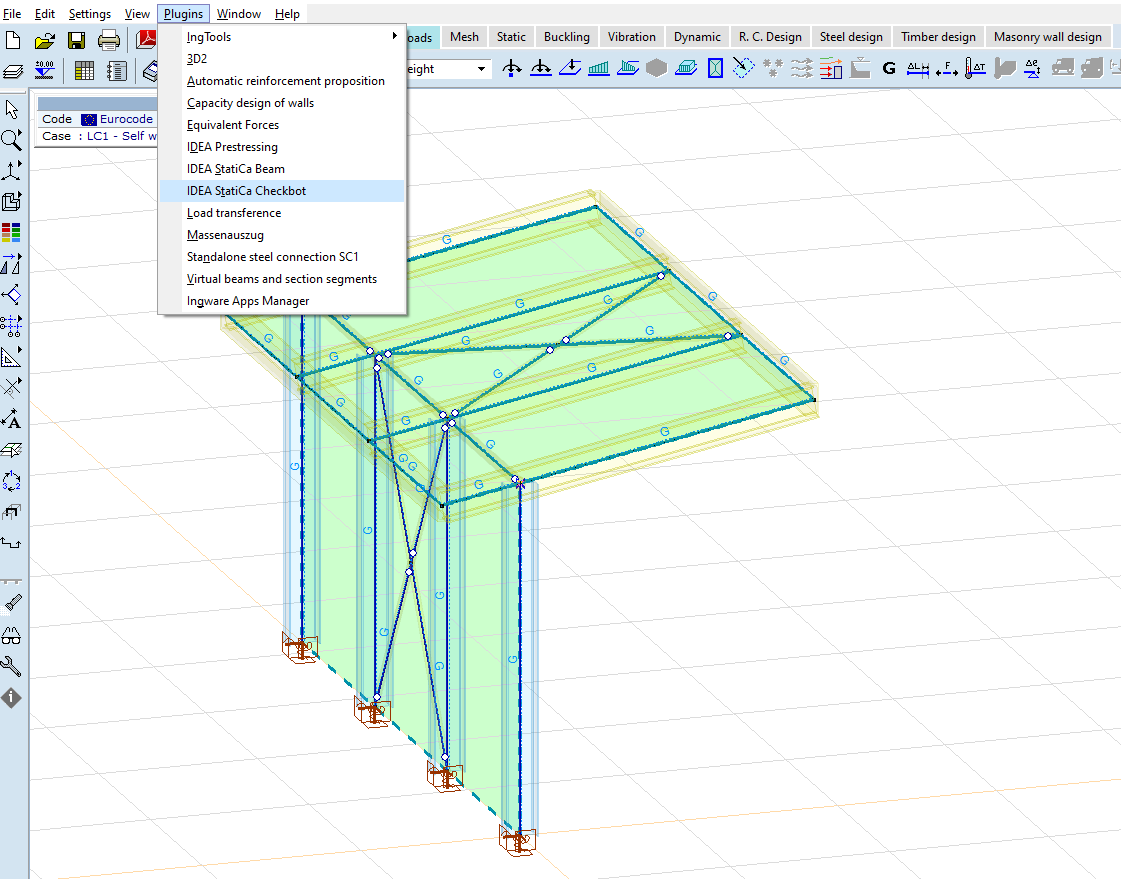
The BIM link should be automatically integrated. You can find it in the top ribbon under Plugins -> IDEA StatiCa Checkbot. This will open the Checkbot application.
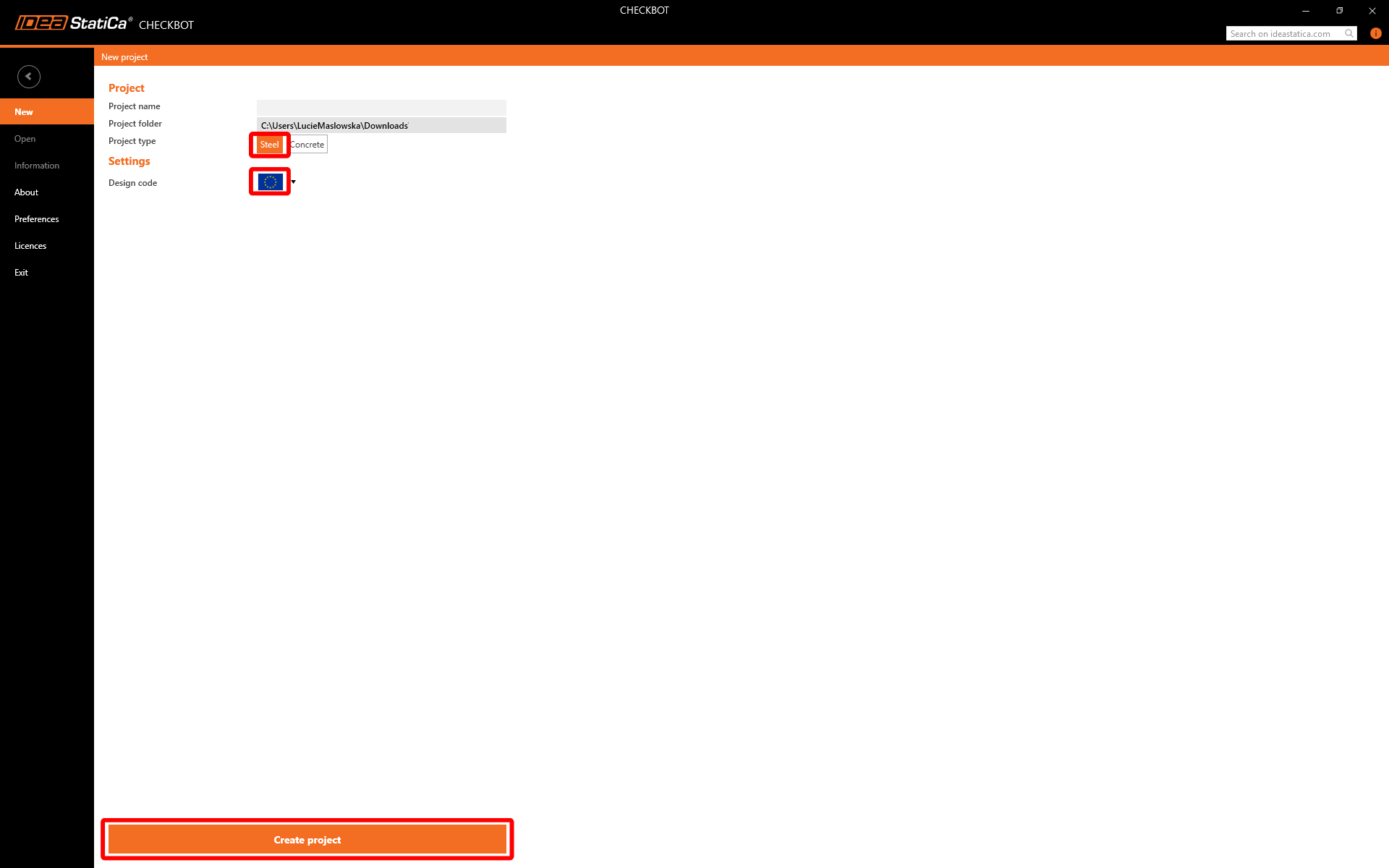
Select the New option with project type Steel and design code EN. Then select Create project.
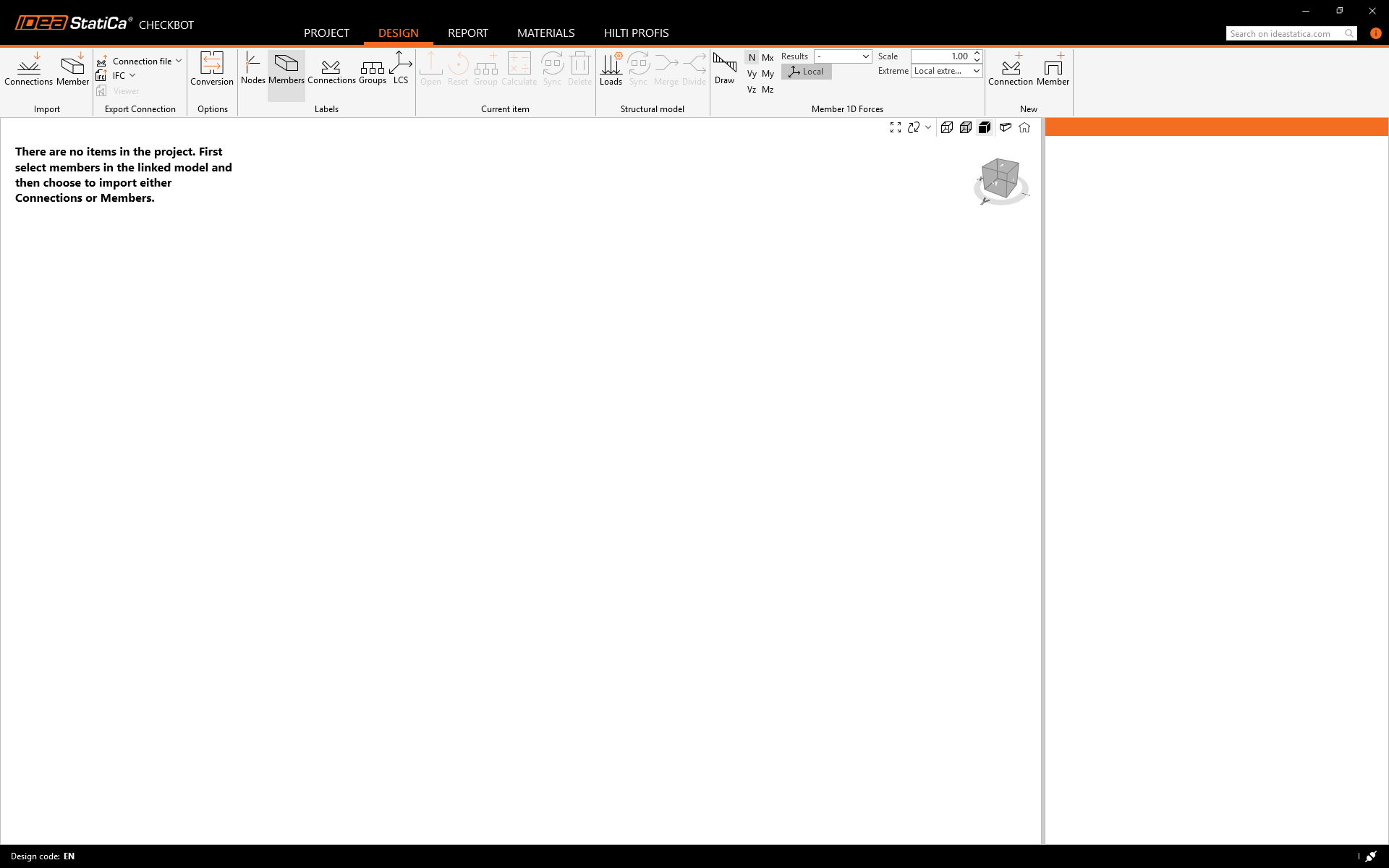
The new Checkbot project is ready to import connections from AxisVM.
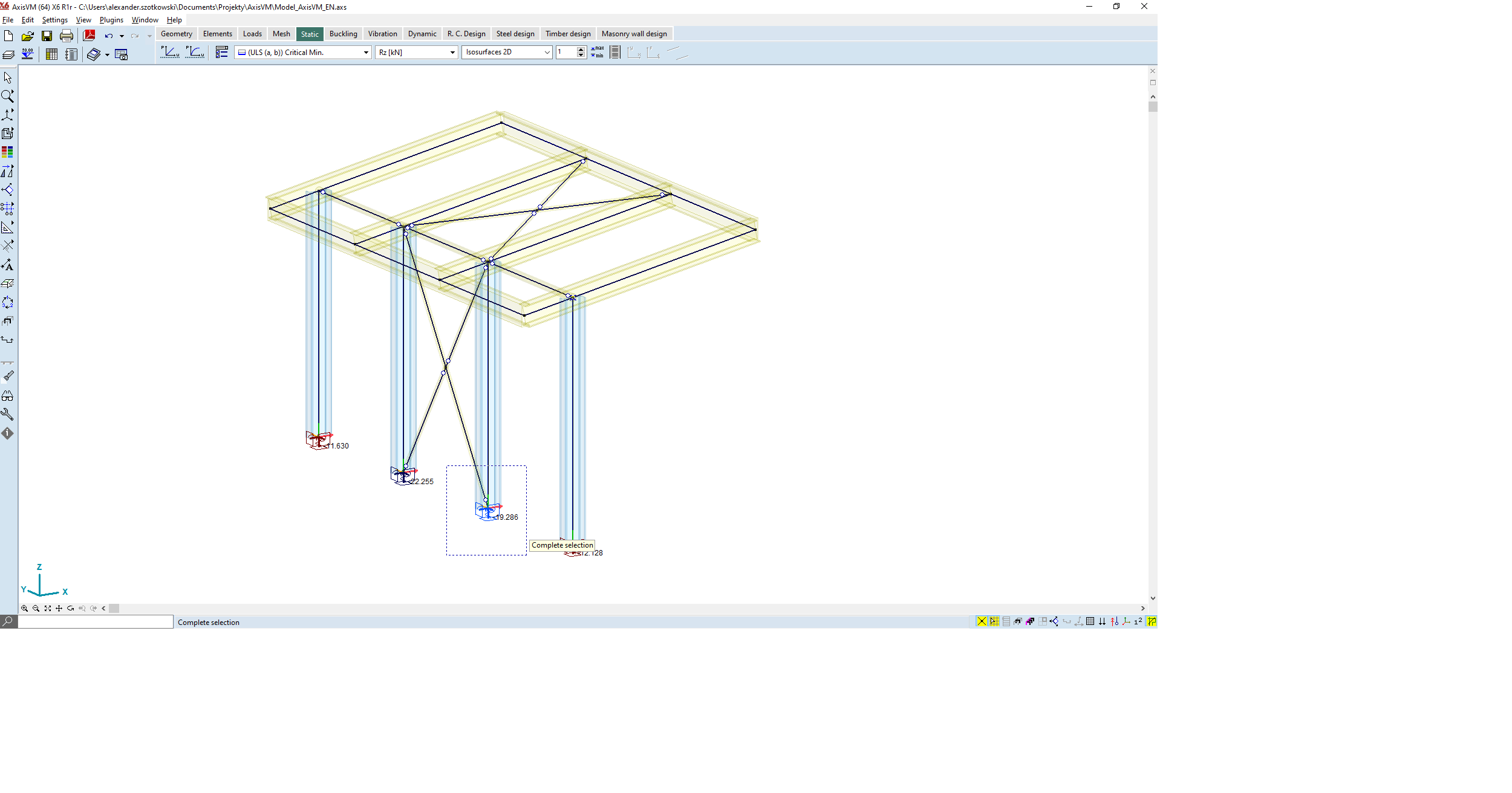
In AxisVM, select one of the inside columns with bracing making sure you also select the lowest node.
Widget #NaN: support_center_article
Name: General BIM Link tutorial - Import
ID: 4014d755-0bf0-43d9-a46c-da9ce928f004
Show Raw Data
{
"title": {
"name": "Main headline (H1)",
"type": "text",
"value": "Import"
},
"preview_image": {
"name": "Preview image",
"type": "asset",
"value": []
},
"post_date": {
"name": "Post date",
"type": "date_time",
"value": null,
"displayTimeZone": null
},
"perex_content": {
"name": "Lead paragraph",
"type": "text",
"value": ""
},
"content": {
"images": [
{
"description": null,
"imageId": "9e8f6845-e105-4892-a3bd-9def81d98bb6",
"url": "https://assets-us-01.kc-usercontent.com:443/28eac049-c8ed-00e2-220c-12142a968dff/e734e597-4d88-471b-80f1-6b622107eea4/import%20node.png",
"height": 1032,
"width": 1920
},
{
"description": null,
"imageId": "4cd06b43-6f27-4e21-ab5b-13b6520951eb",
"url": "https://assets-us-01.kc-usercontent.com:443/28eac049-c8ed-00e2-220c-12142a968dff/fc21c861-7d5f-4418-af2a-f7ee319aa914/single%20connection%20in%20checkbot.png",
"height": 1032,
"width": 1920
},
{
"description": null,
"imageId": "be4f07d7-d6e4-4bd3-8acd-2507951101d8",
"url": "https://assets-us-01.kc-usercontent.com:443/28eac049-c8ed-00e2-220c-12142a968dff/43f14268-3a11-43ba-9e9a-b5a84af9d4cf/RFEM%20-%20load%20configurator.png",
"height": 1136,
"width": 1918
},
{
"description": null,
"imageId": "bb64cd03-216e-4036-b058-f51b5bef237a",
"url": "https://assets-us-01.kc-usercontent.com:443/28eac049-c8ed-00e2-220c-12142a968dff/1803d6c5-85a0-42ec-97de-fcb751b17a46/all%20structure.png",
"height": 1032,
"width": 1920
}
],
"linkedItemCodenames": [],
"linkedItems": [],
"links": [],
"name": "Content",
"type": "rich_text",
"value": "<p>Then in Checkbot select <strong>Connections</strong>.</p>\n<figure data-asset-id=\"9e8f6845-e105-4892-a3bd-9def81d98bb6\" data-image-id=\"9e8f6845-e105-4892-a3bd-9def81d98bb6\"><img src=\"https://assets-us-01.kc-usercontent.com:443/28eac049-c8ed-00e2-220c-12142a968dff/e734e597-4d88-471b-80f1-6b622107eea4/import%20node.png\" data-asset-id=\"9e8f6845-e105-4892-a3bd-9def81d98bb6\" data-image-id=\"9e8f6845-e105-4892-a3bd-9def81d98bb6\" alt=\"\"></figure>\n<p>This will import the column and its load effects into Checkbot - with the same coordinates, orientations, and section sizes as per the FEA model.</p>\n<p>Please note that your node and member numbering might be different.</p>\n<figure data-asset-id=\"4cd06b43-6f27-4e21-ab5b-13b6520951eb\" data-image-id=\"4cd06b43-6f27-4e21-ab5b-13b6520951eb\"><img src=\"https://assets-us-01.kc-usercontent.com:443/28eac049-c8ed-00e2-220c-12142a968dff/fc21c861-7d5f-4418-af2a-f7ee319aa914/single%20connection%20in%20checkbot.png\" data-asset-id=\"4cd06b43-6f27-4e21-ab5b-13b6520951eb\" data-image-id=\"4cd06b43-6f27-4e21-ab5b-13b6520951eb\" alt=\"\"></figure>\n<p><strong>Before running the analysis, make sure to review the Result classes for checks </strong>and adjust the load cases accordingly<strong>.</strong> In the <strong>Load configurator </strong>dialog, you can see all imported load cases and load combinations on the left and the result classes used for checks in the middle. If some load cases are not relevant for your design verification, exclude them by right-clicking on the selected loads and removing them from the result classes list.</p>\n<figure data-asset-id=\"be4f07d7-d6e4-4bd3-8acd-2507951101d8\" data-image-id=\"be4f07d7-d6e4-4bd3-8acd-2507951101d8\"><img src=\"https://assets-us-01.kc-usercontent.com:443/28eac049-c8ed-00e2-220c-12142a968dff/43f14268-3a11-43ba-9e9a-b5a84af9d4cf/RFEM%20-%20load%20configurator.png\" data-asset-id=\"be4f07d7-d6e4-4bd3-8acd-2507951101d8\" data-image-id=\"be4f07d7-d6e4-4bd3-8acd-2507951101d8\" alt=\"\"></figure>\n<p>Please note the 3D workspace is designed to show an overview of the imported structure and not a detailed view of the actual connections. For more information on Checkbot, see <a href=\"https://www.ideastatica.com/support-center/checkbot-bulk-bim-workflows\" title=\"Checkbot\">here</a>.</p>\n<p>For several FEA solutions, you can also import multiple connections into Checkbot in the same manner as above. Instead of selecting one node and the connected members, you can select multiple nodes and members and import them all at once.</p>\n<figure data-asset-id=\"bb64cd03-216e-4036-b058-f51b5bef237a\" data-image-id=\"bb64cd03-216e-4036-b058-f51b5bef237a\"><img src=\"https://assets-us-01.kc-usercontent.com:443/28eac049-c8ed-00e2-220c-12142a968dff/1803d6c5-85a0-42ec-97de-fcb751b17a46/all%20structure.png\" data-asset-id=\"bb64cd03-216e-4036-b058-f51b5bef237a\" data-image-id=\"bb64cd03-216e-4036-b058-f51b5bef237a\" alt=\"\"></figure>"
},
"regions": {
"name": "Region",
"type": "taxonomy",
"value": [
{
"name": "EMEA",
"codename": "emea"
},
{
"name": "AMER",
"codename": "amer"
},
{
"name": "APAC",
"codename": "apac"
}
],
"taxonomyGroup": "region"
},
"product_groups": {
"name": "Product group",
"type": "taxonomy",
"value": [
{
"name": "Connection design",
"codename": "connection_design"
},
{
"name": "Steel",
"codename": "steel"
}
],
"taxonomyGroup": "product_group"
},
"support_center_article_types": {
"name": "Support center article",
"type": "taxonomy",
"value": [
{
"name": "Knowledge base",
"codename": "knowledgebase_article"
}
],
"taxonomyGroup": "support_center_article"
},
"expertise_levels": {
"name": "Expertise level",
"type": "taxonomy",
"value": [
{
"name": "Beginner",
"codename": "beginner"
},
{
"name": "Intermediate",
"codename": "intermediate"
}
],
"taxonomyGroup": "expertise_level"
},
"labels": {
"name": "Labels",
"type": "taxonomy",
"value": [
{
"name": "Connection",
"codename": "connection"
},
{
"name": "Checkbot",
"codename": "checkbot"
},
{
"name": "EN (Eurocode)",
"codename": "eurocode"
},
{
"name": "BIM link",
"codename": "bim_links"
},
{
"name": "AISC (USA)",
"codename": "aisc"
}
],
"taxonomyGroup": "labels"
},
"linked_items": {
"name": "Linked items",
"type": "modular_content",
"value": [],
"linkedItems": []
},
"attachments__files": {
"name": "Attachments",
"type": "asset",
"value": []
},
"content_priority__value": {
"name": "Content priority value",
"type": "number",
"value": null
},
"options": {
"name": "Options",
"type": "multiple_choice",
"value": []
},
"url_slug": {
"name": "Url slug",
"type": "url_slug",
"value": "import"
},
"unique_url_slug": {
"name": "Unique URL slug",
"type": "custom",
"value": "[\"import\",\"[autogenerated]\"]"
},
"content_settings__sitemap": {
"name": "Show in sitemap",
"type": "multiple_choice",
"value": [
{
"name": "default",
"codename": "default"
}
]
},
"content_settings__robots": {
"name": "Search engine indexing",
"type": "multiple_choice",
"value": [
{
"name": "default",
"codename": "default"
}
]
},
"content_settings__is_hidden": {
"name": "Hidden nested content",
"type": "multiple_choice",
"value": [
{
"name": "yes",
"codename": "yes"
}
]
},
"metadata__page_title": {
"name": "Page title",
"type": "text",
"value": "Import of steel connection from FEA/CAD into Checkbot"
},
"metadata__page_description": {
"name": "Page description",
"type": "text",
"value": "IDEA StatiCa step-by-step tutorial for importing steel connection and its load effects from FEA/CAD into Checkbot. Structural design of welded and bolted steel connections."
},
"metadata__page_keywords": {
"name": "Page keywords",
"type": "text",
"value": ""
},
"metadata__canonical_url": {
"name": "Canonical URL",
"type": "text",
"value": ""
},
"metadata__og_title": {
"name": "OG:title",
"type": "text",
"value": ""
},
"metadata__og_description": {
"name": "OG:description",
"type": "text",
"value": ""
},
"metadata__og_image": {
"name": "OG:image",
"type": "asset",
"value": []
},
"translation__translation_connector": {
"name": "Translation Connector",
"type": "taxonomy",
"value": [],
"taxonomyGroup": "languages"
},
"translation__force_translation": {
"name": "Force translation",
"type": "multiple_choice",
"value": []
},
"translation__last_translation": {
"images": [],
"linkedItemCodenames": [],
"linkedItems": [],
"links": [],
"name": "Last translation",
"type": "rich_text",
"value": "<p><br></p>"
},
"translation__ai_translated": {
"name": "AI translated",
"type": "multiple_choice",
"value": []
},
"page_tree_settings__page_label": {
"name": "Page label",
"type": "text",
"value": ""
},
"page_tree_settings__path_segment": {
"name": "Path segment",
"type": "text",
"value": "import-legacy"
},
"page_tree_settings__breadcrumb_style": {
"name": "Breadcrumb style",
"type": "multiple_choice",
"value": []
},
"page_tree_settings__hide_in_breadcrumbs": {
"name": "Hide in breadcrumbs",
"type": "multiple_choice",
"value": []
}
}Widget #NaN: support_center_article
Name: General BIM Link tutorial - Geometry
ID: c25dad44-9532-49cb-8c34-b7d536fec247
Show Raw Data
{
"title": {
"name": "Main headline (H1)",
"type": "text",
"value": "Geometry"
},
"preview_image": {
"name": "Preview image",
"type": "asset",
"value": []
},
"post_date": {
"name": "Post date",
"type": "date_time",
"value": null,
"displayTimeZone": null
},
"perex_content": {
"name": "Lead paragraph",
"type": "text",
"value": ""
},
"content": {
"images": [
{
"description": null,
"imageId": "6c4c6a6e-7ce1-4bae-bf35-efa7734a4f6e",
"url": "https://assets-us-01.kc-usercontent.com:443/28eac049-c8ed-00e2-220c-12142a968dff/b89e2ac5-d8cc-486c-b656-940f237d733c/2.png",
"height": 1000,
"width": 1199
},
{
"description": null,
"imageId": "55b67a24-3191-4f70-bcdf-91dc514d1a54",
"url": "https://assets-us-01.kc-usercontent.com:443/28eac049-c8ed-00e2-220c-12142a968dff/95fb28b7-e444-4e2e-aa19-1725d7e0b736/RFEM%20-%20connection.png",
"height": 1135,
"width": 1920
}
],
"linkedItemCodenames": [],
"linkedItems": [],
"links": [],
"name": "Content",
"type": "rich_text",
"value": "<p>In the list of project items under Connections and with a connection highlighted in Checkbot you can either right-mouse click and select <strong>Open </strong>or click the ribbon command <strong>Open</strong> to start designing, code-checking, and reporting.</p>\n<figure data-asset-id=\"6c4c6a6e-7ce1-4bae-bf35-efa7734a4f6e\" data-image-id=\"6c4c6a6e-7ce1-4bae-bf35-efa7734a4f6e\"><img src=\"https://assets-us-01.kc-usercontent.com:443/28eac049-c8ed-00e2-220c-12142a968dff/b89e2ac5-d8cc-486c-b656-940f237d733c/2.png\" data-asset-id=\"6c4c6a6e-7ce1-4bae-bf35-efa7734a4f6e\" data-image-id=\"6c4c6a6e-7ce1-4bae-bf35-efa7734a4f6e\" alt=\"\"></figure>\n<p>The settings of members are taken from the original FEA application. You can, however, change the section size of any member on the main Checkbot screen, but this will break the link with the FEA application in this session unless it's synchronized again.</p>\n<p>The imported connection is opened in the IDEA StatiCa Connection application.</p>\n<figure data-asset-id=\"55b67a24-3191-4f70-bcdf-91dc514d1a54\" data-image-id=\"55b67a24-3191-4f70-bcdf-91dc514d1a54\"><img src=\"https://assets-us-01.kc-usercontent.com:443/28eac049-c8ed-00e2-220c-12142a968dff/95fb28b7-e444-4e2e-aa19-1725d7e0b736/RFEM%20-%20connection.png\" data-asset-id=\"55b67a24-3191-4f70-bcdf-91dc514d1a54\" data-image-id=\"55b67a24-3191-4f70-bcdf-91dc514d1a54\" alt=\"\"></figure>\n<p>You may see none or different Load effects from your FEA solution, depending on how the load case combinations have been defined. By default, IDEA StatiCa will choose the most critical for code-checking purposes. (* Some BIM solutions are not able to store the load case combination results)</p>\n<p>For more information on Load effects, see <a href=\"https://www.ideastatica.com/support-center/checkbot-bulk-bim-workflows\" title=\"Checkbot\">here</a>.</p>"
},
"regions": {
"name": "Region",
"type": "taxonomy",
"value": [
{
"name": "EMEA",
"codename": "emea"
},
{
"name": "AMER",
"codename": "amer"
},
{
"name": "APAC",
"codename": "apac"
}
],
"taxonomyGroup": "region"
},
"product_groups": {
"name": "Product group",
"type": "taxonomy",
"value": [
{
"name": "Connection design",
"codename": "connection_design"
},
{
"name": "Steel",
"codename": "steel"
}
],
"taxonomyGroup": "product_group"
},
"support_center_article_types": {
"name": "Support center article",
"type": "taxonomy",
"value": [
{
"name": "Knowledge base",
"codename": "knowledgebase_article"
}
],
"taxonomyGroup": "support_center_article"
},
"expertise_levels": {
"name": "Expertise level",
"type": "taxonomy",
"value": [
{
"name": "Beginner",
"codename": "beginner"
},
{
"name": "Intermediate",
"codename": "intermediate"
}
],
"taxonomyGroup": "expertise_level"
},
"labels": {
"name": "Labels",
"type": "taxonomy",
"value": [
{
"name": "Connection",
"codename": "connection"
},
{
"name": "EN (Eurocode)",
"codename": "eurocode"
},
{
"name": "AISC (USA)",
"codename": "aisc"
},
{
"name": "BIM link",
"codename": "bim_links"
},
{
"name": "Checkbot",
"codename": "checkbot"
}
],
"taxonomyGroup": "labels"
},
"linked_items": {
"name": "Linked items",
"type": "modular_content",
"value": [],
"linkedItems": []
},
"attachments__files": {
"name": "Attachments",
"type": "asset",
"value": []
},
"content_priority__value": {
"name": "Content priority value",
"type": "number",
"value": null
},
"options": {
"name": "Options",
"type": "multiple_choice",
"value": []
},
"url_slug": {
"name": "Url slug",
"type": "url_slug",
"value": "geometry"
},
"unique_url_slug": {
"name": "Unique URL slug",
"type": "custom",
"value": "[\"geometry\",\"[autogenerated]\"]"
},
"content_settings__sitemap": {
"name": "Show in sitemap",
"type": "multiple_choice",
"value": [
{
"name": "default",
"codename": "default"
}
]
},
"content_settings__robots": {
"name": "Search engine indexing",
"type": "multiple_choice",
"value": [
{
"name": "default",
"codename": "default"
}
]
},
"content_settings__is_hidden": {
"name": "Hidden nested content",
"type": "multiple_choice",
"value": [
{
"name": "yes",
"codename": "yes"
}
]
},
"metadata__page_title": {
"name": "Page title",
"type": "text",
"value": "Import of steel connection from FEA/CAD into Checkbot"
},
"metadata__page_description": {
"name": "Page description",
"type": "text",
"value": "IDEA StatiCa step-by-step tutorial for importing steel connection and its load effects from FEA/CAD into Checkbot. Structural design of welded and bolted steel connections."
},
"metadata__page_keywords": {
"name": "Page keywords",
"type": "text",
"value": ""
},
"metadata__canonical_url": {
"name": "Canonical URL",
"type": "text",
"value": ""
},
"metadata__og_title": {
"name": "OG:title",
"type": "text",
"value": ""
},
"metadata__og_description": {
"name": "OG:description",
"type": "text",
"value": ""
},
"metadata__og_image": {
"name": "OG:image",
"type": "asset",
"value": []
},
"translation__translation_connector": {
"name": "Translation Connector",
"type": "taxonomy",
"value": [],
"taxonomyGroup": "languages"
},
"translation__force_translation": {
"name": "Force translation",
"type": "multiple_choice",
"value": []
},
"translation__last_translation": {
"images": [],
"linkedItemCodenames": [],
"linkedItems": [],
"links": [],
"name": "Last translation",
"type": "rich_text",
"value": "<p><br></p>"
},
"translation__ai_translated": {
"name": "AI translated",
"type": "multiple_choice",
"value": []
},
"page_tree_settings__page_label": {
"name": "Page label",
"type": "text",
"value": ""
},
"page_tree_settings__path_segment": {
"name": "Path segment",
"type": "text",
"value": "geometry-legacy"
},
"page_tree_settings__breadcrumb_style": {
"name": "Breadcrumb style",
"type": "multiple_choice",
"value": []
},
"page_tree_settings__hide_in_breadcrumbs": {
"name": "Hide in breadcrumbs",
"type": "multiple_choice",
"value": []
}
}Widget #NaN: support_center_article
Name: General BIM Link tutorial - Design Example (EN)
ID: e07071db-5126-40e2-a3ab-7d86be4a2f24
Show Raw Data
{
"title": {
"name": "Main headline (H1)",
"type": "text",
"value": "Design"
},
"preview_image": {
"name": "Preview image",
"type": "asset",
"value": []
},
"post_date": {
"name": "Post date",
"type": "date_time",
"value": null,
"displayTimeZone": null
},
"perex_content": {
"name": "Lead paragraph",
"type": "text",
"value": ""
},
"content": {
"images": [
{
"description": null,
"imageId": "5d50d85b-4229-49ee-bbfd-873de39cb3e9",
"url": "https://assets-us-01.kc-usercontent.com:443/28eac049-c8ed-00e2-220c-12142a968dff/3b20dc20-a84b-4f94-bcd3-09ddb17bf97c/4.png",
"height": 1200,
"width": 1920
},
{
"description": null,
"imageId": "2f31bf0c-8a40-4523-99e3-38b883907181",
"url": "https://assets-us-01.kc-usercontent.com:443/28eac049-c8ed-00e2-220c-12142a968dff/fab207f8-65d2-436f-b113-7f344aac3621/5.png",
"height": 143,
"width": 1920
},
{
"description": null,
"imageId": "aa53b13b-04e3-40c0-9da7-40d545a500d4",
"url": "https://assets-us-01.kc-usercontent.com:443/28eac049-c8ed-00e2-220c-12142a968dff/94d4a2a5-4eeb-49dd-8dbf-489fd86fa331/Design2B.png",
"height": 630,
"width": 1045
},
{
"description": null,
"imageId": "f5507c07-0f64-469a-ab46-2d9445d77865",
"url": "https://assets-us-01.kc-usercontent.com:443/28eac049-c8ed-00e2-220c-12142a968dff/19d7bb85-18e2-4a99-9b0c-6a210607d43c/Design2Ca.png",
"height": 441,
"width": 500
},
{
"description": null,
"imageId": "817e17bf-e3c3-4e68-a523-504d1ae3af67",
"url": "https://assets-us-01.kc-usercontent.com:443/28eac049-c8ed-00e2-220c-12142a968dff/f9846e79-3e28-46e8-b99b-1399ced3e2b7/Design3Ca.png",
"height": 510,
"width": 743
},
{
"description": null,
"imageId": "b7b90869-cc6f-447e-a24a-49a8d4e66356",
"url": "https://assets-us-01.kc-usercontent.com:443/28eac049-c8ed-00e2-220c-12142a968dff/2d1df896-2a42-43e1-bba1-eafbb7c25b54/RFEM%20-%20connection%20final.png",
"height": 1200,
"width": 1920
},
{
"description": null,
"imageId": "aff89a25-eb57-41a4-a406-5ea04d04427b",
"url": "https://assets-us-01.kc-usercontent.com:443/28eac049-c8ed-00e2-220c-12142a968dff/e2064bf5-fe9f-4f15-86fc-8e371ac2124f/8.png",
"height": 143,
"width": 1920
},
{
"description": null,
"imageId": "10916e97-a2ac-4cef-90f8-e0212129bd66",
"url": "https://assets-us-01.kc-usercontent.com:443/28eac049-c8ed-00e2-220c-12142a968dff/6707198c-521f-4f35-b163-120790d09bba/RFEM%20-%20connection%20failing.png",
"height": 1200,
"width": 1920
},
{
"description": null,
"imageId": "1bfcf362-ab36-4e14-b774-fb5e46663670",
"url": "https://assets-us-01.kc-usercontent.com:443/28eac049-c8ed-00e2-220c-12142a968dff/fa7baf74-b381-4f4f-aab8-1a4b1f4e914a/RFEM%20-%20connection%20failing.png",
"height": 1200,
"width": 1920
},
{
"description": null,
"imageId": "7fbf37d6-f5af-44a4-ae1d-3eb76a2823ed",
"url": "https://assets-us-01.kc-usercontent.com:443/28eac049-c8ed-00e2-220c-12142a968dff/4f9aa168-f31c-4230-a94e-5fb7425cc825/RFEM%20-%20connection%20length.png",
"height": 1200,
"width": 1920
},
{
"description": null,
"imageId": "41af0bb7-1cc4-4e0b-8932-8c5f879cf7a0",
"url": "https://assets-us-01.kc-usercontent.com:443/28eac049-c8ed-00e2-220c-12142a968dff/2b3f0982-263a-4069-a5b7-14778a184e30/RFEM%20-%20ok.png",
"height": 1200,
"width": 1920
},
{
"description": null,
"imageId": "2e83a5fc-2434-4927-b3e2-463303abf93e",
"url": "https://assets-us-01.kc-usercontent.com:443/28eac049-c8ed-00e2-220c-12142a968dff/6c2cdb78-c06c-4ef2-87a8-e8e480861647/report.png",
"height": 1200,
"width": 2523
},
{
"description": null,
"imageId": "0c24db03-0d22-413b-94f7-54a884235afa",
"url": "https://assets-us-01.kc-usercontent.com:443/28eac049-c8ed-00e2-220c-12142a968dff/c9c367ee-919a-477e-adea-097a5792034f/RFEM%20-%20ok%20Checkbot.png",
"height": 1200,
"width": 1920
},
{
"description": null,
"imageId": "37a17af2-1908-46df-bf9b-dc3217b22840",
"url": "https://assets-us-01.kc-usercontent.com:443/28eac049-c8ed-00e2-220c-12142a968dff/33edf21a-db64-4609-8de1-a452d0a8df46/RFEM%20-%20ok%20Checkbot%202.png",
"height": 1200,
"width": 1920
}
],
"linkedItemCodenames": [],
"linkedItems": [],
"links": [
{
"codename": "rn_23_1__connection_library___the_largest_database",
"linkId": "37fb73bf-dfd3-46d7-ae57-ee0e9c4cdb75",
"urlSlug": "connection-library-the-largest-database-of-downloadable-steel-connections",
"type": "support_center_article"
},
{
"codename": "landing_page___steel_verification",
"linkId": "06158daa-1491-4e83-ac34-4964bd5a3c63",
"urlSlug": "steel-verification",
"type": "landing_page"
},
{
"codename": "design_v2",
"linkId": "b0a659df-8f92-4d1f-abb6-2efa02bad946",
"urlSlug": "connection-design",
"type": "landing_page"
},
{
"codename": "how_to_export_report_to_ms_word__dxf_or_pdf_files",
"linkId": "dfedaf85-c16f-5228-849c-0bfe09e9e8d1",
"urlSlug": "how-to-create-and-export-a-report-to-ms-word-pdf-or-dxf-files",
"type": "support_center_article"
},
{
"codename": "rn_21_1__checkbot",
"linkId": "4074acd5-0f5f-40f9-aa70-ac1ff373919d",
"urlSlug": "checkbot-bulk-bim-workflows",
"type": "support_center_article"
}
],
"name": "Content",
"type": "rich_text",
"value": "<p>We are going to be using a <a href=\"https://www.ideastatica.com/support-center/how-to-model-one-bolt-connection\" title=\"Single bolt connections\">single bolt connection</a> for the diagonal brace. For this type of connection, we must also change the <strong>Model type</strong> of the brace member to <strong>N-Vy-Vz</strong>. Select the brace in the list of Members and modify the Model type in the drop-down list.</p>\n<figure data-asset-id=\"5d50d85b-4229-49ee-bbfd-873de39cb3e9\" data-image-id=\"5d50d85b-4229-49ee-bbfd-873de39cb3e9\"><img src=\"https://assets-us-01.kc-usercontent.com:443/28eac049-c8ed-00e2-220c-12142a968dff/3b20dc20-a84b-4f94-bcd3-09ddb17bf97c/4.png\" data-asset-id=\"5d50d85b-4229-49ee-bbfd-873de39cb3e9\" data-image-id=\"5d50d85b-4229-49ee-bbfd-873de39cb3e9\" alt=\"\"></figure>\n<p>We are going to use the Connection Library to generate a connection. Select <strong>Propose</strong> and IDEA StatiCa will put forward possible solutions for the current geometry.</p>\n<figure data-asset-id=\"2f31bf0c-8a40-4523-99e3-38b883907181\" data-image-id=\"2f31bf0c-8a40-4523-99e3-38b883907181\"><img src=\"https://assets-us-01.kc-usercontent.com:443/28eac049-c8ed-00e2-220c-12142a968dff/fab207f8-65d2-436f-b113-7f344aac3621/5.png\" data-asset-id=\"2f31bf0c-8a40-4523-99e3-38b883907181\" data-image-id=\"2f31bf0c-8a40-4523-99e3-38b883907181\" alt=\"\"></figure>\n<p><a data-item-id=\"37fb73bf-dfd3-46d7-ae57-ee0e9c4cdb75\" href=\"\">Connection Library</a> shows you the possible solutions for the current geometry. Choose the template <strong>Column I base plate 4 bolts diagonal bolted weak</strong> and press <strong>OK</strong>.</p>\n<figure data-asset-id=\"aa53b13b-04e3-40c0-9da7-40d545a500d4\" data-image-id=\"aa53b13b-04e3-40c0-9da7-40d545a500d4\"><img src=\"https://assets-us-01.kc-usercontent.com:443/28eac049-c8ed-00e2-220c-12142a968dff/94d4a2a5-4eeb-49dd-8dbf-489fd86fa331/Design2B.png\" data-asset-id=\"aa53b13b-04e3-40c0-9da7-40d545a500d4\" data-image-id=\"aa53b13b-04e3-40c0-9da7-40d545a500d4\" alt=\"\"></figure>\n<p>Accept the proposed values in the conversion tab and press <strong>OK</strong>.</p>\n<figure data-asset-id=\"f5507c07-0f64-469a-ab46-2d9445d77865\" data-image-id=\"f5507c07-0f64-469a-ab46-2d9445d77865\"><img src=\"https://assets-us-01.kc-usercontent.com:443/28eac049-c8ed-00e2-220c-12142a968dff/19d7bb85-18e2-4a99-9b0c-6a210607d43c/Design2Ca.png\" data-asset-id=\"f5507c07-0f64-469a-ab46-2d9445d77865\" data-image-id=\"f5507c07-0f64-469a-ab46-2d9445d77865\" alt=\"\"></figure>\n<p>Edit the parameters of this template to fit the desired design – <strong>Base plate thickness </strong>to 12 mm, <strong>Base plate offset</strong> to 10 mm, <strong>Concrete block offset</strong> to 250 mm, <strong>Gusset plate thickness </strong>to 6 mm, and <strong>Gusset plate width</strong> to 100 mm.</p>\n<figure data-asset-id=\"817e17bf-e3c3-4e68-a523-504d1ae3af67\" data-image-id=\"817e17bf-e3c3-4e68-a523-504d1ae3af67\"><img src=\"https://assets-us-01.kc-usercontent.com:443/28eac049-c8ed-00e2-220c-12142a968dff/f9846e79-3e28-46e8-b99b-1399ced3e2b7/Design3Ca.png\" data-asset-id=\"817e17bf-e3c3-4e68-a523-504d1ae3af67\" data-image-id=\"817e17bf-e3c3-4e68-a523-504d1ae3af67\" alt=\"\"></figure>\n<p>This is what the initial connection looks like.</p>\n<figure data-asset-id=\"b7b90869-cc6f-447e-a24a-49a8d4e66356\" data-image-id=\"b7b90869-cc6f-447e-a24a-49a8d4e66356\"><img src=\"https://assets-us-01.kc-usercontent.com:443/28eac049-c8ed-00e2-220c-12142a968dff/2d1df896-2a42-43e1-bba1-eafbb7c25b54/RFEM%20-%20connection%20final.png\" data-asset-id=\"b7b90869-cc6f-447e-a24a-49a8d4e66356\" data-image-id=\"b7b90869-cc6f-447e-a24a-49a8d4e66356\" alt=\"\"></figure>\n<p>That completes the design of the connection for the column base plate with a diagonal brace.</p>\n<h2>Code-check and Report</h2>\n<p>Now run a code-check using the <strong>Calculate </strong>icon in the <a data-item-id=\"06158daa-1491-4e83-ac34-4964bd5a3c63\" href=\"\">CBFEM</a> panel from the top ribbon.<br>\nWithin <a data-item-id=\"b0a659df-8f92-4d1f-abb6-2efa02bad946\" href=\"\">IDEA StatiCa Connection</a>, you can carry out many different types of analysis and code-checks. For more information, please see <a href=\"https://www.ideastatica.com/support-center/checkbot-bulk-bim-workflows\" data-new-window=\"true\" title=\"Checkbot\" target=\"_blank\" rel=\"noopener noreferrer\">here</a>.</p>\n<figure data-asset-id=\"aff89a25-eb57-41a4-a406-5ea04d04427b\" data-image-id=\"aff89a25-eb57-41a4-a406-5ea04d04427b\"><img src=\"https://assets-us-01.kc-usercontent.com:443/28eac049-c8ed-00e2-220c-12142a968dff/e2064bf5-fe9f-4f15-86fc-8e371ac2124f/8.png\" data-asset-id=\"aff89a25-eb57-41a4-a406-5ea04d04427b\" data-image-id=\"aff89a25-eb57-41a4-a406-5ea04d04427b\" alt=\"\"></figure>\n<p>The results might not be acceptable. In this case, the anchors fail because of their low design capacity.</p>\n<figure data-asset-id=\"10916e97-a2ac-4cef-90f8-e0212129bd66\" data-image-id=\"10916e97-a2ac-4cef-90f8-e0212129bd66\"><img src=\"https://assets-us-01.kc-usercontent.com:443/28eac049-c8ed-00e2-220c-12142a968dff/6707198c-521f-4f35-b163-120790d09bba/RFEM%20-%20connection%20failing.png\" data-asset-id=\"10916e97-a2ac-4cef-90f8-e0212129bd66\" data-image-id=\"10916e97-a2ac-4cef-90f8-e0212129bd66\" alt=\"\"></figure>\n<p>You can go to the <strong>Check </strong>tab to review the results and take a closer look at the anchors by expanding the calculation using the '<strong>+</strong>' symbol. You can see that the anchors are failing in tension in the concrete block.</p>\n<figure data-asset-id=\"1bfcf362-ab36-4e14-b774-fb5e46663670\" data-image-id=\"1bfcf362-ab36-4e14-b774-fb5e46663670\"><img src=\"https://assets-us-01.kc-usercontent.com:443/28eac049-c8ed-00e2-220c-12142a968dff/fa7baf74-b381-4f4f-aab8-1a4b1f4e914a/RFEM%20-%20connection%20failing.png\" data-asset-id=\"1bfcf362-ab36-4e14-b774-fb5e46663670\" data-image-id=\"1bfcf362-ab36-4e14-b774-fb5e46663670\" alt=\"\"></figure>\n<p>We must optimize the design to find the passing solution. Go back to the <strong>Design </strong>tab, click on the<strong> operation</strong>, and change the <strong>Anchoring length</strong> to 200 mm. Then run the analysis and code-check again.</p>\n<figure data-asset-id=\"7fbf37d6-f5af-44a4-ae1d-3eb76a2823ed\" data-image-id=\"7fbf37d6-f5af-44a4-ae1d-3eb76a2823ed\"><img src=\"https://assets-us-01.kc-usercontent.com:443/28eac049-c8ed-00e2-220c-12142a968dff/4f9aa168-f31c-4230-a94e-5fb7425cc825/RFEM%20-%20connection%20length.png\" data-asset-id=\"7fbf37d6-f5af-44a4-ae1d-3eb76a2823ed\" data-image-id=\"7fbf37d6-f5af-44a4-ae1d-3eb76a2823ed\" alt=\"\"></figure>\n<p>Once the code-check is finished in the <strong>Report </strong>tab, you can create the report containing results and diagrams for your <a data-item-id=\"b0a659df-8f92-4d1f-abb6-2efa02bad946\" href=\"\">connection</a> model.</p>\n<figure data-asset-id=\"41af0bb7-1cc4-4e0b-8932-8c5f879cf7a0\" data-image-id=\"41af0bb7-1cc4-4e0b-8932-8c5f879cf7a0\"><img src=\"https://assets-us-01.kc-usercontent.com:443/28eac049-c8ed-00e2-220c-12142a968dff/2b3f0982-263a-4069-a5b7-14778a184e30/RFEM%20-%20ok.png\" data-asset-id=\"41af0bb7-1cc4-4e0b-8932-8c5f879cf7a0\" data-image-id=\"41af0bb7-1cc4-4e0b-8932-8c5f879cf7a0\" alt=\"\"></figure>\n<p>The report can be printed or saved in several formats. For more information, please see <a data-item-id=\"dfedaf85-c16f-5228-849c-0bfe09e9e8d1\" href=\"\">here</a>.</p>\n<figure data-asset-id=\"2e83a5fc-2434-4927-b3e2-463303abf93e\" data-image-id=\"2e83a5fc-2434-4927-b3e2-463303abf93e\"><img src=\"https://assets-us-01.kc-usercontent.com:443/28eac049-c8ed-00e2-220c-12142a968dff/6c2cdb78-c06c-4ef2-87a8-e8e480861647/report.png\" data-asset-id=\"2e83a5fc-2434-4927-b3e2-463303abf93e\" data-image-id=\"2e83a5fc-2434-4927-b3e2-463303abf93e\" alt=\"\"></figure>\n<p><strong>Save </strong>this connection and switch back to the Checkbot window (you can keep the Connection window open).</p>\n<p>In Checkbot, you will see a green tick next to the connection and the node box filled with green color. This means that the connection has passed all code-checks. In the Connection panel, you can also see a representation of the connection and a summary of the code-check results.</p>\n<figure data-asset-id=\"0c24db03-0d22-413b-94f7-54a884235afa\" data-image-id=\"0c24db03-0d22-413b-94f7-54a884235afa\"><img src=\"https://assets-us-01.kc-usercontent.com:443/28eac049-c8ed-00e2-220c-12142a968dff/c9c367ee-919a-477e-adea-097a5792034f/RFEM%20-%20ok%20Checkbot.png\" data-asset-id=\"0c24db03-0d22-413b-94f7-54a884235afa\" data-image-id=\"0c24db03-0d22-413b-94f7-54a884235afa\" alt=\"\"></figure>\n<p>In the example below, you can see that only one connection has passed the respective code-check while the remaining connections have yet to be designed.</p>\n<figure data-asset-id=\"37a17af2-1908-46df-bf9b-dc3217b22840\" data-image-id=\"37a17af2-1908-46df-bf9b-dc3217b22840\"><img src=\"https://assets-us-01.kc-usercontent.com:443/28eac049-c8ed-00e2-220c-12142a968dff/33edf21a-db64-4609-8de1-a452d0a8df46/RFEM%20-%20ok%20Checkbot%202.png\" data-asset-id=\"37a17af2-1908-46df-bf9b-dc3217b22840\" data-image-id=\"37a17af2-1908-46df-bf9b-dc3217b22840\" alt=\"\"></figure>\n<p>You can continue with the design of other connections, either one by one or using <a data-item-id=\"4074acd5-0f5f-40f9-aa70-ac1ff373919d\" href=\"\">the bulk workflows</a>.</p>"
},
"regions": {
"name": "Region",
"type": "taxonomy",
"value": [
{
"name": "EMEA",
"codename": "emea"
},
{
"name": "APAC",
"codename": "apac"
}
],
"taxonomyGroup": "region"
},
"product_groups": {
"name": "Product group",
"type": "taxonomy",
"value": [
{
"name": "Connection design",
"codename": "connection_design"
},
{
"name": "Steel",
"codename": "steel"
}
],
"taxonomyGroup": "product_group"
},
"support_center_article_types": {
"name": "Support center article",
"type": "taxonomy",
"value": [
{
"name": "Knowledge base",
"codename": "knowledgebase_article"
}
],
"taxonomyGroup": "support_center_article"
},
"expertise_levels": {
"name": "Expertise level",
"type": "taxonomy",
"value": [
{
"name": "Beginner",
"codename": "beginner"
},
{
"name": "Intermediate",
"codename": "intermediate"
}
],
"taxonomyGroup": "expertise_level"
},
"labels": {
"name": "Labels",
"type": "taxonomy",
"value": [
{
"name": "BIM link",
"codename": "bim_links"
}
],
"taxonomyGroup": "labels"
},
"linked_items": {
"name": "Linked items",
"type": "modular_content",
"value": [],
"linkedItems": []
},
"attachments__files": {
"name": "Attachments",
"type": "asset",
"value": []
},
"content_priority__value": {
"name": "Content priority value",
"type": "number",
"value": null
},
"options": {
"name": "Options",
"type": "multiple_choice",
"value": []
},
"url_slug": {
"name": "Url slug",
"type": "url_slug",
"value": "design"
},
"unique_url_slug": {
"name": "Unique URL slug",
"type": "custom",
"value": "[\"design\",\"[autogenerated]\"]"
},
"content_settings__sitemap": {
"name": "Show in sitemap",
"type": "multiple_choice",
"value": [
{
"name": "default",
"codename": "default"
}
]
},
"content_settings__robots": {
"name": "Search engine indexing",
"type": "multiple_choice",
"value": [
{
"name": "default",
"codename": "default"
}
]
},
"content_settings__is_hidden": {
"name": "Hidden nested content",
"type": "multiple_choice",
"value": [
{
"name": "yes",
"codename": "yes"
}
]
},
"metadata__page_title": {
"name": "Page title",
"type": "text",
"value": "Structural design of bolted connection"
},
"metadata__page_description": {
"name": "Page description",
"type": "text",
"value": "IDEA StatiCa step-by-step tutorial for the structural design of bolted connection in stress analysis software."
},
"metadata__page_keywords": {
"name": "Page keywords",
"type": "text",
"value": ""
},
"metadata__canonical_url": {
"name": "Canonical URL",
"type": "text",
"value": ""
},
"metadata__og_title": {
"name": "OG:title",
"type": "text",
"value": ""
},
"metadata__og_description": {
"name": "OG:description",
"type": "text",
"value": ""
},
"metadata__og_image": {
"name": "OG:image",
"type": "asset",
"value": []
},
"translation__translation_connector": {
"name": "Translation Connector",
"type": "taxonomy",
"value": [],
"taxonomyGroup": "languages"
},
"translation__force_translation": {
"name": "Force translation",
"type": "multiple_choice",
"value": []
},
"translation__last_translation": {
"images": [],
"linkedItemCodenames": [],
"linkedItems": [],
"links": [],
"name": "Last translation",
"type": "rich_text",
"value": "<p><br></p>"
},
"translation__ai_translated": {
"name": "AI translated",
"type": "multiple_choice",
"value": []
},
"page_tree_settings__page_label": {
"name": "Page label",
"type": "text",
"value": ""
},
"page_tree_settings__path_segment": {
"name": "Path segment",
"type": "text",
"value": "design-bim"
},
"page_tree_settings__breadcrumb_style": {
"name": "Breadcrumb style",
"type": "multiple_choice",
"value": []
},
"page_tree_settings__hide_in_breadcrumbs": {
"name": "Hide in breadcrumbs",
"type": "multiple_choice",
"value": []
}
}Widget #NaN: support_center_article
Name: General BIM Link connection tutorial - Synchronize model
ID: 69626664-8ef3-4051-80e0-33bc98c97204
Show Raw Data
{
"title": {
"name": "Main headline (H1)",
"type": "text",
"value": "Synchronisation du modèle"
},
"preview_image": {
"name": "Preview image",
"type": "asset",
"value": []
},
"post_date": {
"name": "Post date",
"type": "date_time",
"value": null,
"displayTimeZone": null
},
"perex_content": {
"name": "Lead paragraph",
"type": "text",
"value": ""
},
"content": {
"images": [
{
"description": null,
"imageId": "06d20ca4-2fb6-4f94-882d-66634084d102",
"url": "https://assets-us-01.kc-usercontent.com:443/28eac049-c8ed-00e2-220c-12142a968dff/ff009b18-fc87-4bf8-990c-1f3d5a554cd0/Synchronize1F.png",
"height": 161,
"width": 862
},
{
"description": null,
"imageId": "18a161cd-b9f4-4804-94c8-b0d5cd4daa30",
"url": "https://assets-us-01.kc-usercontent.com:443/28eac049-c8ed-00e2-220c-12142a968dff/38ea9cc2-af57-4394-b1b7-35e74da0f274/Synchronize7E.png",
"height": 572,
"width": 699
},
{
"description": null,
"imageId": "2dd5ffd4-d30e-495b-aa0e-eba0cab6f5da",
"url": "https://assets-us-01.kc-usercontent.com:443/28eac049-c8ed-00e2-220c-12142a968dff/f8ab1c63-2749-4070-b50f-074fca51f515/Synchronize7D.png",
"height": 1164,
"width": 1920
},
{
"description": null,
"imageId": "44bf104d-2a0e-46d2-bb11-31a35f37d1a7",
"url": "https://assets-us-01.kc-usercontent.com:443/28eac049-c8ed-00e2-220c-12142a968dff/602d9426-058c-42e9-9b4a-979a30176f2f/Synchronize4B.png",
"height": 202,
"width": 331
}
],
"linkedItemCodenames": [],
"linkedItems": [],
"links": [
{
"codename": "checkbot",
"linkId": "caeb1a6c-2621-446f-8005-4d2799496a39",
"urlSlug": "checkbot",
"type": "landing_page"
},
{
"codename": "supported_integrations",
"linkId": "4a9855d4-6081-4707-86d5-7f4ad2bb3a57",
"urlSlug": "bim-integrations-old",
"type": "landing_page"
},
{
"codename": "different_ways_of_load_definition",
"linkId": "3eca9f92-b870-40f1-b11b-dd1ba61acb5a",
"urlSlug": "different-ways-of-load-definition",
"type": "support_center_article"
},
{
"codename": "design_v2",
"linkId": "b0a659df-8f92-4d1f-abb6-2efa02bad946",
"urlSlug": "conception-d-attaches",
"type": "landing_page"
},
{
"codename": "fabrication___v2",
"linkId": "aa5365b6-eee0-41ad-8f98-c3f4843f90b0",
"urlSlug": "fabrication-optimisation",
"type": "landing_page"
}
],
"name": "Content",
"type": "rich_text",
"value": "<p>De temps en temps, il y a des modifications de votre modèle MEF/BIM, par exemple une taille différente de section d'un élément ou des charges différentes. Il est possible de les synchroniser entre <a data-item-id=\"caeb1a6c-2621-446f-8005-4d2799496a39\" href=\"\">Checkbot</a> et le modèle MEF/BIM.</p>\n<p>Il y a deux alternatives :</p>\n<ul>\n <li>Synchroniser l'Élément actuel (si un ou plusieurs assemblages sont sélectionnés)</li>\n <li>Synchroniser le Modèle structural importé entier</li>\n</ul>\n<figure data-asset-id=\"06d20ca4-2fb6-4f94-882d-66634084d102\" data-image-id=\"06d20ca4-2fb6-4f94-882d-66634084d102\"><img src=\"https://assets-us-01.kc-usercontent.com:443/28eac049-c8ed-00e2-220c-12142a968dff/ff009b18-fc87-4bf8-990c-1f3d5a554cd0/Synchronize1F.png\" data-asset-id=\"06d20ca4-2fb6-4f94-882d-66634084d102\" data-image-id=\"06d20ca4-2fb6-4f94-882d-66634084d102\" alt=\"\"></figure>\n<p>Pour vérifier cette fonction, vous pouvez changer la taille ou forme de section d'un élément dans votre <a data-item-id=\"4a9855d4-6081-4707-86d5-7f4ad2bb3a57\" href=\"\">application BIM</a>/MEF ou modifier un cas ou combinaison de <a data-item-id=\"3eca9f92-b870-40f1-b11b-dd1ba61acb5a\" href=\"\">charge</a>, etc. : <strong>changez les poteaux pour une section plus petite. </strong>N'oubliez pas de <strong>réanalyser le modèle MEF.</strong></p>\n<figure data-asset-id=\"18a161cd-b9f4-4804-94c8-b0d5cd4daa30\" data-image-id=\"18a161cd-b9f4-4804-94c8-b0d5cd4daa30\"><img src=\"https://assets-us-01.kc-usercontent.com:443/28eac049-c8ed-00e2-220c-12142a968dff/38ea9cc2-af57-4394-b1b7-35e74da0f274/Synchronize7E.png\" data-asset-id=\"18a161cd-b9f4-4804-94c8-b0d5cd4daa30\" data-image-id=\"18a161cd-b9f4-4804-94c8-b0d5cd4daa30\" alt=\"\"></figure>\n<p>Dans <a data-item-id=\"caeb1a6c-2621-446f-8005-4d2799496a39\" href=\"\">Checkbot</a>, sélectionnez les attaches conçues (il peut y avoir plus qu'une) et puis <strong>Synchronisation </strong>au panneau Élément actuel.</p>\n<p>Le projet dans Checkbot sera actualisé, la <a data-item-id=\"b0a659df-8f92-4d1f-abb6-2efa02bad946\" href=\"\">conception d'attache</a> sera enregistrée mais les résultats ne seront plus valides. Vous pouvez voir que le poteau est actualisé – avec le même changement qu'au modèle MEF.</p>\n<figure data-asset-id=\"2dd5ffd4-d30e-495b-aa0e-eba0cab6f5da\" data-image-id=\"2dd5ffd4-d30e-495b-aa0e-eba0cab6f5da\"><img src=\"https://assets-us-01.kc-usercontent.com:443/28eac049-c8ed-00e2-220c-12142a968dff/f8ab1c63-2749-4070-b50f-074fca51f515/Synchronize7D.png\" data-asset-id=\"2dd5ffd4-d30e-495b-aa0e-eba0cab6f5da\" data-image-id=\"2dd5ffd4-d30e-495b-aa0e-eba0cab6f5da\" alt=\"\"></figure>\n<p>Il faut seulement vérifier les attaches en surbrillance encore une fois en sélectionnant <strong>Calculer </strong>au panneau Élément actuel. Veuillez noter que des changements plus significatifs du modèle peuvent exiger des étapes de validation supplémentaires pour les attaches affectées (comme ci-dessus).</p>\n<figure data-asset-id=\"44bf104d-2a0e-46d2-bb11-31a35f37d1a7\" data-image-id=\"44bf104d-2a0e-46d2-bb11-31a35f37d1a7\"><img src=\"https://assets-us-01.kc-usercontent.com:443/28eac049-c8ed-00e2-220c-12142a968dff/602d9426-058c-42e9-9b4a-979a30176f2f/Synchronize4B.png\" data-asset-id=\"44bf104d-2a0e-46d2-bb11-31a35f37d1a7\" data-image-id=\"44bf104d-2a0e-46d2-bb11-31a35f37d1a7\" alt=\"\"></figure>\n<p>Si les attaches ne donnent pas de résultats désirés, vous pouvez les rouvrir pour <a data-item-id=\"aa5365b6-eee0-41ad-8f98-c3f4843f90b0\" href=\"\">optimiser la conception</a> (renforcer-les si elles échouent la vérification ou alléger si l'utilisation est trop basse).</p>"
},
"regions": {
"name": "Region",
"type": "taxonomy",
"value": [
{
"name": "EMEA",
"codename": "emea"
},
{
"name": "AMER",
"codename": "amer"
},
{
"name": "APAC",
"codename": "apac"
}
],
"taxonomyGroup": "region"
},
"product_groups": {
"name": "Product group",
"type": "taxonomy",
"value": [
{
"name": "Connection design",
"codename": "connection_design"
},
{
"name": "Steel",
"codename": "steel"
}
],
"taxonomyGroup": "product_group"
},
"support_center_article_types": {
"name": "Support center article",
"type": "taxonomy",
"value": [
{
"name": "Knowledge base",
"codename": "knowledgebase_article"
}
],
"taxonomyGroup": "support_center_article"
},
"expertise_levels": {
"name": "Expertise level",
"type": "taxonomy",
"value": [
{
"name": "Beginner",
"codename": "beginner"
},
{
"name": "Intermediate",
"codename": "intermediate"
}
],
"taxonomyGroup": "expertise_level"
},
"labels": {
"name": "Labels",
"type": "taxonomy",
"value": [
{
"name": "Connection",
"codename": "connection"
},
{
"name": "EN (Eurocode)",
"codename": "eurocode"
},
{
"name": "AISC (USA)",
"codename": "aisc"
},
{
"name": "BIM link",
"codename": "bim_links"
},
{
"name": "Checkbot",
"codename": "checkbot"
}
],
"taxonomyGroup": "labels"
},
"linked_items": {
"name": "Linked items",
"type": "modular_content",
"value": [],
"linkedItems": []
},
"attachments__files": {
"name": "Attachments",
"type": "asset",
"value": []
},
"content_priority__value": {
"name": "Content priority value",
"type": "number",
"value": null
},
"options": {
"name": "Options",
"type": "multiple_choice",
"value": []
},
"url_slug": {
"name": "Url slug",
"type": "url_slug",
"value": "synchroniser-modele"
},
"unique_url_slug": {
"name": "Unique URL slug",
"type": "custom",
"value": "[\"synchroniser-modele\",\"[autogenerated]\"]"
},
"content_settings__sitemap": {
"name": "Show in sitemap",
"type": "multiple_choice",
"value": [
{
"name": "default",
"codename": "default"
}
]
},
"content_settings__robots": {
"name": "Search engine indexing",
"type": "multiple_choice",
"value": [
{
"name": "default",
"codename": "default"
}
]
},
"content_settings__is_hidden": {
"name": "Hidden nested content",
"type": "multiple_choice",
"value": [
{
"name": "yes",
"codename": "yes"
}
]
},
"metadata__page_title": {
"name": "Page title",
"type": "text",
"value": "Synchronisation de modèle d'attache en acier entre DAO/MEF et Checkbot"
},
"metadata__page_description": {
"name": "Page description",
"type": "text",
"value": ""
},
"metadata__page_keywords": {
"name": "Page keywords",
"type": "text",
"value": "Tutoriel pas-à-pas IDEA StatiCa pour synchronisation d'attaches en acier entre MEF/DAO et Checkbot. Conception structurale des attaches soudées et boulonnées."
},
"metadata__canonical_url": {
"name": "Canonical URL",
"type": "text",
"value": ""
},
"metadata__og_title": {
"name": "OG:title",
"type": "text",
"value": ""
},
"metadata__og_description": {
"name": "OG:description",
"type": "text",
"value": ""
},
"metadata__og_image": {
"name": "OG:image",
"type": "asset",
"value": []
},
"translation__translation_connector": {
"name": "Translation Connector",
"type": "taxonomy",
"value": [],
"taxonomyGroup": "languages"
},
"translation__force_translation": {
"name": "Force translation",
"type": "multiple_choice",
"value": []
},
"translation__last_translation": {
"images": [],
"linkedItemCodenames": [],
"linkedItems": [],
"links": [],
"name": "Last translation",
"type": "rich_text",
"value": "<p><br></p>"
},
"translation__ai_translated": {
"name": "AI translated",
"type": "multiple_choice",
"value": []
},
"page_tree_settings__page_label": {
"name": "Page label",
"type": "text",
"value": ""
},
"page_tree_settings__path_segment": {
"name": "Path segment",
"type": "text",
"value": ""
},
"page_tree_settings__breadcrumb_style": {
"name": "Breadcrumb style",
"type": "multiple_choice",
"value": []
},
"page_tree_settings__hide_in_breadcrumbs": {
"name": "Hide in breadcrumbs",
"type": "multiple_choice",
"value": []
}
}You have successfully linked AxisVM with IDEA StatiCa Connection via Checkbot.
Learn how to use IDEA StatiCa effectively with our self-paced e-learning courses
Start learning